
はじめに
CloudWatchエージェントをEC2にインストールしてみました。
検証としてログ監視はapacheのログを設定します。
以下の記事を参考にさせていただきました。
https://qiita.com/tonkatsu_oishi/items/ec163751cc7f644f9cae
CloudTechの動画を一部参考にさせていただきました。
前提条件
CloudWatchagentをインストール済み
apacheインストール済み
対応手順
CloudWatch Agent の設定ファイルを対話形式で作成するコマンドを実行した。
/opt/aws/amazon-cloudwatch-agent/bin/amazon-cloudwatch-agent-config-wizard
ログ監視の質問のみ抜粋した
ログ監視の設定しますか。
yesと回答した
o you want to monitor any log files?
1. yes
2. no
default choice: [1]:
1
Log file path:
/var/log/httpd/access_log  ←監視対象のログパス
Log group name:
default choice: [access_log] ←ロググループ名
ロググループクラスは標準とした。
Log group class:
1. STANDARD
2. INFREQUENT_ACCESS
default choice: [1]:
1
ログストリーム名はデフォルトのインスタンスIDとした。
Log stream name:
default choice: [{instance_id}]
ログをどれだけ保持するかは検証用のため5日間とした。
Log Group Retention in days
1. -1
2. 1
3. 3
4. 5
5. 7
6. 14
7. 30
8. 60
9. 90
10. 120
11. 150
12. 180
13. 365
14. 400
15. 545
16. 731
17. 1096
18. 1827
19. 2192
20. 2557
21. 2922
22. 3288
23. 3653
default choice: [1]:
4
他にログ監視をしますか。の質問はapacheのログのみ監視したいため、noとした。
Do you want to specify any additional log files to monitor?
1. yes
2. no
default choice: [1]:
2
検証用でX-ray tracesは不要のため、noと回答した。
Do you want the CloudWatch agent to also retrieve X-ray traces?
1. yes
2. no
default choice: [1]:
2
Existing config JSON identified and copied to:  /opt/aws/amazon-cloudwatch-agent/etc/backup-configs
Saved config file to /opt/aws/amazon-cloudwatch-agent/bin/config.json successfully.
Current config as follows:
{
        "agent": {
                "metrics_collection_interval": 60,
                "run_as_user": "root"
        },
        "logs": {
                "logs_collected": {
                        "files": {
                                "collect_list": [
                                        {
                                                "file_path": "/var/log/httpd/access_log",
                                                "log_group_class": "STANDARD",
                                                "log_group_name": "access_log",
                                                "log_stream_name": "{instance_id}",
                                                "retention_in_days": 5
                                        }
                                ]
                        }
                }
        },
        "metrics": {
                "aggregation_dimensions": [
                        [
                                "InstanceId"
                        ]
                ],
                "append_dimensions": {
                        "AutoScalingGroupName": "${aws:AutoScalingGroupName}",
                        "ImageId": "${aws:ImageId}",
                        "InstanceId": "${aws:InstanceId}",
                        "InstanceType": "${aws:InstanceType}"
                },
                "metrics_collected": {
                        "disk": {
                                "measurement": [
                                        "used_percent"
                                ],
                                "metrics_collection_interval": 60,
                                "resources": [
                                        "*"
                                ]
                        },
                        "mem": {
                                "measurement": [
                                        "mem_used_percent"
                                ],
                                "metrics_collection_interval": 60
                        }
                }
        }
}

Please check the above content of the config.
The config file is also located at /opt/aws/amazon-cloudwatch-agent/bin/config.json.
Edit it manually if needed.
今回検証用のため、パラメータストアに保存しない noと回答した
Do you want to store the config in the SSM parameter store?
1. yes
2. no
default choice: [1]:
2
Program exits now.
cloudwatch-agentのサービスは停止を確認した
[root@ip-10-0-0-20 httpd]# /opt/aws/amazon-cloudwatch-agent/bin/amazon-cloudwatch-agent-ctl -a status
{
  "status": "stopped",
  "starttime": "",
  "configstatus": "not configured",
  "version": "1.300064.2"
}
起動コマンドを実行した
[root@ip-10-0-0-20 httpd]# /opt/aws/amazon-cloudwatch-agent/bin/amazon-cloudwatch-agent-ctl \
    -a fetch-config \
    -m ec2 \
    -c file:/opt/aws/amazon-cloudwatch-agent/bin/config.json \
    -s

****** processing amazon-cloudwatch-agent ******
Starting config-downloader, this will map back to a call to amazon-cloudwatch-agent
Executing /opt/aws/amazon-cloudwatch-agent/bin/amazon-cloudwatch-agent with arguments: [config-downloader -multi-config default -mode ec2 -download-source file:/opt/aws/amazon-cloudwatch-agent/bin/config.json -output-dir /opt/aws/amazon-cloudwatch-agent/etc/amazon-cloudwatch-agent.d -config /opt/aws/amazon-cloudwatch-agent/etc/common-config.toml]I! Trying to detect region from ec2
D! [EC2] Found active network interface
I! imds retry client will retry 1 times
Start configuration validation...
2026/05/06 22:00:54 Reading json config file path: /opt/aws/amazon-cloudwatch-agent/etc/amazon-cloudwatch-agent.d/file_config.json.tmp ...
2026/05/06 22:00:54 I! Valid Json input schema.
2026/05/06 22:00:54 D! ec2tagger processor required because append_dimensions is set
2026/05/06 22:00:54 Configuration validation first phase succeeded
Starting config-translator, this will map back to a call to amazon-cloudwatch-agent
Executing /opt/aws/amazon-cloudwatch-agent/bin/amazon-cloudwatch-agent with arguments: [config-translator -config /opt/aws/amazon-cloudwatch-agent/etc/common-config.toml -multi-config default -input /opt/aws/amazon-cloudwatch-agent/etc/amazon-cloudwatch-agent.json -input-dir /opt/aws/amazon-cloudwatch-agent/etc/amazon-cloudwatch-agent.d -output /opt/aws/amazon-cloudwatch-agent/etc/amazon-cloudwatch-agent.toml -mode ec2]I! Trying to detect region from ec2
D! [EC2] Found active network interface
I! imds retry client will retry 1 times
/opt/aws/amazon-cloudwatch-agent/bin/amazon-cloudwatch-agent -schematest -config /opt/aws/amazon-cloudwatch-agent/etc/amazon-cloudwatch-agent.toml
Configuration validation second phase succeeded
Configuration validation succeeded
amazon-cloudwatch-agent has already been stopped
Created symlink /etc/systemd/system/multi-user.target.wants/amazon-cloudwatch-agent.service → /etc/systemd/system/amazon-cloudwatch-agent.service.
CloudWatch agentが起動しました。
[root@ip-10-0-0-20 httpd]# /opt/aws/amazon-cloudwatch-agent/bin/amazon-cloudwatch-agent-ctl -a status
{
  "status": "running",
  "starttime": "2026-05-06T13:00:54+00:00",
  "configstatus": "configured",
  "version": "1.300064.2"
}
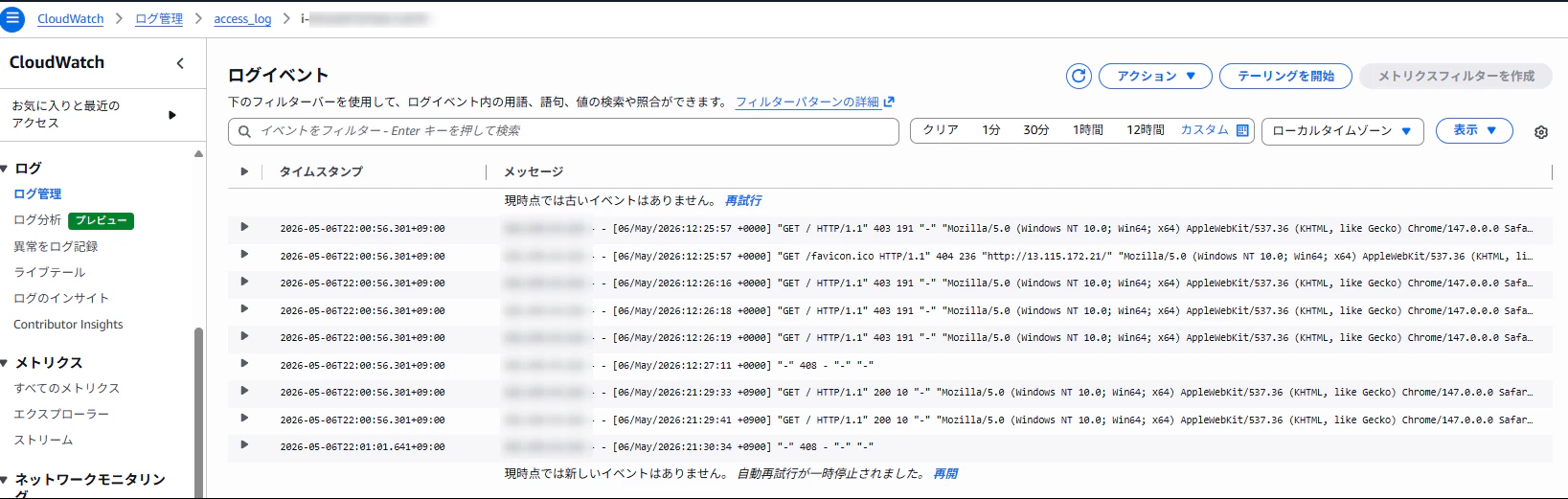
apacheのログ出力を確認した
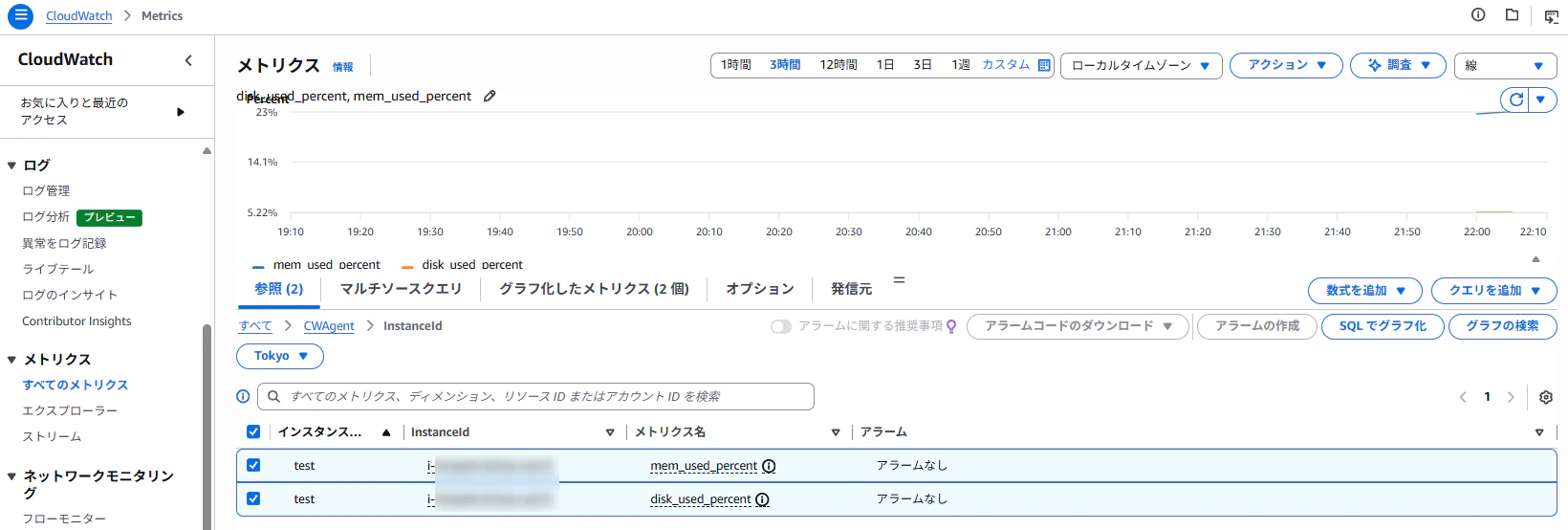
CloudWatchのメトリックスを確認した
メモリとディスク使用率のメトリックスが出力されていました。
まとめ
CloudWatchエージェントは対話形式で設定できることが分かりました。
私の検証環境では「/opt/aws/amazon-cloudwatch-agent/bin/config.json」のファイルにCloudWatch Agent の設定内容が分かります。
CloudWatchエージェントの設定が今どうなっているか確認するには上記のconfig.jsonが参考になります。