はじめに:
Nginxを用いたHTTP/3(QUIC)対応のWebサーバーの構築手順を記述します。
Nginxの公式ドキュメントの手順では、うまくできなかったです。自分でうまくビルドできた手順を残します。
The OpenSSL library version 3.5.1 or higher is recommended to build nginx with QUIC support. Otherwise, the OpenSSL compatibility layer will be used that does not support early data. Alternatively, BoringSSL, LibreSSL, or QuicTLS prebuilt libraries can be used.
公式ドキュメントでは、HTTP/3(QUIC)対応の Nginx をビルドする際には OpenSSL 3.5.1 以上の利用が推奨されており、代替手段として BoringSSL や LibreSSL などの利用も可能であると説明されています。
検証では BoringSSL を用いたビルドも試みましたが、私の環境では正常に動作させることができなかったため、OpenSSL 3.5.1 以上を使用する方法を採用しました。
なお、Ubuntu 24.04.1 LTS に標準でインストールされている OpenSSL のバージョンは 3.0.13 であり、要件を満たしていません。そのため、本記事では OpenSSL 3.5.1 以上のソースコードを取得し、ビルドする手順を紹介します。
環境:
OS : Ubuntu 24.04.1 LTS
事前準備:
- ドメインの取得:今回は「お名前.com」 でドメインを取得
- let’s encrypt でSSL証明書を発行
Nginxのビルド/起動/停止
# 環境構築 (nginxのビルド)
curl -sL -o - https://www.openssl.org/source/openssl-3.5.4.tar.gz
tar -zxf openssl-3.5.4.tar.gz
curl -sL -o - https://nginx.org/download/nginx-1.28.0.tar.gz
tar -zxf nginx-1.28.0.tar.gz
cd nginx-1.28.0
./configure --prefix=./build \
--without-poll_module \
--with-threads \
 --with-http_ssl_module \
 --with-http_v2_module \
--with-http_v3_module \
--with-http_realip_module \
--with-http_addition_module \
--with-http_sub_module \
--with-http_secure_link_module \
--with-http_degradation_module \
--with-http_slice_module \
--with-http_stub_status_module \
--with-pcre \
--with-pcre-jit \
--with-compat \
--with-openssl=../openssl-3.5.4

# make
make

# make install
make install

# ビルド済み nginx 起動コマンド
./build/sbin/nginx

# nginx 停止手順
# 起動したnginxのPIDの確認
sudo lsof -i :443

# <nginxのPID>は、sudo lsof -i :443 で確認したPID
sudo kill -9 <nginxのPID>
設定ファイルの編集
/build/conf/nginx.confの編集
#user  nobody;
worker_processes  1;
#error_log  logs/error.log;
#error_log  logs/error.log  notice;
#error_log  logs/error.log  info;
#pid        logs/nginx.pid;
events {
    worker_connections  1024;
}

http {
    include       mime.types;
    default_type  application/octet-stream;
    #log_format  main  '$remote_addr - $remote_user [$time_local] "$request" '
    #                  '$status $body_bytes_sent "$http_referer" '
    #                  '"$http_user_agent" "$http_x_forwarded_for"';
    #access_log  logs/access.log  main;
    sendfile        on;
    #tcp_nopush     on;
    #keepalive_timeout  0;
    keepalive_timeout  65;
    #gzip  on;
    server {
        listen      443 ssl;
        #listen      [::]:443;
        listen      443 quic reuseport;
        #listen      [::]:443 quic reuseport;

        ssl_protocols TLSv1.3;
        http2 on;
        http3 on;
        ssl_early_data on;
        server_name  <取得したドメインのFQDN>;
        ssl_certificate      <fullchain証明書のフルパス>;
        ssl_certificate_key  <秘密鍵のフルパス>;

        # Enable session cache
        ssl_session_cache shared:SSL:10m;
        ssl_session_timeout 10m;
        ssl_session_tickets on;

       location / {
           add_header Alt-Svc 'h3=":443"; ma=86400';
           root   html;
           index  index.html index.htm;
       }
    }
}
ホストおよびクライアントのhostsファイル編集
# Linux
vi /etc/hosts
# Windows
C:\Windows\System32\drivers\etc\hosts
で設定ファイルに以下を追加する。
(※ ここでは、サーバー用PCのプライベートIPアドレスを 192.168.1.29 とする)
192.168.1.29 <取得したドメイン名>
ブラウザ(Chrome)から確認
- URL欄に chrome://flags/ を入力
- Experimental QUIC protocol を Enabled に変更
- ターミナルからChromeを開き、HTTP/3でアクセスできることを確認
#Linux
google-chrome --enable-quic --origin-to-force-quic-on=<domain_name>:443
#Windows
& "C:\Program Files\Google\Chrome\Application\chrome.exe" --enable-quic --origin-to-force-quic-on=<domain_name>:443
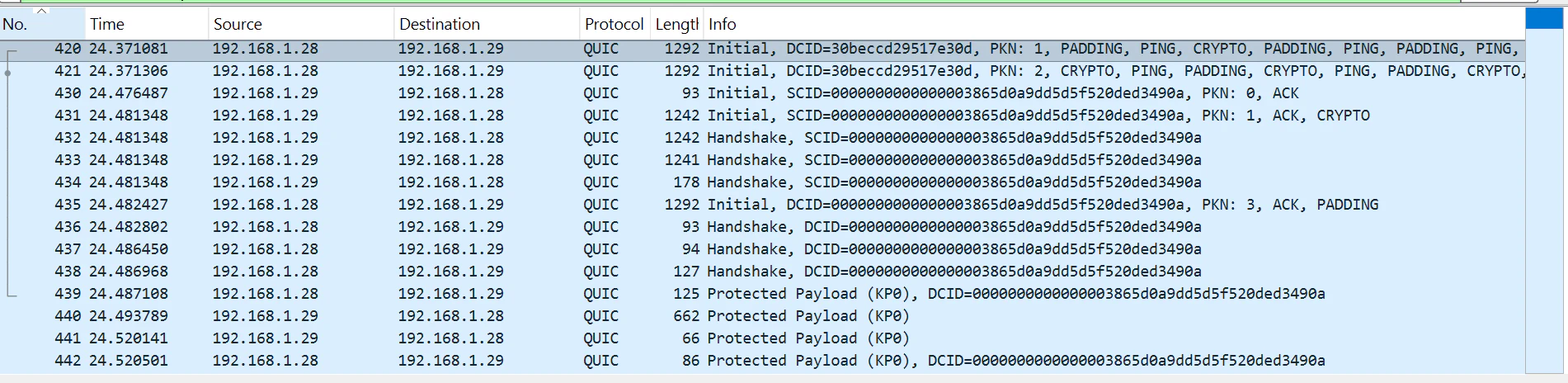
開発者モードの、Networkでも確認可能ですが、今回はWiresharkで確認しました。