
はじめに
フォロー機能について勉強している中で、リレーションが上手く理解できなかったため、
自分なりの言葉でまとめたものとなります。
フォロー機能のリレーションの前に
ウーバーイーツを例でまず考える。
ユーザーはたくさんの食べ物を選択することができる。
また、食べ物はたくさんのユーザーから選択される。
この関係はn対nの関係である。
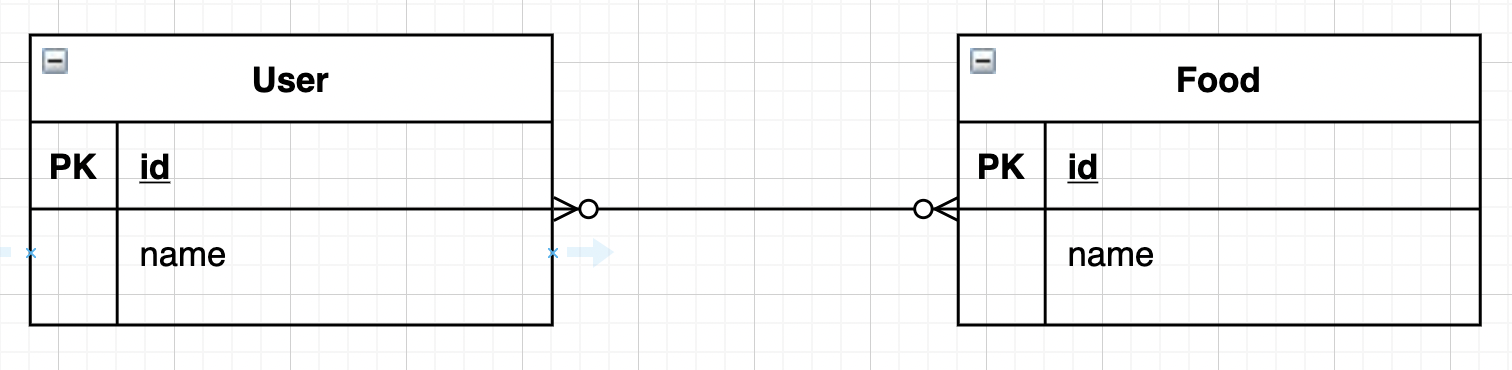
この関係を2つのテーブルで表そうとすると、
ユーザーや食事が増えるたびお互いのカラムを増やし続けなければならない。

この場合、中間テーブルを置くことで、解決する。
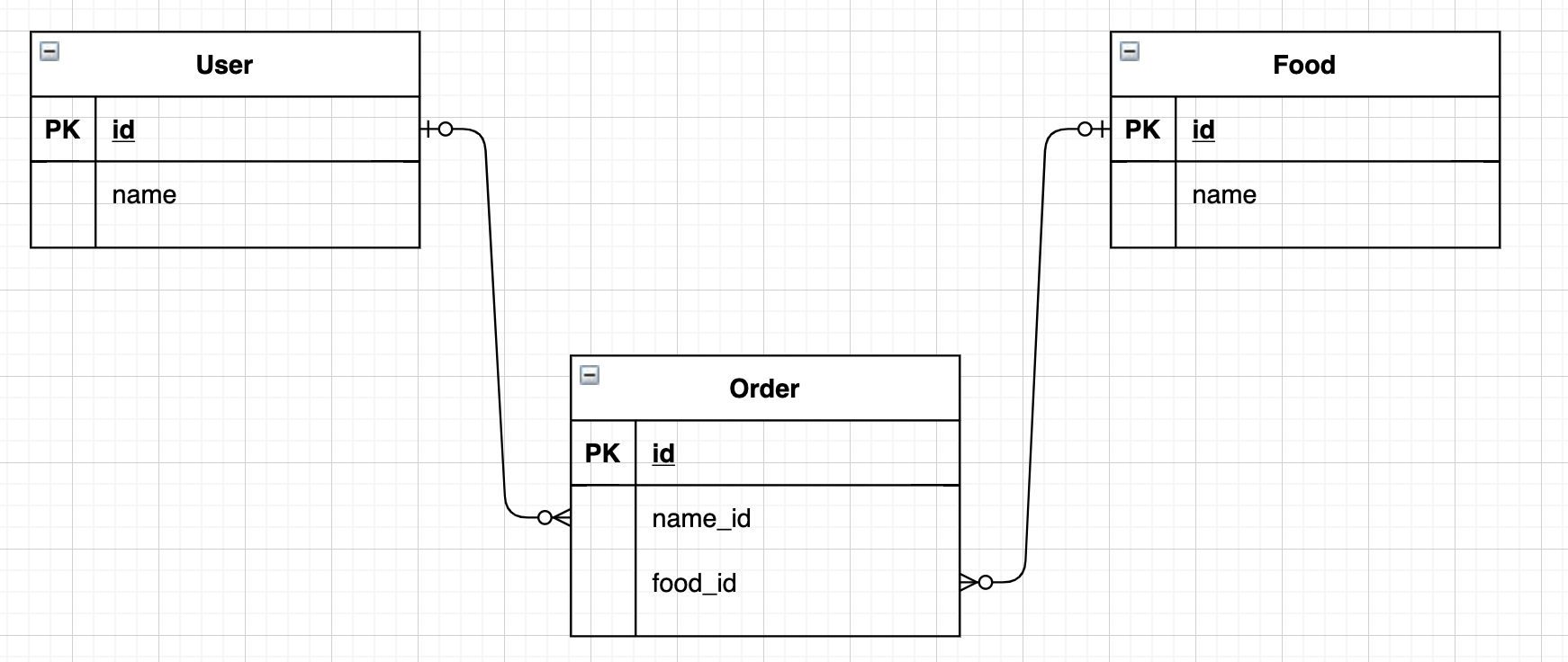
これで、2つの1対多の関係で表すことができ、
UserやFoodが増えても関係性を足すだけで管理が可能になる
モデルには以下で表記する
class User < ApplicationRecord
  has_many :orders
end

class Order < ApplicationRecord
  belongs_to :user
  belongs_to :food
end

class Item < ApplicationRecord
  has_many :orders
end
ここで、ユーザーの頼んだ食事がなにかを直接知りたい場合、
現段階でもしれないことは無いが、@user.foodsと表記するだけで持ってこれるようにしたい。
class User < ApplicationRecord
  has_many :orders
  has_many :foods #間違い
end
上記のままでは、userとfoodの関係性が無いため、表すことができない。
そのため、一度orderを通してからfoodを確認したい。
それには、throughを用いることで可能になる。
class User < ApplicationRecord
  has_many :orders
  has_many :foods, through: :orders
end

class Order < ApplicationRecord
  belongs_to :user
  belongs_to :food
end

class Item < ApplicationRecord
  has_many :orders
  has_many :users, through: :orders
end
フォロー機能のリレーション
一度上のER図と形をあわせるため、userテーブルを複製し、user1、user2とした場合、フォロー関係は以下になる

しかし、実際には、ユーザーの更新の度に同じ情報を複製したりするのは、管理上非常にめんどくさい。
そのためuserテーブルを一つにして考える。
(この時、Relationshipのカラム名を変更している)

Relationshipモデルについて考える
class Relationship < ApplicationRecord
  belongs_to :user #間違い
  belongs_to :user #間違い
end

# class Order < ApplicationRecord
  #belongs_to :user
  #belongs_to :food
# end
先程の書き方に習うとこのようになるが、重複しており、Relationshipテーブルには”user_id”は無いため不可。
代わりにfollower_idとfollowed_idがあるためこれを用いて記載する。
class Relationship < ApplicationRecord
  belongs_to :follower #間違い
  belongs_to :followed #間違い
end
しかし、これではrailsがfollower、followedテーブルを参照しに行ってしまうので、
class_nameを指定することで回避する。
class Relationship < ApplicationRecord
  belongs_to :follower, class_name: "User"
  belongs_to :followed, class_name: "User"
end
Userモデルについて考える
class User < ApplicationRecord
  has_many :relationships #間違い
  has_many :relationships #間違い
end

# class User < ApplicationRecord
  #has_many :orders
# end

# class Item < ApplicationRecord
  #has_many :orders
# end
先程の書き方に習うとこのようになるが、重複しており、Relationshipテーブルには”user_id”は無いため不可。
そのため、ひとまず名前をつける。
上記は、自分がフォローする側の関係性と自分がフォローされる側の関係性のため
active_relationships、passive_relationshipsとして表記する。
(テーブル名の複数形ではなくなるため、class_nameも追加)
class User < ApplicationRecord
  has_many :active_relationships, class_name: "Relationship" #間違い
  has_many :passive_relationships, class_name: "Relationship" #間違い
end
しかし、この状態ではrailsはRelationshipのuser_idを探しに行ってしまう。
そのため、参照するカラムをforeign_keyで指定する。
class User < ApplicationRecord
  has_many :active_relationships, class_name: "Relationship", foreign_key: "follower_id"
  has_many :passive_relationships, class_name: "Relationship", foreign_key: "followed_id"
end
最後に、以下情報が取れるようにする
”@userがフォローしているUser一覧” ⇒ @user.followings (followedsは英語的におかしいため)
”@userがフォローされているUser一覧” ⇒ @user.followers
class User < ApplicationRecord
  has_many :active_relationships, class_name: "Relationship", foreign_key: "follower_id"
  has_many :passive_relationships, class_name: "Relationship", foreign_key: "followed_id"
  has_many :followings, through: :active_relationships #間違い
  has_many :followers, through: :passive_relationships

# class User < ApplicationRecord
  #has_many :orders
  #has_many :foods, through: :orders
# end
end
ここでrailsはfollowings、followersの表記より、
(単数形)_idがRelationshipテーブルにあるかを探しに行くが、followingsの方は存在していない。
そのため、sourceを用いて、Relationshipテーブルの参照先カラムを指定する。
class User < ApplicationRecord
  has_many :active_relationships, class_name: "Relationship", foreign_key: "follower_id"
  has_many :passive_relationships, class_name: "Relationship", foreign_key: "followed_id"
  has_many :followings, through: :active_relationships, source: :followed
  has_many :followers, through: :passive_relationships, source: :follower
end