
はじめに
開発しているプロジェクトフォルダをserverless deployするためにdind(docker-in-docker)したので、簡単にまとめてみます。
ディレクトリ構成
sample-project
┣ backend(railsプロジェクト)
┣ Dockerfile
┣ entrypoint.sh
┣ docker-compose.yml
ファイル
sample-project/Dockerfile
FROM ruby:2.7.5 as base
RUN apt-get update && apt-get install -y build-essential make
RUN curl -fsSL https://deb.nodesource.com/setup_lts.x | bash - && apt-get install -y nodejs
RUN npm install --global yarn

RUN mkdir /app
WORKDIR /app

COPY ./backend/Gemfile /app/Gemfile
COPY ./backend/Gemfile.lock /app/Gemfile.lock
RUN bundle install
COPY ./backend /app
sample-project/docker-compose.yml
services:
  hoge:
    build:
      context: .
    tty: true
    init: true
    ports:
      - 8080:8080
      - アプリケーション毎に追加
    volumes:
      - ./:/app
    container_name: hoge
dind前とdind後の動作の違い
これまではRailsやReactなど、各アプリケーション毎にコンテナを立てて、必要に応じて各コンテナに入って操作していました。
これからはserverless deployするタイミングでコンテナの中でさらにコンテナを立てる必要があるので、各アプリケーションのコンテナを1つにまとめます。このコンテナのイメージを作るDockerfileはプロジェクト直下に置き、deploy用のイメージを作るDockerfileはbackendに置いています。
dind前
・コンテナ起動時に各アプリケーションのサーバが起動する
・コンテナで指定したポートから対応するサーバにアクセスできる
dind後
・コンテナ起動後に更にコンテナに入る
・各アプリケーションのサーバを起動する
・コンテナで指定したポートから対応するサーバにアクセスできることを確認する
動作確認
docker-compose build
docker-compose up
開発用コンテナに入れることを確認します
docker exec -it hoge sh
Railsサーバを起動し、8080番からアクセスできることを確認します
rm -f tmp/pids/server.pid && yarn install && bundle exec rails s -p 8080 -b '0.0.0.0'

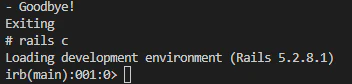
Railsコンソールに入れることも確認できました
今回はRailsサーバのみの動作確認をしましたが、毎回色々なアプリケーションのサーバをコマンドで起動するのは手間なので、.shファイルに起動関連のコマンドをまとめておくと良さそうです。
run_local_server.sh
echo 'Run backend Server'

cd backend && bundle exec rails s -d -p 8080 -b '0.0.0.0'

echo 'Run frontend Server...'

cd react && yarn install && yarn start
docker exec -it hoge sh
sh run_local_server.sh
おわりに
説明に端折った部分も多いと思いますが、これでserverless deployに挑戦できるようになりました。
serverless deployするまでに色々とやらなければならないことが雪だるま式に増えてきましたが折れずに頑張ってみます。