

Databricks Assistantとペアプロして作りました。
ソースコード
テーブル
CREATE DATABASE IF NOT EXISTS sample_ecommerce;
USE sample_ecommerce;

CREATE OR REPLACE TABLE customers (
  customer_id INT,
  customer_name STRING,
  email STRING,
  registration_date DATE,
  prefecture STRING,
  age INT
) USING DELTA;

INSERT INTO customers VALUES
  (1, '山田太郎', 'yamada@example.com', '2023-01-15', '東京都', 35),
  (2, '佐藤花子', 'sato@example.com', '2023-02-20', '大阪府', 28),
  (3, '鈴木一郎', 'suzuki@example.com', '2023-03-10', '神奈川県', 42),
  (4, '田中美咲', 'tanaka@example.com', '2023-04-05', '愛知県', 31),
  (5, '高橋健太', 'takahashi@example.com', '2023-05-12', '福岡県', 26),
  (6, '伊藤さくら', 'ito@example.com', '2023-06-18', '北海道', 38),
  (7, '渡辺大輔', 'watanabe@example.com', '2023-07-22', '千葉県', 45),
  (8, '中村真理子', 'nakamura@example.com', '2023-08-30', '埼玉県', 29);
Databricks Appsソース
app.py
import streamlit as st
from databricks.sdk import WorkspaceClient
from databricks.sdk.service.sql import StatementState
import pandas as pd
from datetime import date
import time

st.set_page_config(page_title="顧客管理システム", layout="wide")

# プレースホルダを変更してください
TABLE_NAME = "<my_catalog>.sample_ecommerce.customers"

@st.cache_resource
def get_client():
    """WorkspaceClientを取得"""
    return WorkspaceClient()

@st.cache_data(ttl=60)
def get_warehouse_id():
    """SQL Warehouse IDを取得"""
    w = get_client()
    warehouses = list(w.warehouses.list())
    if warehouses:
        # RUNNINGまたはSTARTING状態のWarehouseを優先
        for wh in warehouses:
            if wh.state and wh.state.value in ['RUNNING', 'STARTING']:
                return wh.id, wh.name
        # なければ最初のものを返す
        return warehouses[0].id, warehouses[0].name
    return None, None

def execute_sql(query, timeout=30):
    """SQLクエリを実行してDataFrameを返す"""
    try:
        w = get_client()
        warehouse_id, warehouse_name = get_warehouse_id()

        if not warehouse_id:
            st.error("⚠️ SQL Warehouseが見つかりません")
            return pd.DataFrame()

        # クエリを実行
        response = w.statement_execution.execute_statement(
            warehouse_id=warehouse_id,
            statement=query,
            # プレースホルダを変更してください
            catalog="<my_catalog>",
            schema="sample_ecommerce",
            wait_timeout=f"{timeout}s"
        )

        # 結果を待機
        statement_id = response.statement_id
        max_wait = timeout
        waited = 0

        while waited < max_wait:
            status = w.statement_execution.get_statement(statement_id)

            if status.status.state == StatementState.SUCCEEDED:
                # 成功:データを取得
                if status.result and status.result.data_array:
                    columns = [col.name for col in status.manifest.schema.columns]
                    data = status.result.data_array
                    return pd.DataFrame(data, columns=columns)
                return pd.DataFrame()

            elif status.status.state == StatementState.FAILED:
                error_msg = status.status.error.message if status.status.error else "Unknown error"
                st.error(f"クエリ失敗: {error_msg}")
                return pd.DataFrame()

            elif status.status.state in [StatementState.PENDING, StatementState.RUNNING]:
                # 実行中:待機
                time.sleep(1)
                waited += 1

            else:
                st.warning(f"予期しない状態: {status.status.state}")
                return pd.DataFrame()

        st.error(f"タイムアウト: {timeout}秒以内に完了しませんでした")
        return pd.DataFrame()

    except Exception as e:
        st.error(f"クエリ実行エラー: {str(e)}")
        import traceback
        with st.expander("詳細エラー"):
            st.code(traceback.format_exc())
        return pd.DataFrame()

def fetch_customers():
    """全顧客データを取得"""
    query = f"SELECT * FROM {TABLE_NAME} ORDER BY customer_id"
    return execute_sql(query)

def insert_customer(customer_id, customer_name, email, registration_date, prefecture, age):
    """新規顧客を登録"""
    customer_name = str(customer_name).replace("'", "''")
    email = str(email).replace("'", "''")
    prefecture = str(prefecture).replace("'", "''")

    query = f"""
    INSERT INTO {TABLE_NAME}
    (customer_id, customer_name, email, registration_date, prefecture, age)
    VALUES ({customer_id}, '{customer_name}', '{email}', DATE'{registration_date}', '{prefecture}', {age})
    """
    execute_sql(query)

def update_customer(customer_id, customer_name, email, registration_date, prefecture, age):
    """顧客情報を更新"""
    customer_name = str(customer_name).replace("'", "''")
    email = str(email).replace("'", "''")
    prefecture = str(prefecture).replace("'", "''")

    query = f"""
    UPDATE {TABLE_NAME}
    SET customer_name = '{customer_name}',
        email = '{email}',
        registration_date = DATE'{registration_date}',
        prefecture = '{prefecture}',
        age = {age}
    WHERE customer_id = {customer_id}
    """
    execute_sql(query)

def delete_customer(customer_id):
    """顧客を削除"""
    query = f"DELETE FROM {TABLE_NAME} WHERE customer_id = {customer_id}"
    execute_sql(query)

# メインUI
st.title("🛒 顧客管理システム")
st.markdown(f"**テーブル:** `{TABLE_NAME}`")

# Warehouse情報を表示
warehouse_id, warehouse_name = get_warehouse_id()
if warehouse_name:
    st.sidebar.success(f"✅ Warehouse: {warehouse_name}")

menu = st.sidebar.selectbox("操作を選択", ["顧客一覧", "新規登録", "更新", "削除"])

if menu == "顧客一覧":
    st.header("📋 顧客一覧")

    with st.spinner("データを読み込み中..."):
        df = fetch_customers()

    if not df.empty:
        search_term = st.text_input("🔍 顧客名またはメールで検索")
        if search_term:
            df = df[
                df['customer_name'].str.contains(search_term, case=False, na=False) |
                df['email'].str.contains(search_term, case=False, na=False)
            ]
        st.dataframe(df, use_container_width=True, height=500)
        st.info(f"総顧客数: {len(df)}件")
    else:
        st.warning("データが見つかりません")

elif menu == "新規登録":
    st.header("➕ 新規顧客登録")

    with st.form("insert_form"):
        col1, col2 = st.columns(2)

        with col1:
            customer_id = st.number_input("顧客ID", min_value=1, step=1)
            customer_name = st.text_input("顧客名")
            email = st.text_input("メールアドレス")

        with col2:
            registration_date = st.date_input("登録日", value=date.today())
            prefecture = st.text_input("都道府県")
            age = st.number_input("年齢", min_value=0, max_value=150, step=1)

        submitted = st.form_submit_button("登録")

        if submitted:
            if not customer_name or not email:
                st.error("顧客名とメールアドレスは必須です")
            else:
                with st.spinner("登録中..."):
                    try:
                        insert_customer(customer_id, customer_name, email, registration_date, prefecture, age)
                        st.success(f"✅ 顧客ID {customer_id} を登録しました")
                        st.balloons()
                    except Exception as e:
                        st.error(f"登録エラー: {str(e)}")

elif menu == "更新":
    st.header("✏️ 顧客情報更新")

    with st.spinner("データを読み込み中..."):
        df = fetch_customers()

    if not df.empty:
        customer_ids = df['customer_id'].tolist()
        selected_id = st.selectbox("更新する顧客IDを選択", customer_ids)

        if selected_id:
            customer = df[df['customer_id'] == selected_id].iloc[0]

            with st.form("update_form"):
                col1, col2 = st.columns(2)

                with col1:
                    st.text_input("顧客ID", value=selected_id, disabled=True)
                    customer_name = st.text_input("顧客名", value=customer['customer_name'])
                    email = st.text_input("メールアドレス", value=customer['email'])

                with col2:
                    registration_date = st.date_input("登録日", value=pd.to_datetime(customer['registration_date']))
                    prefecture = st.text_input("都道府県", value=customer['prefecture'] if pd.notna(customer['prefecture']) else "")
                    age = st.number_input("年齢", value=int(customer['age']) if pd.notna(customer['age']) else 0, min_value=0, max_value=150)

                submitted = st.form_submit_button("更新")

                if submitted:
                    with st.spinner("更新中..."):
                        try:
                            update_customer(selected_id, customer_name, email, registration_date, prefecture, age)
                            st.success(f"✅ 顧客ID {selected_id} を更新しました")
                            st.rerun()
                        except Exception as e:
                            st.error(f"更新エラー: {str(e)}")

elif menu == "削除":
    st.header("🗑️ 顧客削除")

    with st.spinner("データを読み込み中..."):
        df = fetch_customers()

    if not df.empty:
        customer_ids = df['customer_id'].tolist()
        selected_id = st.selectbox("削除する顧客IDを選択", customer_ids)

        if selected_id:
            customer = df[df['customer_id'] == selected_id].iloc[0]

            st.warning("⚠️ 以下の顧客を削除します")
            st.json({
                "顧客ID": int(customer['customer_id']),
                "顧客名": customer['customer_name'],
                "メールアドレス": customer['email'],
                "登録日": str(customer['registration_date']),
                "都道府県": customer['prefecture'],
                "年齢": int(customer['age']) if pd.notna(customer['age']) else None
            })

            if st.button("🗑️ 削除実行", type="primary"):
                with st.spinner("削除中..."):
                    try:
                        delete_customer(selected_id)
                        st.success(f"✅ 顧客ID {selected_id} を削除しました")
                        st.rerun()
                    except Exception as e:
                        st.error(f"削除エラー: {str(e)}")

st.sidebar.markdown("---")
st.sidebar.info("💡 このアプリは顧客データの登録・更新・削除を行います")
app.yaml
command: ['streamlit', 'run', 'app.py', '--server.enableCORS=false', '--server.enableXsrfProtection=false']
requirements.txt
streamlit>=1.28.0
databricks-sdk>=0.18.0
pandas>=2.0.0
デプロイ
- アプリを作成
- アプリ名を設定
- 構成で「アプリのリソース」を追加
- SQLウェアハウスを選択し「使用可能」にする
- ほかはデフォルト
- アプリが作成されたら、Databricks CLIでソースコードをデプロイ
- 「許可」タブからサービスプリンシパルを取得、対象テーブルとSQLウェアハウスに権限を付与
画面
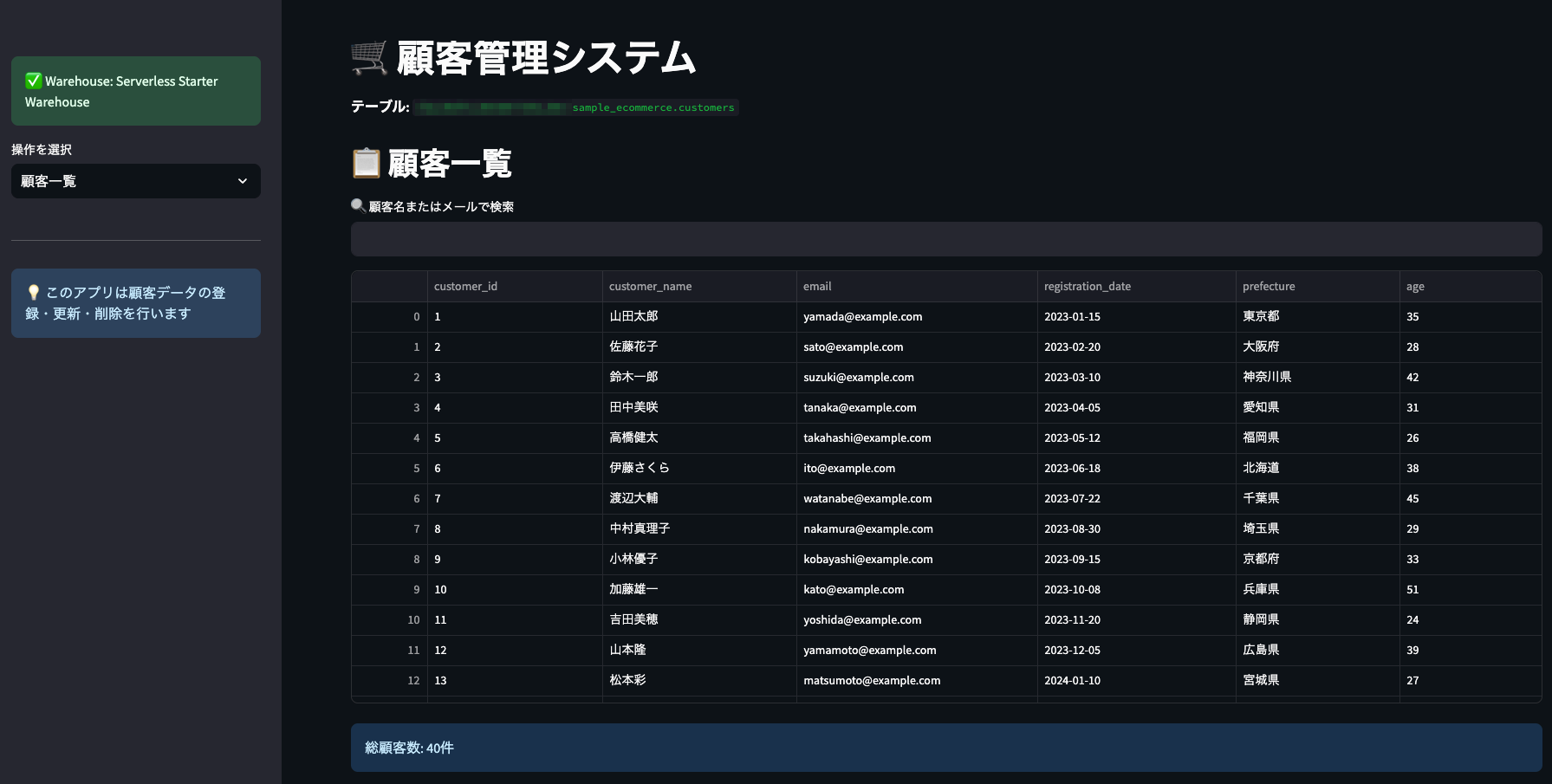
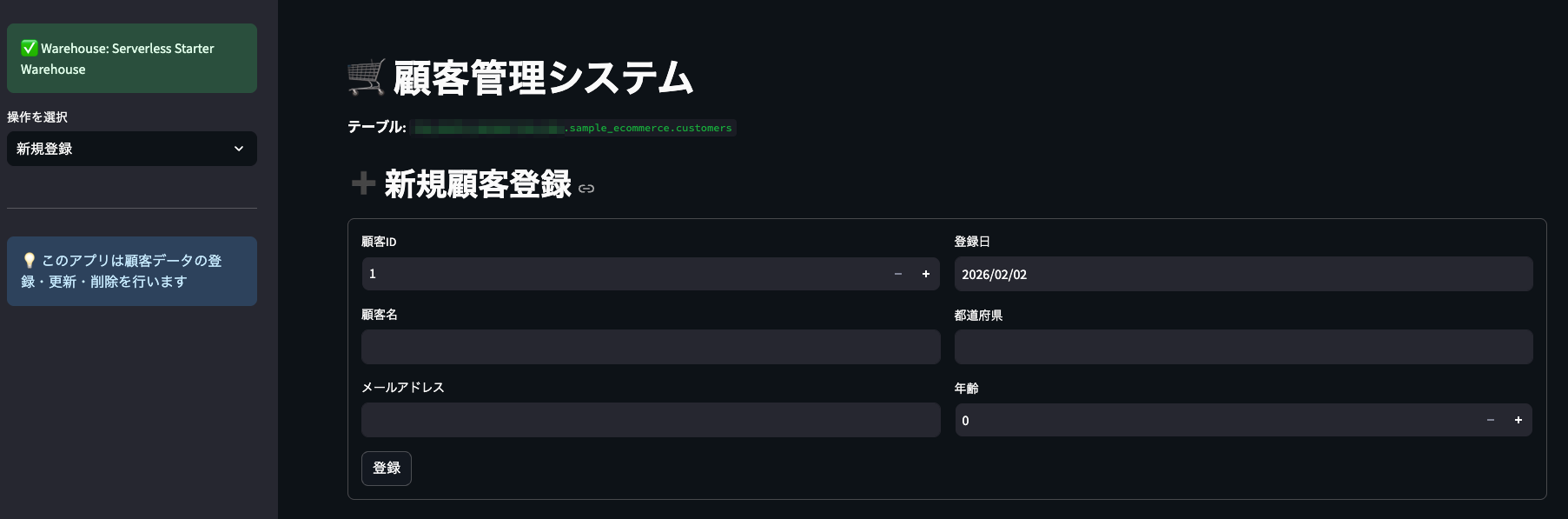
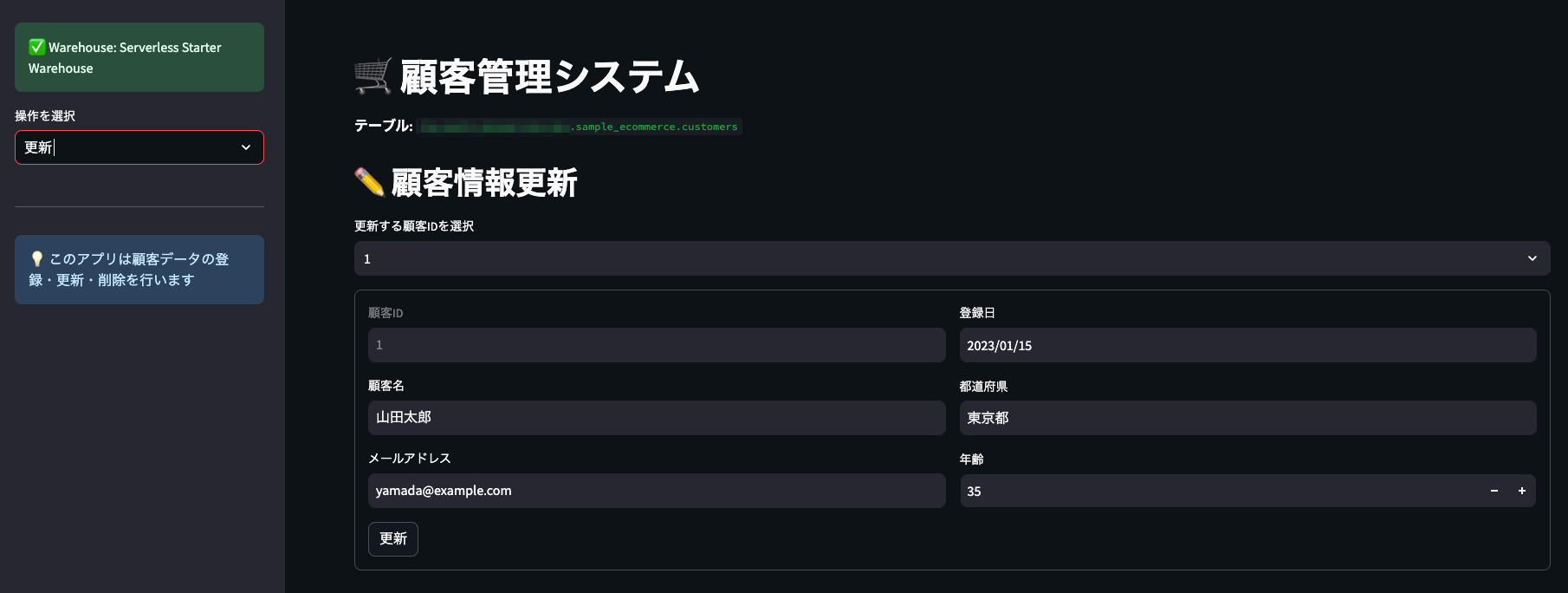
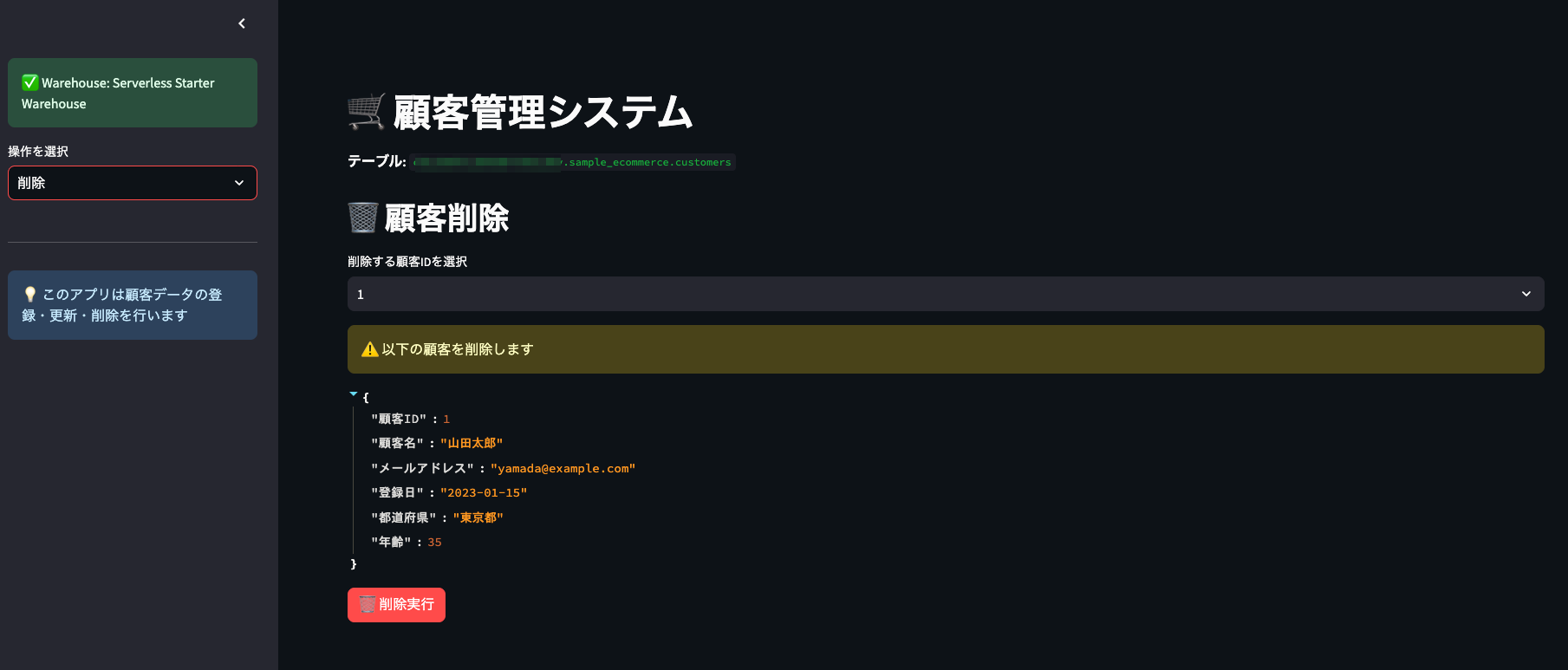
注意
Databricks Apps はアプリが起動している間、裏でコンピュートリソースが動き続けます。
使わないときはちゃんと停止しておかないと、じわじわコストがかかるので注意です!