
WinBox.js
WinBox.js は Web ページ内でウィンドウマネージャを実現するライブラリで、ウィンドウを開いてウィンドウ内にコンテンツを表示することができる。
シンプルなウィンドウの表示
new WinBox({title: {title}, html: {html}}) でウィンドウを表示することができる。
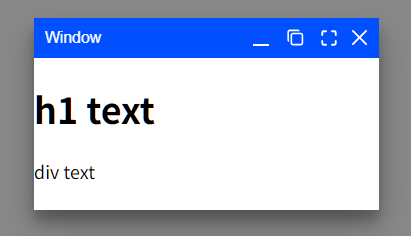
test1.html
<!DOCTYPE html>
<html>
  <head>
    <meta http-equiv="Content-Type" content="text/html; utf-8" />
    <title>WinBox test 1</title>
    <script src="winbox.bundle.min.js"></script>
  </head>
  <body style="background-color: #888888;">
    <script>
      const win = new WinBox({
        title: "Window",
        html: "<h1>h1 text</h1><div>div text</div>",
      });
    </script>
  </body>
</html>
ウィンドウサイズの調整
width, height でウィンドウのサイズを指定することができる。
const win1 = new WinBox({
  title: "Window 1",
  html: "<h1>h1 text</h1><h2>h2 text</h2><div>div</div>",
  width: 200,
  height: 250,
});
ウェブページの表示
URL を指定すると、その URL をウィンドウ内に表示することができる。
const win2 = new WinBox({
  title: "Window 2",
  url: "content1.html",
  width: 200,
  height: 100,
});
content1.html
<!DOCTYPE html>
<html>
  <head>
    <meta http-equiv="Content-Type" content="text/html; utf-8" />
    <title>content1.html</title>
  </head>
  <body style="background-color: #dddddd;">
    <div id="text1">text 1</div>
    <div id="text2"></div>
    <script>
      const tag = document.getElementById("text2");
      tag.innerText = "text 2";
    </script>
  </body>
</html>
content1.html には JavaScript も記述されているが、JavaScript も実行される。
ウィンドウの最小化
minimize() で最下部にウィンドウをたたむことができる。
const win3 = new WinBox({
  title: "Window 3",
}).minimize();
