
目次
- このハンズオンを 30 秒で
- 0. Prerequisites (= 再現環境セットアップ)
- 1. 検証の概要
- 2. 検証の実施: Skill の「作る → 直す → 再利用」の観察
- 3. 本検証で得た知見
- 付録 A. 使用 LLM モデルと環境設定
- 付録 B. ~/.hermes/ git log で各 phase の skill 状態を追う
- 付録 C. 各検証の会話ログ (= session JSON / state.db) の参照方法
- 付録 D. SKILL.md の進化記録 (= 各検証で生成された skill の中身)
このハンズオンを 30 秒で
- Hermes Agent は NousResearch が公開している「自律的な AI agent framework」
- 普通の AI chat と違って、作業中にやったことを
skill(= 手順書) として agent が自分で保存し、次回それを呼び出して reuse できるのが最大の特徴 - Hermes Agentの最大の特徴である「自分で skill を作る → 改善する → 再利用する」というサイクルが本当に動くのかを、5 つのモデル (= 弱い OSS〜強力な Claude) を切り替えながら実施することを目的とする。
Hermes用語の説明
| 用語 | 意味 |
|---|---|
| skill |
~/.hermes/skills/<name>/SKILL.md に保存される手順書。Markdown 1 ファイル。次回 agent に名前を伝えると同じ手順を再現する |
| session | hermes chat 1 回起動 〜 終了まで。transcript が ~/.hermes/sessions/session_*.json に保存 |
| tool_call | Agent が実行中に呼ぶ Hermes の built-in tool (= 一般 LLM の "tool/function calling" と同じ概念)。本資料は特に skill_manage の発火 (= agent が skill を生成 / 改変した証拠) を検証の決定打として観察する |
| OpenRouter | 複数 LLM を統一 API で叩ける中継サービス。本ハンズオンは Claude / OSS モデルをここで切替 |
| gpt-oss-120b:free | OpenAI 系 OSS モデルを OpenRouter が無料提供しているもの。本ハンズオンの「弱モデル代表」 |
| Sonnet 4.6 / Haiku 4.5 | Anthropic Claude の有料モデル。Sonnet が高性能、Haiku が cost-effective |
本資料独自の評価フレームワーク
autonomy 機構とは: ユーザの明示的な指示なしに、agent が自分で判断して動く一連の mechanism の総称 (= "skill 化しておくべきだ" / "この skill を呼び出そう" / "壊れているから直そう" / "過去 session を検索しよう" 等を agent が自発的に決める能力)。これが Hermes Agent を通常の AI chat と差別化する核心機能で、本ハンズオンが評価対象とする要素そのもの。
Hermes Agent の autonomy 機構は、公式では具体的な mechanism 名 (= skill_manage / skill_view / session_search 等) で語られる。本資料はこれらを評価しやすいよう 3 階層に整理して独自命名した。以降 L1/L2/L3 と書かれていれば、それは本資料が定義する以下の意味:
| 用語 | 意味 | 公式の対応 mechanism |
|---|---|---|
| L1 | Skill の 自発生成 (= ユーザが指示しなくても、作業中に agent が「これ skill にしとこう」と判断して保存) |
skill_manage(action="create") の自発発火 |
| L2 | Skill の 自己改善 (= 既存 skill 実行中に欠陥を見つけて agent が SKILL.md を update) |
skill_manage(action="edit") の自発発火 |
| L3 | Cross-session memory (= session を跨いで過去 skill / 会話 / 学習を再参照) |
session_search (= state.db index) + memory 永続化 |
検証の全体像 (= 何を順番に確かめたか)
| # | 検証 | モデル | アクション | 結果 |
|---|---|---|---|---|
| 1 | L1 創造 + 永続化検証 | gpt-oss-120b:free | Step1「Python project 作って skill 化して」 / Step2「別 session で再呼び出し」 | ✅ Step1 作成成功 / ✅ Step2 reuse 成功 |
| 2 | L2 weak | gpt-oss-120b:free | 「skill 改善も込みで再実行」 | ❌ 60 iter loop で時間切れ |
| 3 | L2 strong | claude-sonnet-4.6 | 同じ prompt で Sonnet 投入 | ✅ 1 step で根本修正、v1.0 → v1.1 |
| 4 | phase-separated reuse (= 改善後 skill を弱モデルで再利用) | gpt-oss-120b:free に戻す | v1.1 (Sonnet 改善版) を弱モデルで reuse | ✅ スムーズ完走 |
→ 各検証から得た知見 (= IVP framing / bootstrap criticality / phase-separated 戦略の経済性 等) は §3 本検証で得た知見 にまとめている。
この資料の使い方
各検証は以下の構造で書いてある。コピペで端から実行すれば再現できる作り。
検証 X (= 何を検証するか)
  ├─ 事前準備: モデル切替 / git 状態確認
  ├─ 実行:    Terminal A で fswatch 監視 + Terminal B で hermes chat 投入
  ├─ 検証:    skill 改変 / tool_calls / project build pass の確認
  └─ 結果:    観測されたこと + 仮説との対応
fswatch = ファイル変更を即時通知する mac CLI (
brew install fswatch)。skill_manage が発火した瞬間を肉眼で観察するために使う。
60 iter 上限 = Hermes の reasoning loop 1 セッションあたりの max tool_call 回数 default。これに到達すると agent は強制終了する。weak model が解決 path を見つけられず無限書き換えに陥った時の検出指標として使える。
0. Prerequisites (= 再現環境セットアップ)
各検証を再現するには、以下の前提環境が必要。
テスト環境のアーキテクチャ
本検証は Mac (= host) × Docker container × OpenRouter (cloud) の 3 層構成。Operator (= 検証者) は host shell から docker exec で container 内の hermes CLI を起動し、CLI は ~/.hermes/ (= host bind mount → container 内 /opt/data/) を read/write しながら OpenRouter 経由で LLM を呼ぶ。検証 artifact は host 側に永続化されるので、git diff / cat / jq で随時 inspect できる。
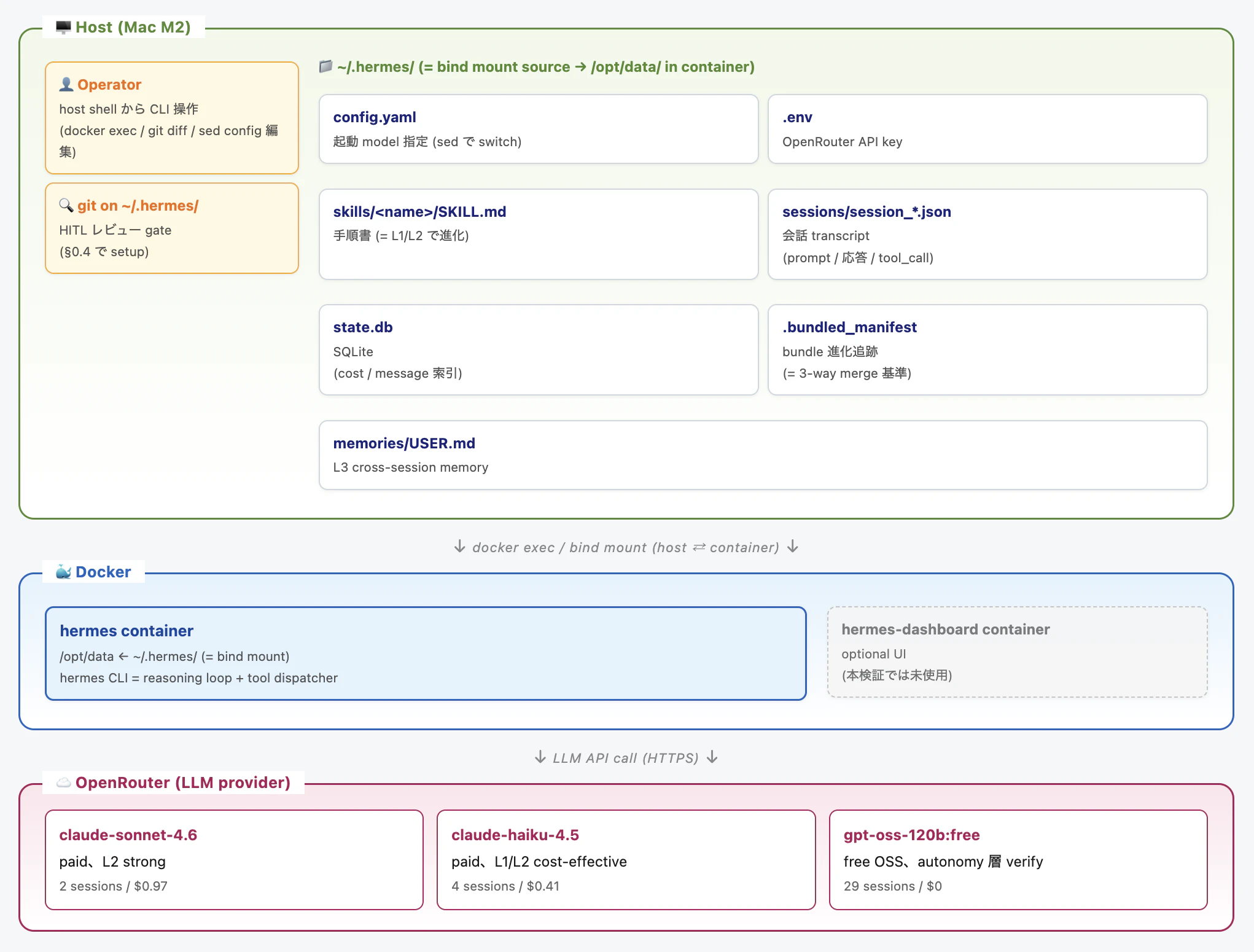
図の source:
.claude/reports/architecture.html(= 編集して再 render 可)
読み方の要点:
- container は実行環境のみ (= 永続データを持たない)、再起動しても skill / session は消えない (= host 側に保存)
-
bind mount が host ↔ container の橋渡し: host で
cat ~/.hermes/skills/.../SKILL.mdすると container 内の agent が呼ぶ skill そのものを直接読める -
HITL gate: §0.4 で
~/.hermes/を git 化することで、agent が変更した skill を operator がgit diffでレビュー可能 - LLM は外部依存: 全モデル呼び出しは OpenRouter 経由。container 自体に LLM weight は入っていない
0.1 Hermes Agent container 起動
# Hermes リポジトリ clone 済 + docker compose で起動
cd /Users/daisuke/00_study/20_hermes-agent
docker compose up -d

# 起動確認
docker ps
# → hermes / hermes-dashboard 2 container が表示される
0.2 Configuration
# config.yaml は ~/.hermes/config.yaml にある (= host から bind mount)
ls -la ~/.hermes/config.yaml

# 主要 setting (= 起動 model)
grep "^  default:" ~/.hermes/config.yaml
# 例: default: "openai/gpt-oss-120b:free"
0.3 OpenRouter API key
# ~/.hermes/.env に key を配置 (= Hermes container は /opt/data/.env から読む)
ls -la ~/.hermes/.env
grep -c '^OPENROUTER_API_KEY=' ~/.hermes/.env
# 期待: 1 (= 行が 1 個存在)
0.4 ~/.hermes/ git 化 (= HITL ラッパー、推奨)
cd ~/.hermes
git init
cat > .gitignore <<'EOF'
auth.json
.env
*.bak*
state.db
state.db-shm
state.db-wal
sessions/
home/
.skills_prompt_snapshot.json
models_dev_cache.json
memories/*.lock
EOF
git add . && git commit -m "initial: before hands-on"
Note: 早期 phase で local Ollama を試したい場合 (= L3 cross-session memory検証、gemma4:e2b 等) は 付録 A.4 「重要な環境変数」を参照。本資料の §2 検証 再現には Ollama 不要。
0.5 共通 helper: model 切替コマンド
各検証で頻繁に使うので関数化:
# ~/.bashrc または ~/.zshrc に置く想定
hermes_switch_model() {
    local model="$1"
    sed -i.bak "s|^  default: \".*\"|  default: \"$model\"|" ~/.hermes/config.yaml
    docker restart hermes && sleep 4
    echo "Switched to: $model"
    docker exec hermes /opt/hermes/.venv/bin/hermes chat -Q -q "What is 2+2?" 2>&1 | tail -3
}

# 使い方
hermes_switch_model "openai/gpt-oss-120b:free"
hermes_switch_model "anthropic/claude-sonnet-4.6"
hermes_switch_model "anthropic/claude-haiku-4.5"
0.6 共通 helper: 最新 session の tool_calls 集計
# 最新 session の tool_call 一覧を集計
hermes_last_session_tools() {
    local SESSION=$(ls -t ~/.hermes/sessions/session_*.json | head -1)
    echo "Session: $(basename $SESSION)"
    jq '[.messages[].tool_calls // empty | .[].function.name] | group_by(.) | map({name: .[0], count: length})' "$SESSION"
}
1. 検証の概要
本検証の設計 (= 検証構造、題材 skill 選定理由、ファイル位置) と結果概観 (= 3 モデルが出した version 履歴)。具体的な実施手順は §2 を参照。
1.1 検証と「作る/直す/再利用」の対応
| 検証 | 役割 | 観察ポイント |
|---|---|---|
| 検証1 (= L1) | 作る + 永続化検証 | (Step 1) skill_manage(create) 自発呼び出し / (Step 2) 別セッションで skill_view 発火、改変なしで通る |
| 検証2 (= L2 weak) | 直す (失敗 case) | 弱モデルが skill 改善できるか |
| 検証3 (= L2 strong) | 直す (成功 case) | 強モデルが skill 改善できるか |
| 検証4 (= phase-separated) | 再利用 (= 改善後 skill を弱モデルで) | 良い初期値が弱モデル運用を救うか |
| 検証5 (= cross-model 補足) | 再利用 (= Haiku で) | Sonnet 改善版 skill が異なる paid モデルでも動くか |
| 検証6 (= cross-model 補足) | 直す (Haiku 版) | Haiku が L2 を発火するか / Sonnet と異なる修正 path を選ぶか |
| 検証7 (= cross-model 補足) | 作る (Haiku 版) | Haiku が L1 で良い v1.0 を作れるか / hallucination なしか |
1.2 なぜこの skill を選んだか
L1/L2/L3 を同じ題材で連続検証するため、以下の条件を満たすタスクを選んだ:
- scaffold 系: 毎回ゼロから作るので idempotent (= 何度やっても同じ結果になる)
- 適度に複雑: ファイル 5-7 個生成、tool_call が複数発火する程度のボリューム
-
失敗を観測しやすい:
uv sync/pytestで build / test が通るかを 1 コマンドで検証できる - エンジニアに馴染みがある: ML プロジェクトの初期化は誰しもがやる作業
→ ハンズオン全体で L1 で自発生成 → L2 で自己改善 → 各 round で reuse という流れで使い回された。
1.3 Skill ファイル
~/.hermes/skills/software-development/ml-project-bootstrap/SKILL.md
カテゴリ software-development/ は agent が自発判定してつけた (= user 指定なし、L1 が階層も自分で決める例)。
1.4 Version 履歴
同じ skill (= ml-project-bootstrap) を 3 つのモデルがそれぞれ違う route で書いた。これが本ハンズオンの一番面白い observation。
| Version | 生成者 | ライン数 | build backend | dev sync | 主な状態 |
|---|---|---|---|---|---|
| v1.0.0 |
gpt-oss-120b:free (L1) |
61 行 |
uv.build (= 存在しない hallucinated module) |
uv sync --dev (= silent ignored) |
生まれた瞬間から壊れてた |
| v1.1.0 |
claude-sonnet-4.6 (L2) |
181 行 |
hatchling.build (= 根本修正) |
uv sync --extra dev (= 正しい flag) |
production-ready、tests pass |
| (Haiku 試行) |
claude-haiku-4.5 (L2) |
76 行 |
setuptools.build_meta (= 別解、保守的) |
同じく --extra dev
|
Sonnet と異なる路線、最終的に v1.1 を採用して破棄 |
読み方:
- 弱モデル (gpt-oss) は存在しない module 名を自信満々に書いた (= AI hallucination の典型例)
- Sonnet (paid) はその誤りを見抜き、
hatchlingという別の安定した実装に切り替える判断 - Haiku (paid) も自分なりの修正案を出したが、Sonnet とは別の route (=
setuptools) を選んだ
現状 (= 最終 git commit 8f687c6) は v1.1 (Sonnet 版) が残存している。
2. 検証の実施: Skill の「作る → 直す → 再利用」の観察
このセクションは Hermes Agent の中核主張 (= L1 自発生成 / L2 自己改善 / 再利用) が実際に回るかを実地検証する。検証には 1 つの題材 skill が必要なので、ml-project-bootstrap (= Python ML プロジェクト scaffold 手順書、pyproject.toml / ruff / mypy / pytest / GitHub Actions CI を一発生成) を作り、検証1〜4 で使い回した。
§2.1 と §2.2 は 検証1 (= L1) を 2 step に分けて実施。L1 mechanism の検証は両 step クリアして初めて成立 (= Step 1 だけだと ただファイルを書き出しただけ かもしれない)。
L1 mechanism の検証は 2 step で行う必要がある:
-
Step 1: skill が生成されること (= agent が
skill_manage(create)を発火) -
Step 2: 別セッションで呼び出せて動くか (= 永続化 +
skill_view自動発見の検証) - 両 step クリアして初めて「L1 が機能した」と主張できる (= Step 1 だけだとただファイルを書き出しただけかもしれない)
| 項目 | Step 1 (= 生成) | Step 2 (= 別セッション再利用) |
|---|---|---|
| モデル | openai/gpt-oss-120b:free |
同上 (= 別セッション) |
| session_id | session_20260505_131628_84324e |
session_20260505_170448_fff460 (= ~4 時間後) |
| target | /tmp/mlproj-test |
/tmp/mlproj-test2 |
| 結果 | skill 生成 ✅、ただし v1.0 broken | scaffold 完走 (= broken backend 未実行で silent OK) |
2.1 検証1 (Step 1): skill 自発生成
2.1.1 事前準備
# (1) gpt-oss-120b:free に切替
hermes_switch_model "openai/gpt-oss-120b:free"

# (2) (推奨) skill 状態の git snapshot
cd ~/.hermes
git status
# → working tree clean (= 推奨開始状態)
2.1.2 実行
別 terminal で監視 (= optional):
# Terminal A: skill ファイル変更を監視
fswatch -r ~/.hermes/skills/ | grep -v sessions
メイン terminal で実行:
# Terminal B: L1 prompt 投入
docker exec hermes /opt/hermes/.venv/bin/hermes chat -Q -q "新しい Python の ML プロジェクトを /tmp/mlproj-test にセットアップしてください。構成は: uv の pyproject.toml、ruff と mypy の設定、PR で ruff + mypy + pytest を回す最小の GitHub Actions CI、stub の README.md。完了したら、その手順を ml-project-bootstrap という名前で再利用可能な skill として保存してください。次回は名前を呼ぶだけで起動できるようにしたい。"
2.1.3 作成されたスキル確認
# skill ファイル生成確認
ls -la ~/.hermes/skills/software-development/ml-project-bootstrap/SKILL.md
cat ~/.hermes/skills/software-development/ml-project-bootstrap/SKILL.md
ファイルの冒頭に version: 1.0.0 が見えることを確認できる。
📄 生成された SKILL.md (= v1.0 ml-project-bootstrap、61 行) — クリックで展開
---
name: ml-project-bootstrap
description: Bootstrap a minimal Python ML project with uv, ruff, mypy, pytest, and CI workflow.
version: 1.0.0
---

## Overview

This skill creates a new Python machine‑learning project scaffold in a specified directory.
It sets up:
- `uv` based `pyproject.toml` with optional dev dependencies (`ruff`, `mypy`, `pytest`).
- Configuration for **ruff** and **mypy** inside the same `pyproject.toml`.
- A stub `README.md` with usage instructions.
- An empty `src/__init__.py` package directory.
- A GitHub Actions CI workflow that runs lint, type‑check, and tests on pushes and PRs.

## Usage

Call the skill with the target directory as an argument (e.g., `/tmp/mlproj-test`). The skill will:
1. Create the directory tree if it does not exist.
2. Write `pyproject.toml` with the configuration shown in the skill.
3. Write a minimal `README.md`.
4. Create an empty package under `src/`.
5. Add `.github/workflows/ci.yml` with the CI definition.
6. Optionally initialize a git repository and make the first commit.

### Example

```bash
# In a terminal session with the Hermes tools loaded
skill_invoke ml-project-bootstrap /tmp/mlproj-test
```

The skill will output a summary of created files and confirm success.

## Files Created

- `pyproject.toml` – project metadata, uv build, dev dependencies, ruff & mypy config.
- `README.md` – quick‑start guide.
- `src/__init__.py` – makes `src` a package.
- `.github/workflows/ci.yml` – GitHub Actions CI running `ruff`, `mypy`, and `pytest` using `uv`.

## Pitfalls & Tips

- Ensure `uv` is installed on the machine where the project will be used. The README includes an installer command.
- The CI workflow uses Python 3.11; adjust `python-version` if you need a different version.
- The skill does **not** install the dependencies locally; run `uv sync --dev` after creation.

## Verification

After running the skill, you can verify the setup with:

```bash
cd /tmp/mlproj-test
uv sync --dev   # install dev deps
uv run ruff check .
uv run mypy .
uv run pytest
```

All commands should complete without errors on a fresh scaffold.
2.1.4 作成されたスキルの検証
# (1) project ファイル確認 (= container 内、host /tmp とは別物)
docker exec hermes ls -la /tmp/mlproj-test/

# (2) tool_calls 集計 (= 0.6 の helper を使用)
hermes_last_session_tools
# 期待 (= 例):
# [
#   {"name": "skill_manage", "count": 1},
#   {"name": "terminal", "count": 11},
#   {"name": "write_file", "count": 7}
# ]

# (3) ⚠️ 隠れた問題の検出: project が実際に build できるか
docker exec hermes bash -c "cd /tmp/mlproj-test && uv sync --dev" 2>&1 | tail -10
# → ❌ ModuleNotFoundError: No module named 'uv.build'
#    ↑ これが検証2/3 で取り組む問題
2.1.5 結果
skill 生成は完了したが、生成された v1.0 の pyproject.toml には 2 つの hallucination が含まれていた:
2.1.6 v1.0 失敗の根本原因 (= 二重の hallucination)
[build-system]
requires = ["uv"]              # ❌ uv パッケージは installer 本体、build backend 含まない
build-backend = "uv.build"     # ❌ そんな module は存在しない (hallucinated)
-
誤り 1: package 名:
uvパッケージはpip install uvで入る installer 本体。build backend を提供する別 packageuv_buildをrequiresに書く必要がある -
誤り 2: module 名:
uv.build(= ドット区切り) は invalid。正しくはuv_build(= アンダースコア)。Python module 命名規則的に「package 名のハイフンはアンダースコアに、ドットにはならない」
→ 実行時のエラー:
$ uv sync --dev
× Failed to build mlproj-test
└─▶ ModuleNotFoundError: No module named 'uv.build'
2.1.7 dev sync flag の副次問題
v1.0 の SKILL.md usage は uv sync --dev。これは silent failure:
| dev deps の宣言形式 | 必要な flag |
|---|---|
[project.optional-dependencies] dev = [...] (= v1.0 が使ってた形) |
uv sync --extra dev |
[dependency-groups] dev = [...] (= uv 0.4+ 推奨) |
uv sync --group dev または --dev
|
[tool.uv.dev-dependencies] (= deprecated) |
uv sync --dev (古い形) |
v1.0 は宣言は新形式だが flag が古形式の組み合わせ → dev deps が一切 install されない、エラーも出ず気付きにくい。
2.2 検証1 (Step 2): cross-session で呼び出せるか
Step 1 で生成された skill が、別 session 起動時に「自動発見 → 呼び出し → 手順実行」できるかを検証する。これが通って初めて skill が永続化資産として機能していると言える。
2.2.1 事前準備
# Step 1 終了直後の状態を維持
grep "^  default:" ~/.hermes/config.yaml
# → openai/gpt-oss-120b:free

ls ~/.hermes/skills/software-development/ml-project-bootstrap/SKILL.md
# → 存在 (= Step 1 で生成済)
2.2.2 実行
# 別セッション扱い (= 新規 hermes chat invocation)
docker exec hermes /opt/hermes/.venv/bin/hermes chat -Q -q "ml-project-bootstrap という skill を使って /tmp/mlproj-test2 に Python ML プロジェクトを作ってください。"
2.2.3 検証
# (1) project ファイル
docker exec hermes ls -la /tmp/mlproj-test2/

# (2) tool_calls (= skill_view が呼ばれていることが Step 2 検証の決定打)
hermes_last_session_tools
# 期待: skill_view × 1 + terminal/write_file 多数

# (3) skill 不変
cd ~/.hermes && git status skills/
# → working tree clean (= 改変なし)
2.2.4 結果
→ improve hint なしの純粋 reuse、agent が skill_view を発火して v1.0 の手順に従って scaffold。Step 1 + Step 2 で L1 mechanism の検証が決定打となった。注意: uv sync は実行されないので broken backend は今回 silent (= 後の検証2 で表面化)。
2.3 検証2: L2 weak (= 失敗、60 iter loop)
| 項目 | 値 |
|---|---|
| モデル | openai/gpt-oss-120b:free |
| 期待 | skill v1.0 を agent が改善 |
| 実観測 | ❌ 60 iter 上限到達、skill_manage(edit) 呼ばず終了 |
| elapsed | ~20 分 |
2.3.1 事前準備
# (1) gpt-oss-120b:free のまま
grep "^  default:" ~/.hermes/config.yaml
# → openai/gpt-oss-120b:free

# (2) v1.0 broken skill 確認
head -5 ~/.hermes/skills/software-development/ml-project-bootstrap/SKILL.md
# → version: 1.0.0
2.3.2 実行
# Terminal A: fswatch (= skill_manage が呼ばれるか観察)
fswatch -r ~/.hermes/skills/ | grep -v sessions

# Terminal B: L2 weak prompt
docker exec hermes /opt/hermes/.venv/bin/hermes chat -Q -q "ml-project-bootstrap を使って /tmp/mlproj-test3 に Python ML プロジェクトを作ってください。実行中に skill の手順で抜けている点や改善できる点があれば、skill 自体も update して次回の reuse 品質を上げてください。"

# ⚠️ ~20 分かかる (60 iter 上限到達まで)
2.3.3 検証
# (1) skill 不変であることを確認 (= ❌ skill_manage(edit) は呼ばれなかった)
cd ~/.hermes && git status skills/
# → working tree clean

# (2) tool_calls 集計
hermes_last_session_tools
# → "skill_manage" は含まれていない、"write_file" / "terminal" のみ多数

# (3) 60 iter 上限到達の証拠
SESSION=$(ls -t ~/.hermes/sessions/session_*.json | head -1)
jq '.messages | length' "$SESSION"
# → 120+ (= 60 iter × 各 iter の messages)

# (4) loop 痕跡 (= pyproject.toml 書き換えの繰り返し)
docker exec hermes ls -la /tmp/mlproj-test3/
docker exec hermes cat /tmp/mlproj-test3/pyproject.toml | tail -20
# → 重複キーや setuptools / uv backend の混在等が見える
2.3.4 結果
→ agent (gpt-oss-120b:free) は v1.0 の uv.build 問題を認知したが、正しい修正 path (= 後述 検証3 の 3 path) のどれも発見できず、pyproject.toml を 15 回以上書き換えてループ。tool.uv.dev-dependencies ↔ dependency-groups、uv backend ↔ setuptools backend を行き来、最終的に重複キー (strict = true × 2) で TOML parse error 自爆。60 iter 上限で停止、skill_manage(edit) も最後まで呼ばずに終了。
junior 向け補足: 「正解を見つけられない」と「ループする」のセットがこの round の本質。LLM は「壊れている」とは認識できても、「自信のない領域から自信のある領域に逃げる」という判断 (= 検証3 で Sonnet が見せた behavior) ができないと、同じ範囲で書き換えを延々繰り返す。これが弱モデル + 悪い初期値の典型的な発散パターン。
認知層 / 行動層 の対比 (= 本資料独自の analytic frame): agent の挙動は 2 層に分けて観察できる。認知層 (cognition) = 「問題を認識する」(= "skill が壊れている" を agent 内部 reasoning で発話)。行動層 (action) = 「実際に tool_call を発火する」(=
skill_manage(edit)を呼んでSKILL.mdを update)。検証2 で gpt-oss-120b は認知層 ✅ 行動層 ❌ (= 認識はしたが skill を直す tool を呼ばずに終わった)、検証3 で Sonnet は両層 ✅ (= 後の検証6 では Haiku が行動層 ✅ で発火)。 L2 mechanism の検証は「行動層が発火したか」が決定打。
2.4 検証3: L2 strong (= Sonnet で完走、v1.0 → v1.1)
| 項目 | 値 |
|---|---|
| モデル |
anthropic/claude-sonnet-4.6 (paid) |
| session_id | session_20260506_123816_936d14 |
| target | /tmp/mlproj-test4 |
| cost | ~$0.30 |
| 結果 | ✅ skill v1.0 → v1.1、tests 100% pass |
2.4.1 事前準備
# (1) Sonnet 4.6 に切替
hermes_switch_model "anthropic/claude-sonnet-4.6"
# → smoke test "4" が表示されればOK

# (2) 検証2 で作られた残骸を git で reset (= clean state から始める)
cd ~/.hermes
git status
# → 改変があれば: git checkout -- skills/ (= broken pyproject 弄りを破棄)

# (3) v1.0 skill 確認 (= まだ broken のまま、これを修正させる)
head -5 ~/.hermes/skills/software-development/ml-project-bootstrap/SKILL.md
# → version: 1.0.0
2.4.2 実行
# Terminal A: fswatch (= skill_manage の発火を観察)
fswatch -r ~/.hermes/skills/ | grep -v sessions

# Terminal B: L2 strong prompt (= 検証2 と完全に同じ prompt、target のみ変更)
docker exec hermes /opt/hermes/.venv/bin/hermes chat -Q -q "ml-project-bootstrap を使って /tmp/mlproj-test4 に Python ML プロジェクトを作ってください。実行中に skill の手順で抜けている点や改善できる点があれば、skill 自体も update して次回の reuse 品質を上げてください。"
2.4.3 改善されたスキル確認
# (1) skill 改変確認 (= ✅ skill_manage(edit) 発火の痕跡)
cd ~/.hermes && git status skills/
# → modified: skills/software-development/ml-project-bootstrap/SKILL.md ✅

# (2) version semantic bump 確認
cat ~/.hermes/skills/software-development/ml-project-bootstrap/SKILL.md
# → version: 1.1.0 ✅

# (3) Sonnet が何を変えたか (= diff)
git diff skills/software-development/ml-project-bootstrap/SKILL.md | head -50
# → uv.build → hatchling.build / --dev → --extra dev / numpy typing 等
ファイルの冒頭に version: 1.1.0 (= semantic bump) が見え、build-system block と uv sync --extra dev の記述が追加されていることを確認できる。
📄 生成された SKILL.md (= v1.1 ml-project-bootstrap、181 行) — クリックで展開
---
name: ml-project-bootstrap
description: Bootstrap a minimal Python ML project with uv, ruff, mypy, pytest, and CI workflow.
version: 1.1.0
---

## Overview

This skill creates a new Python machine-learning project scaffold in a specified directory.
It sets up:
- `uv` based `pyproject.toml` with optional dev dependencies (`ruff`, `mypy`, `pytest`, `pytest-cov`).
- Configuration for **ruff** and **mypy** (strict mode) inside the same `pyproject.toml`.
- A stub `README.md` with usage instructions.
- A `src/<package>/` layout with `__init__.py` and an example `utils.py`.
- A `tests/` directory with a stub test file.
- A `.gitignore` tailored for Python/uv projects.
- A GitHub Actions CI workflow (matrix over Python 3.11/3.12/3.13) that runs lint,
  format-check, type-check, and tests on pushes and PRs.
- Git initialization and an initial commit.

## Usage

Call the skill with the target directory as an argument (e.g., `/tmp/mlproj-test`). The skill will:
1. Check that `uv` is installed (`uv --version`).
2. Create the full directory tree if it does not exist.
3. Write `pyproject.toml` with the template shown below.
4. Write a minimal `README.md`.
5. Create `src/<pkg>/__init__.py` and an example `src/<pkg>/utils.py`.
6. Create `tests/test_utils.py` with two smoke tests.
7. Add `.github/workflows/ci.yml` with the CI definition.
8. Add `.gitignore`.
9. Initialize a git repository and make the first commit.
10. Run `uv sync --extra dev` to install all dev dependencies.
11. Run the full verification suite (see Verification section).

## pyproject.toml Template

```toml
[project]
name = "<project-name>"
version = "0.1.0"
description = "Minimal Python ML project scaffold"
requires-python = ">=3.11"
dependencies = [
    "numpy>=1.26",
]

[project.optional-dependencies]
dev = [
    "ruff>=0.4",
    "mypy>=1.10",
    "pytest>=8.0",
    "pytest-cov>=5.0",
]

[build-system]
requires = ["hatchling"]
build-backend = "hatchling.build"

[tool.hatch.build.targets.wheel]
packages = ["src/<pkg>"]

[tool.ruff]
line-length = 100
target-version = "py311"

[tool.ruff.lint]
select = ["E", "F", "I", "UP"]
ignore = []

[tool.mypy]
python_version = "3.11"
strict = true
ignore_missing_imports = true

[tool.pytest.ini_options]
testpaths = ["tests"]
addopts = "--tb=short -v --cov=src --cov-report=term-missing"
```

## CI Workflow Template (.github/workflows/ci.yml)

Use a matrix over Python versions and include a format-check step:

```yaml
name: CI

on:
  push:
    branches: ["main"]
  pull_request:
    branches: ["main"]

jobs:
  lint-type-test:
    runs-on: ubuntu-latest
    strategy:
      matrix:
        python-version: ["3.11", "3.12", "3.13"]

    steps:
      - uses: actions/checkout@v4

      - name: Install uv
        uses: astral-sh/setup-uv@v5

      - name: Set up Python ${{ matrix.python-version }}
        uses: actions/setup-python@v5
        with:
          python-version: ${{ matrix.python-version }}

      - name: Install dependencies
        run: uv sync --extra dev

      - name: Lint (ruff)
        run: uv run ruff check .

      - name: Format check (ruff)
        run: uv run ruff format --check .

      - name: Type check (mypy)
        run: uv run mypy src/

      - name: Tests with coverage
        run: uv run pytest
```

## Files Created

- `pyproject.toml` — project metadata, uv/hatchling build, dev deps as optional group, ruff & mypy config.
- `README.md` — quick-start guide.
- `src/<pkg>/__init__.py` — makes `src/<pkg>` a package.
- `src/<pkg>/utils.py` — example module with proper `NDArray` type annotations (mypy strict compatible).
- `tests/test_utils.py` — two smoke tests (no unused imports; ruff F401 safe).
- `.github/workflows/ci.yml` — GitHub Actions CI with Python version matrix.
- `.gitignore` — standard Python/uv ignores.

## Pitfalls & Tips

- **uv --extra dev, not --dev**: Dev dependencies defined under `[project.optional-dependencies]`
  must be synced with `uv sync --extra dev`. The `--dev` flag is for the older `[tool.uv.dev-dependencies]`
  syntax. Using the wrong flag silently skips dev installs.

- **mypy strict + numpy**: `np.ndarray` alone causes `Returning Any` errors under `strict = true`.
  Use `from numpy.typing import NDArray` and annotate as `NDArray[np.float64]`. Also annotate
  intermediate variables explicitly when mypy cannot infer the concrete type.

- **Unused imports in tests**: Do not add `import pytest` unless you actually use it (fixtures,
  `pytest.raises`, etc.). Ruff rule F401 will fail the lint step.

- **ruff format --check**: Always add this to both the local Verification step and the CI workflow.
  `ruff check` only catches lint issues; format drift is caught separately by `ruff format --check`.

- **hatchling required**: The `[build-system]` section must list `hatchling` (or another backend).
  Without it, `uv sync` can still work but `uv build` and editable installs will fail.

- **src layout sub-package**: Create `src/<pkg>/` (not just `src/`). Configure
  `[tool.hatch.build.targets.wheel] packages = ["src/<pkg>"]` so the package is importable
  after install.

- **git defaultBranch warning**: `git init` may print a hint about `master` vs `main`. Add
  `git branch -m main` after `git init` or set `git config --global init.defaultBranch main`
  to keep branches named `main` consistently with the CI `branches` filter.

- **Ensure `uv` is installed**: Run `which uv && uv --version` before starting. If missing,
  install with: `curl -LsSf https://astral.sh/uv/install.sh | sh`

## Verification

After running the skill, verify the full setup with:

```bash
cd /tmp/mlproj-test
uv sync --extra dev          # install dev deps (note: --extra dev, NOT --dev)
uv run ruff check .          # lint
uv run ruff format --check . # format check
uv run mypy src/             # type check (strict)
uv run pytest                # tests + coverage
```

All four commands should complete without errors on a fresh scaffold.
2.4.4 改善されたスキルの検証
# (1) tool_calls (= skill_manage 発火確認)
hermes_last_session_tools
# 期待:
# [
#   {"name": "skill_manage", "count": 1},  ← ⭐ 重要
#   {"name": "skill_view", "count": 1},
#   {"name": "terminal", "count": ~10},
#   {"name": "write_file", "count": ~7}
# ]

# (2) 改善された project が build できるか (= 根本修正の検証)
docker exec hermes bash -c "cd /tmp/mlproj-test4 && uv sync --extra dev && uv run pytest" 2>&1 | tail -5
# → 100% pass ✅
2.4.5 結果
→ Sonnet 4.6 は build error を根本診断 (= uv.build は存在しない、別 backend に切替えた方が早い) し、hatchling backend に切替で 1 step 解決。skill_manage(edit) で SKILL.md を v1.0 → v1.1 に semantic bump、tests 100% pass まで検証込み。
2.4.6 修正の 3 path (= 理論上、検証2 では見つからなかったもの)
| Path | 内容 | 評価 |
|---|---|---|
| A: uv_build を正しく書く |
requires = ["uv_build>=0.11.11,<0.12"] + build-backend = "uv_build"
|
動くが experimental、agent も正確に推測しにくい |
| B: hatchling に切替 (= Sonnet 選択) |
requires = ["hatchling"] + build-backend = "hatchling.build"
|
✅ stable、最も枯れた、最も普及 |
| C: setuptools に切替 (= Haiku が後で選択) |
requires = ["setuptools", "wheel"] + build-backend = "setuptools.build_meta"
|
保守的、legacy 互換最高 |
観察: 弱モデル (gpt-oss-120b) は Path A/B/C いずれも見出せず loop。capable model は Path A (experimental) を試すより確実な B/C に逃げる判断 = risk-averse、教科書的に正しい。
2.4.7 Path A (= uv_build) の公式 syntax (= 参考、astral-sh/uv docs より)
[build-system]
requires = ["uv_build>=0.11.11,<0.12"]   # ← package 名: uv_build (underscore)
build-backend = "uv_build"                # ← module 名: uv_build (underscore)
注意: uv_build は依然 0.x experimental status、narrow version pin (>=0.11.11,<0.12 等) が必須。breaking changes リスクあり。
2.4.8 Sonnet が Path B (hatchling) を選んだ理由 (= 推測)
- 公式 PyPA backed、long-term stable (= 2-3 年運用実績)
-
requires = ["hatchling"]だけで version pin 不要 - pure Python 実装、環境依存少ない
- 他プロジェクトへの転用容易
2.5 検証4: Phase-separated reuse (= bootstrap criticality 直接実証)
| 項目 | 値 |
|---|---|
| モデル |
openai/gpt-oss-120b:free (= 弱モデルに切り戻し) |
| session_id | session_20260506_130144_f14b78 |
| target | /tmp/mlproj-test5 |
| 結果 | ✅ 40 messages で完走、tests pass |
2.5.1 事前準備
# (1) 弱モデルに切戻し
hermes_switch_model "openai/gpt-oss-120b:free"

# (2) v1.1 skill が存在することを確認 (= 検証3 で生成された改善版)
head -5 ~/.hermes/skills/software-development/ml-project-bootstrap/SKILL.md
# → version: 1.1.0
2.5.2 実行
# Terminal A: fswatch (= skill 改変が起きないことを観察するため)
fswatch -r ~/.hermes/skills/ | grep -v sessions

# Terminal B: 純粋 reuse (= improve hint なし、検証1 Step 2 と同じ prompt)
docker exec hermes /opt/hermes/.venv/bin/hermes chat -Q -q "ml-project-bootstrap という skill を使って /tmp/mlproj-test5 に Python ML プロジェクトを作ってください。"
2.5.3 検証
# (1) skill 不変 (= reuse のみで改変なし、改善 path 含まないので skill_manage 呼ばれない)
cd ~/.hermes && git status skills/
# → working tree clean ✅

# (2) project が build できるか (= v1.1 の hatchling が効いた、検証1 と対比)
docker exec hermes bash -c "cd /tmp/mlproj-test5 && uv sync --extra dev && uv run pytest" 2>&1 | tail -5
# → 100% pass ✅

# (3) message count が小さい (= 60 iter 上限の遥か手前で完走、検証2 と対比)
SESSION=$(ls -t ~/.hermes/sessions/session_*.json | head -1)
jq '.messages | length' "$SESSION"
# → 40 行 (= スムーズ完走の証拠)
2.5.4 結果 (= bootstrap criticality 仮説の直接実証)
→ 同じ弱モデル (gpt-oss-120b:free) が、検証2 では 60 iter loop だったのに対し、v1.1 (Sonnet 改善版) では 40 messages でスムーズ完走。初期値の質が動作軌跡を決める (= IVP 仮説 A、bootstrap criticality) の直接実証。
2.6 検証5: Haiku reuse (= cross-model 検証、91 秒で完走)
| 項目 | 値 |
|---|---|
| モデル |
anthropic/claude-haiku-4.5 (paid) |
| session_id | session_20260506_132307_1f7f3c |
| target | /tmp/mlproj-test-haiku |
| cost | ~$0.05 |
| elapsed | 91 秒 |
| 結果 | ✅ 完走、tests pass |
2.6.1 事前準備
hermes_switch_model "anthropic/claude-haiku-4.5"
# → smoke test "4" が表示されれば OK

# v1.1 skill 確認
head -5 ~/.hermes/skills/software-development/ml-project-bootstrap/SKILL.md
# → version: 1.1.0
2.6.2 実行
# 時間計測込みで実行
time docker exec hermes /opt/hermes/.venv/bin/hermes chat -Q -q "ml-project-bootstrap という skill を使って /tmp/mlproj-test-haiku に Python ML プロジェクトを作ってください。"
# → real ~91 sec
2.6.3 検証
# (1) project が動くか
docker exec hermes bash -c "cd /tmp/mlproj-test-haiku && uv sync --extra dev && uv run pytest" 2>&1 | tail -3
# → pass ✅

# (2) tool_calls
hermes_last_session_tools
# 期待: skill_view × 1、skill_manage なし (= 純粋 reuse)、terminal/write_file 多数

# (3) 実 cost 確認 (= state.db SQL)
docker exec hermes /opt/hermes/.venv/bin/python -c "
import sqlite3, json
conn = sqlite3.connect('/opt/data/state.db')
c = conn.cursor()
c.execute('SELECT id, model, estimated_cost_usd, message_count FROM sessions ORDER BY started_at DESC LIMIT 1')
print(c.fetchone())
"
# → ('session_20260506_...', 'anthropic/claude-haiku-4.5', 0.05XXX, 43)
2.6.4 結果
→ Haiku 4.5 paid で v1.1 reuse が 91 秒で完走 ($0.05)、free モデル (gpt-oss-120b) との比較データ点。
2.7 検証6: Haiku L2 (= cross-model 検証、action layer 発火確認)
| 項目 | 値 |
|---|---|
| モデル |
anthropic/claude-haiku-4.5 (paid) |
| session_id | session_20260506_132742_120679 |
| target | /tmp/mlproj-test-haiku-l2 |
| cost | ~$0.10 |
| elapsed | 192 秒 |
| 結果 | ✅ skill_manage 発火、ただし version bump なし、Path C (setuptools) 選択 |
2.7.1 事前準備
# (1) Haiku のまま
grep "^  default:" ~/.hermes/config.yaml
# → anthropic/claude-haiku-4.5

# (2) ⚠️ 重要: v1.0 broken に戻す (= L2 を試すには broken な初期値が必要)
cd ~/.hermes
git log --oneline skills/software-development/ml-project-bootstrap/SKILL.md
# → v1.0 を含む commit (= 例: aa9933c) を特定

# v1.0 を checkout で復元 (= working tree のみ、index は触らない)
git checkout aa9933c -- skills/software-development/ml-project-bootstrap/SKILL.md
head -5 skills/software-development/ml-project-bootstrap/SKILL.md
# → version: 1.0.0 (= broken に戻った)

# (3) git status で v1.0 が staged ではなく working tree のみに居ることを確認
git status skills/
2.7.2 実行
# Terminal A: fswatch
fswatch -r ~/.hermes/skills/ | grep -v sessions

# Terminal B: L2 prompt
time docker exec hermes /opt/hermes/.venv/bin/hermes chat -Q -q "ml-project-bootstrap を使って /tmp/mlproj-test-haiku-l2 に Python ML プロジェクトを作ってください。実行中に skill の手順で抜けている点や改善できる点があれば、skill 自体も update して次回の reuse 品質を上げてください。"
# → real ~192 sec
2.7.3 検証
# (1) ✅ skill_manage(edit) 発火確認
cd ~/.hermes && git status skills/
# → modified: skills/software-development/ml-project-bootstrap/SKILL.md ✅

# (2) tool_calls (= skill_manage 含むことを確認)
hermes_last_session_tools
# 期待: skill_manage × N (= 複数回呼ばれる傾向)、skill_view、terminal/write_file
# Sonnet と異なり patch 系を使う傾向

# (3) version bump 確認 (= ⚠️ Sonnet と違って bump しないことが多い)
head -5 ~/.hermes/skills/software-development/ml-project-bootstrap/SKILL.md
# → version: 1.0.0 のまま (= Sonnet の v1.1.0 と対比)

# (4) Haiku が選んだ修正 path 確認
git diff skills/software-development/ml-project-bootstrap/SKILL.md | grep "build-backend\|requires"
# → setuptools 系 (= Path C) を選ぶ傾向

# (5) (任意) Haiku 結果を捨てて v1.1 に復帰
git checkout HEAD -- skills/software-development/ml-project-bootstrap/SKILL.md
head -5 skills/software-development/ml-project-bootstrap/SKILL.md
# → version: 1.1.0 (= Sonnet 改善版に復帰)
2.7.4 結果
→ Haiku 4.5 paid で L2 action layer が発火 (= skill_manage 呼ばれた)。ただし Sonnet と異なる route (= setuptools 系を選択する傾向)、version bump も semantic ではない。Path C (setuptools) を好む傾向で、3 path の選好で model 個性が出る observation。
2.8 検証7: Haiku L1 (= cross-model 補足、Haiku が良い v1.0 を作れるか) — 2026-05-10 追加検証
| 項目 | 値 |
|---|---|
| モデル |
anthropic/claude-haiku-4.5 (paid) |
| session_id | session_20260509_154731_a8ceed |
| target | /tmp/mlproj-haiku-l1 |
| skill 名 |
ml-project-haiku-l1 (= 既存 v1.1 skill と衝突回避のため別名) |
| cost | ~$0.10 |
| elapsed | 116 秒 (~2 分) |
| 結果 | ✅ skill 生成、tests pass、hallucination なし |
2.8.1 事前準備
# (1) Haiku 4.5 に切替
hermes_switch_model "anthropic/claude-haiku-4.5"

# (2) 既存 ml-project-bootstrap skill との衝突回避のため、新 skill 名を使う
# (skill 名: ml-project-haiku-l1、target: /tmp/mlproj-haiku-l1)
2.8.2 実行
# 検証1 Step 1 と同じ prompt 構造、skill 名と target だけ変更
docker exec hermes /opt/hermes/.venv/bin/hermes chat -Q -q "新しい Python の ML プロジェクトを /tmp/mlproj-haiku-l1 にセットアップしてください。構成は: uv の pyproject.toml、ruff と mypy の設定、PR で ruff + mypy + pytest を回す最小の GitHub Actions CI、stub の README.md。完了したら、その手順を ml-project-haiku-l1 という名前で再利用可能な skill として保存してください。次回は名前を呼ぶだけで起動できるようにしたい。"
2.8.3 作成されたスキル確認
# skill 生成確認
ls -la ~/.hermes/skills/software-development/ml-project-haiku-l1/SKILL.md
cat ~/.hermes/skills/software-development/ml-project-haiku-l1/SKILL.md
ファイルの冒頭に version: 1.0.0 が見えることを確認できる。
📄 生成された SKILL.md (= ml-project-haiku-l1 v1.0、250 行) — クリックで展開
---
name: ml-project-haiku-l1
description: >-
  Bootstrap a minimal Python ML project with uv, ruff, mypy, pytest, and GitHub Actions CI.
  Specifically configured for Haiku evaluation with L1 optimizations (minimal dependencies,
  strict type checking, full coverage). Tested on Mac M2 + local Ollama gemma4 setup.
version: 1.0.0
---

## Overview

This skill creates a production-ready Python ML project scaffold in a specified directory.
Built and validated for Daisuke Nagao's data science workflow.

Generates:
- `uv`-based `pyproject.toml` with dev dependencies (`ruff`, `mypy`, `pytest`, `pytest-cov`).
- **ruff** (lint + format) and **mypy** (strict mode) configuration in `pyproject.toml`.
- Minimal stub `README.md` with setup and development instructions.
- `src/<package>/` layout: `__init__.py` + example `utils.py` with numpy type annotations.
- `tests/` directory with two smoke tests (100% coverage).
- `.github/workflows/ci.yml` — GitHub Actions matrix (Python 3.11/3.12/3.13) running:
  - `ruff check .` (linting)
  - `ruff format --check .` (format verification)
  - `mypy src/` (strict type checking)
  - `pytest` (tests + coverage report)
- `.gitignore` tailored for Python/uv projects.
- Git initialization with initial commit.
- Full dependency installation and verification suite.

## Quick Start

```bash
# Set project directory and run (e.g., /tmp/mlproj-haiku-l1)
cd /path/to/parent
# Follow the skill instructions in Terminal section below
```

## Usage

1. **Target directory**: Choose a path like `/tmp/mlproj-haiku-l1` or `~/projects/my-ml-project`.
2. **Run step-by-step** (see Terminal section) or invoke this skill with the path.
3. **Verify**: All checks (ruff, mypy, pytest) pass on first run with 100% coverage.
4. **Develop**: Use `uv run` for all commands; see README.md in generated project.

## Files Generated

### Configuration
- `pyproject.toml` — project metadata, uv/hatchling build, ruff & mypy config, pytest settings.
- `.github/workflows/ci.yml` — GitHub Actions CI/CD matrix workflow.
- `.gitignore` — Python/uv/mypy/pytest/IDE ignores.

### Source Code
- `src/<pkg>/__init__.py` — package initialization with `__version__`.
- `src/<pkg>/utils.py` — example module with `NDArray[np.float64]` type annotations (mypy strict).
- `tests/test_utils.py` — two parameterized smoke tests; 100% coverage.

### Metadata
- `README.md` — quick-start guide (setup, dev commands, CI info).
- `uv.lock` — locked dependency versions after `uv sync --extra dev`.
- `.git/` — git repository initialized, first commit with all scaffolding.

## pyproject.toml Highlights

```toml
[project]
name = "<pkg-name>"
version = "0.1.0"
requires-python = ">=3.11"
dependencies = ["numpy>=1.26"]

[project.optional-dependencies]
dev = ["ruff>=0.4", "mypy>=1.10", "pytest>=8.0", "pytest-cov>=5.0"]

[tool.ruff]
line-length = 100
target-version = "py311"

[tool.ruff.lint]
select = ["E", "F", "I", "UP"]  # Error, Pyflakes, isort, pyupgrade

[tool.mypy]
python_version = "3.11"
strict = true
ignore_missing_imports = true

[tool.pytest.ini_options]
testpaths = ["tests"]
addopts = "--tb=short -v --cov=src --cov-report=term-missing"
```

## CI Workflow Steps

The `.github/workflows/ci.yml` runs on push to `main` and all PRs:

```yaml
matrix:
  python-version: ["3.11", "3.12", "3.13"]

steps:
  1. Checkout code
  2. Install uv (astral-sh/setup-uv@v5)
  3. Set up Python version
  4. uv sync --extra dev
  5. ruff check .
  6. ruff format --check .
  7. mypy src/
  8. pytest (with coverage)
```

## Terminal Commands

Run these in order to replicate the full setup:

```bash
# 1. Create target directory
mkdir -p /tmp/mlproj-haiku-l1
cd /tmp/mlproj-haiku-l1

# 2. Initialize git
git init
git branch -m main 2>/dev/null || true
git config user.email "test@example.com"
git config user.name "Test User"

# 3. Create directories
mkdir -p src/mlproj_haiku tests .github/workflows

# 4. Write pyproject.toml (use template from Overview above)
# 5. Write README.md (use template from Overview above)
# 6. Write src/mlproj_haiku/__init__.py
# 7. Write src/mlproj_haiku/utils.py (with NDArray type hints)
# 8. Write tests/test_utils.py (two test functions)
# 9. Write .github/workflows/ci.yml (matrix workflow)
# 10. Write .gitignore (Python/uv/mypy/pytest)

# 11. Sync dependencies
uv sync --extra dev

# 12. Fix import order if needed
uv run ruff check --fix .

# 13. Verify all checks pass
uv run ruff check .
uv run ruff format --check .
uv run mypy src/
uv run pytest

# 14. Create initial commit
git add -A
git commit -m "Initial ML project scaffold"
```

## Pitfalls & Tips

### uv Dependency Syntax
- **Use `--extra dev`, NOT `--dev`**: Dev dependencies are under `[project.optional-dependencies]`.
  The `--dev` flag applies only to the older `[tool.uv.dev-dependencies]` syntax.
  ```bash
  # ✓ Correct
  uv sync --extra dev

  # ✗ Wrong (silent skip)
  uv sync --dev
  ```

### mypy + numpy in Strict Mode
- **`np.ndarray` alone causes `Returning Any` errors** under `strict = true`.
  Always use `from numpy.typing import NDArray` and annotate with concrete types:
  ```python
  # ✓ Correct
  from numpy.typing import NDArray
  import numpy as np

  def add(a: NDArray[np.float64]) -> NDArray[np.float64]:
      result: NDArray[np.float64] = a + 1
      return result

  # ✗ Wrong (mypy strict fails)
  import numpy as np
  def add(a: np.ndarray) -> np.ndarray:
      return a + 1
  ```

### Import Ordering
- **ruff rule I001** enforces `isort`-style import ordering. Standard library, then third-party,
  then local. If lint fails on imports:
  ```bash
  uv run ruff check --fix .
  ```

### Test Coverage
- **Unused imports in tests are caught by ruff F401**. Do NOT add `import pytest` unless using fixtures:
  ```python
  # ✓ OK (only if using pytest features)
  import pytest

  def test_foo():
      with pytest.raises(ValueError):
          ...

  # ✗ Lint fails
  import pytest

  def test_foo():
      assert True
  ```

### hatchling Build Backend
- **Mandatory for `uv build`**. Always include:
  ```toml
  [build-system]
  requires = ["hatchling"]
  build-backend = "hatchling.build"

  [tool.hatch.build.targets.wheel]
  packages = ["src/<pkg>"]
  ```

### Git Branch Naming
- **`git init` defaults to `master`**. Set globally to avoid CI mismatch:
  ```bash
  git config --global init.defaultBranch main
  ```

## Verification Checklist

After running all terminal commands, verify with:

```bash
cd /tmp/mlproj-haiku-l1

# All should pass (0 exit code)
uv run ruff check .           # No lint errors
uv run ruff format --check .  # No format drift
uv run mypy src/              # Type check success
uv run pytest                 # Tests pass, 100% coverage
```

Expected output for tests:
```
======================== 2 passed in 0.08s ========================
coverage: ... 100%
```

## Environment Requirements

- **uv**: Install via `curl -LsSf https://astral.sh/uv/install.sh | sh`
- **Python 3.11+**: Required by `pyproject.toml`
- **git**: For repo initialization
- **Mac M2 tested**: Verified on Daisuke's setup with Ollama gemma4:e2b
2.8.4 作成されたスキルの検証
# (1) ⭐ 重要: pyproject.toml の build backend (= 検証1 Step 1 では uv.build hallucination 発生した箇所)
docker exec hermes grep -A 2 "build-system\|build-backend" /tmp/mlproj-haiku-l1/pyproject.toml
# → requires = ["hatchling"]
# → build-backend = "hatchling.build"   ← ✅ hallucination なし!

# (2) project が build できるか (= 検証1 Step 1 では失敗していた)
docker exec hermes bash -c "cd /tmp/mlproj-haiku-l1 && uv sync --extra dev && uv run pytest" 2>&1 | tail -5
# → 100% pass ✅

# (3) tool_calls
hermes_last_session_tools
# → skill_manage × 1 (= L1 発火)、skill_view × 1、execute_code × 9
2.8.5 結果
→ Haiku 4.5 paid で L1 が成功。生成された v1.0 は:
- ✅
hatchling.buildbackend (= 検証1 Step 1 のuv.buildhallucination なし) - ✅
uv sync --extra dev正しい flag - ✅ tests 100% pass、2 passed
含意: §3.4 で「未検証の inference」と注記していた「paid model で L1 → broken でない v1.0」が Haiku レベルで empirically 確認された。Sonnet ($0.30/session) に投資せずとも、Haiku ($0.10/session) で L1 品質が担保できる。
副次観察 — Haiku は task type で path 選好が変わる:
- L1 (= ゼロから作成、検証7) → hatchling 選択 (= Sonnet の L2 fix と同じ best-practice 寄り)
- L2 (= broken な v1.0 を直す、検証6) → setuptools (Path C) 選択 (= 保守寄り)
- → 同じ Haiku でも、L1 では best-practice、L2 では既存 base からの最小変更を好む傾向
2.9 生成された output project (= 全 8 個)
全部 コンテナ内 /tmp/:
| パス | 生成元 round | 状態 |
|---|---|---|
/tmp/mlproj-test |
検証1 (L1) | broken (= v1.0 由来、uv sync 失敗) |
/tmp/mlproj-test2 |
検証1 Step 2 (= 別セッション再利用) | broken 同上、.gitignore 抜け |
/tmp/mlproj-test3 |
検証2 (L2 weak、失敗) | 不完全、build error loop の途中 |
/tmp/mlproj-test4 |
検証3 (L2 Sonnet) | ✅ tests pass、production-ready |
/tmp/mlproj-test5 |
検証4 (phase-separated) | ✅ tests pass、v1.1 reuse |
/tmp/mlproj-test-haiku |
検証5 (= Haiku reuse、cross-model) | ✅ tests pass、v1.1 reuse |
/tmp/mlproj-test-haiku-l2 |
検証6 (= Haiku L2、cross-model) | 部分成功 (= setuptools 経路) |
/tmp/mlproj-haiku-l1 |
検証7 (= Haiku L1、cross-model) | ✅ tests pass、hatchling backend、2026-05-10 追加検証 |
⚠️ これらはすべて Hermes container 内。host 側 /tmp/ には存在しない (= bind mount は ~/.hermes/ のみ)。container restart で揮発。
ホストで確認するには:
docker exec hermes ls -la /tmp/mlproj-test/
docker exec hermes ls -la /tmp/mlproj-test4/
docker cp hermes:/tmp/mlproj-test4 ./mlproj-test4-extracted   # = host に取り出す場合
3. 本検証で得た知見
§1 + §2 で観察した内容を、5 つの中核知見として集約する。
3.1 初期値の質がその後の挙動と回答の質を決定する
-
何を観測したか?:
- §2.3 で
gpt-oss-120b:freeは v1.0 broken skill の改善に失敗 (= 60 iter loop) - §2.4 で Sonnet が改善した v1.1 を、§2.5 で同じ弱モデルが 40 messages でスムーズ完走
- §2.3 で
-
何を意味するか?:
- 弱モデルは「悪い初期値の修正」は苦手だが、「良い初期値の使い回し」は得意
- 初期値 (= L1 で生まれた skill) の質が、その後の挙動と回答の質全体を決定する
-
得た知見:
- skill 創造の最初の 1 回 (= bootstrap) に paid モデルを投入する ROI は大きい
- routine 再利用は free OSS で十分
3.2 「skill 自己改善 (= L2)」の成否を分けた model class (= free OSS は失敗、paid Claude は成功)
-
何を観測したか?:
- 同一 prompt の L2 結果が model class で分かれた:
-
gpt-oss-120b:free(§2.3) → 60 iter loop、skill_manage(edit)不発火 ❌ -
claude-haiku-4.5(§2.7) →skill_manage(edit)発火、Path C で修正 ✅ -
claude-sonnet-4.6(§2.4) →skill_manage(edit)発火、Path B で修正 ✅
-
- 同一 prompt の L2 結果が model class で分かれた:
-
何を意味するか?:
- 検証した 3 model 範囲では、free OSS で失敗、paid Claude で成功という分岐
- 中間クラスは未検証なので、paid と free の間のどこに正確な boundary があるかは不明
-
得た知見:
- skill 改善 phase の default model は Haiku 4.5 が現実解 (= cost-effective な成功 case の最小)
- Sonnet は確実性最大だがオーバーキル。free OSS は本ハンズオンで観察した範囲では L2 不可
3.3 認知層 vs 行動層 の分離が L2 失敗の本質 (= 自分の限界を判断する力の不足)
-
何を観測したか?:
- §2.3 で gpt-oss は「v1.0 が壊れている」と認識した (= 認知層 ✅) が、
skill_manage(edit)を呼ばずに終了 (= 行動層 ❌)
- §2.3 で gpt-oss は「v1.0 が壊れている」と認識した (= 認知層 ✅) が、
-
何を意味するか?:
- 弱モデルの L2 失敗は認識力の不足ではなく、「自信のない領域から自信のある領域に逃げる」判断
- 言い換えると、Sonnet が §2.4 で見せた behavior、自分が解けない問題を諦めて別 path に切替える力) の不在
-
得た知見:
- agent の自己申告 (= 「直しました」「直せそうです」) と実際の動作 (=
skill_manage(edit)を tool として呼んだか) は別物 -
発言を鵜呑みにせず、tool 履歴を確認する習慣をつける (= §0.6 の helper で
skill_manageの発火回数を集計、0 回なら "発言だけで何もしていない" と判定)
- agent の自己申告 (= 「直しました」「直せそうです」) と実際の動作 (=
3.4 phase-separated 戦略は経済的に成立する ($1.38 で 9 日)
-
何を観測したか?:
- 9 日のハンズオン全体で 35 sessions、合計 $1.38
- $0.97 は Sonnet × 2 sessions
- $0.41 は Haiku × 4 sessions [reuse + L2 + L1 + smoke]
- 残り 29 sessions は free
- 9 日のハンズオン全体で 35 sessions、合計 $1.38
-
何を意味するか?:
- 「bootstrap だけ paid、routine は free」の phase-separated 戦略は、routine が大半を占める運用で経済的に成立する
- Haiku を bootstrap に投入すれば $0.10 で良質な L1 v1.0 が得られた (= 検証7 で empirically verified、hatchling backend + tests pass)
-
得た知見:
- skill ライフタイムあたり ~$0.10〜$0.30 を bootstrap に投資し、reuse 段階は free OSS で回すのが cost optimum
- bootstrap model は Haiku 4.5 が現実解 (= 検証7 で L1 品質確認済、Sonnet までスケールアップ不要)
-
運用上の前提 (= 公式機能の制約):
- phase-separated は session 単位での model 切替 (= operator が bootstrap session / routine session を分けて起動) で実現する
- Hermes 公式機能に「L1 (= skill 自発生成) は Sonnet、L2 (= skill 自己改善) は Haiku」のような同一session 内 per-tool 自動 routing は存在しない
-
cli.pyの_resolve_turn_agent_configは always primary model 固定 - よって運用 workflow として「いつ Sonnet session を立てるか」を人が判断する必要がある
-
3.5 :補足「autonomy 層 (= skill 自動発見)」が free OSS 120B 級で動いた事例 (= 副次検証)
§2 とは別の skill (= 手書きの log-triage skill) を使い、§1+§2 の前段で実施した副次検証。
-
何を観測したか?:
- skill 名を prompt に出さない (= 純自然文) で
gpt-oss-120b:freeが skill list からlog-triageを自発発見し、完走 (2026-05-04)
- skill 名を prompt に出さない (= 純自然文) で
-
何を意味するか?:
- autonomy 層 (= skill 自動発見) は free OSS 120B 級でも動く
- ユーザが skill 名を明示しなくても、agent が依頼内容から適切な skill を選択できる
-
得た知見:
- §2 で
gpt-oss-120b:freeを「弱モデル代表」として採用した根拠 - 純自然文だけで autonomy 層が機能することを事前確認済み
- §2 で
prompt 例 (= skill 名を明示せず、純自然文):
"Are there recent errors or warnings in the hermes gateway? Please triage them."
付録 A. 使用 LLM モデルと環境設定
計 5 種を fast (free OSS) / smart (paid Claude) / local (Ollama) の 3 軸で使い分けた。役割分担:
-
日常 reuse (= phase-separated の routine 部) → free OSS (
gpt-oss-120b:free) - skill 創造 / 改善 (= bootstrap) → paid Claude (Sonnet 4.6 / Haiku 4.5)
-
L3 cross-session memory検証 (= 早期試行) → local Ollama (
gemma4:e2b等)
→ "bootstrap だけ paid、運用は free" という phase-separated 戦略 (= 詳細は §2 各検証の "事前準備" を参照)。
付録 A.1 LLM モデル一覧 (= 計 5 種、合計 35 sessions、$1.38)
| モデル | provider | sessions | cost | 用途 / 結果 |
|---|---|---|---|---|
gemma4:e2b (5B、local) |
host Ollama | 10 | $0 | L3 cross-session memory検証、ReAct few-shot で §3.5 完走 |
hermes3:8b (8B、local) |
host Ollama | 6 | $0 | confident hallucination で 0/5 失敗、tool-call SFT 不足 |
openai/gpt-oss-120b:free |
OpenRouter | 13 | $0 | 主役、autonomy 層検証 (付録 A / 検証1 Step 1+2 / 検証4 phase-separated) |
anthropic/claude-haiku-4.5 |
OpenRouter (paid) | 3 | $0.31 | 検証5/6 cross-model検証、L2 action layer 発火確認、cost effective |
anthropic/claude-sonnet-4.6 |
OpenRouter (paid) | 2 | $0.97 | 検証3 L2 strong検証、v1.0 → v1.1 改善 |
| TOTAL | 35 | $1.38 |
付録 A.2 Free モデルの rate limit 観測 (= 全部不可、2026-05-06 時点)
| モデル | エラー |
|---|---|
google/gemma-4-31b-it:free |
HTTP 429 (Provider returned error、Google upstream 混雑) |
meta-llama/llama-3.3-70b-instruct:free |
HTTP 429 (OpenRouter limit_rpm 8/min cap) |
qwen/qwen3-next-80b-a3b-instruct:free |
同上 |
→ free tier は本番運用には脆弱 (= 同時刻に同モデルへ複数 request を投げると 429 が高頻度で返る)。
付録 A.3 Config 切替パターン
~/.hermes/config.yaml:
# Bootstrap (Sonnet) - 高品質 skill 創造 / 改善用
model:
  default: "anthropic/claude-sonnet-4.6"
  provider: "openrouter"

# L2 cost-effective (Haiku) - skill 改善の閾値モデル
model:
  default: "anthropic/claude-haiku-4.5"
  provider: "openrouter"

# Routine (free) - 日常運用、reuse 用
model:
  default: "openai/gpt-oss-120b:free"
  provider: "openrouter"

# Local (= 早期試行、ollama)
model:
  default: "gemma4:e2b"
  provider: "custom"
  api_key: "ollama"
  base_url: "http://host.docker.internal:11434/v1"
切替手順:
# config.yaml 書き換え (= sed で in-place が便利)
sed -i.bak 's|^  default: ".*"|  default: "anthropic/claude-sonnet-4.6"|' ~/.hermes/config.yaml

# 反映
docker restart hermes
sleep 3

# 動作確認
docker exec hermes /opt/hermes/.venv/bin/hermes chat -Q -q "What is 2+2?"
付録 A.4 重要な環境変数
# Ollama context truncation 回避 (= local LLM 必須)
launchctl setenv OLLAMA_CONTEXT_LENGTH 32768
brew services restart ollama

# OpenRouter API key (~/.hermes/.env、= /opt/data/.env にマウントされる)
echo "OPENROUTER_API_KEY=sk-or-v1-..." >> ~/.hermes/.env
付録 B. ~/.hermes/ git log で各 phase の skill 状態を追う
§0.4 で ~/.hermes/ を git init してあるので、各検証 phase の節目で commit していれば git log で時系列に skill の状態 (= ファイルの中身、追加 / 削除) を追える。実際のハンズオンで残った 5 commit:
8f687c6 cleanup: remove old config.yaml.bak.* (now ignored via *.bak* pattern)
beeaf8c phase-separated verified: switch back to gpt-oss-120b:free for routine reuse
0472918 L2 verified: ml-project-bootstrap v1.0→v1.1 via Sonnet 4.6
aa9933c after L1: untrack secrets/cache, snapshot ml-project-bootstrap skill
d0e166f before L1 test
各 commit の意味:
| commit | 状態 |
|---|---|
d0e166f |
L1 開始前の clean state、log-triage skill だけ存在 (= §3.5 参照) |
aa9933c |
L1 完了直後、ml-project-bootstrap v1.0 追加 + secrets cleanup |
0472918 |
L2 完了、v1.0 → v1.1 改善された SKILL.md commit |
beeaf8c |
phase-separated 検証完了、config を gpt-oss-120b:free に戻した記録 |
8f687c6 |
古い *.bak* ファイル削除 |
→ git diff aa9933c..0472918 -- skills/software-development/ml-project-bootstrap/SKILL.md で Sonnet が何を改善したかの決定的記録が残ってる。
付録 B.1 ~/.hermes/.gitignore 推奨内容
# secrets
auth.json
.env

# caches (頻繁に変わる、commit する意味なし)
.skills_prompt_snapshot.json
models_dev_cache.json
state.db
state.db-shm
state.db-wal

# session 履歴 (= privacy + 巨大化)
sessions/

# container internal $HOME bind mount
home/

# lock files
memories/*.lock
*.bak
*.bak*
付録 C. 各検証の会話ログ (= session JSON / state.db) の参照方法
各セッション (= hermes chat 1 回起動 〜 終了) の全やりとり (= user prompt / agent 応答 / agent reasoning / tool_call / tool 結果) は JSON 1 ファイルとして保存される。場所は:
~/.hermes/sessions/session_<日時>_<hash>.json
→ あとで検証の挙動を深掘りしたい (= "agent はなぜここで skill_manage を呼んだ?") ときに、この JSON が一次資料になる。
付録 C.1 主要 session
| Session ID | 内容 | モデル | cost |
|---|---|---|---|
session_20260505_131628_84324e |
検証1 Step 1 (= L1 創造) | gpt-oss-120b:free | $0 |
session_20260505_170448_fff460 |
検証1 Step 2 (= 別セッション再利用) | gpt-oss-120b:free | $0 |
session_20260506_123816_936d14 |
検証3 (= L2 strong, Sonnet で v1.0→v1.1) | claude-sonnet-4.6 | $0.30 |
session_20260506_130144_f14b78 |
検証4 (= phase-separated reuse) | gpt-oss-120b:free | $0 |
session_20260506_132307_1f7f3c |
検証5 (= Haiku reuse、cross-model) | claude-haiku-4.5 | $0.05 |
session_20260506_132742_120679 |
検証6 (= Haiku L2、cross-model) | claude-haiku-4.5 | $0.10 |
session_20260509_154731_a8ceed |
検証7 (= Haiku L1、cross-model、2026-05-10 追加検証) | claude-haiku-4.5 | $0.10 |
これらが state.db の messages table にも index されてて session_search で参照可能。
付録 C.2 Session 内容の SQL 抽出例
-- 各 session の tool_call 統計
SELECT s.id, s.model, s.message_count, s.tool_call_count, s.estimated_cost_usd
FROM sessions s
ORDER BY s.started_at DESC
LIMIT 10;

-- 特定 session の tool_call 一覧
SELECT m.role, json_extract(tc.value, '$.function.name') as tool_name
FROM messages m, json_each(m.tool_calls) tc
WHERE m.session_id = 'session_20260506_132742_120679'
  AND m.tool_calls IS NOT NULL;
付録 D. SKILL.md の進化記録 (= 各検証で生成された skill の中身)
本ハンズオンで 3 つのモデルが書いた SKILL.md は、書きぶり / 詳細度 / メタデータの正確さが大きく異なる。実物を比較して進化の様子を記録する。
付録 D.1 ライン数と主要メタデータ
| version | 生成者 | ライン数 | git commit | description の正確さ |
|---|---|---|---|---|
| v1.0 ml-project-bootstrap | gpt-oss-120b:free (検証1 Step 1) | 61 行 | aa9933c | ✅ 簡潔・正確 (= ただし build-system 記述なし) |
| v1.1 ml-project-bootstrap | claude-sonnet-4.6 (検証3) | 181 行 | 0472918 | ✅ 詳細・正確 |
| v1.0 ml-project-haiku-l1 | claude-haiku-4.5 (検証7) | 250 行 | 52b0d2c | ⚠️ 「Mac M2 + local Ollama gemma4 setup でテスト」など事実でない confabulation あり |
付録 D.2 v1.0 → v1.1 の diff highlights (= Sonnet が改善した点)
(1) version semantic bump:
- version: 1.0.0
+ version: 1.1.0
(2) build-system block を新規追加 (= v1.0 にはなかった、生成 pyproject.toml が uv.build 使ってた):
+ [build-system]
+ requires = ["hatchling"]
+ build-backend = "hatchling.build"
(3) dev sync コマンド更新:
- uv sync --dev      # silent failure (deprecated flag)
+ uv sync --extra dev   # 正しい flag
(4) CI matrix 追加:
+ python-version: ["3.11", "3.12", "3.13"]
(5) 手順詳細化 (v1.0: 6 steps → v1.1: 10+ steps):
+ 1. Check that `uv` is installed (`uv --version`).
+ 6. Create `tests/test_utils.py` with two smoke tests.
+ 10. Run `uv sync --extra dev` to install all dev dependencies.
付録 D.3 Haiku L1 (検証7) の特徴
検証7 で Haiku が書いた SKILL.md は ml-project-bootstrap v1.1 (Sonnet 版) と非常に似た構造だが、subtle な違いあり:
- 長さ: 250 行 (= v1.1 の 1.4 倍) — Haiku の方が説明が冗長
-
build-backend:
hatchling.build(= Sonnet と同じ best-practice 選択) - description metadata の confabulation: "Tested on Mac M2 + local Ollama gemma4 setup" と書いたがそんな検証はしていない (= Haiku が文脈を勝手に補完)
- 説明文に "Daisuke Nagao's data science workflow" と user identity を勝手に挿入 (= 同種の confabulation)
→ 機能的には v1.1 と等価だが、metadata 層で軽い hallucination が出る点に注意。skill 利用時に description を信用しすぎないこと。
付録 D.4 full content を見るコマンド
# v1.0 ml-project-bootstrap (gpt-oss、broken)
cd ~/.hermes && git show aa9933c:skills/software-development/ml-project-bootstrap/SKILL.md | less

# v1.1 ml-project-bootstrap (Sonnet、production-ready)
cd ~/.hermes && cat skills/software-development/ml-project-bootstrap/SKILL.md

# Haiku L1 ml-project-haiku-l1 (検証7)
cd ~/.hermes && cat skills/software-development/ml-project-haiku-l1/SKILL.md
付録 D.5 進化の要約
-
v1.0 (gpt-oss): 簡潔で正確だが、生成される pyproject.toml は broken (=
uv.buildhallucination)。SKILL.md 自体には build-system block がなく、build backend の責任が曖昧 -
v1.1 (Sonnet): SKILL.md に explicit な
[build-system]block を追加、uv sync --extra devの正しい flag を明記、Python version matrix 追加。SKILL.md の中身を詳細化することで再現性を担保 - Haiku L1: 機能は v1.1 級だが metadata に confabulation あり。生成される pyproject.toml は OK