3
4

Delete article

Deleted articles cannot be recovered.

Draft of this article would be also deleted.

Are you sure you want to delete this article?

More than 5 years have passed since last update.

TwitterKit iOS 利用時の Request failed: forbidden (403) への対処

3
Last updated at Posted at 2018-02-02

TwitterKitを用いて開発を行っている際にTwitterのAPIを叩くと、下記のようなエラーが発生することがある。

Error 
  Domain=TwitterAPIErrorDomain
  Code=99 "Request failed: forbidden (403)" 
  UserInfo={
    NSLocalizedFailureReason=Twitter API error : Unable to verify your     credentials (code 99), 
    TWTRNetworkingStatusCode=403,
    NSErrorFailingURLKey=https://api.twitter.com/oauth2/token, 
    NSLocalizedDescription=Request failed: forbidden (403)
}

設定は正しいはずなのにこのエラーが頻発する際は、アプリ内で使用しているConsumerKeyを再生成し、設定し直すことで直る。

また、iOS Simulator での開発中であれば
Hardware > Erase Al Content and Setting
から端末リセットを書けることでも直る。
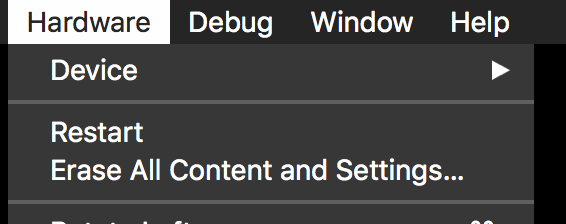
Screen Shot 2018-02-03 at 0.34.03.png

[参考]
https://stackoverflow.com/questions/44535636/twitter-kit-error

3
4
0

Register as a new user and use Qiita more conveniently

  1. You get articles that match your needs
  2. You can efficiently read back useful information
  3. You can use dark theme
What you can do with signing up
3
4

Delete article

Deleted articles cannot be recovered.

Draft of this article would be also deleted.

Are you sure you want to delete this article?