
Amazon ECR で壊れたイメージをpushしてしまい、稼働するイメージに latest タグを付け替えるのに苦労したので後世のための共有です。
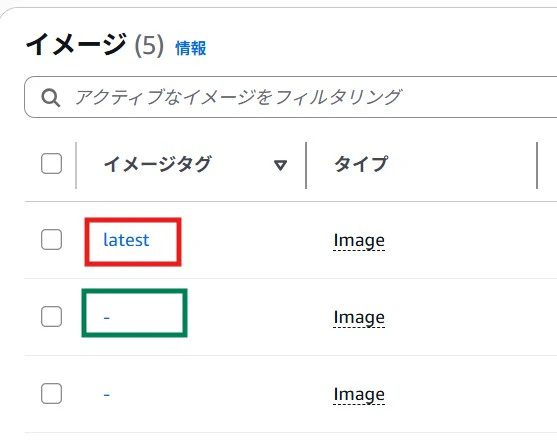
ECRで上記の赤枠の latest タグが付いているものが壊れて動かなかったので削除し、ひとつ前の緑枠のものに latest を付与することを試みました。
結論としては以下のようにイメージのマニフェストを取得するコマンドで --image-ids オプションの条件にイメージのダイジェストを imageDigest=[イメージのダイジェスト] という形式で指定すればよいです。
なお、 AWS CLI をインストールしていることが前提になります。
MANIFEST=$(aws ecr batch-get-image --repository-name [リポジトリ名] --image-ids imageDigest=[イメージのダイジェスト] --output text --query 'images[].imageManifest')

aws ecr put-image --repository-name [リポジトリ名] --image-tag latest --image-manifest "$MANIFEST"
ECRのイメージにタグを付与する記事はほとんどがタグを指定してマニフェストを取得するものばかりですが batch-get-image のマニュアルを見ると --image-ids オプションの条件に imageDigest が記述されています。
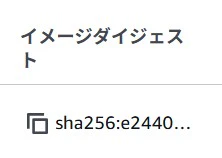
なお、ECRのWEBコンソールなどから対象のイメージのダイジェスト (sha... の長い文字列) は取得できます。