はじめに
Splunkへデータを取り込む際、特定の条件に合致したデータのみをSplunkへ取り込む事が可能です。
今回は、以下の要件を実現する場合の設定についてご紹介します。
- 対象データ
- JSONフォーマットデータ
- 取り込み条件
- 任意のKeyの値(value)が事前に指定した値である場合のみ取り込む
- 指定値はリストとして保持
構成
- Splunk Enterpriseバージョン
- v8.2.2
- データ取り込み構成
- Heavy Forwarder -> Indexer
- Heavy Forwarderにて今回の要件を実現する設定を適用します。
- Heavy Forwarder -> Indexer
利用するSplunk機能
- リスト保持
- Lookup機能
- 取り込み判定処理
- 条件定義:Ingest-time Eval機能(EVAL関数を用いた条件指定)
- 条件判定に基づく取り込み選択:Queue指定(nullQueue or indexQueue)
取得要件例
以下のJSONフォーマットデータを対象として、mail値が事前に定義された値であるデータのみをSplunkに取り込みます。
- sample.log
{"msg":"this is test log","name":"Tokyo","type":"VPN User","mail":"user01@test.com","time":"2022-04-01T01:10:40Z"}
{"msg":"this is test log","name":"Tokyo","type":"VPN User","mail":"user02@test.com","time":"2022-04-01T01:20:40Z"}
{"msg":"this is test log","name":"Tokyo","type":"VPN User","mail":"user03@test.com","time":"2022-04-01T01:30:40Z"}
{"msg":"this is test log","name":"Tokyo","type":"VPN User","mail":"user04@test.com","time":"2022-04-01T01:40:40Z"}
{"msg":"this is test log","name":"Tokyo","type":"VPN User","mail":"user01@test.com","time":"2022-04-01T01:50:40Z"}
設定例
今回の内容に関連する設定のみ記載します。
- Heavy Forwarder (Lookupファイル配置)
- maillist.csv
- Lookupファイル
mail
user01@test.com
user04@test.com
- Lookupファイル
- maillist.csv
- Heavy Forwarder (取り込み設定)
- props.conf
- ソースタイプ名(sample_json_filtered)及び各種ソースタイプ設定の定義
- 適用する取り込み設定(transforms.conf)の参照
[sample_json_filtered]
CHARSET=UTF-8
INDEXED_EXTRACTIONS=json
KV_MODE=none
SHOULD_LINEMERGE=true
disabled=false
pulldown_type=true
TIMESTAMP_FIELDS=time
LINE_BREAKER=([\r\n]+)
NO_BINARY_CHECK=true
TRANSFORMS-filter = filter_list
- transforms.conf
- 取り込みデータのmail値と指定したルックアップファイル内の値を照合し、値が合致する場合は取り込み対象(indexQueue), 合致しない場合は取り込み対象外(nullQueue)とします。
[filter_list]
INGEST_EVAL= queue=if(json_extract(lookup("maillist.csv", json_object("mail", mail), json_array("mail"))),"indexQueue","nullQueue")
- 取り込みデータのmail値と指定したルックアップファイル内の値を照合し、値が合致する場合は取り込み対象(indexQueue), 合致しない場合は取り込み対象外(nullQueue)とします。
- props.conf
取得結果
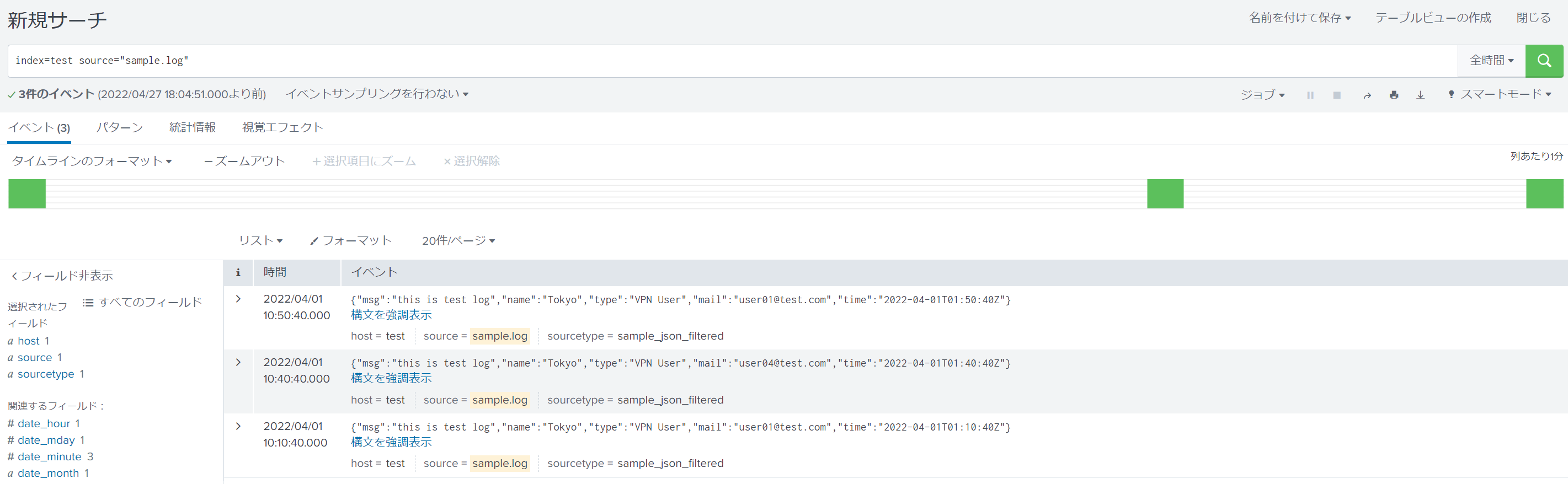
sample.logを取り込んだ結果を以下に示します。
リストに記載されたmail値を持つデータのみが格納されていることが分かります。