
Isingモデル
Isingモデルとは格子に二種のスピンを配置したモデルです。相転移のモデルとして有名です。今回はIsingモデルのwebアプリを作成したので、この動作を解説します。
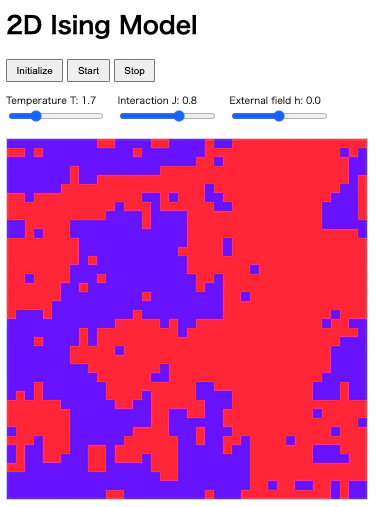
以下、アプリ画面とURLを示します。
原理
isingモデルでは系のエネルギーを次のように計算します。
$$
E = -J\sum_{<i, j>} s_i s_j
$$
ここで、$s_i$が格子点$i$のスピン、$J$が相互作用の強さ、$⟨i,j⟩$が隣接するスピンの組です。
$J>0$の時、隣り合う格子のスピンは同じ向きを向くと安定です。つまり、$J>0$は強磁性的な相互作用です。反対に、$J<0$の時、隣り合う格子のスピンは反対の向きを向くと安定です。つまり、$J<0$は反強磁性的な相互作用です。
系のエネルギーを最低にするスピンの配列が最安定のスピン状態です。ここでランダムな格子点$i$のスピンを反転させることを考えます。この時のエネルギー変化$\Delta E$が、$\Delta E<=0$である場合、スピンの反転により系のエネルギーが減少するので、スピン反転が起こります。
反対に、$\Delta E>0$である場合、スピンの反転により系のエネルギーが増加するので、次の確率でスピン反転が起こるようにします。
$$
\exp (\frac{\Delta E}{T})
$$
こうすることで、モデルに温度$T$を組み込むことができます。
スクリプト
プログラムは次のHTMLファイルになります。
<!DOCTYPE html>
<html lang="ja">
<head>
  <meta charset="UTF-8" />
  <title>Ising Model JS</title>
  <meta name="viewport" content="width=device-width, initial-scale=1" />
  <style>
    body {
      font-family: sans-serif;
      margin: 1rem;
    }
    #controls {
      display: flex;
      flex-wrap: wrap;
      gap: 1rem;
      margin-bottom: 1rem;
    }
    label {
      display: block;
      font-size: 0.8rem;
    }
    canvas {
      border: 1px solid #ccc;
      image-rendering: pixelated; /* 拡大してもカリッと */
    }
    button {
      padding: 0.4rem 0.8rem;
    }
  </style>
</head>
<body>
  <h1>2D Ising Model</h1>

  <!-- ボタン行 -->
  <div id="controls">
    <div>
      <button id="randBtn"> Initialize</button>
      <button id="startBtn"> Start</button>
      <button id="stopBtn"> Stop</button>
    </div>
  </div>

  <!-- スライダー行(T, J, hだけ) -->
  <div id="controls">
    <div>
      <label>Temperature T: <span id="tVal">2.5</span></label>
      <input type="range" id="tRange" min="0.5" max="5.0" step="0.1" value="2.5" />
    </div>
    <div>
      <label>Interaction J: <span id="jVal">1.0</span></label>
      <input type="range" id="jRange" min="-3" max="3" step="0.1" value="1.0" />
    </div>
    <div>
      <label>External field h: <span id="hVal">0.0</span></label>
      <input type="range" id="hRange" min="-2" max="2" step="0.1" value="0.0" />
    </div>
  </div>

  <canvas id="ising" width="480" height="480"></canvas>

  <script>
    // ====== parameters ======
    const N = 40;                   // 40x40 に固定
    const scale = 12;               // 表示拡大用 → 40*12=480px
    const canvas = document.getElementById("ising");
    const ctx = canvas.getContext("2d");

    // UI elements
    const tRange = document.getElementById("tRange");
    const tVal = document.getElementById("tVal");
    const jRange = document.getElementById("jRange");
    const jVal = document.getElementById("jVal");
    const hRange = document.getElementById("hRange");
    const hVal = document.getElementById("hVal");
    const startBtn = document.getElementById("startBtn");
    const stopBtn = document.getElementById("stopBtn");
    const randBtn = document.getElementById("randBtn");

    let T = parseFloat(tRange.value);
    let J = parseFloat(jRange.value);
    let H = parseFloat(hRange.value);
    let beta = 1.0 / T;

    const intervalMs = 100;
    let lastTime = 0;

    // ====== lattice ======
    let lattice = initLattice();

    function initLattice() {
      const arr = new Array(N);
      for (let i = 0; i < N; i++) {
        arr[i] = new Array(N);
        for (let j = 0; j < N; j++) {
          arr[i][j] = Math.random() < 0.5 ? -1 : 1;
        }
      }
      return arr;
    }

    function energyChange(i, j) {
      const s = lattice[i][j];
      // periodic boundary
      const up    = lattice[(i - 1 + N) % N][j];
      const down  = lattice[(i + 1) % N][j];
      const left  = lattice[i][(j - 1 + N) % N];
      const right = lattice[i][(j + 1) % N];
      const nb = up + down + left + right;
      // ΔE = 2 s (J * nb + H)
      return 2 * s * (J * nb + H);
    }

    // 1 Monte Carlo sweep (N*N trial)
    function metropolisSweep() {
      for (let k = 0; k < N * N; k++) {
        const i = Math.floor(Math.random() * N);
        const j = Math.floor(Math.random() * N);
        const dE = energyChange(i, j);
        if (dE <= 0) {
          lattice[i][j] *= -1;
        } else {
          const r = Math.random();
          if (r < Math.exp(-beta * dE)) {
            lattice[i][j] *= -1;
          }
        }
      }
    }

    // draw lattice
    function draw() {
      for (let i = 0; i < N; i++) {
        for (let j = 0; j < N; j++) {
          const s = lattice[i][j];
          if (s === 1) {
            ctx.fillStyle = "rgb(255,80,80)";  // red
          } else {
            ctx.fillStyle = "rgb(80,80,255)";  // blue
          }
          ctx.fillRect(j * scale, i * scale, scale, scale);
        }
      }
    }

    // ====== animation loop ======
    let running = false;
    function loop(timestamp) {
      if (running) {
        const elapsed = timestamp - lastTime;
        if (elapsed >= intervalMs) {
          metropolisSweep();
          draw();
          lastTime = timestamp;
        }
        requestAnimationFrame(loop);
      }
    }

    // ====== UI handlers ======
    tRange.addEventListener("input", () => {
      T = parseFloat(tRange.value);
      beta = 1.0 / T;
      tVal.textContent = T.toFixed(1);
    });
    jRange.addEventListener("input", () => {
      J = parseFloat(jRange.value);
      jVal.textContent = J.toFixed(1);
    });
    hRange.addEventListener("input", () => {
      H = parseFloat(hRange.value);
      hVal.textContent = H.toFixed(1);
    });

    startBtn.addEventListener("click", () => {
      if (!running) {
        running = true;
        lastTime = performance.now(); // 開始時にリセット
        requestAnimationFrame(loop);
      }
    });

    stopBtn.addEventListener("click", () => {
      running = false;
    });

    randBtn.addEventListener("click", () => {
      lattice = initLattice();
      draw();
    });

    // 初期描画
    draw();
  </script>
</body>
</html>
動作
例えば、温度のパラメタを小さくすると、赤と青の色のドメインが大きくなり、逆に温度のパラメタを大きくすると赤と青の色のドメインが小さくなります。これは、磁石を加熱すると磁力がなくなり、温度を下げると磁力が回復する現象に対応します。