

普通にやるとトップレベルは1つしか返せないので変なノードができがち
import React, { Component } from "react";

const Tabledata = props => {
  return (
    <div>
      <td>{props.col1}</td>
      <td>{props.col2}</td>
    </div>
  );
};

class Table extends Component {
  render() {
    return (
      <table>
        <tbody>
          <tr>
            <Tabledata col1="silence suzuka" col2="special week" />
          </tr>
        </tbody>
      </table>
    );
  }
}

export default Table;
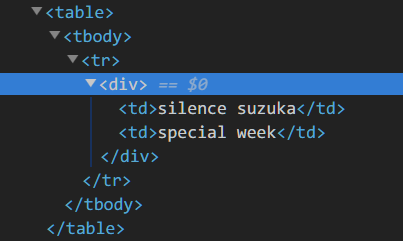
そんな時はReact.Fragmentを使う
const Tabledata = props => {
  return (
    <React.Fragment>
      <td>{props.col1}</td>
      <td>{props.col2}</td>
    </React.Fragment>
  );
};
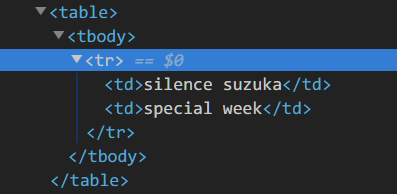
一応ショートハンドもある、けど現状だとその他ツールが追いついていないのでReact.Fragment使っとけばよさそう
const Tabledata = props => {
  return (
    <>
      <td>{props.col1}</td>
      <td>{props.col2}</td>
    </>
  );
};
因みにarrayみたいな渡し方でもいけるそう
const Tabledata = props => {
  return [<td>{props.col1}</td>, <td>{props.col2}</td>];
};