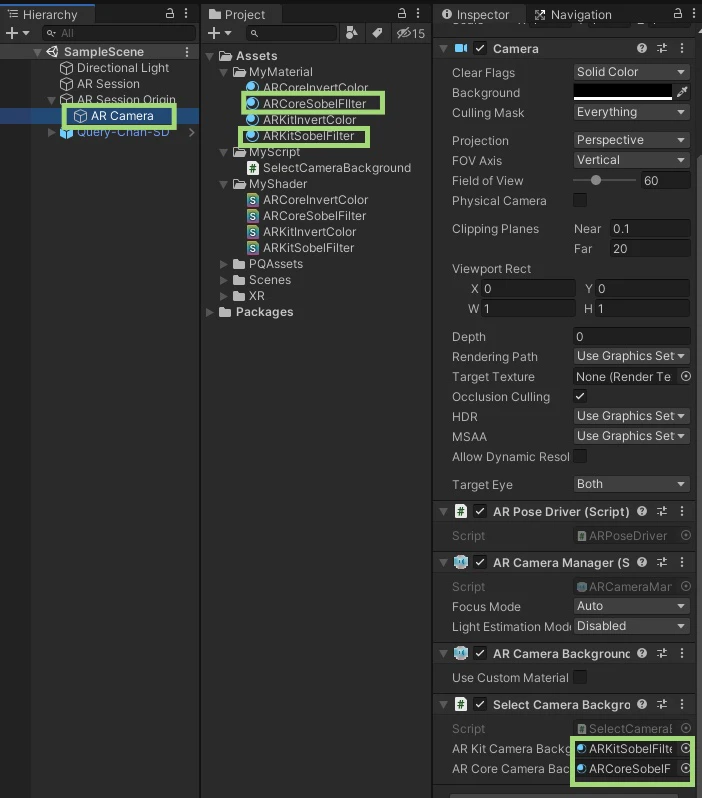
ARKitBackgroundをコピーし、ARKitSobelFilterに名前を変更する。
ARCoreSobelFilterも同様に作成する。

SelectCameraBackgroundに下記を記述する
SelectCameraBackground
using System.Collections;
using System.Collections.Generic;
using UnityEngine;
using UnityEngine.XR.ARFoundation;

public class SelectCameraBackground : MonoBehaviour
{
    [SerializeField]
    private Material ARKitCameraBackground;

    [SerializeField]
    private Material ARCoreCameraBackground;

    private ARCameraManager m_ARCameraManager;
    private ARCameraBackground m_ARCameraBackground;

    void Awake()
    {
        m_ARCameraManager = GetComponent<ARCameraManager>();
        m_ARCameraBackground = GetComponent<ARCameraBackground>();

        //カメラ背景のカスタムマテリアルを有効にする
        m_ARCameraBackground.useCustomMaterial = true;
# if UNITY_IPHONE
        //カスタムマテリアルにARKIt用のマテリアルをセットする
        m_ARCameraBackground.customMaterial = ARKitCameraBackground;
# elif UNITY_ANDROID
        //カスタムマテリアルにARCore用のマテリアルをセットする
        m_ARCameraBackground.customMaterial = ARCoreCameraBackground;
# endif
    }

    void OnEnable()
    {
        // ARCameraManager がカメラフレームを更新したら関数を実行
        if (m_ARCameraManager != null)
        {
            m_ARCameraManager.frameReceived += CameraFrameReceived;
        }
    }

    // カメラフレームが更新されたら以下の関数が実行される
    private void CameraFrameReceived(ARCameraFrameEventArgs eventArgs)
    {
        // 取得したカメラフレームの幅と高さをマテリアルに渡す
        m_ARCameraBackground.customMaterial.SetInt(
            "_ImageWidth", eventArgs.textures[0].width);
        m_ARCameraBackground.customMaterial.SetInt(
            "_ImageHeight", eventArgs.textures[0].height);
    }
}
ARKitSobelFilter.Shaderには下記を記述する
ARKitSobelFilter.Shader
Shader "CameraBackground/ARKitSobelFilter"
{
    Properties
    {
        _textureY ("TextureY", 2D) = "white" {}
        _textureCbCr ("TextureCbCr", 2D) = "black" {}
        _ImageWidth ("ImageWidth", Int) = 0
        _ImageHeight ("ImageWidth", Int) = 0
    }
    SubShader
    {
        Cull Off
        Tags { "RenderType"="Opaque" }
        LOD 100

        Pass
        {
            ZWrite Off
            CGPROGRAM
            #pragma vertex vert
            #pragma fragment frag

            #include "UnityCG.cginc"

            float4x4 _UnityDisplayTransform;

            struct Vertex
            {
                float4 position : POSITION;
                float2 texcoord : TEXCOORD0;
            };

            struct TexCoordInOut
            {
                float4 position : SV_POSITION;
                float2 texcoord : TEXCOORD0;
            };

            TexCoordInOut vert (Vertex vertex)
            {
                TexCoordInOut o;
                o.position = UnityObjectToClipPos(vertex.position);

                float texX = vertex.texcoord.x;
                float texY = vertex.texcoord.y;

                o.texcoord.x = (_UnityDisplayTransform[0].x * texX + _UnityDisplayTransform[1].x * (texY) + _UnityDisplayTransform[2].x);
                o.texcoord.y = (_UnityDisplayTransform[0].y * texX + _UnityDisplayTransform[1].y * (texY) + (_UnityDisplayTransform[2].y));

                return o;
            }

            // samplers
            sampler2D _textureY;
            sampler2D _textureCbCr;
            int _ImageWidth;
            int _ImageHeight;

            //RGBA値からグレースケール値を求める関数
            float gray (float4 c)
            {
                return 0.2126 * c.r + 0.7152 * c.g + 0.0722 * c.b;
            }

            //YCbCrテクスチャのuv座標からRGBAを求める関数
            float4 rgba (float2 uv)
            {
                float y = tex2D(_textureY, uv).r;
                float4 ycbcr = float4(y, tex2D(_textureCbCr, uv).rg, 1.0);
                 const float4x4 ycbcrToRGBTransform = float4x4(
                        float4(1.0, +0.0000, +1.4020, -0.7010),
                        float4(1.0, -0.3441, -0.7141, +0.5291),
                        float4(1.0, +1.7720, +0.0000, -0.8860),
                        float4(0.0, +0.0000, +0.0000, +1.0000)
                    );

                float4 result = mul(ycbcrToRGBTransform, ycbcr);

# if !UNITY_COLORSPACE_GAMMA
                result = float4(GammaToLinearSpace(result.xyz), result.w);
# endif // !UNITY_COLORSPACE_GAMMA

                return result;
            }

            fixed4 frag (TexCoordInOut i) : SV_Target
            {
                float2 texcoord = i.texcoord;

                //ピクセル幅の算出
                float dx = 1.0 / _ImageWidth;
                float dy = 1.0 / _ImageHeight;

                //対象ピクセルの周囲の画素値を取得
                float4 c00 = rgba(texcoord + float2(-dx, -dy));
                float4 c01 = rgba(texcoord + float2(-dx, 0.0));
                float4 c02 = rgba(texcoord + float2(-dx, +dy));
                float4 c10 = rgba(texcoord + float2(0.0, -dy));
                float4 c11 = rgba(texcoord);
                float4 c12 = rgba(texcoord + float2(0.0, +dy));
                float4 c20 = rgba(texcoord + float2(+dx, -dy));
                float4 c21 = rgba(texcoord + float2(+dx, 0.0));
                float4 c22 = rgba(texcoord + float2(+dx, +dy));

                // Sobel フィルタの係数を基に横方向と縦方向の値を求める
                float4 sx = 1.0 * c00 + 2.0 * c10 + 1.0 * c20
                            + -1.0 * c02 + -2.0 * c12 + -1.0 * c22;
                float4 sy = 1.0 * c00 + 2.0 * c01 + 1.0 * c02
                            + -1.0 * c20 + -2.0 * c21 + -1.0 * c22;

                // 横方向と縦方向の値の二乗和の平方根を求め、グレースケール化で float にする
                float g = gray(sqrt(sx * sx + sy * sy));

                // 求めたしきい値より大きければエッジとして黒、それ以外は白で描画
                return g > 0.3 ? fixed4(0, 0, 0, 1) : fixed4(1, 1, 1, 1);

                // エッジが白、それ以外を黒
                //return g > 0.3 ? fixed4(1, 1, 1, 1) : fixed4(0, 0, 0, 1);

                // しきい値を複数設定して色を変える
                /*
                if (g > 0.4) {
                return fixed4(0.25, 0.25, 0.25, 1);
                } else if (g > 0.3) {
                return fixed4(0.3, 0.5, 1, 1);
                } else if (g > 0.2) {
                return fixed4(1, 0.25, 0.25, 1);
                } else {
                return fixed4(1, 1, 1, 1);
                }
                */

                // エッジ強調しつつ、エッジ以外は元の映像を表示
                //return g > 0.3 ? fixed4(0, 0, 0, 1) : c11;

            }
            ENDCG
        }
    }
}
ARKitSobelFilterマテリアルを作成し、ARKit SobelFilterを設定する
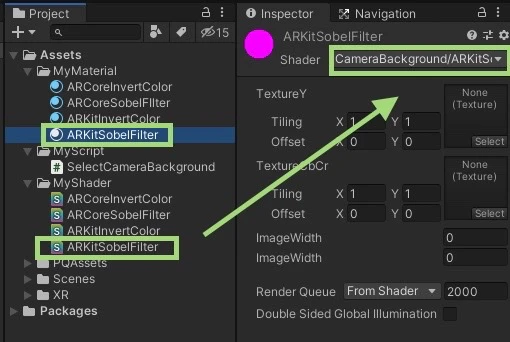
ARCameraのSelectCameraBackgroundに作成したマテリアルをアタッチする