
UnrealEngineで使われるWorldとWorldContextとは?
Worldとは?
アクターを配置する空間の事です。
マルチプレイゲームなどを実装していると、わかると思いますが、複数のゲームインスタンスを実行できる事から
UnrealEditorでは複数のWorldを実行する事が可能です。

その他にもUMGEditorやMaterialEditorやPersonaEditorなど、ビューポート毎にもWorldは用意されます。
-UnrealEditor
    - EditorWorld
        - Level
            - Actor
            - Actor
    - GameWorld1
        - Level
            - Actor
            - Actor
            - Actor
    - GameWorld2
        - Level
            - Actor
            - Actor
    - MaterialEditor1
        - Level
            - Actor
    - PersonaEditor1
        - Level
            - Actor
            - Actor
WorldContextとは?
Outer(親のUObject)経由で最終的にWorldにつながっている物の事
UObject::GetWorldを呼び出した結果所属しているWorldを取得できるUObjectの事
TArray<AActor*> Actors;
UGameplayStatics::GetAllActorsOfClass(WorldContextObject, APawn::StaticClass(), Actors);
例えば上記の関数を呼び出したときに、UnrealEditor上では複数のWorldが存在している為、どのWorldに所属しているPawnを取得するべきか分からない
その為、WorlcContextを指定する事でWorldを呼び分ける事ができます。
独自クラスでWorldContext対応をする為には?
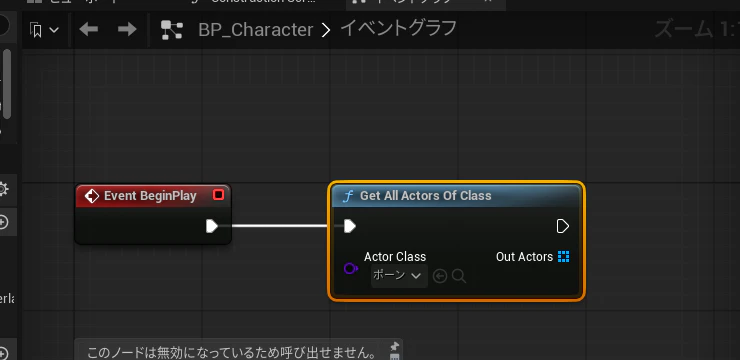
| WorldContext対応Blueprint | WorldContext非対応Blueprint |
|---|---|
 |
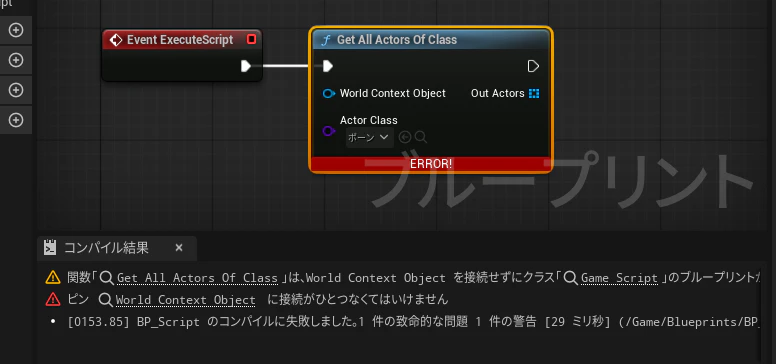 |
GetWorldを実装していないオブジェクトを親クラスに継承した場合には、上記の画像のように関数を呼び出した時に
WorldContextが表示されます。
BlueprintEditor上ではUObject::ImplementsGetWorldを呼び出して、GetWorld関数が実装されているかのチェックをしています。
bool UObject::ImplementsGetWorld() const
{
	bGetWorldOverridden = true;
	GetWorld();
	return bGetWorldOverridden;
}
UObject::GetWorldのデフォルトの実装では、bGetWorldOverriddenの変数が、設定される為未実装扱いです。
class UWorld* UObject::GetWorld() const
{
    // 親のOuterを取得してそのWorldを取得する
    // 再帰的なループによって親が見つかるまで繰り返す
	if (UObject* Outer = GetOuter())
	{
		return Outer->GetWorld();
	}

#if DO_CHECK || WITH_EDITOR
    // Blueprint上でWorldが実装されているかのチェック
	bGetWorldOverridden = false;
#endif
	return nullptr;
}
Super::GetWorldを呼び出さない実装を作る事でWorldContext対応のUObjectにできます
class UWorld* UHogeHoge::GetWorld() const
{
	if (UObject* Outer = GetOuter())
	{
		return Outer->GetWorld();
	}
	return nullptr;
}
なぜこの記事を書いたのか???
WorlcContextを省略する為に、GameInstanceをSingletonにするようなケースが散見されます。
非推奨のGameInstanceでシングルトンを書くコード
UCLASS()
class UMyGameInstance : public UGameInstance
{
	GENERATED_BODY()
public:
	static UMyGameInstance* GetInstance() { return SingletonInstance; }
	virtual void Init() override
    {
    	SingletonInstance = this;
    	Super::Init();
    }
	virtual void Shutdown() override
    {
    	Super::Shutdown();
    	SingletonInstance = nullptr;
    }
private:
	static inline UMyGameInstance* SingletonInstance = nullptr;
};
void UMyBlueprintFunctionLibrary::MyFunction()
{
    // 無理やりGameInstanceを使う例
    // MyFunctionをどこで呼んでも、GameWorldのPlayerを取得できてしまう
    UMyGameInstance* pInstance = UMyGameInstance::GetInstance();
    APawn* pPlayer = UGameplayStatics::GetPlayerPawn(pInstance, 0);
    if (IsValid(pPlayer))
    {
    	pPlayer->Destroy();
    }
}
AnimNotifyやシーケンサーのディレクターBlueprintなどで上を実装すると
PersonaエディターやシーケンサーエディターとPIEが同時に動いているときに、意図していない挙動になります。
マルチプレイヤーなどの観点からもWorldContextの省略は避けるべきです
特殊なWorldContextの実装例に関して
UObjectのOuterがWorldに紐づいていない場合のGetWorldの実装例です。
アニメーションアセットなど何度も実行される為、UObjectの複製コストを避ける為の実装です。
おおよそconst関数で、Blueprintで定義できる関数が定義されているのが特徴です
AnimNotify
UCLASS(abstract, Blueprintable, const, hidecategories=Object, collapsecategories, MinimalAPI)
class UAnimNotify : public UObject
{
	GENERATED_UCLASS_BODY()

    // Blueprint関数の定義
	UFUNCTION(BlueprintImplementableEvent, meta=(AutoCreateRefTerm="EventReference"))
	bool Received_Notify(USkeletalMeshComponent* MeshComp, UAnimSequenceBase* Animation, const FAnimNotifyEventReference& EventReference) const;

    void Notify(USkeletalMeshComponent* MeshComp, UAnimSequenceBase* Animation, const FAnimNotifyEventReference& EventReference)
    {
        // Received_Notify関数が呼ばれている間だけWorlcContextが使えるようにする
        // MeshCompを一時的にメンバ変数に指定する事で、GetWorldでWorldをたどれるようにする
    	USkeletalMeshComponent* PrevContext = MeshContext;
    	MeshContext = MeshComp;
    	Received_Notify(MeshComp, Animation, EventReference);
    	MeshContext = PrevContext;
    }

    // ワールドコンテキストの実装
	virtual class UWorld* GetWorld() const override
    {
    	return (MeshContext ? MeshContext->GetWorld() : NULL);
    }

private:
    // 今アニメーションを実行しているSkeltalMeshコンポーネント
	class USkeletalMeshComponent* MeshContext;
};