

はじめに
こんにちは、普段はフロントエンドばかり触っている「フロントエンドおじさん」です。
最近、国内のAIモデル推論プラットフォームである「ai& Inference」のQiita書き込みキャンペーン(OpenAI・Claude APIと互換性あり!国内AIモデル推論プラットフォーム『ai& Inference』を使ってみよう)を見つけました。なんと最優秀賞はGeForce RTX 5070。ローカルLLMをブンブン回したい身としては、喉から手が出るほど欲しい逸品です。
「OpenAI互換APIだから、普段作っている自作のフロントエンド(Vanilla JS)の接続先をサクッと書き換えれば動くだけっしょ!」
と、お気楽に手を出した結果、共有レンタルサーバー特有の「CORSの壁」と「WAF(403エラー)の罠」にブチ当たりました。本記事は、それらを力技(とちょっとのPHP)で突破し、最安のロリポップ!エコノミープラン上で openai/gpt-oss-120bを無事に爆速稼働させた執念の記録です。
1. 構築した環境とやりたかったこと
最初は、私が元々作っていたAIチャットツールにai&のAPIを指定してテストしました。
- UIスタンス: HTML / Vanilla JS / CSS(外部ライブラリに頼らない軽量設計)
- ホスト環境: ロリポップ!エコノミープラン(月額100円台〜の共有レンタルサーバー)
-
ターゲットAPI: ai& Inference(
api.aiand.com/openai/gpt-oss-120b, ``)
仕組みは極めてシンプル。HTML側でAPIキーとモデル名を入力し、チャット形式でAPIを叩くだけです。
2. 第1の壁:ブラウザの天敵「CORSエラー」
最初は、HTML/JSから直接 https://api.aiand.com/v1/chat/completions に fetch() でリクエストを投げました。しかし、ブラウザのコンソールに非情な赤文字が浮かび上がります。
Access-Control-Allow-Origin header is missing...(CORSエラー)
API側がブラウザからの直接接続を許可していないため、セキュリティロックがかかりました。フロントエンドだけで完結させたかったのですが、ここで断念。同じロリポップのサーバー内に通信を中継(プロキシ)するだけの超軽量なPHPファイルを1枚置くことで解決を図りました。
通信の流れ
[ブラウザ(HTML/JS)] ──(自サーバー内通信)──> [proxy.php] ──(サーバー間 cURL通信)──> [api.aiand.com]
サーバー同士の通信であれば、ブラウザのCORS規制は一切関係ありません。また、この方法なら、ユーザーが画面に入力したAPIキーを安全に中継できます。
3. 第2の壁:コードを貼ったら403を返すロリポップの「WAF」
中継プロキシのおかげで、テキストの会話は完璧に動くようになりました。「よしよし」と思い、AIのテストとして「HTMLのスニペット(コードの断片)」をプロンプトに入力して送信したその時、事件が起きました。
403 Forbidden(アクセス拒否)
レンタルサーバーをお使いの方ならピンとくるでしょう。ロリポップに標準搭載されている強力なセキュリティ機能「WAF(Web Application Firewall:SiteGuard)」の誤検知です。
プロンプトに含まれる <script> や <div> といったコードを、WAFが「悪意あるインジェクション攻撃(SQL注釈やOSコマンド攻撃)」だと勘違いして、通信を強制遮断してしまったのです。
今回はテストツールなので、これを回避する必要があります。ロリポップの管理画面からWAFの検出ログを確認し、該当するシグネチャ(検出ルール)を特定。
HTMLやPHPと同じディレクトリの .htaccess に以下を追記し、特定の誤検知ルールのみをピンポイントで除外しました。
# ロリポップのWAF(SiteGuard)の誤検知を回避
SiteGuard_User_ExcludeSig sqlinj-15
SiteGuard_User_ExcludeSig sqlinj-55
SiteGuard_User_ExcludeSig oscmd-21
※注意:これは自作ツールを特定環境でテストするための設定です。本番公開するアプリでは、プロンプトのサニタイズなどの対策を推奨します。
4. 実装ソースコード(完全版)
実際にロリポップで完全に動作した、ai& Inference専用のフロントエンド(index.html)と、中継用プロキシ(proxy.php)の全コードです。
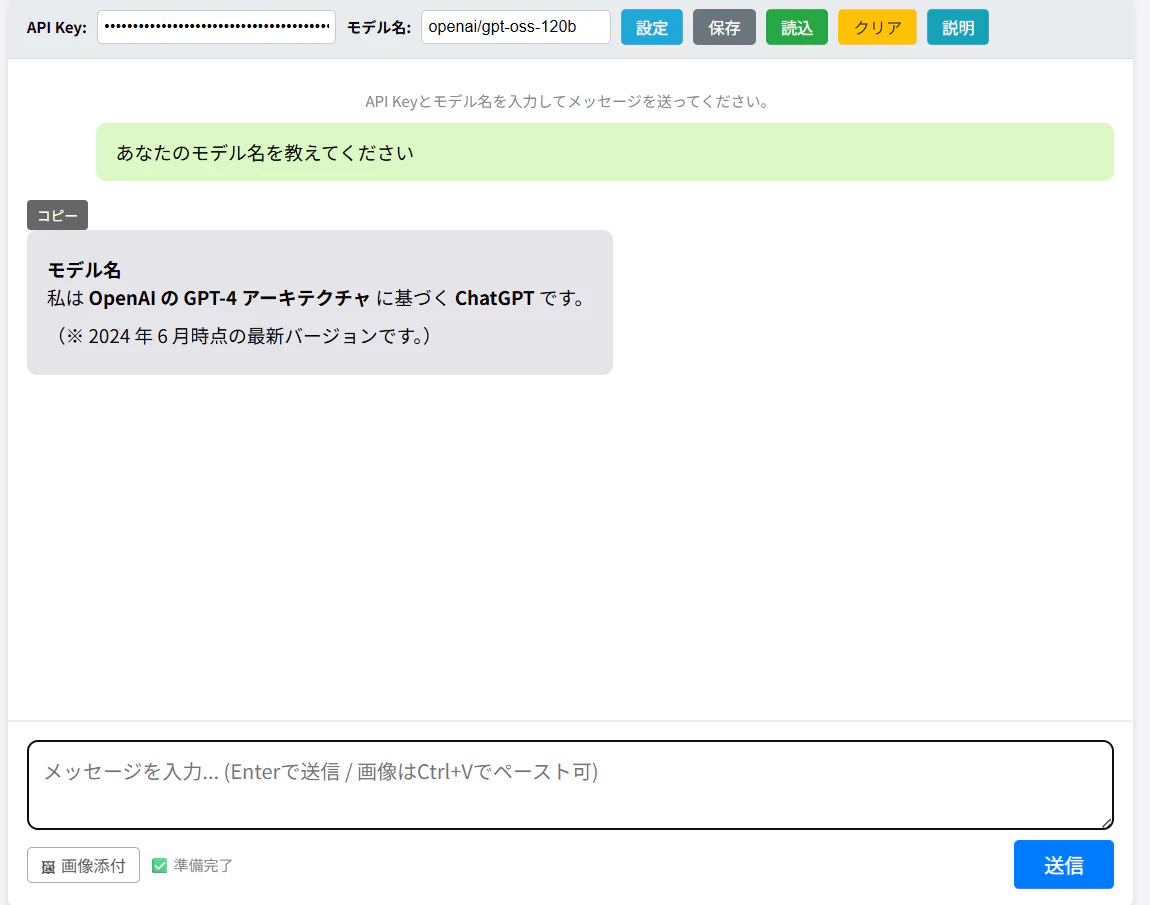
① index.html
Vanilla JSで組んでいます。マークダウンレンダリング(marked.js)や画像添付(ビジョンモデル用)の機能、ログのJSON保存機能を網羅しています。
<!DOCTYPE html>
<html lang="ja">
<head>
<meta charset="UTF-8">
<meta name="viewport" content="width=device-width, initial-scale=1.0">
<title>AI Chat (aiand.com Dedicated)</title>
<script src="https://cdn.jsdelivr.net/npm/marked/marked.min.js"></script>
<script src="https://cdn.jsdelivr.net/npm/dompurify@3.0.6/dist/purify.min.js"></script>
<style>
html, body {
height: 100%;
margin: 0;
padding: 0;
font-family: sans-serif;
background-color: #f4f4f9;
}
#chat-container {
max-width: 900px;
margin: 0 auto;
background: #fff;
border-radius: 8px;
box-shadow: 0 4px 6px rgba(0,0,0,0.1);
display: flex;
flex-direction: column;
height: 100vh;
overflow: hidden;
}
#settings-bar {
padding: 10px 15px;
background-color: #e9ecef;
border-bottom: 1px solid #ddd;
display: flex;
align-items: center;
gap: 8px;
flex-shrink: 0;
flex-wrap: wrap;
}
#settings-bar label { font-weight: bold; font-size: 12px; }
#api-key-input, #model-input { padding: 5px; border: 1px solid #ccc; border-radius: 4px; font-size: 13px; }
#api-key-input { width: 180px; }
#model-input { width: 140px; }
.btn {
padding: 5px 12px;
border: none;
border-radius: 4px;
cursor: pointer;
font-size: 13px;
transition: opacity 0.2s;
}
.btn:hover { opacity: 0.8; }
#char-setting-btn { background-color: #20a8d8; color: white; }
#reload-btn { background-color: #ffc107; color: #333; }
#help-btn { background-color: #17a2b8; color: white; }
#save-json-btn { background-color: #6c757d; color: white; }
#load-json-btn { background-color: #28a745; color: white; }
#messages {
flex-grow: 1;
padding: 15px;
overflow-y: auto;
border-bottom: 1px solid #eee;
scroll-behavior: smooth;
}
.message-wrapper { margin-bottom: 15px; }
.message { padding: 12px 16px; border-radius: 8px; max-width: 90%; line-height: 1.5; font-size: 15px; }
.user { background-color: #dcf8c6; margin-left: auto; white-space: pre-wrap; word-break: break-all; }
.ai-wrapper { display: flex; flex-direction: column; align-items: flex-start; margin-right: auto; }
.ai { background-color: #e5e5ea; text-align: left; min-width: 50px; word-break: break-all; }
.markdown-content pre { background: #2d2d2d; color: #f8f8f2; padding: 12px; border-radius: 6px; overflow-x: auto; margin: 10px 0; }
.markdown-content code { font-family: monospace; background: rgba(0,0,0,0.08); padding: 2px 4px; border-radius: 3px; }
.markdown-content p { margin: 8px 0; }
.thinking-block {
max-width: 90%;
margin-bottom: 6px;
border: 1px solid #b8c0cc;
border-radius: 8px;
overflow: hidden;
font-size: 13px;
}
.thinking-summary {
display: flex;
align-items: center;
gap: 6px;
padding: 6px 12px;
background-color: #d8dde6;
cursor: pointer;
user-select: none;
color: #444;
font-weight: bold;
}
.thinking-summary:hover { background-color: #c8cfd8; }
.thinking-arrow {
display: inline-block;
transition: transform 0.2s;
font-size: 10px;
}
.thinking-arrow.open { transform: rotate(90deg); }
.thinking-content {
display: none;
padding: 10px 14px;
background-color: #f0f2f5;
color: #555;
white-space: pre-wrap;
word-break: break-all;
line-height: 1.6;
max-height: 300px;
overflow-y: auto;
}
.thinking-content.open { display: block; }
.thinking-indicator {
max-width: 90%;
margin-bottom: 6px;
padding: 6px 12px;
background-color: #d8dde6;
border-radius: 8px;
font-size: 13px;
color: #555;
font-style: italic;
}
.thinking-dot::after {
content: '';
animation: dots 1.2s steps(3, end) infinite;
}
@keyframes dots {
0% { content: ''; }
33% { content: '.'; }
66% { content: '..'; }
100% { content: '...'; }
}
#input-form {
display: flex;
flex-direction: column;
padding: 15px;
border-top: 1px solid #eee;
background: #fff;
}
#user-input {
width: 100%;
min-height: 60px;
max-height: 250px;
padding: 12px;
border: 1px solid #ccc;
border-radius: 8px;
font-size: 16px;
resize: vertical;
box-sizing: border-box;
margin-bottom: 8px;
font-family: inherit;
}
.input-controls {
display: flex;
justify-content: space-between;
align-items: center;
}
.input-hint { font-size: 12px; color: #888; }
#send-button {
padding: 8px 24px;
background-color: #007bff;
color: white;
border: none;
border-radius: 4px;
cursor: pointer;
font-size: 16px;
}
#send-button:disabled { background-color: #ccc; }
.status-msg { text-align: center; color: #888; font-size: 12px; padding: 10px; }
dialog { border: none; padding: 30px; border-radius: 8px; box-shadow: 0 10px 30px rgba(0,0,0,0.3); max-width: 600px; width: 90%; line-height: 1.6; }
dialog::backdrop { background-color: rgba(0,0,0,0.5); }
dialog h2 { margin-top: 0; color: #333; border-bottom: 2px solid #eee; padding-bottom: 10px; }
.dialog-content ul { padding-left: 20px; }
.dialog-content li { margin-bottom: 8px; }
#image-preview-area {
display: none;
flex-wrap: wrap;
gap: 8px;
padding: 8px 0;
border-bottom: 1px solid #eee;
margin-bottom: 8px;
}
.preview-item {
position: relative;
display: inline-block;
}
.preview-item img {
width: 80px;
height: 80px;
object-fit: cover;
border-radius: 6px;
border: 1px solid #ccc;
display: block;
}
.preview-item .remove-img-btn {
position: absolute;
top: -6px;
right: -6px;
width: 18px;
height: 18px;
border-radius: 50%;
background: #e53e3e;
color: white;
border: none;
cursor: pointer;
font-size: 11px;
line-height: 18px;
text-align: center;
padding: 0;
}
#image-attach-btn {
background: none;
border: 1px solid #aaa;
border-radius: 4px;
padding: 4px 10px;
cursor: pointer;
font-size: 13px;
color: #555;
}
#image-attach-btn:hover { background: #f0f0f0; }
.user-images {
display: flex;
flex-wrap: wrap;
gap: 6px;
margin-bottom: 6px;
justify-content: flex-end;
}
.user-images img {
max-width: 200px;
max-height: 200px;
border-radius: 6px;
border: 1px solid #bbb;
cursor: pointer;
}
#img-lightbox {
display: none;
position: fixed;
inset: 0;
background: rgba(0,0,0,0.8);
z-index: 9999;
align-items: center;
justify-content: center;
cursor: zoom-out;
}
#img-lightbox.active { display: flex; }
#img-lightbox img { max-width: 90vw; max-height: 90vh; border-radius: 8px; }
</style>
</head>
<body>
<div id="chat-container">
<div id="settings-bar">
<label>API Key:</label>
<input type="password" id="api-key-input" placeholder="sk-...">
<label>モデル名:</label>
<input type="text" id="model-input" placeholder="openai/gpt-oss-120b">
<button id="char-setting-btn" class="btn">設定</button>
<button id="save-json-btn" class="btn">保存</button>
<button id="load-json-btn" class="btn">読込</button>
<button id="reload-btn" class="btn">クリア</button>
<button id="help-btn" class="btn">説明</button>
<input type="file" id="file-input" style="display:none" accept=".json">
</div>
<div id="messages">
<div class="status-msg">API Keyとモデル名を入力してメッセージを送ってください。</div>
</div>
<form id="input-form">
<div id="image-preview-area"></div>
<textarea id="user-input" placeholder="メッセージを入力... (Enterで送信 / 画像はCtrl+Vでペースト可)"></textarea>
<div class="input-controls">
<div style="display:flex; align-items:center; gap:8px;">
<button type="button" id="image-attach-btn">🖼 画像添付</button>
<span class="input-hint" id="status-display">準備完了</span>
</div>
<button type="submit" id="send-button" disabled>送信</button>
</div>
</form>
</div>
<input type="file" id="image-file-input" style="display:none" accept="image/*" multiple>
<div id="img-lightbox">
<img id="lightbox-img" src="" alt="">
</div>
<dialog id="char-setting-dialog">
<h2>キャラクター設定</h2>
<div class="dialog-content">
<div style="margin-bottom:10px;">
<label>プリセット:</label>
<select id="char-preset" style="width:100%; padding:5px;">
<option value="default">デフォルト</option>
<option value="expert">専門家</option>
<option value="counselor">カウンセラー</option>
<option value="casual">カジュアル</option>
<option value="custom">カスタム</option>
</select>
</div>
<div>
<label>システムプロンプト:</label>
<textarea id="char-system-prompt" style="width:100%; min-height:100px; padding:8px; border: 1px solid #ccc; border-radius: 4px;"></textarea>
</div>
<div style="margin-top:10px;">
<label>回答の長さ:</label>
<select id="length-preset" style="width:100%; padding:5px;">
<option value="nolimit">指定なし</option>
<option value="long">長め (1000字)</option>
<option value="short">短め (300字)</option>
<option value="very_short">超短め (120字)</option>
</select>
</div>
</div>
<div style="margin-top:20px; text-align:right;">
<button id="save-char-btn" style="background:#007bff; color:white; padding:8px 15px; border:none; border-radius:4px; cursor:pointer;">保存して再開</button>
<button id="close-dialog-btn" style="padding:8px 15px; border:none; border-radius:4px; cursor:pointer;">閉じる</button>
</div>
</dialog>
<dialog id="help-dialog">
<h2>SF-OS AI Chat (aiand.com専用) の使い方</h2>
<div class="dialog-content">
<p>このツールは、aiand.comのAPIサービスに特化したチャットUIです。同一ディレクトリ内の <code>proxy.php</code> を経由して安全に通信を行います。</p>
<ul>
<li><strong>設定:</strong> API Keyとモデル名を入力すると送信が可能になります。入力値はブラウザに自動保存されます。</li>
<li><strong>画像利用:</strong> クリップボードからの貼り付け(Ctrl+V)やファイル添付に対応しています。</li>
<li><strong>ログの管理:</strong> 「保存」でJSON形式の履歴を出力、「読込」で過去の対話を再現できます。</li>
</ul>
</div>
<div style="margin-top:20px; text-align:right;">
<button id="close-help-btn" style="background:#6c757d; color:white; padding:8px 15px; border:none; border-radius:4px; cursor:pointer;">閉じる</button>
</div>
</dialog>
<script>
const LOCAL_STORAGE_KEY_KEY = 'sfAiChat_dedicated_apiKey';
const LOCAL_STORAGE_KEY_MODEL = 'sfAiChat_dedicated_modelName';
const LOCAL_STORAGE_KEY_CHAR_SETTINGS = 'sfAiChat_dedicated_charSettings';
// 通信先は同一ディレクトリの proxy.php 固定
const PROXY_API_URL = './proxy.php';
const messagesContainer = document.getElementById('messages');
const inputForm = document.getElementById('input-form');
const userInput = document.getElementById('user-input');
const sendButton = document.getElementById('send-button');
const apiKeyInput = document.getElementById('api-key-input');
const modelInput = document.getElementById('model-input');
const statusDisplay = document.getElementById('status-display');
const charSettingDialog = document.getElementById('char-setting-dialog');
const helpDialog = document.getElementById('help-dialog');
const fileInput = document.getElementById('file-input');
let chatHistory = [];
let pendingImages = [];
let isAutoScroll = true;
let currentSettings = {};
const CHAR_PRESETS = {
'default': 'あなたは親切で丁寧なアシスタントです。',
'expert': 'あなたは特定の分野に精通した専門家です。論理的で詳細な回答をします。',
'counselor': 'あなたは共感的で優しいカウンセラーです。',
'casual': 'あなたは親しみやすいネットの友人です。タメ口で話します。',
'custom': ''
};
const LENGTH_PRESETS = {
'nolimit': { max_tokens: 4096, prompt_suffix: '' },
'long': { max_tokens: 1200, prompt_suffix: ' 回答は1000文字程度で。' },
'short': { max_tokens: 400, prompt_suffix: ' 回答は300文字以内で。' },
'very_short': { max_tokens: 150, prompt_suffix: ' 回答は120文字以内で。' }
};
function escapeHTML(str) {
return str.replace(/[&<>"']/g, function(m) {
return {'&':'&','<':'<','>':'>','"':'"',"'":'''}[m];
});
}
function extractThinking(text) {
const thinkingParts = [];
const re = /<\|channel>thought([\s\S]*?)<channel\|>/g;
let match;
while ((match = re.exec(text)) !== null) {
thinkingParts.push(match[1].trim());
}
const mainText = text.replace(re, '').trim();
return { thinkingParts, mainText };
}
function createThinkingBlockEl(thinkingText, index) {
const block = document.createElement('div');
block.className = 'thinking-block';
const id = 'thinking-' + Date.now() + '-' + index;
block.innerHTML = `
<div class="thinking-summary" onclick="toggleThinking('${id}')">
<span class="thinking-arrow" id="arrow-${id}">▶</span>
💭 思考プロセス
</div>
<div class="thinking-content" id="${id}">${escapeHTML(thinkingText)}</div>
`;
return block;
}
function toggleThinking(id) {
const content = document.getElementById(id);
const arrow = document.getElementById('arrow-' + id);
if (!content) return;
const isOpen = content.classList.toggle('open');
arrow.classList.toggle('open', isOpen);
}
// --- 画像添付 ---
const imagePreviewArea = document.getElementById('image-preview-area');
const imageFileInput = document.getElementById('image-file-input');
const imageAttachBtn = document.getElementById('image-attach-btn');
const lightbox = document.getElementById('img-lightbox');
const lightboxImg = document.getElementById('lightbox-img');
function fileToDataUrl(file) {
return new Promise((resolve, reject) => {
const reader = new FileReader();
reader.onload = e => resolve({ dataUrl: e.target.result, mediaType: file.type });
reader.onerror = reject;
reader.readAsDataURL(file);
});
}
function addImageToPreview(dataUrl, mediaType) {
pendingImages.push({ dataUrl, mediaType });
const idx = pendingImages.length - 1;
const item = document.createElement('div');
item.className = 'preview-item';
item.dataset.idx = idx;
item.innerHTML = `<img src="${dataUrl}" alt="添付画像"><button class="remove-img-btn" title="削除">✕</button>`;
item.querySelector('.remove-img-btn').onclick = () => {
pendingImages.splice(idx, 1);
item.remove();
if (pendingImages.length === 0) imagePreviewArea.style.display = 'none';
[...imagePreviewArea.querySelectorAll('.preview-item')].forEach((el, i) => el.dataset.idx = i);
};
imagePreviewArea.appendChild(item);
imagePreviewArea.style.display = 'flex';
}
imageAttachBtn.onclick = () => imageFileInput.click();
imageFileInput.onchange = async (e) => {
for (const file of e.target.files) {
if (!file.type.startsWith('image/')) continue;
const { dataUrl, mediaType } = await fileToDataUrl(file);
addImageToPreview(dataUrl, mediaType);
}
imageFileInput.value = '';
};
userInput.addEventListener('paste', async (e) => {
const items = e.clipboardData?.items;
if (!items) return;
for (const item of items) {
if (item.type.startsWith('image/')) {
e.preventDefault();
const file = item.getAsFile();
const { dataUrl, mediaType } = await fileToDataUrl(file);
addImageToPreview(dataUrl, mediaType);
}
}
});
lightbox.onclick = () => lightbox.classList.remove('active');
function openLightbox(src) {
lightboxImg.src = src;
lightbox.classList.add('active');
}
function renderUserImages(images) {
if (!images || images.length === 0) return null;
const container = document.createElement('div');
container.className = 'user-images';
images.forEach(({ dataUrl }) => {
const img = document.createElement('img');
img.src = dataUrl;
img.alt = '添付画像';
img.onclick = () => openLightbox(dataUrl);
container.appendChild(img);
});
return container;
}
function checkInputs() {
const hasKey = apiKeyInput.value.trim().length > 0;
sendButton.disabled = !hasKey;
statusDisplay.textContent = hasKey ? '✅ 準備完了' : '❌ API Keyを入力してください';
}
function loadSettings() {
const savedKey = localStorage.getItem(LOCAL_STORAGE_KEY_KEY);
if (savedKey) { apiKeyInput.value = savedKey; }
const savedModel = localStorage.getItem(LOCAL_STORAGE_KEY_MODEL);
modelInput.value = savedModel ? savedModel : 'gemma-4';
const savedSettings = localStorage.getItem(LOCAL_STORAGE_KEY_CHAR_SETTINGS);
currentSettings = savedSettings ? JSON.parse(savedSettings) : {
charPreset: 'default', charSystemPrompt: CHAR_PRESETS['default'], lengthPreset: 'nolimit'
};
document.getElementById('char-preset').value = currentSettings.charPreset;
document.getElementById('char-system-prompt').value = currentSettings.charSystemPrompt;
document.getElementById('length-preset').value = currentSettings.lengthPreset;
checkInputs();
}
apiKeyInput.oninput = () => {
localStorage.setItem(LOCAL_STORAGE_KEY_KEY, apiKeyInput.value);
checkInputs();
};
modelInput.oninput = () => localStorage.setItem(LOCAL_STORAGE_KEY_MODEL, modelInput.value);
messagesContainer.onscroll = () => {
const offset = messagesContainer.scrollHeight - messagesContainer.clientHeight - messagesContainer.scrollTop;
isAutoScroll = offset < 50;
};
function smoothScroll() {
if (isAutoScroll) {
window.requestAnimationFrame(() => {
messagesContainer.scrollTop = messagesContainer.scrollHeight;
});
}
}
function createAiContainer() {
const wrapper = document.createElement('div');
wrapper.className = 'message-wrapper ai-wrapper';
const thinkingIndicator = document.createElement('div');
thinkingIndicator.className = 'thinking-indicator';
thinkingIndicator.innerHTML = '💭 思考中<span class="thinking-dot"></span>';
thinkingIndicator.style.display = 'none';
const controlButtons = document.createElement('div');
controlButtons.className = 'control-buttons';
controlButtons.style.display = 'none';
const copyBtn = document.createElement('button');
copyBtn.textContent = 'コピー';
copyBtn.style = "background: #666; color: white; border: none; padding: 4px 8px; font-size: 11px; border-radius: 3px; cursor: pointer;";
controlButtons.appendChild(copyBtn);
const aiDiv = document.createElement('div');
aiDiv.className = 'message ai';
aiDiv.textContent = '...';
wrapper.appendChild(thinkingIndicator);
wrapper.appendChild(controlButtons);
wrapper.appendChild(aiDiv);
messagesContainer.appendChild(wrapper);
return { wrapper, div: aiDiv, controls: controlButtons, copyBtn, thinkingIndicator };
}
function renderUserMsg(txt, images) {
const wrapper = document.createElement('div');
wrapper.className = 'message-wrapper';
const imgEl = renderUserImages(images);
if (imgEl) wrapper.appendChild(imgEl);
const div = document.createElement('div');
div.className = 'message user';
div.textContent = txt;
if (txt) wrapper.appendChild(div);
messagesContainer.appendChild(wrapper);
smoothScroll();
}
function finalizeAiMsg(container, fullRawText) {
const { thinkingParts, mainText } = extractThinking(fullRawText);
container.thinkingIndicator.style.display = 'none';
thinkingParts.forEach((tp, i) => {
const blockEl = createThinkingBlockEl(tp, i);
container.wrapper.insertBefore(blockEl, container.div);
});
const html = DOMPurify.sanitize(marked.parse(mainText || '(本文なし)'));
container.div.innerHTML = `<div class="markdown-content">${html}</div>`;
container.controls.style.display = 'flex';
container.copyBtn.onclick = () => {
navigator.clipboard.writeText(mainText);
container.copyBtn.textContent = '完了!';
setTimeout(() => container.copyBtn.textContent = 'コピー', 1000);
};
smoothScroll();
}
async function sendMessage() {
const text = userInput.value.trim();
const images = [...pendingImages];
if (!text && images.length === 0) return;
renderUserMsg(text, images);
userInput.value = '';
userInput.style.height = 'auto';
pendingImages = [];
imagePreviewArea.innerHTML = '';
imagePreviewArea.style.display = 'none';
sendButton.disabled = true;
isAutoScroll = true;
const aiBox = createAiContainer();
let fullText = "";
let inThinking = false;
const systemMsg = {
role: "system",
content: `あなたは優秀なアシスタントです。回答は必ずMarkdown形式で行ってください。 ${currentSettings.charSystemPrompt} ${LENGTH_PRESETS[currentSettings.lengthPreset].prompt_suffix}`
};
let userContent;
if (images.length > 0) {
userContent = [];
images.forEach(({ dataUrl, mediaType }) => {
const base64 = dataUrl.split(',')[1];
userContent.push({
type: 'image_url',
image_url: { url: `data:${mediaType};base64,${base64}` }
});
});
if (text) userContent.push({ type: 'text', text });
} else {
userContent = text;
}
// 専用プロキシ(proxy.php)へのヘッダー構築
const headers = {
'Content-Type': 'application/json',
'X-Proxy-Auth': `Bearer ${apiKeyInput.value.trim()}`
};
const modelName = modelInput.value.trim() || "gemma-4";
try {
const response = await fetch(PROXY_API_URL, {
method: 'POST',
headers: headers,
body: JSON.stringify({
model: modelName,
messages: [systemMsg, ...chatHistory, { role: "user", content: userContent }],
temperature: 0.7,
max_tokens: LENGTH_PRESETS[currentSettings.lengthPreset].max_tokens,
stream: true
})
});
const reader = response.body.getReader();
const decoder = new TextDecoder();
while (true) {
const { done, value } = await reader.read();
if (done) break;
const chunk = decoder.decode(value);
const lines = chunk.split('\n');
for (const line of lines) {
if (line.startsWith('data: ')) {
const rawData = line.substring(6).trim();
if (rawData === '[DONE]') break;
try {
const json = JSON.parse(rawData);
const content = json.choices[0].delta.content;
if (content) {
fullText += content;
if (fullText.includes('<|channel>thought') && !fullText.includes('<channel|>')) {
if (!inThinking) { inThinking = true; aiBox.thinkingIndicator.style.display = 'block'; }
} else if (inThinking && fullText.includes('<channel|>')) {
inThinking = false; aiBox.thinkingIndicator.style.display = 'none';
}
if (!inThinking) {
const { mainText } = extractThinking(fullText);
aiBox.div.textContent = mainText || '...';
}
smoothScroll();
}
} catch(e) {}
}
}
}
chatHistory.push({ role: "user", content: text || '[画像のみ]' }, { role: "assistant", content: fullText });
finalizeAiMsg(aiBox, fullText);
} catch (err) {
aiBox.thinkingIndicator.style.display = 'none';
aiBox.div.textContent = "Error: " + err.message;
} finally {
sendButton.disabled = false;
}
}
// 各種ボタン操作
document.getElementById('save-json-btn').onclick = () => {
const data = { settings: currentSettings, history: chatHistory, date: new Date().toISOString() };
const blob = new Blob([JSON.stringify(data, null, 2)], { type: 'application/json' });
const a = document.createElement('a');
a.href = URL.createObjectURL(blob);
a.download = `sf-chat-dedicated-log-${Date.now()}.json`;
a.click();
};
document.getElementById('load-json-btn').onclick = () => fileInput.click();
fileInput.onchange = (e) => {
const file = e.target.files[0];
if (!file) return;
const reader = new FileReader();
reader.onload = (event) => {
try {
const data = JSON.parse(event.target.result);
chatHistory = data.history || [];
currentSettings = data.settings || currentSettings;
localStorage.setItem(LOCAL_STORAGE_KEY_CHAR_SETTINGS, JSON.stringify(currentSettings));
messagesContainer.innerHTML = '<div class="status-msg">履歴を読み込みました</div>';
chatHistory.forEach(m => {
if (m.role === 'user') renderUserMsg(typeof m.content === 'string' ? m.content : '[画像]', []);
else { const box = createAiContainer(); finalizeAiMsg(box, m.content); }
});
} catch(e) { alert("読込失敗"); }
};
reader.readAsText(file);
};
userInput.onkeydown = (e) => { if (e.key === 'Enter' && !e.shiftKey) { e.preventDefault(); sendMessage(); } };
userInput.oninput = () => { userInput.style.height = 'auto'; userInput.style.height = (userInput.scrollHeight) + 'px'; };
inputForm.onsubmit = (e) => { e.preventDefault(); sendMessage(); };
document.getElementById('reload-btn').onclick = () => { if(confirm('履歴をクリアしますか?')) location.reload(); };
// ダイアログ制御
document.getElementById('char-setting-btn').onclick = () => charSettingDialog.showModal();
document.getElementById('close-dialog-btn').onclick = () => charSettingDialog.close();
document.getElementById('save-char-btn').onclick = () => {
currentSettings.charPreset = document.getElementById('char-preset').value;
currentSettings.lengthPreset = document.getElementById('length-preset').value;
currentSettings.charSystemPrompt = document.getElementById('char-system-prompt').value;
localStorage.setItem(LOCAL_STORAGE_KEY_CHAR_SETTINGS, JSON.stringify(currentSettings));
charSettingDialog.close();
};
document.getElementById('char-preset').onchange = (e) => {
if(e.target.value !== 'custom') document.getElementById('char-system-prompt').value = CHAR_PRESETS[e.target.value];
};
// 説明ダイアログ
document.getElementById('help-btn').onclick = () => helpDialog.showModal();
document.getElementById('close-help-btn').onclick = () => helpDialog.close();
loadSettings();
</script>
</body>
</html>
② proxy.php
ブラウザから届いたリクエストを api.aiand.com へ右から左へ横流しするプロキシです。APIキーはカスタムヘッダー X-Proxy-Auth 経由で安全に渡されます。
<?php
// タイムアウトを無効化(長い生成に対応するため)
set_time_limit(0);

// ストリーミング用のヘッダーを設定
header('Content-Type: text/event-stream');
header('Cache-Control: no-cache');
header('Connection: keep-alive');
header('X-Accel-Buffering: no'); // nginx環境でのバッファリングを無効化

// ブラウザからのPOSTデータを取得
$inputRaw = file_get_contents('php://input');

// ブラウザが送ってきたヘッダーから APIキー(X-Proxy-Auth) を取得
$headers = getallheaders();
$authHeader = isset($headers['X-Proxy-Auth']) ? $headers['X-Proxy-Auth'] : '';

if (empty($authHeader)) {
    echo "data: " . json_encode(["choices" => [["delta" => ["content" => "Error: API Key is missing in proxy request."]]]]) . "\n\n";
    exit;
}

// aiand.com 向けの通信設定
$targetUrl = 'https://api.aiand.com/v1/chat/completions';

$ch = curl_init($targetUrl);

curl_setopt($ch, CURLOPT_RETURNTRANSFER, false); // 直接出力(WRITEFUNCTIONで制御するためfalse)
curl_setopt($ch, CURLOPT_POST, true);
curl_setopt($ch, CURLOPT_POSTFIELDS, $inputRaw);

// 正しい Authorization ヘッダーを再構築して aiand.com に投げる
curl_setopt($ch, CURLOPT_HTTPHEADER, [
    'Content-Type: application/json',
    'Authorization: ' . $authHeader
]);

// aiand.com からデータを受信するたびに実行されるコールバック関数
curl_setopt($ch, CURLOPT_WRITEFUNCTION, function($ch, $data) {
    // 受け取ったデータをそのままブラウザに向けて出力
    echo $data;

    // 各種バッファを強制的に空にして即座にブラウザへ送り届ける
    if (ob_get_level() > 0) {
        ob_flush();
    }
    flush();

    return strlen($data);
});

// 通信を実行
curl_exec($ch);

if (curl_errno($ch)) {
    $error_msg = curl_error($ch);
    echo "data: " . json_encode(["choices" => [["delta" => ["content" => "Proxy cURL Error: " . $error_msg]]]]) . "\n\n";
}

curl_close($ch);
?>
5. 実際に動かしてみた感想
ロリポップエコノミープランという、スペック的には極小のサーバーですが、中継しているだけなので挙動はめちゃくちゃ軽快です。
openai/gpt-oss-120b のような超巨大モデルを叩いても、レスポンスの初期速度が非常に速く、ストレスなく思考結果が返ってきます。
何より、自作の使い慣れたUIから、世界中のオープンモデル(GemmaやDeepSeekなど)を1行で切り替えて、クローズドな環境で実験できるのが最高に楽しいだろうと思います。
おわりに
フロントエンド完結にこだわった結果、CORSとWAFという「レンタルサーバーあるある」の洗礼を浴びましたが、最小限のPHP(1枚)と .htaccess の調整で見事?に手懐けることができました。
自作UIから最先端の推推論基盤に格安サーバーで繋ぐこの構成、ライトな開発環境としてはかなりアリ?ではないでしょうか。
RTX5070欲しいですけどこの程度じゃ無理ですよねw