

背景
2026/6/1 の RU to Credit 後、上限拡張をしてもらうまでに、Foundry AIで Claude Code を利用することになった。
ただ、せっかくなら、GitHub Copilot の使い勝手で使えたほうが良いねってことで、BYOKの設定をした際の備忘録
直接 settings.json を編集してもいいけど、以下理由から、GUI使ったほうが良いかな、と
- API Key を使う際にも Secret に簡単に登録できるので、設定共有が楽
- どこに設定ファイルがあるんだっけって探さなくてよい

設定
-
VS Code のモデル選択で、⚙️

-
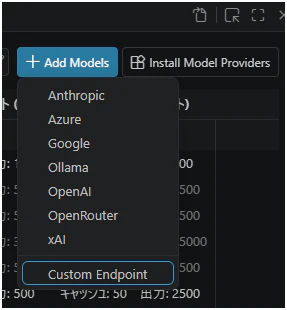
Add Modelsから、custom endpoint
-
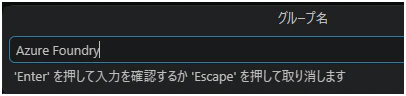
グループ名を入れておく
-
API Key を入力
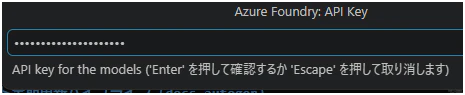
ここから入れる事で、自動的に secret として記録されます
-
で、進めると以下のような設定ファイルに飛ぶので、デプロイしてアルモデルを適当に追加すればOK
設定例
[
  {
    "name": "Copilot",
    "vendor": "copilot",
    "settings": {
      "gpt-5.4": {
        "reasoningEffort": "xhigh"
      }
    }
  },
  {
    "name": "Azure Foundry",
    "vendor": "customendpoint",
    "apiKey": "${input:chat.lm.secret.3e64bd91}",
    "models": [
      {
        "id": "claude-opus-4-8",
        "name": "claude-opus-4-8",
        "url": "https://{name}.services.ai.azure.com/anthropic/v1/messages",
        "toolCalling": true,
        "vision": true,
        "maxInputTokens": 200000,
        "maxOutputTokens": 32000
      },
      {
        "id": "claude-sonnet-4-6",
        "name": "claude-sonnet-4-6",
        "url": "https://{name}.services.ai.azure.com/anthropic/v1/messages",
        "toolCalling": true,
        "vision": true,
        "maxInputTokens": 200000,
        "maxOutputTokens": 32000,
        "thinking": true,
        "supportsReasoningEffort": [
          "low",
          "medium",
          "high"
        ]
      },
      {
        "id": "claude-haiku-4-5",
        "name": "claude-haiku-4-5",
        "url": "https://{name}.services.ai.azure.com/anthropic/v1/messages",
        "toolCalling": true,
        "vision": true,
        "maxInputTokens": 128000,
        "maxOutputTokens": 16000
      }
    ]
  }
]