
背景
毎月カード明細を妻と共有してたんだけど…正直めんどくさい😇
というか、パートナーに言われると、正論だとしてもイラつくのが人間。正論だからこそ? 
「自動で集計してグラフ付きで自動展開してくれたらラクな上に、客観的じゃん?」
ってことで、Power Automate + Office Scripts で作ってみた
やりたかったこと:
- CSVでカード明細が取れるので、それを送信
- 家族ごと・カテゴリごとに集計
- グラフと表でパッと見える化してメールで返して共有
概要
- Outlook → Power Automate → Office Scripts → Outlook のフローで「受信→集計→可視化→返信」
- 店舗名→カテゴリのルールは SharePoint List に置いて変更を想定
- CSVの BOM除去・ダブルクォート処理 でちと躓いた
完成イメージ
こんな感じのレポートが自動で届くようになった👇
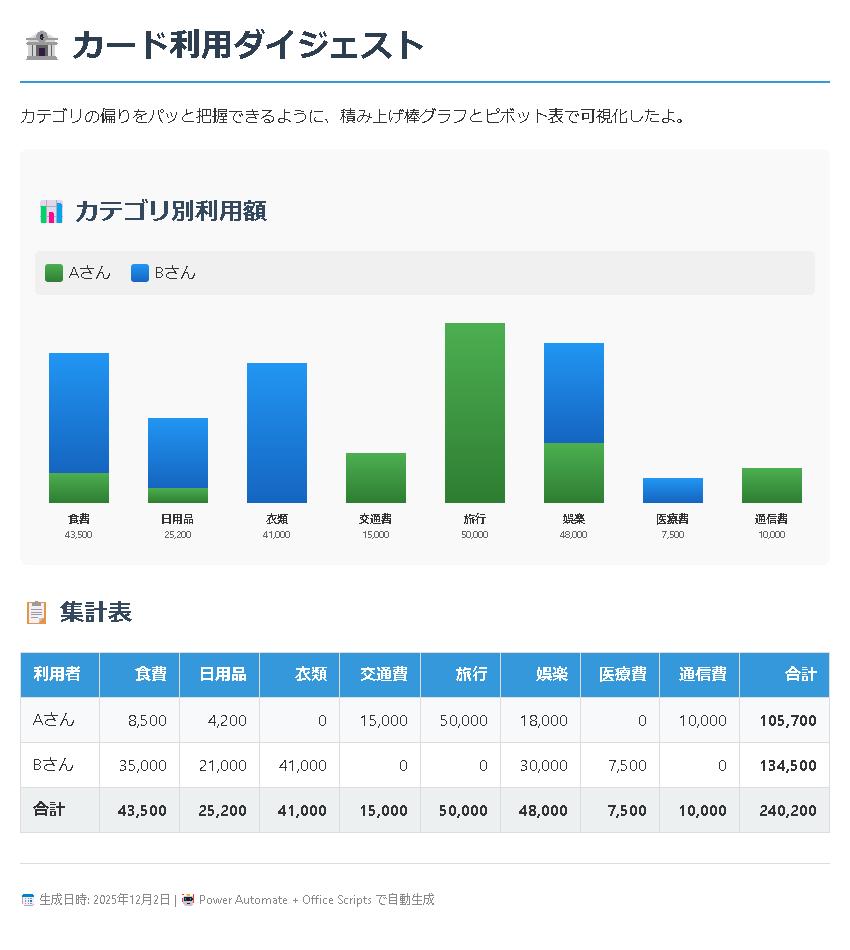
積み上げ棒グラフで「誰がどのカテゴリに偏ってるか」が一目瞭然。表も付いてるから細かい数字も確認できる。
なんかまだ微妙だけど、まぁ、第一弾としてはいっかってレベル
まず動くコード
Office Scriptsはこんな感じ
/**
 * カードCSVをカテゴリ別レポートに変換してHTML文字列を返す。
 */
function main(
  workbook: ExcelScript.Workbook,
  csvData: string,
  rulesJson: string
): string {
  // BOMを削除(これ忘れるとパースでコケる)
  const cleanedCsv = csvData.replace(/^\uFEFF/, "");

  const lines = cleanedCsv.split(/\r?\n/).filter((line) => line.trim() !== "");
  if (lines.length < 2) {
    throw new Error("ヘッダー行が見つからないのでCSVを確認してね");
  }

  // CSVパース(ダブルクォート対応)
  const headers = parseCsvLine(lines[1]);
  const dataRows = lines
    .slice(2)
    .map(parseCsvLine)
    .filter((row) => row.length >= headers.length);

  // カテゴリルールをパース
  const rules = JSON.parse(rulesJson) as Record<string, string>;

  const categories = [
    "食費", "日用品", "衣類", "交通費",
    "旅行", "娯楽", "医療費", "通信費", "その他"
  ];

  // データを処理
  type Entry = { holder: string; category: string; store: string; amount: number };
  const processed: Entry[] = [];

  for (const row of dataRows) {
    const holder = aliasHolder(row[0]);
    const storeName = row[4];
    const amount = Number(row[5].replace(/,/g, ""));
    if (Number.isNaN(amount)) continue;

    // 店舗名からカテゴリを判定
    let category = "その他";
    for (const [pattern, mapped] of Object.entries(rules)) {
      if (storeName.includes(pattern)) {
        category = mapped;
        break;
      }
    }
    processed.push({ holder, category, store: storeName, amount });
  }

  // 集計(利用者×カテゴリ)
  const summary = new Map<string, Map<string, number>>();
  for (const item of processed) {
    if (!summary.has(item.holder)) summary.set(item.holder, new Map());
    const bucket = summary.get(item.holder)!;
    bucket.set(item.category, (bucket.get(item.category) ?? 0) + item.amount);
  }

  // HTML生成(チャート+集計表)
  return buildHtmlReport(summary, categories);
}

/** CSVの1行をパース(ダブルクォート対応) */
function parseCsvLine(line: string): string[] {
  return line.split(/","/').map((cell) => cell.replace(/^"|"$/g, "").trim());
}

/** 利用者名を短縮(個人情報対策) */
function aliasHolder(raw: string): string {
  // 実際の名前に応じてマッピング
  if (raw.includes("HOLDER_A")) return "Aさん";
  if (raw.includes("HOLDER_B")) return "Bさん";
  return raw.split(" ")[0] ?? "Unknown";
}

/** HTMLレポートを組み立て */
function buildHtmlReport(
  summary: Map<string, Map<string, number>>,
  categories: string[]
): string {
  let html = `
    <style>
      body { font-family: 'Segoe UI', sans-serif; margin: 20px; }
      table { border-collapse: collapse; width: 100%; margin-top: 20px; }
      th, td { border: 1px solid #ddd; padding: 8px; text-align: right; }
      th { background: #3498db; color: #fff; }
      td:first-child { text-align: left; }
    </style>
    <h1>🏦 カード利用ダイジェスト</h1>
    <p>カテゴリの偏りをパッと把握できるように集計したよ。</p>
    <table><tr><th>利用者</th>`;

  for (const cat of categories) html += `<th>${cat}</th>`;
  html += `<th>合計</th></tr>`;

  for (const [holder, catMap] of summary.entries()) {
    let total = 0;
    html += `<tr><td>${holder}</td>`;
    for (const cat of categories) {
      const value = catMap.get(cat) ?? 0;
      html += `<td>${value.toLocaleString()}</td>`;
      total += value;
    }
    html += `<td><strong>${total.toLocaleString()}</strong></td></tr>`;
  }

  html += `</table>`;
  return html;
}
Power Automateフローの構成
こんな感じ👇
1. [トリガー] Outlook: 件名に「カード明細」を含むメール受信
      ↓
2. [アクション] 添付ファイルを取得 → Base64デコードでCSV文字列に
      ↓
3. [アクション] SharePoint List からカテゴリルールを取得
      ↓
4. [アクション] Office Scripts 実行(csvData, rulesJson を渡す)
      ↓
5. [アクション] 返ってきたHTMLをメール本文にセットして返信
ポイント:
- SharePoint List には
StorePattern(店舗名の一部)とCategoryの2列を用意 - 新しい店舗が出てきてもListに1行足すだけでOK
ハマったところと解決策
1. CSVのBOM問題
カード会社のCSVにはBOM(\uFEFF)が付いてて、ヘッダー行の判定で失敗してた
// これで解決
const cleanedCsv = csvData.replace(/^\uFEFF/, "");
2. Office Scriptsの console.log 制限
デバッグで console.log("label", value) って書いたら動かなかった😅
Office Scripts は 可変長引数をサポートしてない ので、文字列連結で回避。
// NG
console.log("データ数:", processed.length);

// OK
console.log("データ数: " + processed.length);
3. iCloudにメールが届かない
当初、HTMLに生データ表を全部載せてたらサイズ過多&スパム判定されて iCloud に届かなかった。
対策:
- メール本文は2〜3KB程度に抑える
環境
- Office Scripts (Excel on the Web)
- Power Automate(Standardコネクタのみ)
- SharePoint List(カテゴリルール管理用)
あとがき
家計簿の「気づいたら今月も使いすぎ…」を防ぐには、以下とかほしくなる
- 自動アラート
- 年間累計
- カードランクも気になるし

- カードランクも気になるし
- 口座からの直接引き落とし分
今回はカード会社の標準CSVに手を加えず、Power Automate + Office Scripts だけで可視化パイプラインを作れた。ノーコード寄りで保守もラク👍