
RRISM LIBRARY の Documentation から Composite Commands の箇所を学んでみます。
そのまんまの翻訳ですが、メモとして。
日本語がへんなところは英語に戻ってそれなりに理解。。。
In many cases, a command defined by a view model will be bound to controls in the associated view so that the user can directly invoke the command from within the view. However, in some cases, you may want to be able to invoke commands on one or more view models from a control in a parent view in the application's UI.
For example, if your application allows the user to edit multiple items at the same time, you may want to allow the user to save all the items using a single command represented by a button in the application's toolbar or ribbon. In this case, the Save All command will invoke each of the Save commands implemented by the view model instance for each item as shown in the following illustration.
(Google翻訳)
多くの場合、ビューモデルによって定義されたコマンドは、関連付けられたビューのコントロールにバインドされるため、ユーザーはビュー内から直接コマンドを呼び出すことができます。 ただし、場合によっては、アプリケーションのUIの親ビューにあるコントロールから1つ以上のビューモデルのコマンドを呼び出せるようにしたい場合があります。
たとえば、アプリケーションでユーザーが同時に複数のアイテムを編集できるようにする場合、ユーザーがアプリケーションのツールバーまたはリボンのボタンで表される単一のコマンドを使用してすべてのアイテムを保存できるようにすることができます。 この場合、次の図に示すように、[すべて保存]コマンドは、各アイテムのビューモデルインスタンスによって実装された各保存コマンドを呼び出します。
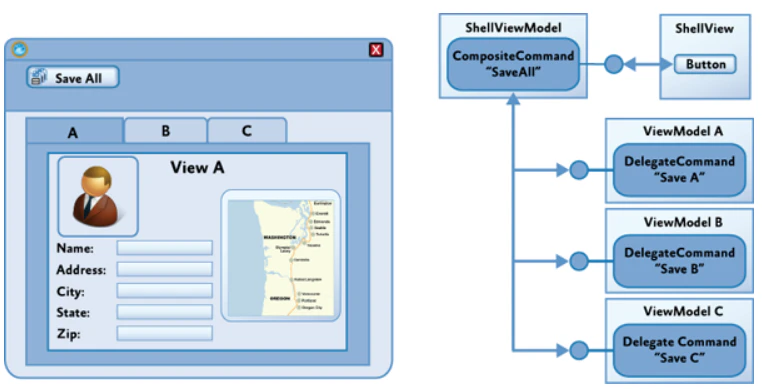
Prism supports this scenario through the CompositeCommand class.
The CompositeCommand class represents a command that is composed from multiple child commands. When the composite command is invoked, each of its child commands is invoked in turn. It is useful in situations where you need to represent a group of commands as a single command in the UI or where you want to invoke multiple commands to implement a logical command.
The CompositeCommand class maintains a list of child commands (DelegateCommand instances). The Execute method of the CompositeCommand class simply calls the Execute method on each of the child commands in turn. The CanExecute method similarly calls the CanExecute method of each child command, but if any of the child commands cannot be executed, the CanExecute method will return false. In other words, by default, a CompositeCommand can only be executed when all the child commands can be executed.
(Google翻訳)
Prismは、CompositeCommandクラスを通じてこのシナリオをサポートします。
CompositeCommandクラスは、複数の子コマンドから構成されるコマンドを表します。 複合コマンドが呼び出されると、その子コマンドのそれぞれが順番に呼び出されます。 これは、UIでコマンドのグループを単一のコマンドとして表す必要がある場合や、論理コマンドを実装するために複数のコマンドを呼び出す必要がある場合に役立ちます。
CompositeCommandクラスは、子コマンド(DelegateCommandインスタンス)のリストを保持します。 CompositeCommandクラスのExecuteメソッドは、各子コマンドのExecuteメソッドを順番に呼び出すだけです。 CanExecuteメソッドは、同様に各子コマンドのCanExecuteメソッドを呼び出しますが、実行できない子コマンドがある場合、CanExecuteメソッドはfalseを返します。 つまり、デフォルトでは、すべての子コマンドを実行できる場合にのみ、CompositeCommandを実行できます。
NOTE
CompositeCommand can be found in the Prism.Commands namespace which is located in the Prism.Core NuGet package.
(Google翻訳)
注意
CompositeCommandは、Prism.Core NuGetパッケージにあるPrism.Commands名前空間にあります。
[ ]
]
(https://www.youtube.com/watch?v=kssprOqdfME&feature=emb_logo)
Creating a Composite Command
To create a composite command, instantiate a CompositeCommand instance and then expose it as either an ICommand or ComponsiteCommand property.
(Google翻訳)
複合コマンドを作成するには、CompositeCommandインスタンスをインスタンス化してから、ICommandまたはComponsiteCommandプロパティのいずれかとして公開します。
    public class ApplicationCommands
    {
        private CompositeCommand _saveCommand = new CompositeCommand();
        public CompositeCommand SaveCommand
        {
            get { return _saveCommand; }
        }
    }
Making a CompositeCommand Globally Available
Typically, CompositeCommands are shared throughout an application and need to be made available globally. It's important that when you register a child command with a CompositeCommand that you are using the same instance of the CompositeCommand throughout the application. This requires the CompositeCommand to be defined as a singleton in your application. This can be done by either using dependency injection (DI), or by defining your CompositeCommand as a static class.
(Google翻訳)
通常、CompositeCommandsはアプリケーション全体で共有され、グローバルに使用できるようにする必要があります。 子コマンドをCompositeCommandに登録するときは、アプリケーション全体でCompositeCommandの同じインスタンスを使用していることが重要です。 これには、アプリケーションでCompositeCommandをシングルトンとして定義する必要があります。 これを行うには、依存性注入(DI)を使用するか、CompositeCommandを静的クラスとして定義します。
Using Dependency Injection
The first step in defining your CompositeCommands is to create an interface.
(Google翻訳)
CompositeCommandsを定義する最初のステップは、インターフェースを作成することです。
    public interface IApplicationCommands
    {
        CompositeCommand SaveCommand { get; }
    }
Next, create a class that implements the interface.
(Google翻訳)
次に、インターフェースを実装するクラスを作成します。
    public class ApplicationCommands : IApplicationCommands
    {
        private CompositeCommand _saveCommand = new CompositeCommand();
        public CompositeCommand SaveCommand
        {
            get { return _saveCommand; }
        }
    }
Once you have defined your ApplicationCommands class, you must register it as a singleton with the container.
(Google翻訳)
ApplicationCommandsクラスを定義したら、コンテナーにシングルトンとして登録する必要があります。
    public partial class App : PrismApplication
    {
        protected override void RegisterTypes(IContainerRegistry containerRegistry)
        {
            containerRegistry.RegisterSingleton<IApplicationCommands, ApplicationCommands>();
        }
    }
Next, ask for the IApplicationCommands interface in the ViewModel constructor. Once you have an instance of the ApplicationCommands class, can now register your DelegateCommands with the appropriate CompositeCommand.
(Google翻訳)
次に、ViewModelコンストラクターでIApplicationCommandsインターフェイスを要求します。 ApplicationCommandsクラスのインスタンスを取得したら、DelegateCommandsを適切なCompositeCommandに登録できます。
    public DelegateCommand UpdateCommand { get; private set; }

    public TabViewModel(IApplicationCommands applicationCommands)
    {
        UpdateCommand = new DelegateCommand(Update);
        applicationCommands.SaveCommand.RegisterCommand(UpdateCommand);
    }
Using a Static Class
Create a static class that will represent your CompositeCommands
(Google翻訳)
CompositeCommandsを表す静的クラスを作成します
public static class ApplicationCommands
{
    public static CompositeCommand SaveCommand = new CompositeCommand();
}
In your ViewModel, associate child commands to the static ApplicationCommands class.
(Google翻訳)
ViewModelで、子コマンドを静的ApplicationCommandsクラスに関連付けます。
    public DelegateCommand UpdateCommand { get; private set; }

    public TabViewModel()
    {
        UpdateCommand = new DelegateCommand(Update);
        ApplicationCommands.SaveCommand.RegisterCommand(UpdateCommand);
    }
NOTE
To increase the maintainability and testability of your code, it is recommended that you using the dependency injection approach.
(Google翻訳)
注意
コードの保守性とテスト容易性を高めるために、依存性注入アプローチを使用することをお勧めします。
Binding to a Globally Available Command
Once you have created your CompositeCommands, you must now bind them to UI elements in order to invoke the commands.
(Google翻訳)
CompositeCommandsを作成したら、コマンドを呼び出すために、それらをUI要素にバインドする必要があります。
Using Depency Injection
When using DI, you must expose the IApplicationCommands for binding to a View. In the ViewModel of the view, ask for the IApplicationCommands in the constructor and set a property of type IApplicationCommands to the instance.
(Google翻訳)
DIを使用する場合、ビューにバインドするためにIApplicationCommandsを公開する必要があります。 ビューのViewModelで、コンストラクターにIApplicationCommandsを要求し、IApplicationCommands型のプロパティをインスタンスに設定します。
    public class MainWindowViewModel : BindableBase
    {
        private IApplicationCommands _applicationCommands;
        public IApplicationCommands ApplicationCommands
        {
            get { return _applicationCommands; }
            set { SetProperty(ref _applicationCommands, value); }
        }

        public MainWindowViewModel(IApplicationCommands applicationCommands)
        {
            ApplicationCommands = applicationCommands;
        }
    }
In the view, bind the button to the ApplicationCommands.SaveCommand property. The SaveCommand is a property that is defined on the ApplicationCommands class.
(Google翻訳)
ビューで、ボタンをApplicationCommands.SaveCommandプロパティにバインドします。 SaveCommandは、ApplicationCommandsクラスで定義されるプロパティです。
<Button Content="Save" Command="{Binding ApplicationCommands.SaveCommand}"/>
Using a Static Class
If you are using the static class approach, the following code example shows how to bind a button to the static ApplicationCommands class in WPF.
(Google翻訳)
静的クラスアプローチを使用している場合、次のコード例は、ボタンをWPFの静的ApplicationCommandsクラスにバインドする方法を示しています。
<Button Content="Save" Command="{x:Static local:ApplicationCommands.SaveCommand}" />
Unregister a Command
As seen in the previous examples, child commands are registered using the CompositeCommand.RegisterCommand method. However, when you no longer wish to respond to a CompositeCommand or if you are destroying the View/ViewModel for garbage collection, you should unregister the child commands with the CompositeCommand.UnregisterCommand method.
(Google翻訳)
前の例で見たように、子コマンドはCompositeCommand.RegisterCommandメソッドを使用して登録されます。 ただし、CompositeCommandに応答する必要がなくなった場合、またはガベージコレクションのView / ViewModelを破棄する場合は、CompositeCommand.UnregisterCommandメソッドを使用して子コマンドの登録を解除する必要があります。
    public void Destroy()
    {
        _applicationCommands.UnregisterCommand(UpdateCommand);
    }
IMPORTANT
You MUST unregister your commands from a CompositeCommand when the View/ViewModel is no longer needed (ready for GC). Otherwise you will have introduced a memory leak.
(Google翻訳)
重要
View / ViewModelが不要になったとき(GCの準備ができているとき)、CompositeCommandからコマンドの登録を解除する必要があります。 そうしないと、メモリリークが発生します。
Executing Commands on Active Views
Composite commands at the parent view level will often be used to coordinate how commands at the child view level are invoked. In some cases, you will want the commands for all shown views to be executed, as in the Save All command example described earlier. In other cases, you will want the command to be executed only on the active view. In this case, the composite command will execute the child commands only on views that are deemed to be active; it will not execute the child commands on views that are not active. For example, you may want to implement a Zoom command on the application's toolbar that causes only the currently active item to be zoomed, as shown in the following diagram.
(Google翻訳)
親ビューレベルでの複合コマンドは、子ビューレベルでのコマンドの呼び出し方法を調整するためによく使用されます。 前述の「すべて保存」コマンドの例のように、表示されているすべてのビューのコマンドを実行したい場合があります。 それ以外の場合は、アクティブビューでのみコマンドを実行する必要があります。 この場合、複合コマンドは、アクティブであると見なされるビューでのみ子コマンドを実行します。 アクティブでないビューでは子コマンドを実行しません。 たとえば、次の図に示すように、アプリケーションのツールバーにズームコマンドを実装すると、現在アクティブなアイテムのみがズームされます。
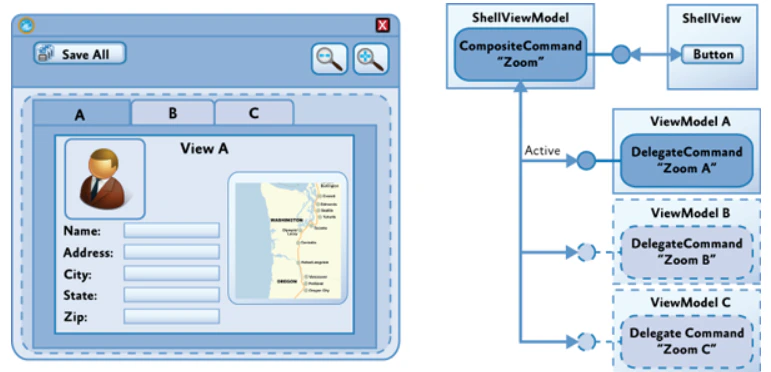
To support this scenario, Prism provides the IActiveAware interface. The IActiveAware interface defines an IsActive property that returns true when the implementer is active, and an IsActiveChanged event that is raised whenever the active state is changed.
You can implement the IActiveAware interface on views or ViewModels. It is primarily used to track the active state of a view. Whether or not a view is active is determined by the views within the specific control. For the Tab control, there is an adapter that sets the view in the currently selected tab as active, for example.
The DelegateCommand class also implements the IActiveAware interface. The CompositeCommand can be configured to evaluate the active status of child DelegateCommands (in addition to the CanExecute status) by specifying true for the monitorCommandActivity parameter in the constructor. When this parameter is set to true, the CompositeCommand class will consider each child DelegateCommand's active status when determining the return value for the CanExecute method and when executing child commands within the Execute method.
(Google翻訳)
このシナリオをサポートするために、PrismはIActiveAwareインターフェースを提供しています。 IActiveAwareインターフェイスは、実装者がアクティブなときにtrueを返すIsActiveプロパティと、アクティブな状態が変更されるたびに発生するIsActiveChangedイベントを定義します。
IActiveAwareインターフェイスをビューまたはViewModelに実装できます。これは主に、ビューのアクティブな状態を追跡するために使用されます。ビューがアクティブかどうかは、特定のコントロール内のビューによって決まります。たとえば、タブコントロールには、現在選択されているタブのビューをアクティブに設定するアダプターがあります。
DelegateCommandクラスは、IActiveAwareインターフェイスも実装します。コンストラクターのmonitorCommandActivityパラメーターにtrueを指定することにより、CanExecuteステータスに加えて、子DelegateCommandsのアクティブステータスを評価するようにCompositeCommandを構成できます。このパラメーターがtrueに設定されている場合、CompositeCommandクラスは、CanExecuteメソッドの戻り値を決定するとき、およびExecuteメソッド内で子コマンドを実行するときに、各子DelegateCommandのアクティブステータスを考慮します。
    public class ApplicationCommands : IApplicationCommands
    {
        private CompositeCommand _saveCommand = new CompositeCommand(true);
        public CompositeCommand SaveCommand
        {
            get { return _saveCommand; }
        }
    }
When the monitorCommandActivity parameter is true, the CompositeCommand class exhibits the following behavior:
・CanExecute: Returns true only when all active commands can be executed. Child commands that are inactive will not be considered at all.
・Execute: Executes all active commands. Child commands that are inactive will not be considered at all.
By implementing the IActiveAware interface on your ViewModels, you will be notified when your view becomes active or inactive. When the view's active status changes, you can update the active status of the child commands. Then, when the user invokes the composite command, the command on the active child view will be invoked.
(Google翻訳)
monitorCommandActivityパラメータがtrueの場合、CompositeCommandクラスは次の動作を示します。
・CanExecute:アクティブなコマンドをすべて実行できる場合のみtrueを返します。 非アクティブな子コマンドはまったく考慮されません。
・実行:アクティブなコマンドをすべて実行します。 非アクティブな子コマンドはまったく考慮されません。
ViewModelにIActiveAwareインターフェースを実装することにより、ビューがアクティブまたは非アクティブになったときに通知されます。 ビューのアクティブステータスが変更されると、子コマンドのアクティブステータスを更新できます。 次に、ユーザーが複合コマンドを呼び出すと、アクティブな子ビューのコマンドが呼び出されます。
    public class TabViewModel : BindableBase, IActiveAware
    {
        private bool _isActive;
        public bool IsActive
        {
            get { return _isActive; }
            set
            {
                _isActive = value;
                OnIsActiveChanged();
            }
        }

        public event EventHandler IsActiveChanged;

        public DelegateCommand UpdateCommand { get; private set; }

        public TabViewModel(IApplicationCommands applicationCommands)
        {
            UpdateCommand = new DelegateCommand(Update);
            applicationCommands.SaveCommand.RegisterCommand(UpdateCommand);
        }

        private void Update()
        {
            //implement logic
        }

        private void OnIsActiveChanged()
        {
            UpdateCommand.IsActive = IsActive; //set the command as active
            IsActiveChanged?.Invoke(this, new EventArgs()); //invoke the event for all listeners
        }
    }