GmailApp.sendEmail()は、1日あたりのメール送信数に制限が設けられています。
これを回避する方法です。
回避方法
手順
- 下書きを作成
- 下書きを送信
ソースコード
  const draftId = GmailApp.createDraft("email","subject","body").getId();
  GmailApp.getDraft(draftId).send();
尚、getDraft(draftId)を介さないと、普通に制限にカウントされます。
GmailApp.createDraft("email","subject","body").send();
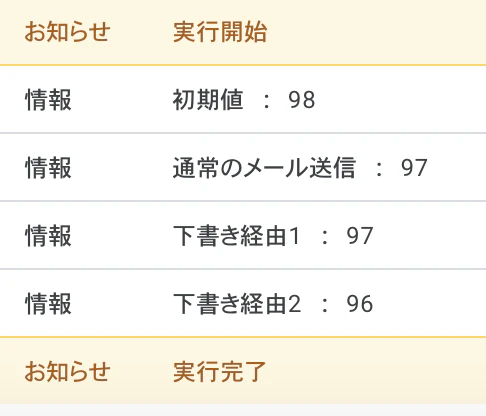
実際にテストしてみました。
ソースコード
function myFunction() {
  const { email } = env;
  console.log("初期値 : " + MailApp.getRemainingDailyQuota());

  GmailApp.sendEmail(email,"current time","The time is:" + new Date().toString());
  console.log("通常のメール送信 : " + MailApp.getRemainingDailyQuota());

  const draftId = GmailApp.createDraft(email,"current time","The time is:" + new Date().toString()).getId();
  GmailApp.getDraft(draftId).send();
  console.log("下書き経由1 : " + MailApp.getRemainingDailyQuota());

  GmailApp.createDraft(email,"current time","The time is:" + new Date().toString()).send();
  console.log("下書き経由2 : " + MailApp.getRemainingDailyQuota());

}

const env = (() =>  new Proxy({e : PropertiesService.getScriptProperties()}, {
      get: (t, p) => t.e ? t.e.getProperty(p) : void 0,
      set: (t, k, v) => t.e ? t.e.setProperty(k, v) : void 0
  }))();
結果