Cloud IoT Core の Registry-level CA certificates 機能してみます。
Registry-level CA certificates を使用するとCA署名付き証明書を使って、デバイスの所有権を確認するために使用できます。
重要点として、Registry-level CA certificates は Cloud IoT Core を使用する上で必須の機能ではありません。
参考となるマニュアルページ
https://cloud.google.com/iot/docs/create-device-registry
https://cloud.google.com/iot/docs/how-tos/credentials/keys
https://cloud.google.com/iot/docs/how-tos/credentials/verifying-credentials#ca_certificate_requirements
https://cloud.google.com/certificate-authority-service/docs/request-certificates-gcloud
#手順
CA として、GCP の Certificate Authority Service を使用します。
Certificate Authority Service
CA pool を作成する
gcloud auth login
gcloud services enable privateca.googleapis.com
gcloud config set privateca/location us-central1
gcloud privateca pools create my-pool-1 --tier "enterprise"
Creating CA Pool....done.
Created CA Pool [projects/PROJECT-ID/locations/us-central1/caPools/my-pool-1].
Tier は、Enterprise と DevOps から選択可能です。
Enterprise は、ライフサイクル管理が重要なデバイスやユーザーIDで通常見られる、少量で長期間有効な証明書の発行に焦点を当てています。
DevOps は、マイクロサービスベースのアプリケーションに見られる大量の短期間の証明書発行に焦点を当てています。
https://cloud.google.com/certificate-authority-service/docs/tiers
Root CA を作成する
gcloud privateca roots create my-ca-1 --pool my-pool-1 --subject "CN=Example Prod Root CA, O=Google"
Creating Certificate Authority....done.
Created Certificate Authority [projects/PROJECT-ID/locations/us-central1/caPools/my-pool-1/certificateAuthorities/my-ca-1].
The CaPool [my-pool-1] has no enabled CAs and cannot issue any certificates until at least one CA is enabled. Would you like to also enable this CA?

Do you want to continue (y/N)?  y

Enabling CA....done.
CA cert を確認して、ファイルに保存する。
gcloud privateca roots describe my-ca-1 --location=us-central1 --pool=my-pool-1
accessUrls:
  caCertificateAccessUrl: http://privateca-content-6235d6aa-0000-2307-b86d-883d24f822cc.storage.googleapis.com/4c58fe7437fd1eac2657/ca.crt
  crlAccessUrls:
  - http://privateca-content-6235d6aa-0000-2307-b86d-883d24f822cc.storage.googleapis.com/4c58fe7437fd1eac2657/crl.crl

-略-

createTime: '2022-03-19T02:10:50.162721910Z'
keySpec:
  algorithm: RSA_PKCS1_4096_SHA256
lifetime: 315569261s
name: projects/xxx/locations/us-central1/caPools/my-pool-1/certificateAuthorities/my-ca-1
pemCaCertificates:
- |
  -----BEGIN CERTIFICATE-----
  MIIFUDCCAzigAwIBAgITP+zS3wO+jGClPza3LkSE5VDNLzANBgkqhkiG9w0BAQsF
  ・・・・・・
  -----END CERTIFICATE-----
state: ENABLED
tier: ENTERPRISE
type: SELF_SIGNED
updateTime: '2022-03-19T02:10:59.102484272Z'

vi ca_cert.crt
Device 証明書を作成するために Device 用の秘密鍵を作成し、秘密鍵から CSR を作成する
openssl genpkey -algorithm RSA -out ca_device_private_key.pem -pkeyopt rsa_keygen_bits:2048
openssl req -new -sha256 -key ca_device_private_key.pem -out ca_device_private_key.csr -subj "/CN=device"
Device 証明書を作成する
デバイス用の証明書を作成する。
gcloud privateca certificates create \
    --issuer-pool my-pool-1 \
    --issuer-location=us-central1 \
    --csr=./ca_device_private_key.csr \
    --cert-output-file=./ca_cert.pem
Created Certificate [projects/577084326214/locations/us-central1/caPools/my-pool-1/certificates/20220320-G1X-GID] and saved it to [./ca_cert.pem].
デバイス用の証明書をエクスポートする。
gcloud privateca certificates export 20220320-G1X-GID \
    --issuer-pool my-pool-1 \
    --include-chain \
    --output-file device_cert.pem
Exported certificate [projects/PROJECT-ID/locations/us-central1/caPools/my-pool-1/certificates/20220320-G1X-GID] to [device_cert.pem].
CA cert が含まれているので削除する。
vi device_cert.pem
=>エクスポートしたファイルに2つ証明書が含まれているので、2つ目の証明書(CA cert)を削除する
Cloud IoT Core
デバイスレジストリを作成し、CA 証明書を登録する
gcloud iot registries create --region=us-central1 my-registry-1 --public-key-path=./ca_cert.crt
Created registry [my-registry-1].
デバイスを作成して、デバイス証明書を登録する
gcloud iot devices create my-device-1 \
    --region=us-central1 \
    --registry=my-registry-1 \
    --public-key path=device_cert.pem,type=rsa-x509-pem
Created device [my-device-1]
これで、CA署名付き証明書を使った IoT デバイスが作成できました。
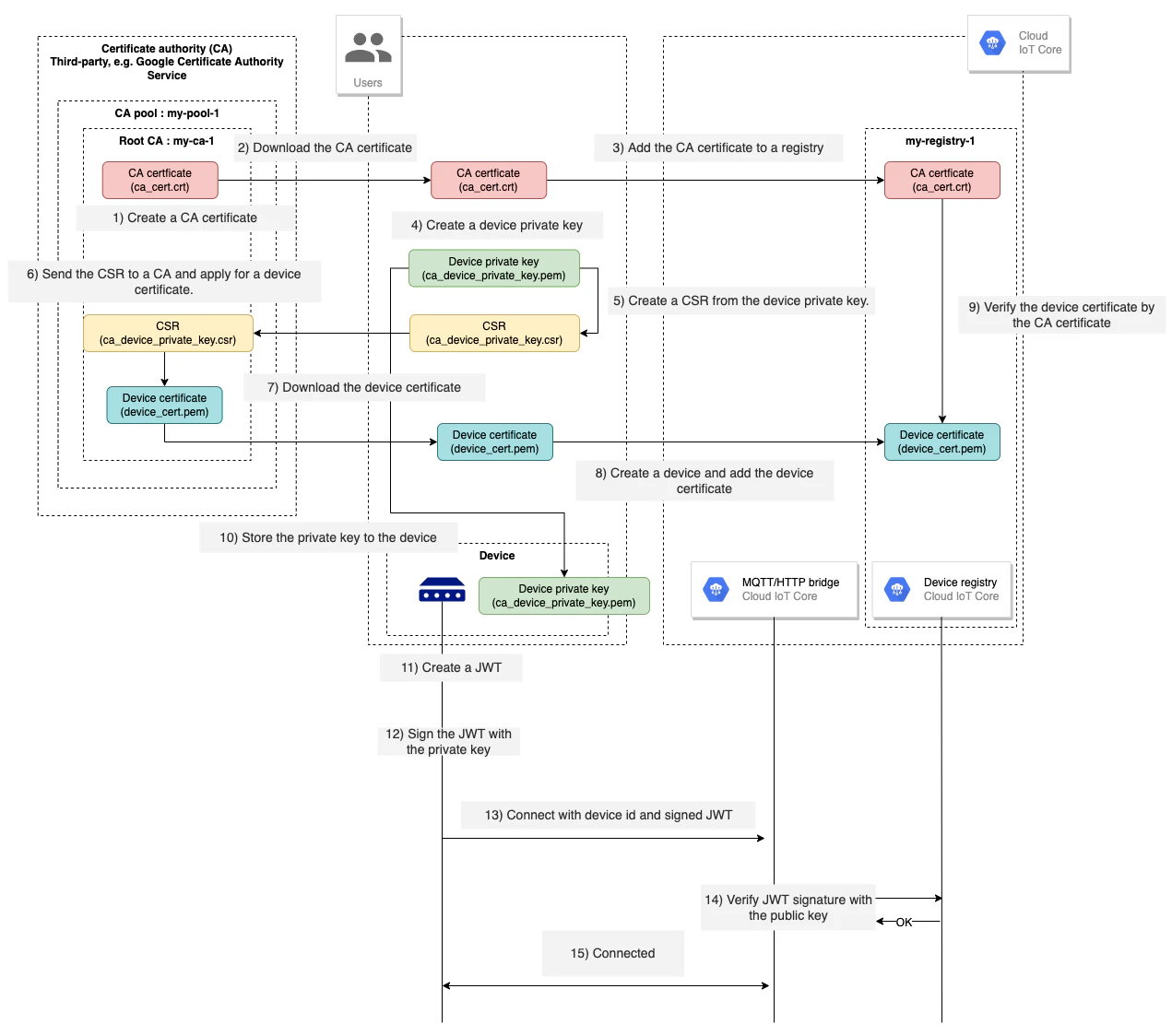
図にすると以下の様なイメージになります。