

目次
1. 概要
- PowershellでTeratermマクロを自動生成する。
- Teratermマクロを作成する必要があり、その際に作ったものの備忘録です。
2. 前提条件
動作確認済の環境は以下です。
- 動作環境
- Windows 11 24H2
- TeraTerm 5.3
- Powershell 5.1.26100.6584
3. 構成
- ディレクトリ構成
TeraTermMacroAssets/
├─ 00_readme.txt
├─ 01_script/
|  └── create_ttl.ps1
├─ 02_conf/
|  ├── template.ttl
|  └── user_info.csv
├─ 03_generated_macros/
└─ 04_teratermlog/
4. 使用方法
1.02_conf/user_info.csvに下記の情報をカンマ区切りで記載する。
認証方法は「パスワード認証」と「鍵認証」の2種類に対応しています。
<入力情報>
username:ログインユーザ名
hostname:接続先ホスト名
password:パスワード
keyfile:秘密鍵ファイルのパス
inifile:Teraterm設定ファイルのパス
<記載例>
username,hostname,password,keyfile,inifile
user1,192.168.0.1,pass123,,C:\teraterm\default.ini
user2,192.168.0.1,,C:\test\key.pem,C:\teraterm\default.ini
2.Powershell実行
user_info.csvに情報を記載後、01_script/create_ttl.ps1を実行すると03_generated_macros配下にマクロファイルが生成される。
5.処理概要
powershellスクリプトとTeratermマクロテンプレートの内容は下記です。
鍵認証/パスワード認証の使い分けについてはTeratermマクロ上で実装しています。
# 変数宣言
$scriptDir     = Split-Path -Parent $MyInvocation.MyCommand.Path
$basedir       = Split-Path -Parent $scriptDir

$templateFile  = "template.ttl"   #テンプレートttlファイル名
$csvFile       = "user_info.csv"  #ユーザ情報csv名
$confSubDir    = "02_conf"
$outputSubDir  = "03_generated_macros"

$confDir       = Join-Path $basedir $confSubDir
$templatePath  = Join-Path $confDir $templateFile
$csvPath       = Join-Path $confDir $csvFile
$outputDir     = Join-Path $basedir $outputSubDir

# テンプレート読み込み
$template = Get-Content $templatePath -Raw

# マクロ出力フォルダ存在確認
if (!(Test-Path $outputDir)) {
    New-Item -ItemType Directory -Path $outputDir | Out-Null
}

# CSV読み込み/マクロ生成
Import-Csv $csvPath | ForEach-Object {
    $username = $_.username
    $hostname = $_.hostname
    $password = $_.password
    $keyfile  = $_.keyfile
    $inifile  = $_.inifile

    if (!$username -or !$hostname) {
        Write-Host "空の username または hostname を検出しました。スキップします。"
        return
    }

    $macro = $template
    $macro = $macro -replace '%USERNAME%', $username
    $macro = $macro -replace '%HOSTNAME%', $hostname
    $macro = $macro -replace '%PASSWORD%', $password
    $macro = $macro -replace '%KEYFILE%', $keyfile
    $macro = $macro -replace '%INIFILE%', $inifile

    $macroName = "${hostname}_${username}.ttl"
    $macroPath = Join-Path $outputDir $macroName

    Set-Content -Path $macroPath -Value $macro -Encoding UTF8
}

Write-Host "マクロ生成が完了しました。"
;#######################################################
;# ログインマクロテンプレート
;#######################################################

;==============================
;■ 自動設定項目(csvから読み込み)
;==============================
username     = '%USERNAME%'
hostname     = '%HOSTNAME%'
userpasswd   = '%PASSWORD%'
keyfile      = '%KEYFILE%'
inifilepath  = '%INIFILE%'

;==============================
;■ その他設定項目
;==============================
portnum      = '22' ;#使用ポート番号
connecthost  = hostname
remote_prompt = ']$'

;ログ出力先設定(デフォルト)
getdir currentDir
strconcat LOGSPATH currentDir
strconcat LOGSPATH '\..\04_teratermlog\'

;ログ出力先設定(カスタム)
;LOGSPATH = '<ログ出力先パス>'

;==============================
;■ 接続コマンドの生成
;==============================
msg = hostname
strconcat msg ':'
strconcat msg portnum
strconcat msg ' /ssh /user='
strconcat msg username

strlen keyfile
if result > 0 then
    ; 鍵認証
    strconcat msg ' /auth=publickey /keyfile='
    strconcat msg keyfile
else
    strlen userpasswd
    if result > 0 then
        ; パスワード認証
        strconcat msg ' /auth=password /passwd='
        strconcat msg userpasswd
    else
        ; どちらも指定されていない場合
        msgbox '鍵ファイルまたはパスワードが指定されていません。マクロを終了します。'
        endmacro
    endif
endif

strconcat msg ' /F='
strconcat msg inifilepath

;==============================
;■ ログファイル名の生成
;==============================
getdate NOW '%Y%m%d%H%M%S_'
FULLPATH = LOGSPATH
strconcat FULLPATH NOW
strconcat FULLPATH connecthost
strconcat FULLPATH '_'
strconcat FULLPATH username
strconcat FULLPATH '.log'

;==============================
;■ 接続とログ開始
;==============================
connect msg
settitle connecthost

logclose
logopen FULLPATH 0 1 0 1

;==============================
;■ ホスト名表示
;==============================
wait remote_prompt
sendln ""
sendln "uname -n"
sendln ""
sendln ""
6.動作例
検証用のEC2に下記ユーザをそれぞれ作成して、マクロでログインできるか試してみます。
ssh_test01:パスワード認証
ssh_test02:鍵認証
csvファイルに下記のようなパラメータを入力してスクリプトを実行してみます。
※一部パラメータは例を記載しています。
認証方式に合わせて記載する項目が変わります。
username,hostname,password,keyfile,inifile
ssh_test1,testhostname,test_pass,,C:\hogehoge\TERATERM.INI
ssh_test2,testhostname,,C:\hogehoge\test.pem,C:\hogehoge\TERATERM.INI
その後create_ttl.ps1を実行すると、03_generated_macros配下にマクロが生成されます。
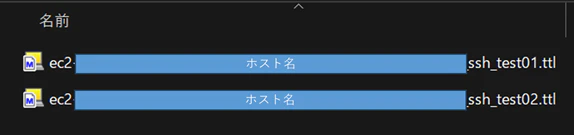
Teratermマクロを実行すると無事接続されました。マクロ内に記載した"uname -n"コマンドも実行されています。
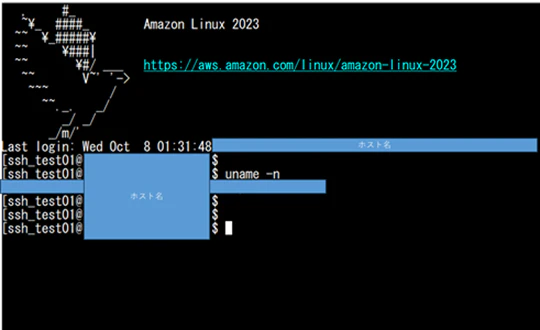
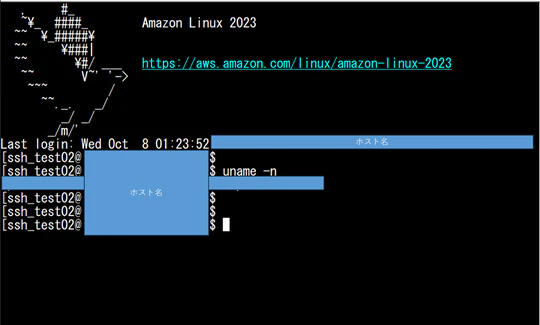
04_teratermlog配下にログも生成されました。

7.所感
OSテストの一環として、サーバ×ユーザごとに複数のコマンドを実行する必要があり、対象数が多いためテスト担当者が対応に苦慮していました。そこで支援の一環として本スクリプトを作成したところ、テストにかかる工数を大幅に削減することができました。
今回の取り組みを通じて、今後もより効率的で効果的な方法を常に模索し続けていくことの重要性を改めて感じました。