PHPでWebアプリの開発するとき、Webサーバー(Apacheなど)を用意するのが面倒だったのですが、PHP 5.4.0 からビルトインウェブサーバーというものが利用できるようです。
PHPをインストールしてあればすぐにWebアプリケーションを開発できます。
ビルトインウェブサーバー
http://php.net/manual/ja/features.commandline.webserver.php
警告
このウェブサーバーは、アプリケーション開発の支援用として設計されたものです。 テスト用に使ったり、制約のある環境でアプリケーションをデモするために使ったりすることもできるでしょう。 あらゆる機能を兼ね備えたウェブサーバーを目指したものではないので、 公開ネットワーク上で使ってはいけません。
と、あるようにあくまで開発用です。リリースするときはちゃんとしたWebサーバーを使うようにしましょう。
今回は仮想環境を使ってゲストOS(CentOS)でビルトインウェブサーバーを起動して、ホストOS(Windows)からアクセスできるようにする手順になります。
環境
Windows 7 Professional SP1 64bit
VirtualBox v5.1.18
Vagrant v1.9.3
ゲストOS
CentOS7.2 (bento/centos-7.2)
PHP 5.6.30
Vagrant設定
ホストOS(Windows)からゲストOS(CentOS)のWebサーバーにアクセスできるように8080ポートを転送する設定をします。
Vagrant.configure("2") do |config|

  config.vm.network "forwarded_port", guest: 8080, host: 8080, host_ip: "127.0.0.1", auto_correct: true

end
ビルトインウェブサーバー起動
ビルトインウェブサーバーの起動は、ゲストOS(CentOS)からphpコマンドに-Sオプションをつけて起動します。
$ php -S 0.0.0.0:8080
以下はvagrantユーザーのホームディレクトリにsampleディレクトリを作って、そこにテスト用のPHPファイル(phpinfo.php)を出力して、ビルトインウェブサーバーを起動しています。
ビルトインウェブサーバーを起動したカレントディレクトリ(sample)がWebサーバーのルートディレクトリになります。
[vagrant@localhost ~]$ mkdir ~/sample
[vagrant@localhost ~]$ cd ~/sample
[vagrant@localhost sample]$ echo '<?php phpinfo() ?>' > phpinfo.php
[vagrant@localhost sample]$ php -S 0.0.0.0:8080
PHP 5.6.30 Development Server started at Wed Apr  5 23:20:27 2017
Listening on http://0.0.0.0:8080
Document root is /home/vagrant/sample
Press Ctrl-C to quit.
動作確認
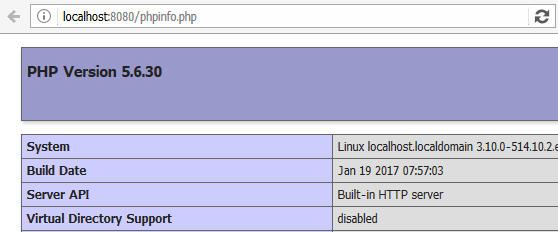
ホストOS(Windows)のブラウザから以下のURLを入力します。
http://localhost:8080/phpinfo.php
うまくいったら以下のようなページが表示されます。