
ArduinoIDE用mruby/cライブラリ
というのを4年前に作っていました。
ArduinoIDEは様々なマイコンに対応しているのでとりあえずそのマイコンでmruby/cを動かしたいときに使おうと思い作ってました。
ArduinoIDEへライブラリをインストールする
こちらのリンクからコードをzipでダウンロードします。
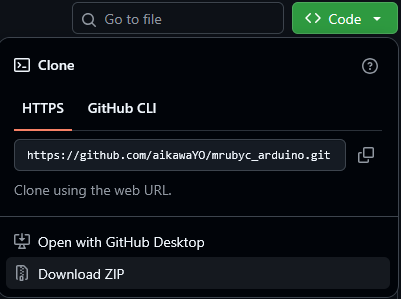
ArduinoIDEを起動し、
スケッチ→ライブラリをインクルード→.ZIP形式のライブラリをインストール

先ほどgithubよりダウンロードしたZIPファイルを選択することによりインストールが完了する
サンプルプログラムを動かす
ファイル→スケッチ例→mrubyc→blink_and_hello
を選択するとサンプルプログラムが出てくるので書き込みを行えば動くはずです。

私の環境ではエラーが出てきました。
Arduino:1.8.13 (Windows 10), ボード:"Arduino UNO R4 Minima"

blink_and_hello.ino.elf section `.bss' will not fit in region `RAM'

ld.exe: section .stack_dummy VMA [20007b00,20007eff] overlaps section .bss VMA [20000528,200093e7]

ld.exe: region `RAM' overflowed by 0 bytes

collect2.exe: error: ld returned 1 exit status

exit status 1

ボードArduino UNO R4 Minimaに対するコンパイル時にエラーが発生しました。
今回Arduino UNO R4 Minimaで動作確認を行っていますがこのボードはRAMが32kbなのでメモリ不足で怒られているようです。
サンプルプログラムを修正しましょう
#define MEMORY_SIZE (1024*30)
を
#define MEMORY_SIZE (1024*10)
へ変更します。
もう一度書き込みを行うと何も問題なく書き込みが完了します。
Download	[=========================] 100%       111760 bytes
Download done.
DFU state(7) = dfuMANIFEST, status(0) = No error condition is present
DFU state(2) = dfuIDLE, status(0) = No error condition is present
Done!