
はじめに
AIエージェントが投稿や下書きを扱うようになると、最初に怖いのは文章の品質ではありません。投稿先アカウントの取り違えです。
同じワークスペースで公式アカウント、個人アカウント、実験用アカウント、別ブランドのアカウントを扱っていると、ファイル名や人間の記憶だけでは足りません。X、note、Qiita、Zenn、ブログ、LINEなど媒体が増えるほど、「どのアカウントで何をするのか」を機械的に固定する必要があります。
そこで、投稿前に route_id を必須にします。route_idは、媒体、対象アカウント、secret参照名、許可操作、ログの紐付けをまとめるキーです。この記事では、TypeScriptで扱える最小schema、preflight、dry-run、テスト観点をまとめます。
route_idで固定するもの
route_idは、媒体とアカウントとsecret名をまとめるキーです。
{
  "routes": {
    "agent_memories_official": {
      "label": "Agent Memories official",
      "platforms": {
        "x": {
          "account": "@agent_memories",
          "secretRef": "local-browser-profile:x-official",
          "operations": ["draft", "schedule", "reply", "quote"]
        },
        "qiita": {
          "account": "agentmemories",
          "secretRef": "qiita-publisher-token",
          "operations": ["publish"]
        },
        "zenn": {
          "account": "agentmemories",
          "secretRef": "zenn-git-deploy-key",
          "operations": ["publish"]
        }
      }
    }
  }
}
ここにsecretの中身は書きません。書くのはsecret名と参照先の種類だけです。Cookie、APIキー、パスワードはsecret管理領域に置き、route台帳には出さないようにします。
この分離が大事です。投稿スクリプトは「どのsecretを使うか」をrouteから受け取り、実値は最後の実行層だけで読みます。レビューやQCでは、secret本文を見なくても投稿先の正しさを確認できます。
原稿frontmatterにも入れる
投稿対象の原稿にも、route_id、platform、accountを入れます。
route_id: "agent_memories_official"
platform: ["qiita", "zenn"]
account: "agentmemories"
この3つが台帳と一致しない場合は、公開処理へ進まないようにします。frontmatterに入れる理由は、原稿単体で投稿先の意図を読めるようにするためです。
たとえば技術記事の本文だけを見ると、Agent Memories公式なのか、桐崎和也の個人発信なのか、Miraigentの法人向け発信なのかが曖昧になることがあります。route_idをfrontmatterに持たせると、本文、画像、QC依頼、公開処理を同じキーでつなげられます。
TypeScriptでregistryを読む
実装では、route registryを型付きで読みます。
type Platform = "x" | "qiita" | "zenn" | "note" | "blog";
type Operation = "draft" | "schedule" | "publish" | "reply" | "quote";

type PlatformRoute = {
  account: string;
  secretRef: string;
  operations: Operation[];
};

type RouteRegistry = {
  routes: Record<string, {
    label: string;
    platforms: Partial<Record<Platform, PlatformRoute>>;
  }>;
};
未知のroute_idを許すと、実行時に「それっぽい名前」で突破できてしまいます。台帳にないrouteは必ず止めます。
function getRoute(registry: RouteRegistry, route_id: string) {
  const route = registry.routes[route_id];
  if (!route) {
    throw new Error(`unknown route_id: ${route_id}`);
  }
  return route;
}
この停止は面倒に見えますが、投稿先を間違えるよりずっと安いです。
preflight check
投稿直前に見るのは、次の5項目です。
type PostingPreflight = {
  ok: boolean;
  routeExists: boolean;
  platformAllowed: boolean;
  accountMatches: boolean;
  secretNamePresent: boolean;
  operationAllowed: boolean;
  reasons: string[];
};
secretNamePresent は、secret本文があるかではなく、台帳に参照名があるかを見ます。実際のsecret読み込みは投稿処理側だけに閉じ込めます。
function preflight(
  registry: RouteRegistry,
  input: { route_id: string; platform: Platform; account: string; operation: Operation }
): PostingPreflight {
  const route = registry.routes[input.route_id];
  const platformRoute = route?.platforms[input.platform];
  const reasons: string[] = [];

  if (!route) reasons.push("route_missing");
  if (route && !platformRoute) reasons.push("platform_not_allowed");
  if (platformRoute && platformRoute.account !== input.account) reasons.push("account_mismatch");
  if (platformRoute && !platformRoute.secretRef) reasons.push("secret_ref_missing");
  if (platformRoute && !platformRoute.operations.includes(input.operation)) reasons.push("operation_not_allowed");

  return {
    ok: reasons.length === 0,
    routeExists: Boolean(route),
    platformAllowed: Boolean(platformRoute),
    accountMatches: Boolean(platformRoute && platformRoute.account === input.account),
    secretNamePresent: Boolean(platformRoute?.secretRef),
    operationAllowed: Boolean(platformRoute?.operations.includes(input.operation)),
    reasons,
  };
}
preflightの役割は、成功時に何かをすることではありません。失敗時に止めることです。AIエージェント運用では、この「止まるための実装」が事故を防ぎます。
operationも分ける
同じアカウントでも、できる操作を分けます。
type Operation =
  | "draft"
  | "schedule"
  | "publish"
  | "reply"
  | "quote";
たとえば、Qiita/Zennのtech-dailyなら publish はAlice QC承認後だけ。Xのリプ運用なら reply は1日5件まで、quote は1日1件まで、というようにroute単位で制約を持てます。
ここで重要なのは、route_idだけで全権限を与えないことです。公式Xで下書き作成は許可しても、即時publishは禁止にする。Qiitaではpublishできてもreplyは存在しない。媒体ごとに操作を絞ることで、スクリプトの呼び間違いにも強くなります。
失敗時の見え方
route_id台帳の価値は、成功時より失敗時に分かります。たとえば、原稿frontmatterが次のようになっていたとします。
route_id: "agent_memories_official"
platform: ["x"]
account: "kirisaki_99"
この状態は、route_idは公式なのにaccountは個人になっています。人間が見ればすぐ分かりますが、複数ファイルを一括処理するスクリプトでは見落としやすいズレです。
preflightでは、次のように止めます。
{
  "ok": false,
  "reason": "account_mismatch",
  "route_id": "agent_memories_official",
  "platform": "x",
  "expected": "@agent_memories",
  "actual": "kirisaki_99"
}
この失敗ログには、secret本文やCookieを出しません。出すのはroute_id、platform、expected、actualだけです。これで十分に原因を追えます。
実行ログにもroute_idを残す
公開や下書き投入が終わったら、route_idを証跡に残します。
{
  "at": "2026-06-26T10:45:00+09:00",
  "route_id": "agent_memories_official",
  "platform": "qiita",
  "account": "agentmemories",
  "operation": "publish",
  "slug": "route-id-posting-ledger",
  "status": "done"
}
あとから見たときに、どのアカウントで何をしたかがすぐ分かる状態にします。
ログに残すのは、操作の証跡と判断材料です。secret名は必要に応じて残してもよいですが、secret本文は絶対に残しません。特にブラウザCookie型の投稿連携では、Cookie文字列がログに混ざると、それ自体が事故になります。
dry-runとテスト
運用では、route台帳を config/platform-account-routes.json に置き、投稿前チェックを scripts/check-platform-account-routing.mjs で実行します。記事原稿のfrontmatterには、少なくとも次の3つを入れます。
route_id: "agent_memories_official"
platform: ["qiita", "zenn"]
account: "agentmemories"
検証コマンドは単純です。
node scripts/check-platform-account-routing.mjs --dry-run
成功時は、確認した件数を返します。
{
  "ok": true,
  "checked": 128
}
Vitestでは、unknown route、platform mismatch、account mismatch、operation not allowedを落とすテストを用意します。
import { describe, expect, it } from "vitest";

describe("posting route preflight", () => {
  it("rejects account mismatch before publish", () => {
    const result = preflight(registry, {
      route_id: "agent_memories_official",
      platform: "x",
      account: "kirisaki_99",
      operation: "publish",
    });
    expect(result.ok).toBe(false);
    expect(result.reasons).toContain("account_mismatch");
  });
});
テストの目的は、投稿処理が動くことを確認するだけではありません。間違った投稿先では絶対に動かないことを確認することです。
まとめ
投稿自動化では、文章生成より先に投稿先の固定が必要です。
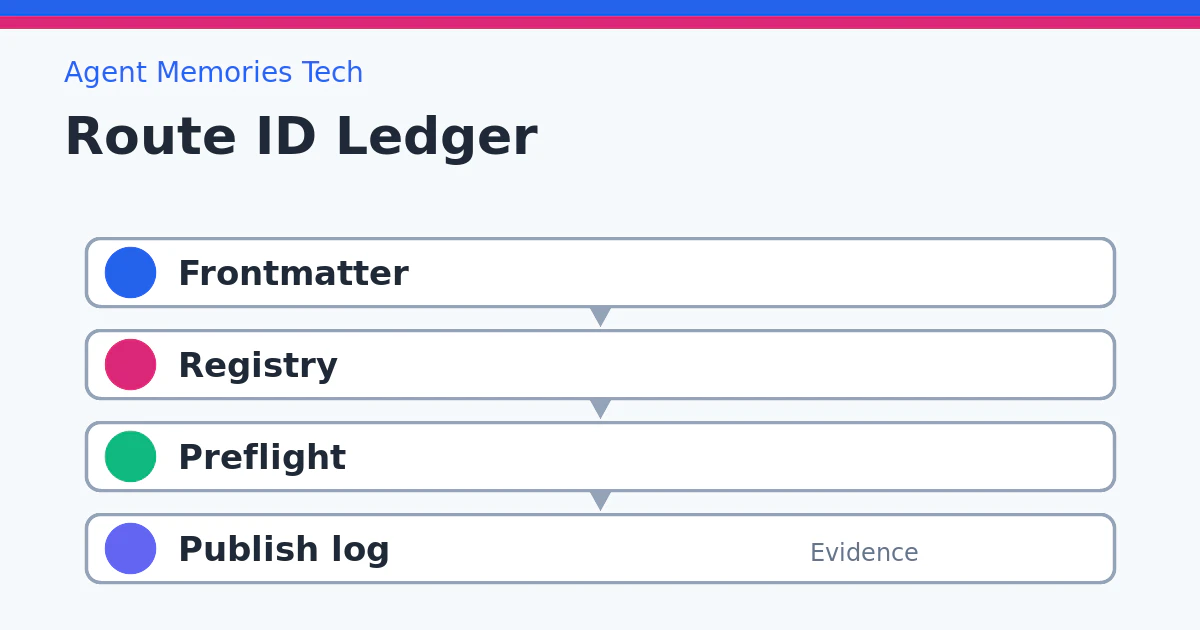
最小のroute_id運用は、台帳で媒体、アカウント、secret名を固定する、原稿frontmatterにもroute_idを入れる、投稿前に台帳と原稿を照合する、台帳にないrouteは停止する、実行ログにもroute_idを残す、という形です。
AIエージェントが複数媒体を扱うほど、route_idは「便利なメタデータ」ではなく、誤投稿を防ぐ安全装置になります。本文の品質を上げる前に、投稿先を間違えない仕組みを作る。それが自動投稿の最初の設計です。