


iTunesConnect(App Store Connect)にアップロードするために使用していた deploy-to-itunesconnect-shenzhen が Deprecated になり、うまく動作しなくなった。
こちらのアナウンス には deploy-to-itunesconnect-deliver ステップに移行してねと書いてあるけど、2段階認証を有効にしているとうまくいかないのでこれは罠!

deploy-to-itunesconnect-application-loader ( Deploy to iTunes Connect - Application Loader ) を使いましょう!
作業
deploy-to-itunesconnect-shenzhen をworkflowから削除し、 deploy-to-itunesconnect-application-loader を追加する。
ステップの設定

Apple ID
Secretsに保存しているApple IDの変数名を指定する。
展開した時に表示される Select secret variable ボタンから変数の選択や追加が可能。

Password
Secretsに保存しているパスワードの変数名を指定する。
Application Specific Password
Secretsに保存しているApp用パスワードを指定する。
App用パスワードは以下の手順で取得可能:
- https://appleid.apple.com でログイン
- セキュリティ セクションの App用パスワード を生成
- 画面の案内に従い、最後に表示されたテキストをコピーする
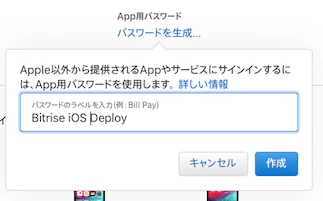

- コピーしたテキストをBitriseのSecretsに変数保存して設定に適用する
設定した箇所のyml
    - deploy-to-itunesconnect-application-loader@0.9.4:
        inputs:
        - password: "$ITUNES_CONNECT_PASSWORD"
        - app_password: "$ITUNES_CONNECT_APP_SPECIFIC_PASSWORD"
        - itunescon_user: "$ITUNES_CONNECT_USER_APPLE_ID"