0
0

Delete article

Deleted articles cannot be recovered.

Draft of this article would be also deleted.

Are you sure you want to delete this article?

More than 5 years have passed since last update.

Pythonのバージョンを確認しようとしたらよくわからん文字列が一気に出力された

0
Posted at

実行環境

  • Cloud9
  • Python 2.7.6

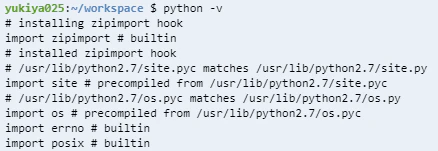
「python -v」でバージョン確認しようとしたら色々文字が出てきた

。。。バージョンは出てこず:dizzy_face: 以下のような文字の羅列が:computer:
何でしょうか。何かインストールしているのでしょうか:alien:
pyv.png

最終的には>>>と出てきましたorz いつものyukiya025:~/workspace $ じゃない:trollface:
データベースでしょうか、Rails Tutorial>>>は出てきたような気がするのですが、如何せんこれを何というのかわからなかった私はとりあえずこのモードを出るべく「q (quit)」と入力しEnterキーを押しました。
q.png

違ったみたいです:see_no_evil:
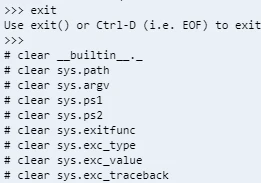
ならばと私の超初心者的語彙力から伝家の宝刀「exit」(もうこれしか心当たりなし:joy_cat:) を入力すると「出るんだったらexit()かCtrl+Dを使ってね!」と教えてもらえたので、Ctrl+Dで脱出。
exit.png

Ctrl+Dを押すと何かを続々とクリアし。。。
clear.png

いつものyukiya025:~/workspace $ に戻れました:relaxed: あーよかった:sparkles:
それにしてもさっきまでの入力モードは何というのでしょうか。。。:frowning:
returned.png

ちなみに本来の目的であったPythonのバージョン確認は$ python --versionで確認できました:clap::clap::clap: 2.7.6だそうです。
276.png

0
0
0

Register as a new user and use Qiita more conveniently

  1. You get articles that match your needs
  2. You can efficiently read back useful information
  3. You can use dark theme
What you can do with signing up
0
0

Delete article

Deleted articles cannot be recovered.

Draft of this article would be also deleted.

Are you sure you want to delete this article?