

SentryのEvent数って集計できないですよね
弊システムのSentryの通知が多すぎるので改善キャンペーンを展開中です。
実績を確認するためにSentryのイベント数を月ごとに集計したくなりました。
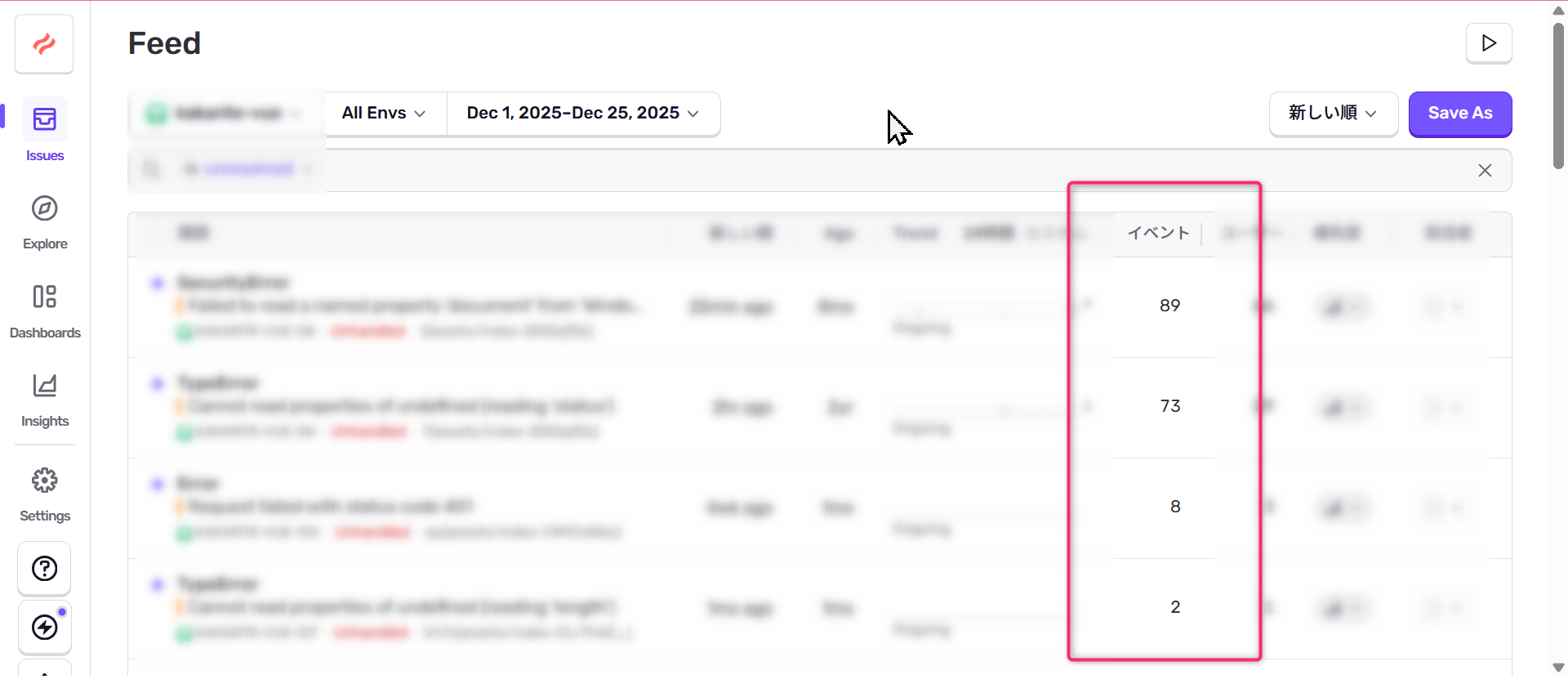
画面上にはIssue単位のイベント数が表示されますが、それを合計するのはとても面倒でした。いままではダッシュボードを作って、ページングしながらExcelに張り付けてSumしてました。

ツール化する
先人がおり、必要な情報をCSV化してくれるPythonコードを書いてくれていました。
ただ、SentryのAPIが変わったりしてうまく動かなかったので作り直しました。
コード
import requests
import csv
import sys
from datetime import datetime, timedelta, timezone

def print_help():
    help_message = """
Sentry Issue Exporter

使用方法:
    python sentry.py <organization> <project_id> <api_token> [start_date] [end_date]

必須引数:
    organization    : Sentry の Organization Slug
    project_id      : Sentry の Project ID
    api_token       : Sentry API Token

オプション引数:
    start_date      : 取得開始日時(ISO 8601 形式)
    end_date        : 取得終了日時(ISO 8601 形式)
                     省略時は過去30日間が対象

入力例:
    python sentry.py my-org 123456 sntrys_abcdef1234567890
    python sentry.py my-org 123456 sntrys_abcdef1234567890 2024-01-01T00:00:00Z 2024-01-31T23:59:59Z
"""
    print(help_message)

args = sys.argv

# 引数のバリデーションチェック
if len(args) < 4 or len(args) > 6:
    print(f"エラー: 引数の数が正しくありません")
    print(f"受け取った引数の数: {len(args) - 1}")
    print_help()
    sys.exit(1)

if len(args) > 1 and (args[1].lower() == 'help' or args[1].lower() == 'man'):
    print_help()
    sys.exit(0)

organization_slug = args[1]
print(f"Organization: {organization_slug}")
project_id = args[2]
print(f"Project: {project_id}")
api_token = args[3]
print(f"ApiToken: {api_token}")

# Sentry APIの設定
sentry_api_url = f'https://sentry.io/api/0/organizations/{organization_slug}/issues/'

# ヘッダーの設定
headers = {
    'Authorization': f'Bearer {api_token}',
    'Content-Type': 'application/json',
}

# 対象期間の設定(例:過去30日間)
arg_start_date = args[4] if len(args) > 4 else None
arg_end_date = args[5] if len(args) > 5 else None

# 日付のパース
end_date = datetime.fromisoformat(arg_end_date.replace('Z', '+00:00')) if arg_end_date else datetime.now(timezone.utc)
end_date = end_date.replace(hour=23, minute=59, second=59, microsecond=0) # 日付の終わりに設定
start_date = datetime.fromisoformat(arg_start_date.replace('Z', '+00:00')) if arg_start_date else end_date - timedelta(days=30)

start = start_date.isoformat().replace('+00:00', 'Z')
end = end_date.isoformat().replace('+00:00', 'Z')

print(f"Fetching issues from {start} to {end}")

# Issueを取得する
issues = []
cursor = None

# レスポンスヘッダーからcursorを取り出す
def get_cursor_from_link_header(link_header):
  if not link_header:
    return None

  # Split by comma to get individual link entries
  links = link_header.split(', ')

  for link in links:
    if 'rel="next"' in link and 'results="true"' in link:
      # Extract cursor value
      cursor_start = link.find('cursor="') + len('cursor="')
      cursor_end = link.find('"', cursor_start)
      return link[cursor_start:cursor_end]

  return None

while True:
    params = {
        'start': start,
        'end': end,
        'project': project_id,
        'query': '',
    }
    if cursor:
        params['cursor'] = cursor

    print(f"Fetching issues")
    response = requests.get(sentry_api_url, headers=headers, params=params)
    data = response.json()
    issues.extend(data)
    print(f"Fetched {len(data)} issues, total so far: {len(issues)}")

    # 次のページがあるかどうか確認
    cursor = get_cursor_from_link_header(response.headers.get('link'))
    if not cursor:
        break

# Issueごとにイベントを集計する関数
def get_event_count(issue_id):
    url = f'https://sentry.io/api/0/issues/{issue_id}/events/'
    events = []
    cursor = None

    while True:
        params = {
            'start': start,
            'end': end,
            'query': '',
        }
        if cursor:
            params['cursor'] = cursor

        print(f"Fetching events for issue {issue_id}")
        response = requests.get(url, headers=headers, params=params)
        data = response.json()
        events.extend(data)
        print(f"Fetched {len(data)} events for issue {issue_id}, total so far: {len(events)}")

        cursor = get_cursor_from_link_header(response.headers.get('link'))
        if not cursor:
            break

    return len(events)

# 各Issueのイベント数を集計
for issue in issues:
    issue['event_count'] = get_event_count(issue['id'])

# CSVに書き出す
with open('sentry_issues.csv', 'w', newline='') as csvfile:
    fieldnames = ['id', 'title', 'status', 'culprit', 'permalink', 'firstSeen', 'lastSeen', 'event_count']
    writer = csv.DictWriter(csvfile, fieldnames=fieldnames)
    writer.writeheader()
    for issue in issues:
        writer.writerow({
            'id': issue['id'],
            'title': issue['title'],
            'status': issue['status'],
            'culprit': issue['culprit'],
            'permalink': issue['permalink'],
            'firstSeen': issue['firstSeen'],
            'lastSeen': issue['lastSeen'],
            'event_count': issue['event_count'],
        })

# 総イベントカウント数を表示
total_event_count = sum(issue['event_count'] for issue in issues)
print(f"Total event count: {total_event_count}")
起動方法
python3 sentry.py [organization] [project_id] [api_token] [start_date(yyyymmdd)] [end_date(yyyymmmdd]
dockerでの起動方法
ホストマシンで以下のコマンドを実施します
docker run -itd --name sentry-ana -v .:/tmp python:3
docker exec -it sentry-ana bash
pip3 install requests
cd /tmp
python3 sentry.py [organization] [project_id] [api_token] [start_date(yyyymmdd)] [end_date(yyyymmmdd]
結果
最後にTotal event countがでます。

課題
ただ、この結果、ダッシュボードで以下のようにEventsを出した結果と異なる数値が出るんですよねー。わからない。
とりあえず、Sentry通知数が改善されていくことが継続集計出来ればいいのでこのツールで満足です。
