
はじめに
この記事では、JSON:APIの概要・メリット・デメリットを具体例を交えて解説します。
JSON:APIとは
JSON:APIは、REST APIのレスポンス形式を統一するための仕様です。2013年頃に策定が始まり、現在は v1.1 が安定版として公開されています。
「どうやってJSONを返すか」のルールを定めたドキュメントです。仕様に従ってサーバーを実装したり、クライアントライブラリを使ったりするものです。
まず前提として、APIレスポンスに関するよくある問題を整理します。
APIレスポンスがカオスになる理由
チームが複数いたり、プロジェクトが長期化したりすると、APIのレスポンス形式がこんな風に分裂していきます。
// エンジニアAが作ったAPI
{
  "data": { "id": 1, "name": "田中" }
}

// エンジニアBが作ったAPI
{
  "user": { "userId": 1, "userName": "田中" }
}

// エンジニアCが作ったAPI(ページネーション付き)
{
  "items": [...],
  "total": 100,
  "page": 1
}
この「統一されていない状態」が引き起こす問題を図で整理してみます。JSON:APIはこの問題に対して「みんなこの形式で返そうよ」という共通ルールを提供します。
JSON:APIの基本構造
JSON:APIのレスポンスは、以下のような構造を持ちます。実際のレスポンス例を見てみましょう。
// GET /articles/1 のレスポンス
{
  "data": {
    "type": "articles",
    "id": "1",
    "attributes": {
      "title": "JSON:API入門",
      "body": "記事の本文...",
      "created-at": "2026-04-01"
    },
    "relationships": {
      "author": {
        "data": { "type": "people", "id": "42" }
      }
    }
  },
  "included": [
    {
      "type": "people",
      "id": "42",
      "attributes": {
        "name": "テスト太郎"
      }
    }
  ]
}
登場するキーワードを整理すると以下のようになります。
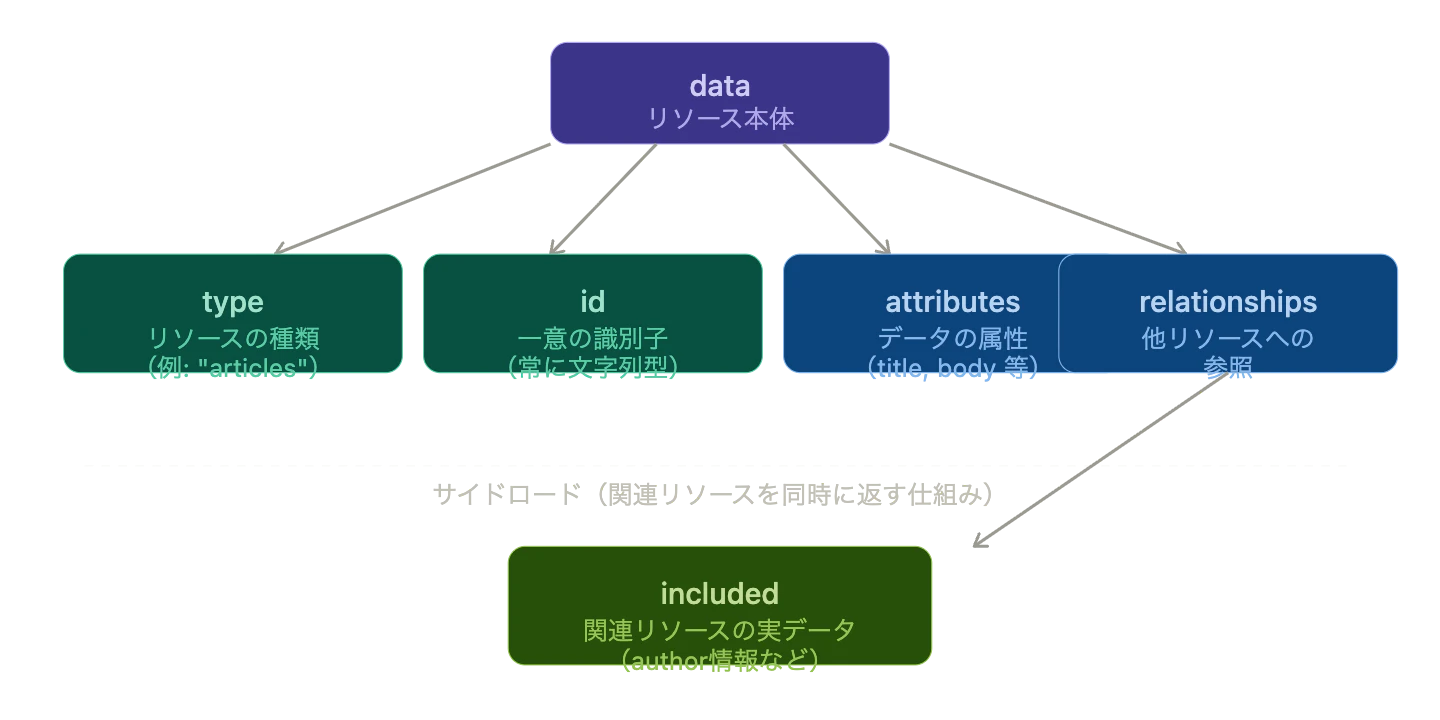
JSON:API ではレスポンス JSON 全体を「Document」と呼びます。
Top-levelには data、errors、meta のどれか1つ以上が必須で、
data と errors は同じDocumentに共存できません。
エラーレスポンスも統一される
JSON:APIではエラーも規約化されています。
// ❌ よくある「バラバラなエラー」
{ "error": "not found" }
{ "message": "Invalid input", "code": 422 }
{ "errors": ["name is required"] }

// ✅ JSON:API のエラー形式(統一)
{
  "errors": [
    {
      "status": "422",
      "title": "Invalid Attribute",
      "detail": "name は必須項目です。",
      "source": {
        "pointer": "/data/attributes/name"
      }
    }
  ]
}
source.pointer でどのフィールドのエラーかが一目でわかるのが特徴です。
ページネーションも標準化
リスト取得のAPIでよくある「ページネーション」も仕様が定義されています。
{
  "data": [...],
  "links": {
    "self": "https://example.com/articles?page[number]=2",
    "first": "https://example.com/articles?page[number]=1",
    "prev": "https://example.com/articles?page[number]=1",
    "next": "https://example.com/articles?page[number]=3",
    "last": "https://example.com/articles?page[number]=10"
  },
  "meta": {
    "total-pages": 10
  }
}
links オブジェクトに first / prev / next / last が入るため、クライアント側でページ遷移のロジックを汎用化できます。
メリット・デメリット
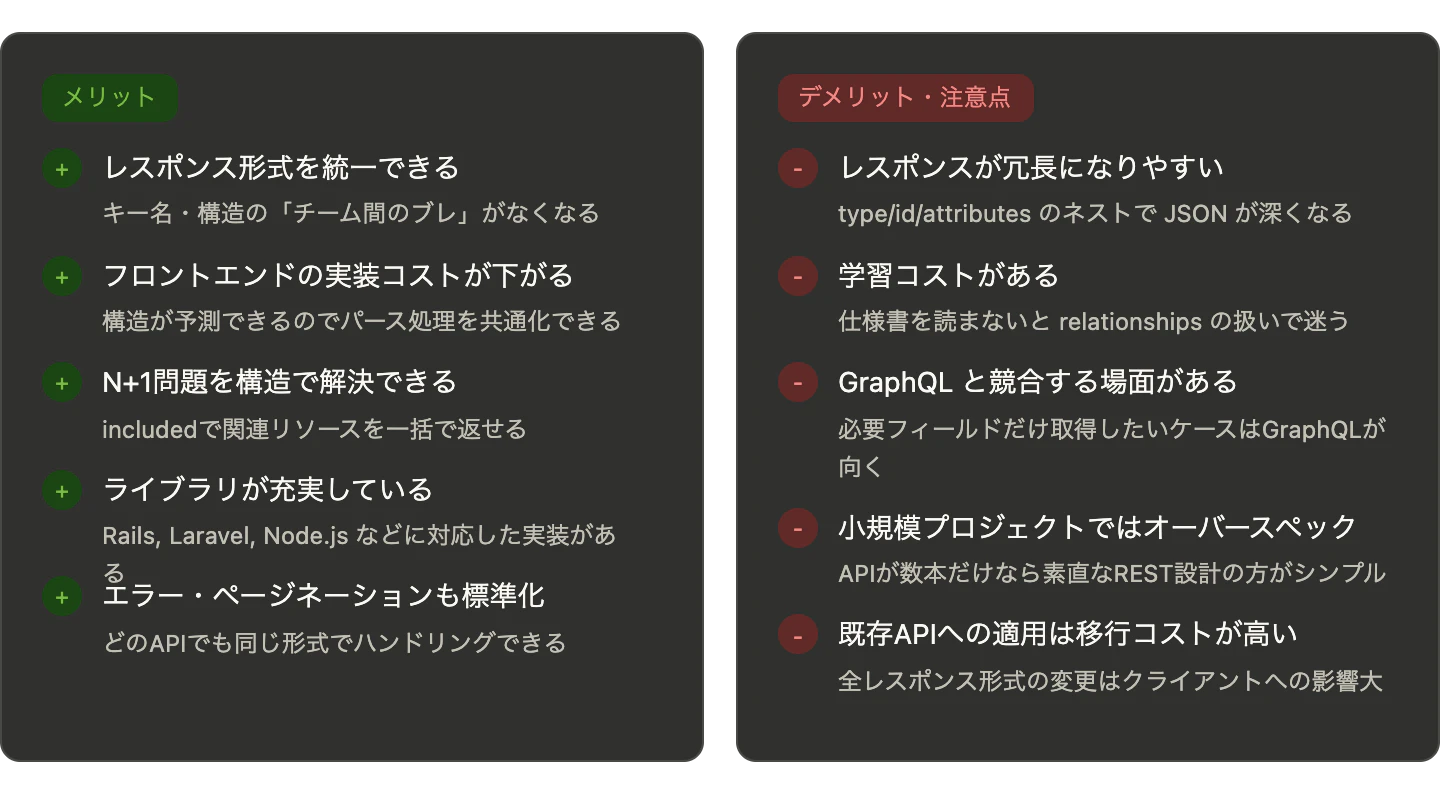
ここまでの内容をもとに、JSON:APIの利点と注意点を整理します。
どんなプロジェクトに向いているか
JSON:APIが真価を発揮するシーンと、そうでないシーンを整理します。
主要な実装ライブラリ
| 言語 / FW | ライブラリ名 | 備考 |
|---|---|---|
| Ruby on Rails | jsonapi-serializer |
旧 fast_jsonapi、最も普及 |
| Laravel (PHP) | laravel-json-api |
Eloquent と統合 |
| Node.js | json-api-serializer |
フレームワーク非依存 |
| Python (Django) | djangorestframework-jsonapi |
DRF と組み合わせて使う |
| フロントエンド |
kitsu, axios + 手実装 |
クライアント側のパース補助 |
まとめ
JSON:APIは「APIレスポンスに共通言語を作る」ための仕様です。
-
data/attributes/relationships/includedという一貫した構造を持つ - エラー・ページネーションも仕様化されていてクライアント実装が楽になる
- 複数チーム・中大規模プロジェクトで特に効果が出る
- 小規模 or GraphQL 移行予定の場合はオーバースペックになることも
チームが大きくなるほど、あるいはAPI本数が増えるほど、統一フォーマットの恩恵は大きくなります。