
bootstrap のライフサイクル
前回の記事では、AWS Lambda の bootstrap と Runtime API について説明しました。
Lambda のコアとして、Lambda instance が起動すると /var/runtime/init を通じて bootstrap が起動され、bootstrap は Runtime API を介して Lambda サービスと通信し、ユーザーイベントを取得して処理します。
bootstrap が Runtime API を呼び出すタイミングに基づいて、bootstrap のライフサイクルを2つのフェーズに分けることができます:
- Init Stage: bootstrap が起動してから
/nextAPI を呼び出すまでのフェーズが Init Stage - Invocation Stage: bootstrap が
/nextAPI を呼び出した後、ユーザーイベントを処理し、最後に/responseAPI を呼び出すまでのフェーズが Invocation Stage。bootstrapはこのフェーズでユーザーイベントを処理し、結果を Lambda サービスに返します
例外処理は興味を引きにくいテーマですが、Lambda の起動と実行フローを理解するための重要なポイントです。特に Lambda のようなサーバーレスモデルではなおさらです。
bootstrap の2つのフェーズについて、以下の点に注目する必要があります:
-
bootstrapが Init Stage で失敗した場合はどうなるか?タイムアウトした場合はどうなるか? -
bootstrapが Invocation Stage で失敗した場合はどうなるか?タイムアウトした場合はどうなるか? -
bootstrapが/responseAPI を呼び出した後、次の/nextAPI を呼び出す前に失敗した場合はどうなるか?タイムアウトした場合はどうなるか?
以下のシーケンス図は、各 Stage とこれから議論する各 Stage の例外処理を示しています

前提条件
前回の記事で作成したテスト用の Lambda 関数を引き続き使用してテストします。
この関数は以下の設定を使用しています:
-
Amazon Linux 2ランタイムを使用し、bootstrapのカスタマイズを容易にしています - すべてのパラメータはデフォルト設定を採用しているため、関数のタイムアウト時間はデフォルトの3秒です
- また、今回は
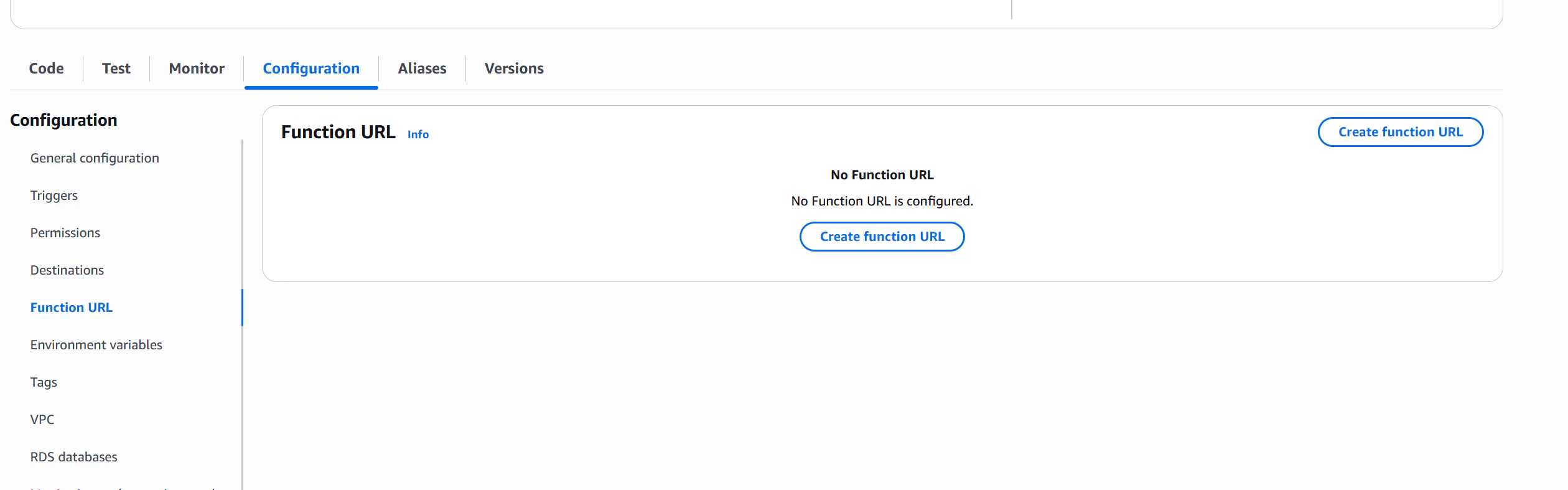
Configuration - Function URL - Create function URLでFunction URLを有効化し、curlで直接 Lambda 関数を呼び出してユーザーリクエストの動作をテストできるようにしています
また、Lambda において、リクエスト処理時に新しい instance が起動されたかどうかを確認することも非常に重要です(Lambda のコールドスタートは重要なパフォーマンス指標です)。例外発生後に Lambda が新しい instance を起動するかどうかも確認する必要があります。
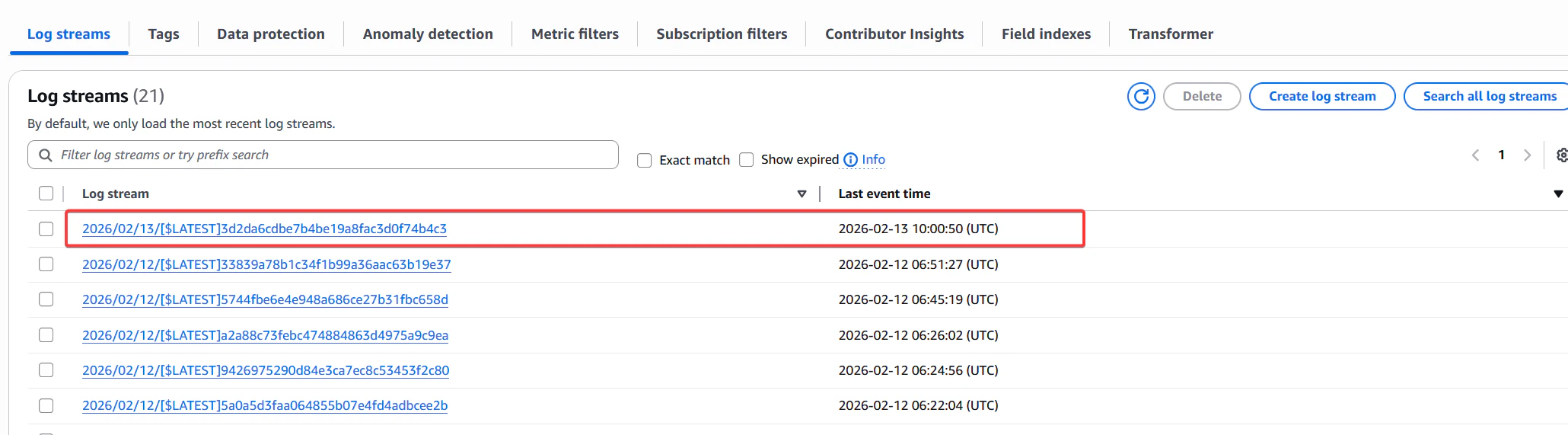
Lambda では、対応する関数の CloudWatch Logs - Log groups 内の Log stream 名を確認することで、Lambda が新しい instance を起動したかどうかを判断できます。
下図のように、Lambda が新しい instance を起動すると、新しい Log stream が作成されます。この Log stream の名前は 202x/xx/xx/[$LATEST]xxxx の形式で命名され、同一 Instance 内のログは同じ Log stream に記録されます。
この方法で、各リクエストが新しい instance を起動したかどうかを確認できます。
Init Stage 例外:/next API リクエスト前の失敗
/next API リクエスト前(すなわち Init Stage)での失敗には複数のケースがあり、それぞれ個別に説明します。
bootstrap が存在しないことによる失敗
まず、bootstrap がそもそも存在しない場合の Lambda の動作を確認します。Lambda は空の zip パッケージのアップロードを許可しないため、bootstrap を bootstrap2 にリネームします。
mv bootstrap bootstrap2
zip -r ../bootstrap-test.zip .
その後、AWS コンソールから Lambda 関数を更新することで、bootstrap が存在しない Lambda 関数を構築します。
curl で先ほど作成した Function URL を呼び出して動作をテストします。
curl https://xxxxxxxxxxxxxxxxxxxxxxxx.lambda-url.ap-northeast-1.on.aws -v
......
< HTTP/1.1 502 Bad Gateway
...
Internal Server Error%
......
502 の HTTP ステータスコードが返され、レスポンスは Internal Server Error でした。これは Lambda サービスがリクエスト処理中にエラーが発生したことを示しています。
注:Lambda 関数の呼び出し方法(Function URL、API Gateway、AWS SDK など)によって、呼び出し元は Lambda のエラーに対して異なるレスポンスを返します。今回は
Function URLを使用してテストしています。
次に、この関数呼び出しに対応するログを確認します。
INIT_REPORT Init Duration: 0.35 ms	Phase: init	Status: error	Error Type: Runtime.InvalidEntrypoint
INIT_REPORT Init Duration: 0.26 ms	Phase: invoke	Status: error	Error Type: Runtime.InvalidEntrypoint
START RequestId: d8c29a1c-cc6d-447b-899b-054777791892 Version: $LATEST
RequestId: d8c29a1c-cc6d-447b-899b-054777791892 Error: Couldn't find valid bootstrap(s): [/var/task/bootstrap /opt/bootstrap]
Runtime.InvalidEntrypoint
END RequestId: d8c29a1c-cc6d-447b-899b-054777791892
REPORT RequestId: d8c29a1c-cc6d-447b-899b-054777791892	Duration: 42.44 ms	Billed Duration: 43 ms	Memory Size: 128 MB	Max Memory Used: 3 MB
ログに Runtime.InvalidEntrypoint エラーが明確に記録され、Error: Couldn't find valid bootstrap(s): [/var/task/bootstrap /opt/bootstrap] という詳細なエラー情報も確認できます。
bootstrap が存在しない場合、Lambda は bootstrap の再起動を試みません(これは後述する他のエラーケースとは異なります)。
次に、すぐに再度 Function URL を呼び出してログを確認し、失敗後に Lambda が新しい instance を起動して bootstrap の再起動を試みるかどうかを確認します。
curl https://xxxxxxxxxxxxxxxxxxxxxxxx.lambda-url.ap-northeast-1.on.aws -v
......
< HTTP/1.1 502 Bad Gateway
...
Internal Server Error%
......
# 1回目のリクエストのログ
...
START RequestId: d8c29a1c-cc6d-447b-899b-054777791892 Version: $LATEST
...
# 2回目のリクエストのログ
...
START RequestId: 9c8b1a1c-cc6d-447b-899b-054777791892 Version: $LATEST
...
2回のリクエストのログが同じ Log Stream に記録されていることがわかります。これは Lambda が2回目のリクエストを処理するために新しい instance を起動せず、1回目のリクエストの instance を再利用したことを示しています。
まとめ
bootstrap が存在しない場合:
- Lambda はユーザーに
502 Internal Server Errorを返し、Runtime.InvalidEntrypointエラーログを記録する - Lambda は
bootstrapの再起動を試みない - Lambda は次のリクエストを処理するために新しい instance を起動せず、同じ instance を再利用する
exit 0: 正常終了による失敗
bootstrap が Init Stage 中に正常終了(すなわち exit 0)した場合はどうなるでしょうか?bootstrap の内容を以下のように変更し、bootstrap is executed! を出力した後に正常終了するようにします。
#!/bin/sh
set -euo pipefail

echo "bootstrap is executed!"
exit 0
同様に curl で Function URL を呼び出して動作をテストします。
curl https://xxxxxxxxxxxxxxxxxxxxxxxx.lambda-url.ap-northeast-1.on.aws -v
Internal Server Error
curl のレスポンスは Internal Server Error で、bootstrap が存在しない場合と同じです。
次にログを確認します。
08:48:32.246 INIT_START Runtime Version: provided:al2.v143 Runtime Version ARN: arn:aws:lambda:ap-northeast-1::runtime:64c84fb4abae0287749677ef42dbfb9c0b2bf4a3c7b1a638630bccc30cf04c7b
08:48:32.254 bootstrap is executed!
08:48:32.255 INIT_REPORT Init Duration: 8.77 ms Phase: init Status: error Error Type: Runtime.ExitError
08:48:32.283 bootstrap is executed!
08:48:32.302 INIT_REPORT Init Duration: 28.52 ms Phase: invoke Status: error Error Type: Runtime.ExitError
08:48:32.302 START RequestId: 951da5f6-c388-43ac-8291-7e27d5b58de7 Version: $LATEST
08:48:32.362 RequestId: 951da5f6-c388-43ac-8291-7e27d5b58de7 Error: Runtime exited without providing a reason Runtime.ExitError
08:48:32.362 END RequestId: 951da5f6-c388-43ac-8291-7e27d5b58de7
08:48:32.362 REPORT RequestId: 951da5f6-c388-43ac-8291-7e27d5b58de7 Duration: 88.56 ms Billed Duration: 89 ms Memory Size: 128 MB Max Memory Used: 3 MB
bootstrap が bootstrap is executed! を出力して終了した後、Lambda サービスが Runtime.ExitError エラーログを記録していることがわかります。また、ログには Runtime exited without providing a reason が記録されています。
さらに、bootstrap is executed! のログが2回出力されていることから、Lambda サービスは bootstrap の終了を検知した後、すぐに bootstrap の再起動を試みて回復を図ることがわかります。
bootstrap の再起動も失敗した場合、Lambda サービスはそれ以上再起動を試みず、ユーザーに 502 Internal Server Error を返します。
また、確認の結果(具体的な確認方法は前述と同様のため、以下省略します)、bootstrap 終了後、Lambda は今後の新しいリクエストを処理するために新しい instance を起動しないことがわかりました。
まとめ
bootstrap が Init Stage 中に正常終了(exit 0)した場合:
- Lambda は
bootstrapの終了を検知し、Runtime.ExitErrorエラーログを記録した後、bootstrapの再起動を試みる -
bootstrapの再起動が失敗した場合、Lambda サービスは諦めてユーザーに502 Internal Server Errorを返す - Lambda は今後の新しいリクエストを処理するために新しい instance を起動せず、同じ instance を再利用する
exit 1: 異常終了による失敗
プログラムやスクリプトが0以外の終了コードで終了する場合、通常はプログラムやスクリプトの実行中にエラーや異常が発生したことを示します。この終了方法は「異常終了」または「エラー終了」と呼ばれ、プログラムが意図したタスクを正常に完了できなかったことをオペレーティングシステムや呼び出し元に伝えます。
bootstrap スクリプトが exit 1 で終了した場合の Lambda の動作を確認するため、bootstrap スクリプトを修正します。前述の exit 0 のケースと比較して、exit 0 を exit 1 に変更しただけで、他の部分はそのままです。
exit 0 と同様です。
#!/bin/sh
set -euo pipefail

echo "bootstrap is executed!"
exit 1
Function URL を呼び出して動作をテストします。
curl https://xxxxxxxxxxxxxxxxxxxxxxxx.lambda-url.ap-northeast-1.on.aws
Internal Server Error
返されるエラーは exit 0 の場合と同じく Internal Server Error です。次に対応するログを確認します。
08:46:54.784 INIT_START Runtime Version: provided:al2.v143 Runtime Version ARN: arn:aws:lambda:ap-northeast-1::runtime:64c84fb4abae0287749677ef42dbfb9c0b2bf4a3c7b1a638630bccc30cf04c7b
08:46:54.798 bootstrap is executed!
08:46:54.798 INIT_REPORT Init Duration: 14.49 ms Phase: init Status: error Error Type: Runtime.ExitError
08:46:54.833 bootstrap is executed!
08:46:54.850 INIT_REPORT Init Duration: 31.73 ms Phase: invoke Status: error Error Type: Runtime.ExitError
08:46:54.851 START RequestId: b0897055-9b29-46d8-beda-61ef735a1b62 Version: $LATEST
08:46:54.872 RequestId: b0897055-9b29-46d8-beda-61ef735a1b62 Error: Runtime exited with error: exit status 1 Runtime.ExitError
08:46:54.872 END RequestId: b0897055-9b29-46d8-beda-61ef735a1b62
08:46:54.872 REPORT RequestId: b0897055-9b29-46d8-beda-61ef735a1b62 Duration: 53.08 ms Billed Duration: 54 ms Memory Size: 128 MB Max Memory Used: 3 MB
bootstrap が exit 1 で終了した場合の動作は exit 0 の場合と類似していることがわかります。
Lambda サービスは Runtime.ExitError エラーログを記録し、bootstrap を再起動して回復を試みます。再起動が失敗した場合、Lambda サービスは諦めてユーザーに 502 Internal Server Error を返します。
ただし、ログのエラー詳細は Runtime exited without providing a reason から Runtime exited with error: exit status 1 に変わっており、Lambda サービスが bootstrap の終了コードを正しくキャプチャしてログに記録していることがわかります。
この場合、Lambda は今後の新しいリクエストを処理するために instance を再利用するでしょうか?テストの結果:再利用します。
まとめ
bootstrap が Init Stage 中に exit 1 で終了した場合:
- その動作は
exit 0と類似している - Lambda は
bootstrapの終了を検知し、Runtime.ExitErrorエラーログを記録した後、bootstrapの再起動を試みる -
bootstrapの再起動が失敗した場合、Lambda サービスは諦めてユーザーに502 Internal Server Errorを返す - Lambda は今後の新しいリクエストを処理するために新しい instance を起動せず、同じ instance を再利用する
Init Stage 例外:/next API リクエスト前のタイムアウト
公式ドキュメント Lambda Lifecycle によると、bootstrap の Init Stage にはタイムアウト時間が設定されています(Init Stage の処理に時間がかかりすぎると、ユーザーへのレスポンス時間に大きく影響するためです)。
The Init phase ends when the runtime and all extensions signal that they are ready by sending a Next API request. The Init phase is limited to 10 seconds. If all three tasks do not complete within 10 seconds, Lambda retries the Init phase at the time of the first function invocation with the configured function timeout.
上記の説明によると、Init Stage のタイムアウト時間は10秒です。bootstrap を修正して Init Stage でタイムアウトが発生する状況をシミュレートします。以下のコードでは、bootstrap is executed! を出力した後に15秒間 sleep してタイムアウトをシミュレートしています。
#!/bin/sh
set -euo pipefail

echo "bootstrap is executed! sleep 15s"
sleep 15
echo "bootstrap sleep done"
time curl https://xxxxxxxxxxxxxxxxxxxxxxxx.lambda-url.ap-northeast-1.on.aws
Internal Server Error curl   0.02s user 0.01s system 0% cpu 14.089 total
10秒ではなく、約14秒かかりました。同じリクエストを複数回試みると
time curl https://xxxxxxxxxxxxxxxxxxxxxxxx.lambda-url.ap-northeast-1.on.aws
Internal Server Error curl   0.03s user 0.00s system 1% cpu 2.985 total

time curl https://xxxxxxxxxxxxxxxxxxxxxxxx.lambda-url.ap-northeast-1.on.aws
Internal Server Error curl   0.02s user 0.00s system 0% cpu 2.996 total
2回目以降のリクエスト時間は約3秒であり、10秒ではないことが観察できます。この時点で Lambda のログを取得して何が起きているかを確認します。
各リクエストと対応するログを紐付けます。
1回目のリクエスト
    ...
    12:34:35.598 bootstrap is executed! sleep 15s
    12:34:45.598 INIT_REPORT Init Duration: 10008.79 ms Phase: init Status: timeout
    12:34:45.626 bootstrap is executed! sleep 15s
    12:34:48.619 INIT_REPORT Init Duration: 3003.40 ms Phase: invoke Status: timeout
    12:34:48.625 2026-02-13T12:34:48.625Z 27e8b154-e141-4c3a-9dd8-6ed6592aa174 Task timed out after 3.01 seconds
    12:34:48.625 END RequestId: 27e8b154-e141-4c3a-9dd8-6ed6592aa174
    12:34:48.625 REPORT RequestId: 27e8b154-e141-4c3a-9dd8-6ed6592aa174 Duration: 3009.44 ms Billed Duration: 3000 ms Memory Size: 128 MB Max Memory Used: 3 MB
    12:34:48.665 INIT_START Runtime Version: provided:al2.v143 Runtime Version ARN: arn:aws:lambda:ap-northeast-1::runtime:64c84fb4abae0287749677ef42dbfb9c0b2bf4a3c7b1a638630bccc30cf04c7b
    12:34:48.667 bootstrap is executed! sleep 15s
    12:34:58.674 INIT_REPORT Init Duration: 10008.88 ms Phase: init Status: timeout

2回目のリクエスト
    12:35:34.615 bootstrap is executed! sleep 15s
    12:35:37.617 INIT_REPORT Init Duration: 3003.32 ms Phase: invoke Status: timeout
    12:35:37.617 START RequestId: 3990792c-3238-4ced-8acc-abda08dd8590 Version: $LATEST
    12:35:37.618 2026-02-13T12:35:37.618Z 3990792c-3238-4ced-8acc-abda08dd8590 Task timed out after 3.00 seconds
    12:35:37.618 END RequestId: 3990792c-3238-4ced-8acc-abda08dd8590
    12:35:37.618 REPORT RequestId: 3990792c-3238-4ced-8acc-abda08dd8590 Duration: 3004.50 ms Billed Duration: 3000 ms Memory Size: 128 MB Max Memory Used: 3 MB
    12:35:37.642 INIT_START Runtime Version: provided:al2.v143 Runtime Version ARN: arn:aws:lambda:ap-northeast-1::runtime:64c84fb4abae0287749677ef42dbfb9c0b2bf4a3c7b1a638630bccc30cf04c7b
    12:35:37.644 bootstrap is executed! sleep 15s
    12:35:47.651 INIT_REPORT Init Duration: 10008.73 ms Phase: init Status: timeout

3回目のリクエスト
    12:36:49.102 bootstrap is executed! sleep 15s
    12:36:52.104 INIT_REPORT Init Duration: 3003.25 ms Phase: invoke Status: timeout
    12:36:52.104 START RequestId: a0a3b004-be56-4db3-bb97-0721aac10563 Version: $LATEST
    12:36:52.105 2026-02-13T12:36:52.104Z a0a3b004-be56-4db3-bb97-0721aac10563 Task timed out after 3.00 seconds
    12:36:52.105 END RequestId: a0a3b004-be56-4db3-bb97-0721aac10563
    12:36:52.105 REPORT RequestId: a0a3b004-be56-4db3-bb97-0721aac10563 Duration: 3004.30 ms Billed Duration: 3000 ms Memory Size: 128 MB Max Memory Used: 3 MB
    12:36:52.124 INIT_START Runtime Version: provided:al2.v143 Runtime Version ARN: arn:aws:lambda:ap-northeast-1::runtime:64c84fb4abae0287749677ef42dbfb9c0b2bf4a3c7b1a638630bccc30cf04c7b
    12:36:52.126 bootstrap is executed! sleep 15s
    12:37:02.133 INIT_REPORT Init Duration: 10008.89 ms Phase: init Status: timeout
- bootstrap の実行タイムアウトでは新しい instance は起動されず、次のリクエスト時に同じ instance を再利用して
bootstrapを再度呼び出します - 1回目のリクエスト(すなわち instance の初回起動後)では:
-
bootstrapが10秒のタイムアウト後、Lambda サービスは再度bootstrapを呼び出しますが、2回目の呼び出しのタイムアウト時間は10秒ではなく3秒になります - 2回目の呼び出し(3秒)もタイムアウトした場合、Lambda サービスはただちにユーザーに
502 Internal Server Errorを返します - ただしログを注意深く観察すると、2回目のタイムアウト後にも Lambda は実際に3回目の
bootstrap呼び出しを行っており、この時のタイムアウトは再び10秒に戻ります。それ以上のリトライはありません。注意すべきは、この3回目の試行は Lambda がユーザーに502を返した後に行われるということです。つまり、この3回目の試行は Lambda が instance を正常状態に回復させ、次のユーザーリクエストを受け付けられるようにするためのものです
-
- 2回目のリクエスト時:
- 2回目のリクエストが発生すると、Lambda は再度
bootstrapの再起動を試みますが、この時のタイムアウト時間は3秒のみです。このタイムアウトが発生するとリトライせずに直接502 Internal Server Errorをユーザーに返します - 同様に、502を返した後、Lambda は再び
bootstrapの呼び出しを試みて instance を正常状態に回復させようとします。このタイムアウト時間は10秒です
- 2回目のリクエストが発生すると、Lambda は再度
- 3回目のリクエスト時の動作は2回目のリクエストと同じです
この3秒は Lambda 関数のタイムアウト時間に関連しているようです。Lambda 関数のタイムアウト時間を30秒に変更して再度 Lambda 関数を呼び出し、ログを確認します。
/* 1回目のリクエスト */ APIリクエスト所要時間  25s
    10:08:25.818 bootstrap is executed! sleep 15s
    10:08:35.805 INIT_REPORT Init Duration: 9994.77 ms Phase: init Status: timeout
    10:08:35.837 bootstrap is executed! sleep 15s
    10:08:50.839 bootstrap sleep done
    10:08:50.839 INIT_REPORT Init Duration: 15016.29 ms Phase: invoke Status: error Error Type: Runtime.ExitError
    10:08:50.839 START RequestId: d7501337-05f2-4bd9-be07-e5d611a4b3c7 Version: $LATEST
    10:08:50.856 RequestId: d7501337-05f2-4bd9-be07-e5d611a4b3c7 Error: Runtime exited without providing a reason Runtime.ExitError
    10:08:50.856 END RequestId: d7501337-05f2-4bd9-be07-e5d611a4b3c7
    10:08:50.856 REPORT RequestId: d7501337-05f2-4bd9-be07-e5d611a4b3c7 Duration: 15033.66 ms Billed Duration: 15034 ms Memory Size: 128 MB Max Memory Used: 3 MB
    10:08:50.901 INIT_START Runtime Version: provided:al2.v143 Runtime Version ARN: arn:aws:lambda:ap-northeast-1::runtime:64c84fb4abae0287749677ef42dbfb9c0b2bf4a3c7b1a638630bccc30cf04c7b
    10:08:50.903 bootstrap is executed! sleep 15s
    10:09:00.898 INIT_REPORT Init Duration: 9997.18 ms Phase: init Status: timeout

/* 2回目のリクエスト */
    10:09:42.356 bootstrap is executed! sleep 15s
    10:09:57.357 bootstrap sleep done
    10:09:57.358 INIT_REPORT Init Duration: 15011.50 ms Phase: invoke Status: error Error Type: Runtime.ExitError
    10:09:57.358 START RequestId: c6760830-db1d-431c-9948-8b822d4958e6 Version: $LATEST
    10:09:57.359 RequestId: c6760830-db1d-431c-9948-8b822d4958e6 Error: Runtime exited without providing a reason Runtime.ExitError
    10:09:57.359 END RequestId: c6760830-db1d-431c-9948-8b822d4958e6
    10:09:57.359 REPORT RequestId: c6760830-db1d-431c-9948-8b822d4958e6 Duration: 15012.88 ms Billed Duration: 15013 ms Memory Size: 128 MB Max Memory Used: 3 MB
    10:09:57.392 INIT_START Runtime Version: provided:al2.v143 Runtime Version ARN: arn:aws:lambda:ap-northeast-1::runtime:64c84fb4abae0287749677ef42dbfb9c0b2bf4a3c7b1a638630bccc30cf04c7b
    10:09:57.394 bootstrap is executed! sleep 15s
    10:10:07.392 INIT_REPORT Init Duration: 9999.78 ms Phase: init Status: timeout
予想通り、2回目のタイムアウト時間は確かに Lambda 関数のタイムアウト時間であることがわかりました。改めてまとめると
- bootstrap 起動後、
/nextAPI を呼び出す前に10秒のタイムアウト時間があり、この時間を超えると Lambda サービスはbootstrapを終了して再起動する - 2回目の
bootstrap起動のタイムアウト時間は Lambda 関数のタイムアウト時間 - 2回目の
bootstrap起動も失敗(またはタイムアウト)した場合、Lambda サービスはただちにユーザーに502 Internal Server Errorを返す - その後 Lambda サービスは3回目の
bootstrap再起動を試み、このタイムアウト時間は再び10秒に戻る。3回目の再起動の目的は instance を正常状態に回復させ、次のユーザーリクエストを受け付けられるようにすること
まとめ
- bootstrap 起動後、
/nextAPI を呼び出す前に10秒のタイムアウト時間があり、この時間を超えると Lambda サービスはbootstrapを終了して再起動する - 2回目の
bootstrap起動のタイムアウト時間は Lambda 関数のタイムアウト時間 - 2回目の
bootstrap起動も失敗(またはタイムアウト)した場合、Lambda サービスはただちにユーザーに502 Internal Server Errorを返す - その後 Lambda サービスは3回目の
bootstrap再起動を試み、このタイムアウト時間は再び10秒に戻る。3回目の再起動の目的は instance を正常状態に回復させ、次のユーザーリクエストを受け付けられるようにすること
Init Stage の例外を正しく処理する
上記では bootstrap が Init Stage で例外が発生した場合の Lambda の動作をテストしました。次に、bootstrap が Init Stage で例外が発生した場合に、どのように正しく例外を処理するかについて説明します。
Lambda Runtime API ドキュメント によると、bootstrap が Init Stage で例外が発生した場合は、/init/error API を呼び出して Lambda サービスに通知する必要があります。
この API は前回の記事で紹介した /next /response API と同様に Runtime API の一部であり、この API を呼び出すことで bootstrap が Init Stage で例外が発生したことを Lambda サービスに通知します。
この API をリクエストする際のポイント:
- リクエストアドレスは
http://${AWS_LAMBDA_RUNTIME_API}/2018-06-01/runtime/init/error - POST リクエストで送信する
- リクエストヘッダーに
Lambda-Runtime-Function-Error-Typeフィールドを含める必要がある。これはユーザーがカスタマイズ可能な文字列で、エラータイプを記述する。このフィールドは Lambda サービスによってキャプチャされ、ログに記録される - リクエスト成功時、この API は 202 ステータスコードを返し、レスポンス内容は
{"status":"OK"}で、Lambda サービスがエラー情報を正常に受信しログに記録したことを示す - リクエストペイロードは JSON オブジェクトで、構造は以下の通り
-
errorMessage: エラー情報の文字列、エラーの詳細を記述 -
errorType: エラータイプの文字列、エラータイプを記述、カスタマイズ可能 -
stackTrace: エラースタックトレース情報、通常は文字列配列で、エラー発生時のコールスタック情報を記述
-
{
      "errorMessage" : "Error parsing event data.",
      "errorType" : "InvalidEventDataException",
      "stackTrace": [ ]
}
次に bootstrap を修正します。bootstrap で例外が発生し、スクリプト内でキャッチされたと仮定して、スクリプト内で /init/error API を呼び出して Lambda サービスに通知し、この API の Response Body を出力します。
#!/bin/sh
set -eu
echo "bootstrap is executed!"

# simulate an error is caught in bootstrap bath, and then notify Lambda service about the error by calling /init/error API
RESP="$(curl -sS -w "\nHTTP %{http_code}\n" \
  -X POST "http://${AWS_LAMBDA_RUNTIME_API}/2018-06-01/runtime/init/error" \
  -H "Content-Type: application/json" \
  -H "Lambda-Runtime-Function-Error-Type: Bootstrap.Unhandled" \
  -d '{"errorMessage":"Failed to load function.","errorType":"InvalidFunctionException","stackTrace":[]}')"

echo "$RESP"
exit 1
同様に curl で Function URL を呼び出して動作をテストします。
curl https://xxxxxxxxxxxxxxxxxxxxxxxx.lambda-url.ap-northeast-1.on.aws
Internal Server Error
呼び出し元のエラーは前述の exit 1 の場合と同じく Internal Server Error でした。関連するログを確認します。
09:43:09.214 INIT_START Runtime Version: provided:al2.v143 Runtime Version ARN: arn:aws:lambda:ap-northeast-1::runtime:64c84fb4abae0287749677ef42dbfb9c0b2bf4a3c7b1a638630bccc30cf04c7b
09:43:09.224 bootstrap is executed!
09:43:09.245 {"status":"OK"}
09:43:09.245 HTTP 202
09:43:09.246 INIT_REPORT Init Duration: 32.18 ms Phase: init Status: error Error Type: Runtime.Unknown
09:43:09.268 bootstrap is executed!
09:43:09.449 {"status":"OK"}
09:43:09.449 HTTP 202
09:43:09.469 INIT_REPORT Init Duration: 203.92 ms Phase: invoke Status: error Error Type: Runtime.Unknown
09:43:09.469 START RequestId: 1ae2f688-f2e8-4739-aa18-1fc4703e3647 Version: $LATEST
09:43:09.470 Unknown application error occurred Runtime.Unknown
09:43:09.470 END RequestId: 1ae2f688-f2e8-4739-aa18-1fc4703e3647
09:43:09.470 REPORT RequestId: 1ae2f688-f2e8-4739-aa18-1fc4703e3647 Duration: 204.69 ms Billed Duration: 205 ms Memory Size: 128 MB Max Memory Used: 5 MB
その動作は前述の exit 1 の場合と類似しており、Lambda は bootstrap の再起動を試みて回復を図り、再起動が失敗した場合はユーザーに 502 Internal Server Error を返します。
ただし、/init/error API で設定したエラータイプ Bootstrap.Unhandled はログに記録されておらず、Runtime.Unknown というエラータイプのみが記録されています。
ここで疑問に思うかもしれません。直接 bootstrap を終了するのと動作が同じなら、/init/error API を呼び出す意義は何でしょうか?
次に bootstrap を修正して、/init/error API を呼び出した後に /next API を呼び出してイベントを取得してみます。
#!/bin/sh
set -eu
echo "bootstrap is executed!"

# simulate an error is caught in bootstrap bath, and then notify Lambda service about the error by calling /init/error API
RESP="$(curl -sS -w "\nHTTP %{http_code}\n" \
  -X POST "http://${AWS_LAMBDA_RUNTIME_API}/2018-06-01/runtime/init/error" \
  -H "Content-Type: application/json" \
  -H "Lambda-Runtime-Function-Error-Type: Bootstrap.Unhandled" \
  -d '{"errorMessage":"Failed to load function.","errorType":"InvalidFunctionException","stackTrace":[]}')"

echo "$RESP"

# call /next API after sending error report to Lambda service
RESPONSE=$(curl -s "http://${AWS_LAMBDA_RUNTIME_API}/2018-06-01/runtime/invocation/next")
echo "The event data is: $RESPONSE"

exit 1
対応するログを確認します。
09:43:43.046 INIT_START Runtime Version: provided:al2.v143 Runtime Version ARN: arn:aws:lambda:ap-northeast-1::runtime:64c84fb4abae0287749677ef42dbfb9c0b2bf4a3c7b1a638630bccc30cf04c7b
09:43:43.055 bootstrap is executed!
09:43:43.079 {"status":"OK"}
09:43:43.079 HTTP 202
09:43:43.085 The event data is: {"errorMessage":"State transition from InitError to Ready failed for runtime. Error: State transition is not allowed","errorType":"InvalidStateTransition"}
09:43:43.086 INIT_REPORT Init Duration: 39.37 ms Phase: init Status: error Error Type: Runtime.Unknown
09:43:43.110 bootstrap is executed!
09:43:43.275 {"status":"OK"}
09:43:43.275 HTTP 202
09:43:43.455 The event data is: {"errorMessage":"State transition from InitError to Ready failed for runtime. Error: State transition is not allowed","errorType":"InvalidStateTransition"}
09:43:43.456 INIT_REPORT Init Duration: 348.23 ms Phase: invoke Status: error Error Type: Runtime.Unknown
09:43:43.456 START RequestId: 762dc5ad-e25a-4829-b4bc-39668836b404 Version: $LATEST
09:43:43.478 Unknown application error occurred Runtime.Unknown
09:43:43.478 END RequestId: 762dc5ad-e25a-4829-b4bc-39668836b404
09:43:43.478 REPORT RequestId: 762dc5ad-e25a-4829-b4bc-39668836b404 Duration: 368.36 ms Billed Duration: 369 ms Memory Size: 128 MB Max Memory Used: 5 MB
Lambda サービスに init エラーを報告した後に /next API を呼び出すと、次のエラーが返されることがわかりました:State transition from InitError to Ready failed for runtime. Error: State transition is not allowed
/init/error API を呼び出した後、Lambda はこの instance をエラー状態としてマークし、bootstrap がユーザーイベントを取得することを拒否することがわかります。
これは実際に公式ドキュメントで推奨されている bootstrap の初期化エラー時の処理方法と一致しています:
Handle errors – If an error occurs, call the initialization error API and exit immediately.
Init Stage でエラーが発生するということは、この instance が正常に動作できないことを意味するため、エラーを報告した後、Lambda はイベントデータの提供を拒否し、bootstrap を終了します。
まとめ
bootstrap が Init Stage で例外が発生した場合、正しい処理方法は /init/error API を呼び出して Lambda サービスに通知し、その後 bootstrap を終了することです。
Invocation Stage 例外:/next API リクエスト後、/response API 返却前の失敗
/next API をリクエストした後、/response API を返す前のフェーズが Invocation Stage です。このフェーズは、日常的に Lambda を使用する際の handler コードが実行されるフェーズです。
このフェーズの例外処理は非常に重要です。なぜなら、このフェーズの例外は handler コードの実行に直接影響するためです。
次に、複数のケースの例外処理について個別に説明します。
bootstrap のクラッシュ終了
bootstrap のコードを修正して、/next API でユーザーリクエストイベントを取得した後に終了するようにします。
#!/bin/sh
set -euo pipefail
echo "bootstrap is executed!"

RESPONSE=$(curl -s "http://${AWS_LAMBDA_RUNTIME_API}/2018-06-01/runtime/invocation/next")
echo "The event data is: $RESPONSE"
exit 1
同様に2回リクエストを試みます。
time curl https://xxxxxxxxxxxxxxxxxxxxxxxx.lambda-url.ap-northeast-1.on.aws
Internal Server Error curl   0.05s user 0.03s system 27% cpu 0.287 total

time curl https://xxxxxxxxxxxxxxxxxxxxxxxx.lambda-url.ap-northeast-1.on.aws
Internal Server Error curl   0.03s user 0.01s system 27% cpu 0.131 total
前回と同様に、両方のリクエストとも 502 Internal Server Error を返しました。重要なのは Lambda のログを確認してその動作を観察することです。
ログ
/*1回目のリクエスト*/
13:18:48.164 bootstrap is executed!
13:18:48.182 START RequestId: 0a0faefe-ec5e-49e0-9aaa-c4b0942ebe8d Version: $LATEST
13:18:48.183 The event data is: xxxxxxx
13:18:48.196 RequestId: 0a0faefe-ec5e-49e0-9aaa-c4b0942ebe8d Error: Runtime exited with error: exit status 1 Runtime.ExitError
13:18:48.196 END RequestId: 0a0faefe-ec5e-49e0-9aaa-c4b0942ebe8d
13:18:48.196 REPORT RequestId: 0a0faefe-ec5e-49e0-9aaa-c4b0942ebe8d Duration: 14.51 ms Billed Duration: 39 ms Memory Size: 128 MB Max Memory Used: 25 MB Init Duration: 24.06 ms
13:18:48.217 INIT_START Runtime Version: provided:al2.v143 Runtime Version ARN: arn:aws:lambda:ap-northeast-1::runtime:64c84fb4abae0287749677ef42dbfb9c0b2bf4a3c7b1a638630bccc30cf04c7b
13:18:48.219 bootstrap is executed!

/*2回目のリクエスト*/
13:20:07.256 START RequestId: a2ff7278-f98c-4c8c-b837-7e1eb407db25 Version: $LATEST
13:20:07.257 The event data is: xxxxxx
13:20:07.276 RequestId: a2ff7278-f98c-4c8c-b837-7e1eb407db25 Error: Runtime exited with error: exit status 1 Runtime.ExitError
13:20:07.276 END RequestId: a2ff7278-f98c-4c8c-b837-7e1eb407db25
13:20:07.276 REPORT RequestId: a2ff7278-f98c-4c8c-b837-7e1eb407db25 Duration: 20.89 ms Billed Duration: 21 ms Memory Size: 128 MB Max Memory Used: 4 MB
13:20:07.312 INIT_START Runtime Version: provided:al2.v143 Runtime Version ARN: arn:aws:lambda:ap-northeast-1::runtime:64c84fb4abae0287749677ef42dbfb9c0b2bf4a3c7b1a638630bccc30cf04c7b
13:20:07.313 bootstrap is executed!
上記のログを観察すると、bootstrap が Invocation Stage で異常終了した場合、以下の動作が発生することがわかります。
- Lambda は
Runtime exited with error: exit status 1 Runtime.ExitErrorエラーログを出力し、ただちにユーザーに502 Internal Server Errorエラーを返す - その後 Lambda は
bootstrapの再起動を試み、bootstrapは再度/nextAPI をリクエストする。以前のユーザーリクエストイベントは既にユーザーに返されているため、この/nextAPI はブロックされ、次のユーザーリクエストが入るまで待機する - 次のユーザーリクエストが入ると、Lambda は正常にユーザーイベントを
/nextに渡してブロック状態を解除し、bootstrapが後続のロジックを実行する。以降このサイクルが繰り返される
まとめ
bootstrap が Invocation Stage でクラッシュ終了した場合、Lambda はただちにユーザーに 502 Internal Server Error を返し、bootstrap の再起動を試みます。この時 bootstrap は再度 /next API をリクエストします。以前のユーザーリクエストイベントは既にユーザーに返されているため、この /next API はブロックされ、次のユーザーリクエストが入るまで待機します。
bootstrap の処理タイムアウト
Invocation Stage のタイムアウトは、Lambda の最もよく知られた特徴の1つです。この記事の前提部分で述べた通り、サンプルの Lambda 関数のタイムアウト時間はデフォルトの3秒を採用しています。この3秒は Invocation Stage のタイムアウト時間を指しています。
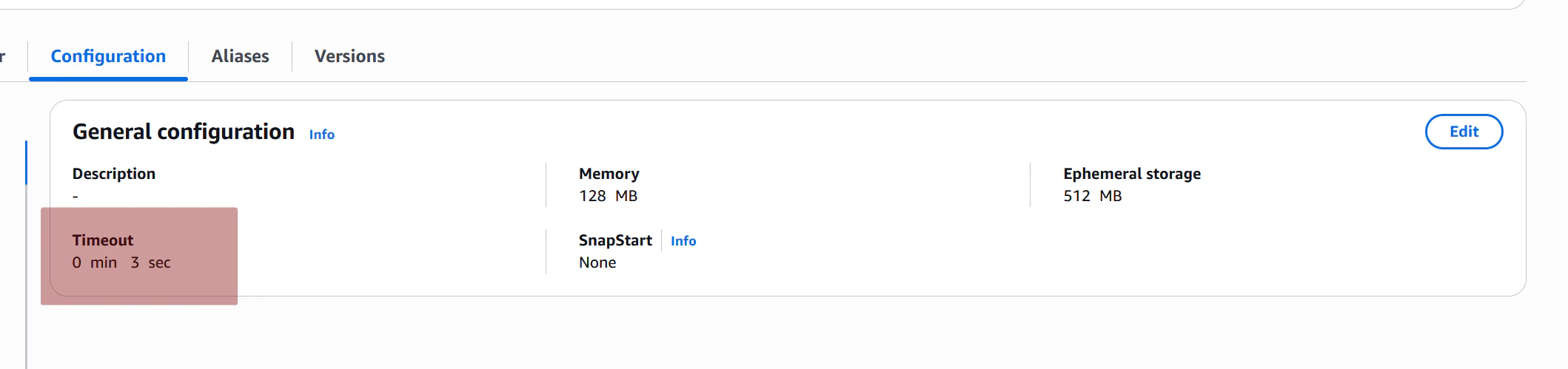
一般的に、Lambda のこのタイムアウト時間は以下のように理解されています:
handler コードの処理タイムアウト時間
しかし実際には、このタイムアウト時間の本質は
bootstrap が
/nextAPI をリクエストしてから/responseAPI を返すまでのタイムアウト時間
bootstrap のコードを修正して、/next API をリクエストした後に10秒 sleep して Invocation Stage のタイムアウトをシミュレートします。
#!/bin/sh
set -euo pipefail
echo "bootstrap is executed!"

# request /next api
HEADERS_FILE=$(mktemp)
RESPONSE=$(curl -sS -D "$HEADERS_FILE" "http://${AWS_LAMBDA_RUNTIME_API}/2018-06-01/runtime/invocation/next")
REQUEST_ID=$(grep -Fi Lambda-Runtime-Aws-Request-Id "$HEADERS_FILE" | tr -d '[:cntrl:]' | awk '{print $2}')
echo "The event data is: $RESPONSE"
echo "The Request ID is: $REQUEST_ID"

# Sleep 10s to make lambda invocation stage timeout
sleep 10s

LAMBDA_RESPONSE="{\"message\": \"Hello from bootstrap!\", \"echo\": $RESPONSE}"
curl -s -X POST "http://${AWS_LAMBDA_RUNTIME_API}/2018-06-01/runtime/invocation/$REQUEST_ID/response" -d "$LAMBDA_RESPONSE"

echo "Response sent successfully!"
curl でこの Lambda 関数を呼び出します。
time curl https://gpwttqecuedsmpnefqmotkx7dy0uhydr.lambda-url.ap-northeast-1.on.aws/               ─╯
Internal Server Error curl   0.03s user 0.01s system 1% cpu 3.140 total
結果は予想通りでした。
- 関数呼び出しはエラーとなり、
502 Internal Server Errorが返された - 関数呼び出しの合計所要時間は
3.140sで、設定したタイムアウト時間の3秒と一致。つまりbootstrapの10秒 sleep が正しく Invocation Stage タイムアウトをトリガーした
次に、この時の Lambda のログを重点的に確認します。
...
14:28:28.951 bootstrap is executed!
14:28:29.044 The event data is: xxxx
14:28:29.044 The Request ID is: 2703bbf7-5dfa-40e5-98bb-fdb55f6750c4
14:28:31.977 2026-02-13T14:28:31.977Z 2703bbf7-5dfa-40e5-98bb-fdb55f6750c4 Task timed out after 3.00 seconds
...
14:28:32.007 bootstrap is executed!
bootstrap が起動して /next API からイベントを取得した3秒後に3秒タイムアウトエラーがトリガーされたことがわかります。ログには Task timed out after 3.00 seconds というエラーが表示されました。
タイムアウトがトリガーされた後、Lambda はただちにユーザーに 502 Internal Server Error を返します。
その後 Lambda は bootstrap を強制終了して再起動します。ログの最後の 14:28:32.007 bootstrap is executed! からこの動作を確認できます。
これは、/response の返却がタイムアウトした後、Lambda が bootstrap を再起動して再度 /next API をリクエストさせブロック状態にし、次のユーザーリクエストの到着を待たせることを示しています。
まとめ
bootstrap が Invocation Stage でタイムアウトした場合、Lambda はただちにユーザーに 502 Internal Server Error を返し、bootstrap を中断して再起動を試みます。
再起動後の bootstrap は再度 /next API をリクエストします。以前のユーザーリクエストイベントは既にユーザーに返されているため、この /next API はブロックされ、次のユーザーリクエストが入るまで待機します。
/next を呼び出した後に再度 /next API を呼び出す場合
次に特殊なケースを考えます。bootstrap が /next API でユーザーリクエストイベントを取得した後、/response API を呼び出さずに複数回 /next API を呼び出してユーザーリクエストイベントを取得しようとした場合です。
この時の bootstrap の動作はどうなるでしょうか?
#!/bin/sh
set -euo pipefail

echo "bootstrap is executed!"
echo "Call /next API for the first time"

HEADERS_FILE=$(mktemp)
RESPONSE=$(curl -sS -D "$HEADERS_FILE" "http://${AWS_LAMBDA_RUNTIME_API}/2018-06-01/runtime/invocation/next")
# Get request id from next API header
REQUEST_ID=$(grep -Fi Lambda-Runtime-Aws-Request-Id "$HEADERS_FILE" | tr -d '[:cntrl:]' | awk '{print $2}')

echo "The event data is: $RESPONSE"
echo "The Request ID is: $REQUEST_ID"

echo "Call /next API for the second time"
HEADERS_FILE=$(mktemp)
RESPONSE=$(curl -sS -D "$HEADERS_FILE" "http://${AWS_LAMBDA_RUNTIME_API}/2018-06-01/runtime/invocation/next")
# Get request id from next API header
REQUEST_ID=$(grep -Fi Lambda-Runtime-Aws-Request-Id "$HEADERS_FILE" | tr -d '[:cntrl:]' | awk '{print $2}')

echo "The event data is: $RESPONSE"
echo "The Request ID is: $REQUEST_ID"

echo "Call /next API for the second time"
HEADERS_FILE=$(mktemp)
RESPONSE=$(curl -sS -D "$HEADERS_FILE" "http://${AWS_LAMBDA_RUNTIME_API}/2018-06-01/runtime/invocation/next")
# Get request id from next API header
REQUEST_ID=$(grep -Fi Lambda-Runtime-Aws-Request-Id "$HEADERS_FILE" | tr -d '[:cntrl:]' | awk '{print $2}')

echo "The event data is: $RESPONSE"
echo "The Request ID is: $REQUEST_ID"
上記のコードの Lambda 関数を実行すると、出力ログは以下の通りです:
08:53:55.145 INIT_START Runtime Version: provided:al2.v143 Runtime Version ARN: arn:aws:lambda:ap-northeast-1::runtime:64c84fb4abae0287749677ef42dbfb9c0b2bf4a3c7b1a638630bccc30cf04c7b
08:53:55.153 bootstrap is executed!
08:53:55.153 Call /next API for the first time
08:53:55.177 START RequestId: 60fa77a3-8a4c-439b-9121-3a210c52df18 Version: $LATEST
08:53:55.258 The event data is: xxx
08:53:55.258 The Request ID is: 60fa77a3-8a4c-439b-9121-3a210c52df18
08:53:55.258 Call /next API for the second time
08:53:55.458 The event data is: xxx
08:53:55.458 The Request ID is: 60fa77a3-8a4c-439b-9121-3a210c52df18
08:53:55.458 Call /next API for the second time
08:53:55.637 The event data is: xxx
08:53:55.637 The Request ID is: 60fa77a3-8a4c-439b-9121-3a210c52df18
08:53:55.640 RequestId: 60fa77a3-8a4c-439b-9121-3a210c52df18 Error: Runtime exited without providing a reason Runtime.ExitError
08:53:55.640 END RequestId: 60fa77a3-8a4c-439b-9121-3a210c52df18
08:53:55.640 REPORT RequestId: 60fa77a3-8a4c-439b-9121-3a210c52df18 Duration: 462.74 ms Billed Duration: 495 ms Memory Size: 128 MB Max Memory Used: 27 MB Init Duration: 31.65 ms
/next API をリクエストした後にすぐ再度 /next API を呼び出してもブロックされず、前回と同じユーザーイベントデータと Request ID が返されることがわかりました。
このメカニズムは次のことを意味しています:Lambda のイベント処理は /response API の呼び出し(または例外処理)を終了のマーカーとしており、それまでの間、Lambda は同じイベントデータを bootstrap に返し続けます。bootstrap が /response API を呼び出すか例外処理が終了するまで、この状態は続きます。
結論
/next API をリクエストした後にすぐ再度 /next API を呼び出してもブロックされず、前回と同じユーザーイベントデータと Request ID が返されます。これは Lambda のイベントと instance がバインドされていることを意味し、/response API でレスポンスを返すまで、または処理タイムアウトなどの理由で bootstrap が再起動されるまで、/next を複数回呼び出しても同じイベントデータと Request ID が返され、ブロックされません。
bootstrap で Invocation Stage のエラーを正しく処理する
Init Stage のエラー処理と同様に、Invocation Stage にもこのフェーズの処理失敗を Lambda に報告するための Runtime API があります:invocation error API
bootstrap はユーザーリクエストイベントの処理中にエラーが発生した場合、この API を呼び出して Lambda サービスに通知できます。
ただし Init Stage のエラーとは異なり、/invocation/next API を呼び出した後は、bootstrap を終了するのではなく、引き続き実行を続けて /next を呼び出し、次のイベントの処理を待つべきです。
これは論理的に理にかなっています。Init Stage のエラーは bootstrap が全く正常に動作できないことを意味するため、直接終了が推奨されます。一方、Invocation Stage のエラーはユーザーリクエストデータの処理中にエラーが発生したこと(例えば RDS のエラー、外部リクエストのエラーなどのビジネスロジックエラー)のみを意味し、bootstrap 自体の動作には影響しません。そのため、Invocation Stage のエラーが発生しても bootstrap を直接終了する必要はなく、次の /next API をリクエストして新しいイベントの処理を続ければよいのです。
以下は Invocation Stage エラーの処理をシミュレートする例です。完全な while ループのイベント処理を使用し、/next API をリクエストした後に直接 /invocation/error API を呼び出して Lambda サービスに今回のイベント処理が失敗したことを通知します。
Lambda に通知した後、bootstrap は引き続き実行を続けて /next API をリクエストし、次のイベントの到着を待ちます。
注意すべき点として、invocation error API の具体的なパスは
http://${AWS_LAMBDA_RUNTIME_API}/2018-06-01/runtime/invocation/${REQUEST_ID}/errorです。URL パスに失敗したリクエストのrequest-idを指定する必要があり、この ID は/nextAPI のレスポンスヘッダーLambda-Runtime-Aws-Request-Idから取得します。
#!/bin/sh
set -euo pipefail
echo "bootstrap is executed!"

HEADERS_FILE=$(mktemp)

while true; do
  echo "start to call /next api..."
  RESPONSE=$(curl -sS -D "$HEADERS_FILE" "http://${AWS_LAMBDA_RUNTIME_API}/2018-06-01/runtime/invocation/next")
  # Get request id from next API header
  REQUEST_ID=$(grep -Fi Lambda-Runtime-Aws-Request-Id "$HEADERS_FILE" | tr -d '[:cntrl:]' | awk '{print $2}')

  echo "The event data is: $RESPONSE"
  echo "The Request ID is: $REQUEST_ID"

  # simulate an error occurred when processing the event
  ERROR_JSON='{"errorMessage":"Error parsing event data.","errorType":"InvalidEventDataException","stackTrace":[]}'
  RESP=$(curl -sS -X POST "http://${AWS_LAMBDA_RUNTIME_API}/2018-06-01/runtime/invocation/$REQUEST_ID/error" \
  -H "Content-Type: application/json" \
  -H "Lambda-Runtime-Function-Error-Type: Unhandled" \
  -d "$ERROR_JSON")

  echo "Invocation error API response: $RESP"
done
この Lambda 関数を呼び出します。
curl https://xxxxxxxxxxxxxxxxxxxxxxxx.lambda-url.ap-northeast-1.on.aws
Internal Server Error curl   0.04s user 0.01s system 12% cpu 0.407 total
関数の返却結果はやはり 502 Internal Server Error です。次にログにどのような違いがあるか確認します。
09:49:58.061 bootstrap is executed!
09:49:58.063 start to call /next api...
09:49:58.164 The event data is: xxxxxxxxxx
09:49:58.164 The Request ID is: 0311825c-6689-46e7-a57d-6e3fc3b15ac8
09:49:58.285 Invocation error API response: {"status":"OK"}
09:49:58.285 start to call /next api...
09:49:58.367 END RequestId: 0311825c-6689-46e7-a57d-6e3fc3b15ac8
09:49:58.367 REPORT RequestId: 0311825c-6689-46e7-a57d-6e3fc3b15ac8 Duration: 283.82 ms Billed Duration: 314 ms Memory Size: 128 MB Max Memory Used: 27 MB Init Duration: 29.65 ms
観察の結果:
-
/invocation/errorAPI の呼び出しが成功した場合、API の返却値は{"status":"OK"} -
/invocation/errorAPI の呼び出しが成功した後、ログに runtime クラッシュなどのエラーは表示されない - Lambda サービスにエラー情報を送信した後、
bootstrapは引き続き/nextAPI をリクエストし、新しいユーザーリクエストがないため/nextAPI はブロックされ、次のユーザーリクエストが入るまで待機する
結論
Invocation Stage のエラーを正しく処理する方法は、/invocation/error API を呼び出して Lambda サービスに通知し、bootstrap を終了せずに引き続き実行を続けて次のイベントの到着を待つことです。
/invocation/error API の呼び出しが成功した場合、API の返却値は {"status":"OK"} であり、Lambda はログに runtime クラッシュなどのエラーを記録しません。
After Invocation Stage 例外:/response API リクエスト後、次の /next API リクエスト前の失敗
次に特殊なフェーズがあります。bootstrap が /response API を呼び出した後、次に /next API を呼び出す前にエラーが発生した場合はどうなるでしょうか。
このエラーを After Invocation Stage エラーと呼びます。
bootstrap のクラッシュ終了
同様に、bootstrap のコードを修正して、/response API を呼び出した後に直接 exit 1 で終了するようにします。
#!/bin/sh
set -euo pipefail

echo "bootstrap is executed!"

HEADERS_FILE=$(mktemp)

while true; do
  echo "now to call /next API"
  RESPONSE=$(curl -sS -D "$HEADERS_FILE" "http://${AWS_LAMBDA_RUNTIME_API}/2018-06-01/runtime/invocation/next")
  # Get request id from next API header
  REQUEST_ID=$(grep -Fi Lambda-Runtime-Aws-Request-Id "$HEADERS_FILE" | tr -d '[:cntrl:]' | awk '{print $2}')

  echo "The event data is: $RESPONSE"
  echo "The Request ID is: $REQUEST_ID"

  LAMBDA_RESPONSE="{\"message\": \"Hello from bootstrap!\", \"echo\": $RESPONSE}"
  curl -s -X POST "http://${AWS_LAMBDA_RUNTIME_API}/2018-06-01/runtime/invocation/$REQUEST_ID/response" -d "$LAMBDA_RESPONSE"

  echo "Response sent successfully!"
  exit 1
done
Lambda 関数を呼び出してみます。
time curl https://gpwttqecuedsmpnefqmotkx7dy0uhydr.lambda-url.ap-northeast-1.on.aws/
{"echo":{"headers":{"x-amzn-tls-cipher-suite":"TLS_AES_128_GCM_SHA.................}
curl   0.02s user 0.02s system 9% cpu 0.482 total
今回の関数呼び出しは成功しました。理由は簡単で、/response が正しく呼び出されたため、今回のリクエスト処理が完了し呼び出しが成功したのです。
しかし Lambda の bootstrap は /response API を呼び出した後にクラッシュ終了しました。具体的な動作をログで確認します。
09:54:39.254 INIT_START Runtime Version: provided:al2.v143 Runtime Version ARN: arn:aws:lambda:ap-northeast-1::runtime:64c84fb4abae0287749677ef42dbfb9c0b2bf4a3c7b1a638630bccc30cf04c7b
09:54:39.262 bootstrap is executed!
09:54:39.292 START RequestId: 1fb629bd-eb19-42c5-8866-145fa8b5e2d3 Version: $LATEST
09:54:39.373 The event data is: xxxxxxxxx
09:54:39.373 The Request ID is: 1fb629bd-eb19-42c5-8866-145fa8b5e2d3
09:54:39.472 {"status":"OK"}
09:54:39.473 Response sent successfully!, now to exit bootstrap
09:54:39.475 RequestId: 1fb629bd-eb19-42c5-8866-145fa8b5e2d3 Error: Runtime exited with error: exit status 1 Runtime.ExitError
09:54:39.475 END RequestId: 1fb629bd-eb19-42c5-8866-145fa8b5e2d3
09:54:39.475 REPORT RequestId: 1fb629bd-eb19-42c5-8866-145fa8b5e2d3 Duration: 183.01 ms Billed Duration: 221 ms Memory Size: 128 MB Max Memory Used: 27 MB Init Duration: 37.42 ms
09:54:39.513 INIT_START Runtime Version: provided:al2.v143 Runtime Version ARN: arn:aws:lambda:ap-northeast-1::runtime:64c84fb4abae0287749677ef42dbfb9c0b2bf4a3c7b1a638630bccc30cf04c7b
09:54:39.516 bootstrap is executed!
Lambda は bootstrap が /response API で送信したレスポンスを正しく受け取り、結果をユーザーに返したことがわかります。しかしその後 bootstrap がクラッシュしたため、Lambda は Runtime.ExitError エラーログを記録した後、bootstrap の再起動を試みます。
まとめ
bootstrap が After Invocation Stage でクラッシュ終了した場合:
-
/responseAPI が正しく呼び出されたため、Lambda は結果をユーザーに正しく返す - Lambda は
Runtime.ExitErrorエラーログを記録した後、bootstrapを再起動する
bootstrap の処理タイムアウト
/response API を呼び出した後、次に /next API をリクエストする前に bootstrap がタイムアウトした場合はどうなるでしょうか?また、このタイムアウト時間は具体的に何秒でしょうか?
bootstrap のコードを修正して、/response API を呼び出した後に15秒 sleep してタイムアウトをシミュレートします。
#!/bin/sh
set -euo pipefail

echo "bootstrap is executed!"

HEADERS_FILE=$(mktemp)

while true; do
  echo "now to call /next API"
  RESPONSE=$(curl -sS -D "$HEADERS_FILE" "http://${AWS_LAMBDA_RUNTIME_API}/2018-06-01/runtime/invocation/next")
  # Get request id from next API header
  REQUEST_ID=$(grep -Fi Lambda-Runtime-Aws-Request-Id "$HEADERS_FILE" | tr -d '[:cntrl:]' | awk '{print $2}')

  echo "The event data is: $RESPONSE"
  echo "The Request ID is: $REQUEST_ID"

  LAMBDA_RESPONSE="{\"message\": \"Hello from bootstrap!\", \"echo\": $RESPONSE}"
  curl -s -X POST "http://${AWS_LAMBDA_RUNTIME_API}/2018-06-01/runtime/invocation/$REQUEST_ID/response" -d "$LAMBDA_RESPONSE"

  echo "Response sent successfully!, now to sleep 15s"
  sleep 15
  echo "sleep 15s over"
done
Lambda 関数を呼び出してみます。
time curl https://gpwttqecuedsmpnefqmotkx7dy0uhydr.lambda-url.ap-northeast-1.on.aws/
{"echo":{"headers":{"x-amzn-tls-cipher-suite":"TLS_AES_128_GCM_SHA.................}
curl   0.02s user 0.02s system 9% cpu 0.482 total
/response API が正しく呼び出されたため、Lambda は結果をユーザーに正しく返します。これは前述の分析結果と一致しています。
次に対応するログを確認して、その後の Lambda の動作を見てみます。
......
09:59:35.749 bootstrap is executed!
09:59:35.749 now to call /next API
......
09:59:35.971 Response sent successfully!, now to sleep 15s
09:59:38.776 2026-02-14T09:59:38.776Z da9ab253-01f9-42e6-aabe-c3d94374b20f Task timed out after 3.00 seconds
09:59:38.776 END RequestId: da9ab253-01f9-42e6-aabe-c3d94374b20f
09:59:38.776 REPORT RequestId: da9ab253-01f9-42e6-aabe-c3d94374b20f Duration: 3004.24 ms Billed Duration: 3033 ms Memory Size: 128 MB Max Memory Used: 27 MB Init Duration: 32.33 ms
09:59:38.848 INIT_START Runtime Version: provided:al2.v143 Runtime Version ARN: arn:aws:lambda:ap-northeast-1::runtime:64c84fb4abae0287749677ef42dbfb9c0b2bf4a3c7b1a638630bccc30cf04c7b
09:59:38.851 bootstrap is executed!
以下が観察されます:
09:59:38.776 2026-02-14T09:59:38.776Z da9ab253-01f9-42e6-aabe-c3d94374b20f Task timed out after 3.00 seconds
この時のタイムアウト時間は Lambda 関数の設定されたタイムアウト時間によって制御されていることがわかります。仮説を検証するため、AWS Console で関数のタイムアウト時間を30秒に変更して再度 Lambda をリクエストします。今回のログは以下を示しています:
......
10:04:08.780 Response sent successfully!, now to sleep 15s
10:04:23.802 sleep 15s over
10:04:23.802 now to call /next API
......
Lambda 関数のタイムアウト時間を30秒に変更した後、bootstrap はタイムアウトしなくなったことがわかります。15秒の sleep を完了した後、bootstrap は正常に次の /next API を呼び出すことができました。
まとめ
bootstrap が After Invocation Stage でタイムアウトした場合:
- タイムアウト時間は Lambda 関数の設定されたタイムアウト時間によって制御される
- タイムアウトした場合、Lambda は
Task timed out afterログを記録した後、bootstrapを再起動する - タイムアウトしなかった場合、Lambda は
bootstrapの実行を継続し、次のユーザーリクエストの到着を待つ
まとめ
ここまでで Lambda の bootstrap の例外処理の分析は完了しました。実に長く退屈なプロセスでした(私もそう思います)。
しかし、これは Lambda の実行フローとメカニズムを明確に理解するために非常に重要であり、今後カスタム Lambda Runtime を作成する際にも重要な指針となります。
この記事を終え、最も基本的な Lambda Runtime API と bootstrap メカニズムを理解したところで、次回からはより実践的で興味深い内容に入っていきます。
- Lambda 公式 Runtime の実装メカニズムの分析
- Lambda の設定で定義する handler(例:
index.handler)が、実際にどのようにファイルや関数と紐付けられるのか - Handler Wrapper メカニズムはどのように実装されているのか
- など