
その1 URL https://qiita.com/Wing2C1/items/6b3a522803a0fc8eaab4
その2 URL https://qiita.com/Wing2C1/items/216691583c1767c60d70
その3 URL https://qiita.com/Wing2C1/items/e11cf2e2ce938205d130
今回の記事にあたっての画像や記述は基本2025/12/04のときのものであることを断っておこう。
9.コンテストとクイズ、提出も添えて
とうとうメインコンテンツ。コンテストとクイズについてのアプリを書いていきましょうかね。
では、まず問題文を作成するに当たって、markdown式はとても便利だ。例えば、Qiitaでは以下のページから何ができるかわかる。
というわけで、ターミナル上でpythonのvenvを有効化することを忘れないようにしつつ、
pip install django-markdownx
を行う。また、settings.pyに以下を追記する。
MARKDOWNX_MARKDOWN_EXTENSIONS = [
    'markdown.extensions.extra',
    'markdown.extensions.admonition',
    'markdown.extensions.codehilite',
]
MARKDOWNX_UPLOAD_MAX_SIZE = 5242880
また、markdownxはdjango内では一種のアプリ扱いのため
INSTALLED_APPS = [
    'django.contrib.admin',
    'django.contrib.auth',
    'django.contrib.contenttypes',
    'django.contrib.sessions',
    'django.contrib.messages',
    'django.contrib.staticfiles',

    'markdownx', #<- 追加
    'home',
    'accounts',
]
また、同じように
urlpatterns = [
    path('admin/', admin.site.urls),
    path('markdownx/', include('markdownx.urls')), #<- 追加
    path('', include('home.urls')),
    path('accounts/', include('accounts.urls')),
    path('contests/', include('contests.urls')),
]
にも追加しよう。
Dockerの導入
今回は、ソースコードを提出してもらいサーバーで採点して結果を出す方式だ。
しかし、ソースコードが悪意あるコードの可能性がある。例えばディレクトリを遡って秘密のファイルを見るディレクトリトラバーサルや、普通にメモリを食わせてサーバーをダウンさせるかもしれない。そのため、サンドボックス環境内で行うことによりホストマシンへの影響を抑えつつ実行すれば安全に確認することができる。そのため、サンドボックス環境を実現するためDocker(ドッカー)を導入する。Dockerは、インフラ関係やDevOps界隈で注目されている技術の一つで、Docker社が開発している、コンテナ型の仮想環境を作成、配布、実行するためのプラットフォームのことだ。

詳しいことは説明すると長くなるので、ある程度割愛する。
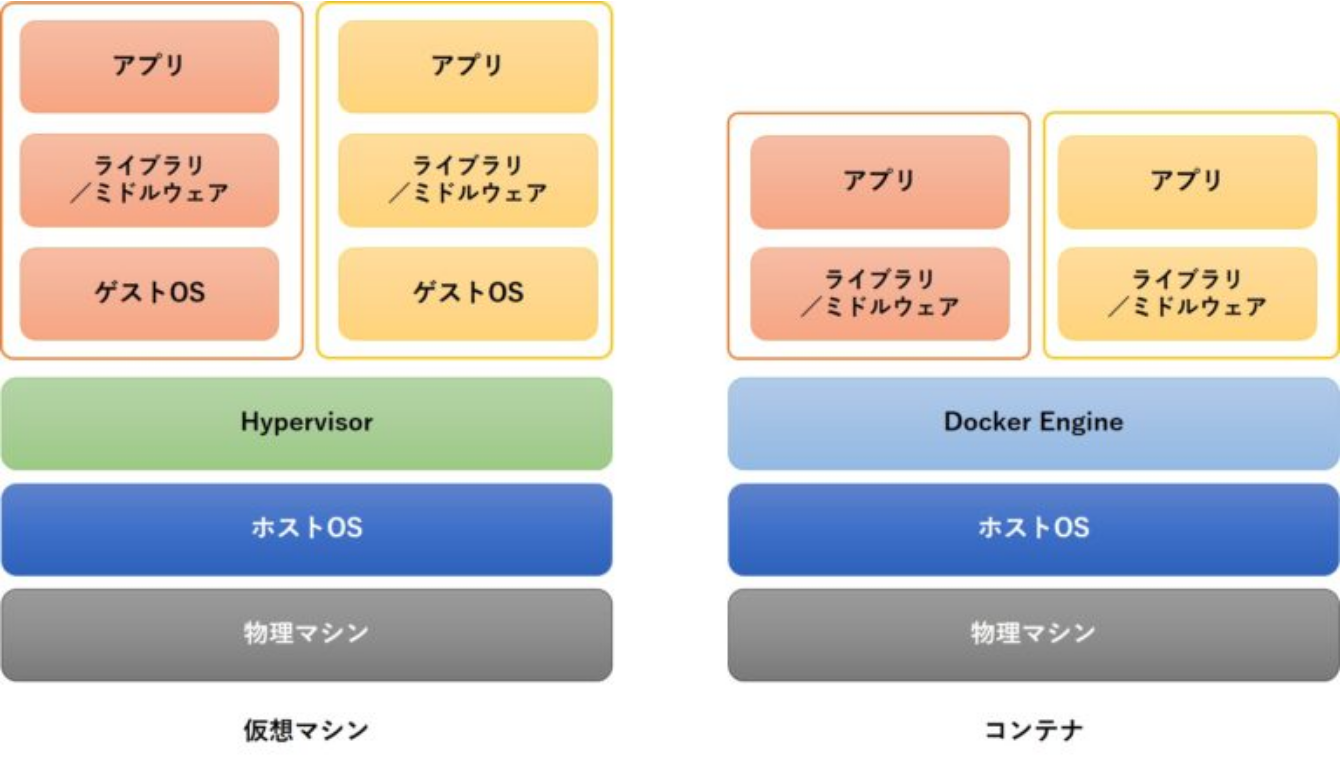
コンテナとは、アプリケーションを実行するための実行環境をパッケージ化した技術のことだ。アプリケーションとその依存関係(必要なライブラリや設定など)を一つのまとまりにし、それを軽量でスケール可能な形式にパッケージ化する。これにより、コンテナを使うことでアプリケーションの環境に依存せず、どんな環境でも同じように動作させることができる。
仮想化としては、VirtualBoxを用いたものとよく比べられるが、Dockerはカーネルを共有するため、VMと比較してリソース消費が格段に少なく、数秒で起動できる。ただ、カーネルを共有するなど高い独立性は持っていないためセキュリティをよく見ないと乗っ取られる可能性があるなどがある。下の画像は大体のイメージ。概観だけで結構。
以下でダウンロード。
sudo install -m 0755 -d /etc/apt/keyrings
curl -fsSL https://download.docker.com/linux/debian/gpg | sudo gpg --dearmor -o /etc/apt/keyrings/docker.gpg
sudo chmod a+r /etc/apt/keyrings/docker.gpg
echo \
  "deb [arch=$(dpkg --print-architecture) signed-by=/etc/apt/keyrings/docker.gpg] \
  https://download.docker.com/linux/debian \
  $(. /etc/os-release && echo "$VERSION_CODENAME") stable" | \
  sudo tee /etc/apt/sources.list.d/docker.list > /dev/null
sudo apt update
sudo apt install docker-ce docker-ce-cli containerd.io docker-buildx-plugin docker-compose-plugin
これを簡単に言うと、
aptにはデフォルトで入っていないため、鍵を置くディレクトリを作成し、その公開鍵を取得してaptにインストールするため、信頼できる鍵としてバイナリ化して保管する。
その後、aptがアクセスできるように権限を変更し、リポジトリを追加していく。そのリポジトリが正しいものであると保証するために公式サイトからもらった鍵を使って署名する。そうすることによって正しく認識され、インストールができるようになり、インストールするという挙動になっている。
dockerが行う動作について、cpserverに権限を求められることがあるため、以下のコマンドでdockerグループにcpserverを追加する。
sudo usermod -aG docker cpserver
usermodはユーザーアカウントの情報を変更するためのコマンド。-aでAppend(追加)して、-Gでグループに追加する。その対象としてcpserverを指定している。
コンテナでは、実行環境をひとまとめにした設計書である「イメージ」がある。これを用いることで、そのコンテナを作成することができるのだ。今回はC, C++, Pythonを実行環境で作成したいため、そのイメージと、タイムアウト用にubuntuイメージを入れておく。
docker pull gcc:12
docker pull ubuntu:24.04
docker pull python:3.11-slim
Celery+Redisの導入
ソースコードからいろいろなケースに対して正しいものとしてチェックするには長い時間が必要だ。そのため、非同期処理と言われるものを行うことで、後ろでチェックしつつこっちは別作業できるようにしたい。
そこで、Celery(セロリ)と言われるものを用いる。Celeryは、Pythonで書かれた分散タスクキューフレームワークのことだ。非同期で実行したいタスクを管理し、実際にタスクを実行するワーカープロセスに仕事を割り振る。簡単に言うと、時間のかかる処理をメインのアプリケーションから切り離し、バックグラウンドで処理させるためのシステムとして、これがよく使われる。

Redis(レディス)とは、アプリケーションから送られてきたタスクの情報(タスク名、引数など)を一時的にキュー(待ち行列)として保持する。ここで、Celeryワーカーがこれを順番に取っていくことにより、高速で処理を行えるのだ。

以下でダウンロード。
pip install celery
pip install redis
そして、以下を実行する。
sudo apt install redis-server
sudo systemctl enable redis-server
sudo systemctl start redis-server
Redisは特別な設定がいらないためすぐ永続化して良い。
また、celeryのサービスファイルを作成する。
[Unit]
Description=Celery Worker for CPsite
After=network.target

[Service]
Type=simple
User=cpserver
Group=cpserver
WorkingDirectory=/home/cpserver/workdir/CPsite
Environment=PYTHONPATH=/home/cpserver/workdir/CPsite
Environment=PATH=/home/cpserver/workdir/venv/bin
Environment=DJANGO_SETTINGS_MODULE=CPsite.settings
Environment=PATH=/home/cpserver/workdir/venv/bin:/usr/local/bin:/usr/bin:/bin
ExecStart=/home/cpserver/workdir/venv/bin/celery -A CPsite worker --loglevel=INFO
Restart=always

[Install]
WantedBy=multi-user.target
次に、CPsiteのプロジェクト起動時に起動するため、init.pyを編集する。
from .celery import app as celery_app  # celery.py に定義した Celery アプリを読み込む

__all__ = ('celery_app',)  # このモジュールが公開する属性として celery_app を指定
そして、
import os
from celery import Celery

# Django の設定ファイルを環境変数に設定
# (Celery 実行時に Django の設定を読み込むために必須)
os.environ.setdefault('DJANGO_SETTINGS_MODULE', 'CPsite.settings')

# Celery アプリケーションのインスタンス作成
# 'CPsite' は Celery プロジェクト名(任意)
app = Celery('CPsite')

# Django の settings.py から "CELERY_" で始まる設定を読み込む
app.config_from_object('django.conf:settings', namespace='CELERY')

# Django アプリケーション内の tasks.py を自動検出してロードする
app.autodiscover_tasks()
そのあと、daemonに読み込ませて起動する。
sudo systemctl daemon-reload
sudo systemctl enable celery.service
sudo systemctl start celery.service
sudo systemctl status celery.service
● celery.service - Celery Worker for CPsite
     Loaded: loaded (/etc/systemd/system/celery.service; enabled; preset: enabled)
     Active: active (running) since Wed 2025-12-03 23:30:04 JST; 2h 0min ago
 Invocation: 528bb597a8634d8cb057d8b3c307cf7a
   Main PID: 922 (celery)
      Tasks: 4 (limit: 4620)
     Memory: 176M (peak: 177.8M)
        CPU: 28.895s
     CGroup: /system.slice/celery.service
             tq 922 /home/cpserver/workdir/venv/bin/python3 /home/cpserver/workdir/venv/bin/celery -A CPsite worker --loglevel=INFO
             tq1857 /home/cpserver/workdir/venv/bin/python3 /home/cpserver/workdir/venv/bin/celery -A CPsite worker --loglevel=INFO
             tq1906 /home/cpserver/workdir/venv/bin/python3 /home/cpserver/workdir/venv/bin/celery -A CPsite worker --loglevel=INFO
             mq1922 /home/cpserver/workdir/venv/bin/python3 /home/cpserver/workdir/venv/bin/celery -A CPsite worker --loglevel=INFO

12月 03 23:30:09 CP-server celery[922]: --- ***** -----
12月 03 23:30:09 CP-server celery[922]:  -------------- [queues]
12月 03 23:30:09 CP-server celery[922]:                 .> celery           exchange=celery(direct) key=celery
12月 03 23:30:09 CP-server celery[922]:
12月 03 23:30:09 CP-server celery[922]: [tasks]
12月 03 23:30:09 CP-server celery[922]:   . contests.tasks.submit_to_judge
12月 03 23:30:10 CP-server celery[922]: [2025-12-03 23:30:10,262: INFO/MainProcess] Connected to redis://localhost:6379/0
12月 03 23:30:10 CP-server celery[922]: [2025-12-03 23:30:10,270: INFO/MainProcess] mingle: searching for neighbors
12月 03 23:30:11 CP-server celery[922]: [2025-12-03 23:30:11,282: INFO/MainProcess] mingle: all alone
12月 03 23:30:11 CP-server celery[922]: [2025-12-03 23:30:11,347: INFO/MainProcess] celery@CP-server ready.
また、以下を追記しよう。
from django.contrib.messages import constants as message_constants

MESSAGE_LEVEL = message_constants.WARNING

CELERY_BROKER_URL = 'redis://localhost:6379/0'
CELERY_RESULT_BACKEND = 'redis://localhost:6379/1'
CELERY_ACCEPT_CONTENT = ['json']
CELERY_TASK_SERIALIZER = 'json'
主に、messageコンテンツの内容表示するのはWARNING以上であること。また、Celeryがタスクの情報を受け取るための場所と、Celeryワーカーが受け入れるタスクのコンテンツタイプを指定している。
実装
あとは、やるだけでしょう。コンテストアプリを作成する。
python3 manage.py startapp contests
...
INSTALLED_APPS = [
    'django.contrib.admin',
    'django.contrib.auth',
    'django.contrib.contenttypes',
    'django.contrib.sessions',
    'django.contrib.messages',
    'django.contrib.staticfiles',

    'markdownx',
    'home',
    'accounts',
    'contests', #<- 追加
]
...
...
urlpatterns = [
    path('admin/', admin.site.urls),
    path('', include('home.urls')),
    path('accounts/', include('accounts.urls')),
    path('contests/', include('contests.urls')),
]
...
ここまでは、言わなくてもやれるはずです。
今回は、コンテストアプリに、コンテストモデル、クイズモデル、提出履歴モデルを作成してみることにしよう。また、クイズの正解などを表すステータスはatcoer準拠とし、以下を参照した。
from django.db import models
from django.conf import settings
from django.utils import timezone
from django.utils.text import slugify
from markdownx.models import MarkdownxField
from django.core.exceptions import ValidationError
from django.core.validators import MinValueValidator
from decimal import Decimal, InvalidOperation
import math

# settings.AUTH_USER_MODEL を使ってカスタムユーザーモデルを参照
User = settings.AUTH_USER_MODEL

class Contest(models.Model):
    title = models.CharField(max_length=200)
    slug = models.SlugField(unique=True, max_length=200, blank=True)  # 自動生成
    description = MarkdownxField(blank=True)  # Markdownx を使った説明文
    is_permanent = models.BooleanField(default=False)  # 常設コンテストかどうか
    start_time = models.DateTimeField(null=True, blank=True)  # 開始日時(未設定可)
    end_time = models.DateTimeField(null=True, blank=True)    # 終了日時(未設定可)
    created_at = models.DateTimeField(auto_now_add=True)
    updated_at = models.DateTimeField(auto_now=True)

    class Meta:
        ordering = ['-created_at']  # 作成日の降順で並べる

    def __str__(self):
        return self.title

    def clean(self):
        # start_time と end_time の整合性チェック(両方存在する場合は start <= end)
        if self.start_time and self.end_time and self.start_time > self.end_time:
            raise ValidationError({'end_time': 'end_time must be after start_time'})

    def save(self, *args, **kwargs):
        # slug が未設定なら title から slug を自動生成し、衝突があれば -1, -2 ... を付与する
        if not self.slug:
            base = slugify(self.title)[:180]
            slug = base
            counter = 1
            # 同じ slug が存在する場合は末尾に番号を付けてユニーク化
            while Contest.objects.filter(slug=slug).exclude(pk=getattr(self, 'pk', None)).exists():
                slug = f"{base}-{counter}"
                counter += 1
            self.slug = slug
        super().save(*args, **kwargs)

    def is_active(self):
        """コンテストが現在アクティブか判定するユーティリティ"""
        if self.is_permanent:
            return True
        now = timezone.now()
        if self.start_time and self.end_time:
            return self.start_time <= now < self.end_time
        if self.start_time and not self.end_time:
            return self.start_time <= now
        if not self.start_time and self.end_time:
            return now < self.end_time
        return False

    def is_started(self):
        """コンテストが開始済みかどうか(常設は常に開始済み扱い)"""
        if self.is_permanent:
            return True
        if self.start_time:
            return timezone.now() >= self.start_time
        return False

    def can_earn_points(self):
        """ポイント獲得可能か(ここでは is_active をそのまま返す)"""
        return self.is_active()


class Quiz(models.Model):
    # 採点方式の定義
    PROBLEM_EXACT = 'exact'
    PROBLEM_ABS_TOL = 'abs_tol'
    PROBLEM_TYPE_CHOICES = [
        (PROBLEM_EXACT, 'Exact output match'),
        (PROBLEM_ABS_TOL, 'Numeric absolute tolerance (|expected-actual| <= 10^-n)'),
    ]

    contest = models.ForeignKey(Contest, on_delete=models.CASCADE, related_name='quizzes')
    title = models.CharField(max_length=200)
    author = models.CharField(max_length=200)
    slug = models.SlugField(max_length=200, blank=True)  # contest と合わせてユニークにする
    description = MarkdownxField(blank=True)
    explanation = MarkdownxField(blank=True)
    # テストケース(公開・非公開ともに JSONField のリストを期待)
    sample_case = models.JSONField(default=list, help_text='例: [{"input":"1 2\\n","output":"3\\n"},...]')
    secret_case = models.JSONField(default=list, help_text='非公開テストケース')
    battle_point = models.PositiveIntegerField(default=0, validators=[MinValueValidator(0)])

    time_limit_seconds = models.PositiveIntegerField(default=2, validators=[MinValueValidator(1)],
                                                   help_text='実行時間上限(秒)')
    memory_limit_mb = models.PositiveIntegerField(default=256, validators=[MinValueValidator(1)],
                                                  help_text='メモリ上限(MiB)')

    # 採点設定
    problem_type = models.CharField(max_length=20, choices=PROBLEM_TYPE_CHOICES, default=PROBLEM_EXACT)
    # abs_tol の場合に使う誤差指数 n(許容誤差 = 10**(-n))
    tolerance_exponent = models.IntegerField(null=True, blank=True,
                                             help_text='許容誤差の指数 n。誤差 <= 10^(-n) と解釈。例: n=3 -> 0.001')

    created_at = models.DateTimeField(auto_now_add=True)
    updated_at = models.DateTimeField(auto_now=True)

    class Meta:
        ordering = ['-created_at']
        # contest ごとに slug をユニークに保つ制約
        constraints = [
            models.UniqueConstraint(fields=['contest', 'slug'], name='unique_quiz_slug_per_contest')
        ]

    def __str__(self):
        return f"{self.contest.title} / {self.title}"

    def save(self, *args, **kwargs):
        # slug 自動生成(contest 内で一意になるように調整)
        if not self.slug:
            base = slugify(self.title)[:180]
            slug = base
            counter = 1
            while Quiz.objects.filter(contest=self.contest, slug=slug).exclude(pk=getattr(self, 'pk', None)).exists():
                slug = f"{base}-{counter}"
                counter += 1
            self.slug = slug
        super().save(*args, **kwargs)

    def clean(self):
        # sample_case / secret_case の中身が期待した形式(list of {"input","output"})かチェック
        for field in ('sample_case', 'secret_case'):
            val = getattr(self, field)
            if val is None:
                continue
            if not isinstance(val, list):
                raise ValidationError({field: 'must be a list of {"input","output"} objects'})
            for i, item in enumerate(val):
                if not isinstance(item, dict) or 'input' not in item or 'output' not in item:
                    raise ValidationError({field: f'item {i} must be an object with \"input\" and \"output\"'})
                # input/output は文字列であることを期待
                if not isinstance(item['input'], (str,)) or not isinstance(item['output'], (str,)):
                    raise ValidationError({field: f'item {i} \"input\" and \"output\" must be strings'})

        # problem_type と tolerance_exponent の整合性チェック
        if self.problem_type == self.PROBLEM_ABS_TOL and (self.tolerance_exponent is None):
            raise ValidationError({'tolerance_exponent': 'tolerance_exponent is required for abs_tol problem type'})
        if self.problem_type != self.PROBLEM_ABS_TOL and self.tolerance_exponent is not None:
            # 無効な組み合わせはエラーにする(自動でクリアする実装にしたければここを変更)
            raise ValidationError({'tolerance_exponent': 'tolerance_exponent only valid when problem_type is abs_tol'})

    def is_explanation_visible(self):
        """解説を表示して良いかの判定(常設コンテストは常に可、終了後は可)"""
        if self.contest.is_permanent:
            return True
        if self.contest.end_time:
            return timezone.now() >= self.contest.end_time
        return False

    @staticmethod
    def _normalize_output(s: str) -> str:
        """
        出力の正規化:
        - None を空文字に変換
        - CR を除去、前後トリム
        - 行末の空白を削除
        - 末尾の空行を削除
        """
        if s is None:
            return ''
        text = str(s).replace('\r','').strip()
        lines = [ln.rstrip() for ln in text.splitlines()]
        # 末尾の空行を取り除く
        while lines and lines[-1] == '':
            lines.pop()
        return "\n".join(lines)

    @classmethod
    def compare_expected_and_actual(cls, expected: str, actual: str) -> bool:
        """完全一致判定(正規化して比較)"""
        return cls._normalize_output(expected) == cls._normalize_output(actual)

    @staticmethod
    def _is_number(s: str):
        """文字列が Decimal で数値に変換可能か判定(整数・小数対応)"""
        try:
            Decimal(str(s).strip())
            return True
        except (InvalidOperation, ValueError, TypeError):
            return False

    @classmethod
    def _float_diff_ok(cls, expected: str, actual: str, tol: float) -> bool:
        """
        数値比較(絶対誤差):
        - Decimal を使って差を計算し tol 以下かどうか判定
        - 数値に変換できなければ False を返す(呼び出し元でフォールバック可能)
        """
        try:
            e = Decimal(str(expected).strip())
            a = Decimal(str(actual).strip())
        except (InvalidOperation, ValueError, TypeError):
            return False
        diff = abs(e - a)
        return diff <= Decimal(str(tol))

    def check_output(self, expected: str, actual: str) -> bool:
        """
        単一テストケースの判定ロジック:
        - problem_type == exact: 正規化して完全一致
        - problem_type == abs_tol: 数値なら絶対誤差 <= 10^(-n) を判定、数値でなければ正規化比較にフォールバック
        """
        if self.problem_type == self.PROBLEM_EXACT:
            return self.compare_expected_and_actual(expected, actual)

        if self.problem_type == self.PROBLEM_ABS_TOL:
            # 許容誤差 tol = 10**(-n)
            tol = Decimal('1e-' + str(int(self.tolerance_exponent)))
            # どちらも単一の数値文字列であれば数値比較
            if self._is_number(expected) and self._is_number(actual):
                return self._float_diff_ok(expected, actual, tol)
            # フォールバック:テキスト比較
            return self.compare_expected_and_actual(expected, actual)

    def evaluate_submission(self, actual_outputs: list):
        """
        提出の評価(全テストケース):
        - actual_outputs: 提出者の出力文字列のリスト(テストケース順)
        - 戻り値: {'results': [True/False,...], 'passed': int, 'total': int}
        注意: 呼び出し元で actual_outputs の長さがテストケース数と一致するか(または不足時の扱い)を管理すること。
        """
        testcases = list(self.sample_case) + list(self.secret_case)
        results = []
        for i, tc in enumerate(testcases):
            expected = tc.get('output', '')
            # actual_outputs が足りないときは空文字を使用して False 扱いになる可能性あり
            actual = actual_outputs[i] if i < len(actual_outputs) else ''
            ok = self.check_output(expected, actual)
            results.append(ok)
        return {
            'results': results,
            'passed': sum(1 for r in results if r),
            'total': len(results)
        }

class Submission(models.Model):
    # ステータス定義
    STATUS_PENDING = 'pending'
    STATUS_RUNNING = 'running'
    STATUS_DONE = 'done'
    STATUS_ERROR = 'error'
    STATUS_CHOICES = [
        (STATUS_PENDING, 'Pending'),
        (STATUS_RUNNING, 'Running'),
        (STATUS_DONE, 'Done'),
        (STATUS_ERROR, 'Error'),
    ]

    # 言語定義
    LANG_C = 'c'
    LANG_CPP = 'cpp'
    LANG_PY3 = 'python3'
    LANGUAGE_CHOICES = [
        (LANG_C, 'C'),
        (LANG_CPP, 'C++'),
        (LANG_PY3, 'Python 3'),
    ]

    user = models.ForeignKey(User, on_delete=models.CASCADE, related_name='submissions')
    quiz = models.ForeignKey('Quiz', on_delete=models.CASCADE, related_name='submissions')
    source = models.TextField(blank=True)       # 提出したソースコード
    language = models.CharField(max_length=20, choices=LANGUAGE_CHOICES, default=LANG_PY3)
    created_at = models.DateTimeField(auto_now_add=True)
    status = models.CharField(max_length=20, choices=STATUS_CHOICES, default=STATUS_PENDING)
    # results は new format と old format の両方を扱える(dict を期待)
    results = models.JSONField(null=True, blank=True)  # {'results':[True,...], 'passed':int, 'total':int}
    awarded_points = models.IntegerField(default=0)   # 授与されたポイント
    error_message = models.TextField(blank=True)
    job_id = models.CharField(max_length=128, null=True, blank=True, db_index=True)

    class Meta:
        ordering = ['-created_at']

    def get_result_rows(self, user=None):
        """
        テンプレート向けに表示しやすい結果行のリストを返すユーティリティ。
        - 新形式: self.results['testcases'] が [{kind,status,note}, ...] のリスト
        - 旧形式: self.results['results'] が [True, False, ...] のみ(boolean list)
        戻り値の各要素は {'kind': 'sample'|'secret', 'status': 'AC'|'WA'|..., 'note': '補足'}
        """
        res = self.results or {}
        # 新形式があればそのまま正規化して返す
        testcases = res.get('testcases')
        if isinstance(testcases, list) and testcases and isinstance(testcases[0], dict):
            # defensive copy(外部からの変更を防ぐためコピーして返す)
            return [dict(tc) for tc in testcases]

        # 旧形式(boolean 配列)にフォールバック
        bools = res.get('results')
        if not isinstance(bools, list):
            return []

        sample_count = len(self.quiz.sample_case or [])
        rows = []
        for i, val in enumerate(bools):
            kind = 'sample' if i < sample_count else 'secret'
            status = 'AC' if bool(val) else 'WA'
            rows.append({'kind': kind, 'status': status, 'note': ''})
        return rows
(venv) cpserver@CP-server:~/workdir/CPsite$ python3 manage.py makemigrations contests
Migrations for 'contests':
  contests/migrations/0001_initial.py
    + Create model Contest
    + Create model Quiz
    + Create model Submission
    + Create constraint unique_quiz_slug_per_contest on model quiz
(venv) cpserver@CP-server:~/workdir/CPsite$ python3 manage.py migrate
Operations to perform:
  Apply all migrations: accounts, admin, auth, contenttypes, contests, sessions
Running migrations:
  Applying contests.0001_initial... OK
あと、markdownに、数式を表示させてみたいと考えてみました。
$$
\int_{0}^{\frac{\pi}{2}} \frac{\sin^{2026}(x)}{\sin^{2026}(x) + \cos^{2026}(x)} \ dx
$$
上記のような形。(ちなみに答えは$\frac{\pi}{4}$)
そのため、$などで囲まれている部分に対して数式のレンダリングをするため、その囲まれている部分の監視を行うスクリプトを書いてみましょう。
ちなみに、これはTexと呼ばれるドナルド・クヌース氏が開発した、高度な組版を行うためのシステム(組版処理システム)で、複雑な数式でもきれいに書ける。その中でも、これはKatexと呼ばれるもので、ウェブサイトで数式をきれいに表示できるソフトウェアだ。
document.addEventListener("DOMContentLoaded", function() {
    // DOM (HTML要素のツリー) の読み込みが完了した後に処理を開始

    // KaTeX の描画オプションを設定
    const katexOptions = {
        delimiters: [
            // 数式をブロック要素 (独立した行) として表示するための区切り文字
            { left: "$$", right: "$$", display: true },
            { left: "\\[", right: "\\]", display: true },
            // 数式をインライン要素 (文中に埋め込み) として表示するための区切り文字
            { left: "$",  right: "$",  display: false },
            { left: "\\(", right: "\\)", display: false }
        ],
        throwOnError: false,     // 無効な LaTeX コードがあっても処理を中断せず、続行する
        errorColor: "#f00"       // エラー表示の色を赤 (#f00) に設定する
    };

    // すべての Markdownx プレビュー要素を取得する
    const previews = document.querySelectorAll(".markdownx-preview");
    if (previews.length === 0) {
        return; // ページにプレビュー要素がなければ、ここで処理を終了
    }

    // 特定の要素内の数式を描画する関数
    function renderPreview(el) {
        // グローバル関数を呼び出して数式を描画
        renderMathInElement(el, katexOptions);
    }

    // 初回描画: ページロード時に存在するすべてのプレビュー要素の数式を描画する
    previews.forEach(el => renderPreview(el));

    // 各プレビュー要素に対して MutationObserver を設定し、要素の変更時に再描画する
    previews.forEach(el => {
        // MutationObserver: DOMツリーへの変更を監視するためのインターフェース
        const observer = new MutationObserver((mutationsList, obs) => {
            // DOM変更 (Mutation) が発生した時の処理

            // 無限ループを防ぐため、一時的に監視を解除する
            obs.disconnect();
            // 数式を再描画する
            renderPreview(el);
            // 再び監視を開始する (子要素の追加/削除、子孫要素の変更を監視)
            obs.observe(el, { childList: true, subtree: true });
        });
        // 監視を開始する (子要素の追加/削除、子孫要素の変更を監視)
        observer.observe(el, { childList: true, subtree: true });
    });
});
その後、manage.pyと同じディレクトリ内でこれを実行。
python3 manage.py collectstatic
adminの管理画面には優秀なことにプレビュー機能がついているので、そこに表示させる。
from django.contrib import admin
from markdownx.admin import MarkdownxModelAdmin
from django import forms
from .models import Contest, Quiz, Submission
from django.utils.html import format_html, mark_safe

# Quiz 管理用のフォーム:tolerance_exponent のバリデーションを追加
class QuizAdminForm(forms.ModelForm):
    class Meta:
        model = Quiz
        fields = '__all__'

    def clean(self):
        # 基底の clean を呼び出してから追加チェック
        cleaned = super().clean()
        problem_type = cleaned.get('problem_type')
        tol = cleaned.get('tolerance_exponent')

        # problem_type が "絶対誤差(ABS_TOL)" の場合、誤差指数 n(tolerance_exponent)は必須
        if problem_type == Quiz.PROBLEM_ABS_TOL and tol in (None, ''):
            raise forms.ValidationError({
                'tolerance_exponent': 'abs_tol のときは誤差指数 n を必ず指定してください(許容誤差 = 10^(-n)) 。'
            })

        # problem_type が abs_tol 以外なら tolerance_exponent は使わないので null に戻す
        if problem_type != Quiz.PROBLEM_ABS_TOL and tol is not None:
            cleaned['tolerance_exponent'] = None

        return cleaned


# Contest モデルの管理画面カスタマイズ
@admin.register(Contest)
class ContestAdmin(MarkdownxModelAdmin):
    # 管理一覧で表示するカラム
    list_display = ('title', 'is_permanent', 'start_time', 'end_time', 'created_at')
    # 絞り込み用のフィルタ
    list_filter = ('is_permanent', 'created_at')
    # 検索対象フィールド
    search_fields = ('title', 'description')
    # 管理画面のフィールド配置(セクションごと)
    fieldsets = (
        ('基本情報', {'fields': ('title', 'description')}),
        ('開催設定', {'fields': ('is_permanent', 'start_time', 'end_time')}),
    )

    # 管理画面で追加する外部 CSS/JS(ここでは KaTeX を読み込み、Markdownx 内で数式レンダリング等を有効化)
    class Media:
        css = {'all': ['https://cdn.jsdelivr.net/npm/katex@0.16.9/dist/katex.min.css']}
        js = [
            'https://cdn.jsdelivr.net/npm/katex@0.16.9/dist/katex.min.js',
            'https://cdn.jsdelivr.net/npm/katex@0.16.9/dist/contrib/auto-render.min.js',
            'js/markdownx-katex.js',
        ]


# Quiz モデルの管理画面カスタマイズ
@admin.register(Quiz)
class QuizAdmin(MarkdownxModelAdmin):
    form = QuizAdminForm  # 上で定義したフォームを使用して管理画面での保存時バリデーションを行う

    list_display = (
        'title','author','contest',
        'battle_point', 'problem_type', 'tolerance_exponent',
        'time_limit_seconds', 'memory_limit_mb', 'created_at'
    )
    list_filter = ('contest', 'problem_type', 'created_at')
    search_fields = ('title', 'description')

    # 管理画面でのフィールド配置。セクションごとに分けて見やすくしている
    fieldsets = (
        ('基本情報', {
            'fields': ('contest', 'title','author', 'description', 'explanation'),
        }),
        ('ケース', {
            'fields': ('sample_case', 'secret_case'),
        }),
        ('採点設定', {
            'fields': ('problem_type', 'tolerance_exponent'),
            'description': 'problem_type が「Numeric absolute tolerance」の場合、tolerance_exponent (n) を設定 します(許容誤差 = 10^(-n))。'
        }),
        ('制約・ポイント', {
            'fields': ('time_limit_seconds', 'memory_limit_mb', 'battle_point'),
        }),
        ('メタ', {
            'fields': ('created_at', 'updated_at'),
        }),
    )

    # 作成日時・更新日時は編集させない(読み取り専用)
    readonly_fields = ('created_at', 'updated_at')

    # ContestAdmin と同様に KaTeX 等を含む外部リソースを読み込む設定
    class Media:
        css = {'all': ['https://cdn.jsdelivr.net/npm/katex@0.16.9/dist/katex.min.css']}
        js = [
            'https://cdn.jsdelivr.net/npm/katex@0.16.9/dist/katex.min.js',
            'https://cdn.jsdelivr.net/npm/katex@0.16.9/dist/contrib/auto-render.min.js',
            'js/markdownx-katex.js',
        ]


# Submission 管理画面カスタマイズ(採点結果などを管理者が確認できるようにする)
@admin.register(Submission)
class SubmissionAdmin(admin.ModelAdmin):
    # 一覧に表示するカラム
    list_display = ('id', 'user', 'quiz', 'status','language','created_at', 'awarded_points')
    # 管理画面で編集不可にするフィールド
    readonly_fields = ('id', 'user', 'quiz', 'status','language', 'created_at', 'awarded_points', 'created_at', 'results_pretty', 'error_message')

    # 管理画面のフィールド配置。Results と Internal log は管理者向けの情報として分離
    fieldsets = (
        (None, {'fields': ('user','quiz','status','language','created_at','awarded_points')}),
        ('Results (admin only)', {'fields': ('results_pretty',)}),
        ('Internal log (admin only)', {'fields': ('error_message',)}),
    )

    # Submission.results を読みやすく表示するヘルパー関数(JSON を整形して <pre> で表示)
    def results_pretty(self, obj):
        # 結果が無ければ (no results) を表示
        if not obj.results:
            return mark_safe("<pre>(no results)</pre>")
        try:
            # pretty JSON にフォーマットして表示(ensure_ascii=False で日本語もそのまま)
            pretty = json.dumps(obj.results, ensure_ascii=False, indent=2)
            # 長い行でも折り返すようにスタイルを設定して返す
            return format_html('<pre style="white-space:pre-wrap; max-width:90vw;">{}</pre>', pretty)
        except Exception:
            # 整形に失敗したらその旨を表示
            return mark_safe("<pre>(could not format results)</pre>")

    # admin の一覧や詳細でのカラム見出しをわかりやすくするための文字列
    results_pretty.short_description = 'Results (pretty JSON)'
import json
from django.shortcuts import render, get_object_or_404, redirect
from django.utils import timezone
from django.contrib.auth.decorators import login_required
from django.core.paginator import Paginator, EmptyPage, PageNotAnInteger
from django.contrib import messages
from django.http import Http404
from django.conf import settings

from .models import Contest, Quiz, Submission
from .tasks import submit_to_judge

def contests_list_view(request):
    """
    終了済コンテストのページネート一覧(per_page = 100)
    URL 名: contests:list を想定(テンプレ等で参照)
    """
    # 現在時刻を取得して、終了済みのコンテストのみを取得(常設は除外)
    now = timezone.now()
    per_page = 100
    qs = Contest.objects.filter(is_permanent=False, end_time__lt=now).order_by('-end_time')

    # ページネータを使って 1 ページあたり per_page 件で分割
    paginator = Paginator(qs, per_page)
    page = request.GET.get('page', 1)

    try:
        contests_page = paginator.page(page)
    except PageNotAnInteger:
        contests_page = paginator.page(1)
    except EmptyPage:
        contests_page = paginator.page(paginator.num_pages)

    context = {
        'contests': contests_page,
    }
    # finished_lists.html テンプレートにコンテスト一覧ページを渡して描画
    return render(request, 'contests/finished_lists.html', context)

def contest_detail_view(request, contest_slug):
    # slug でコンテストを取得し、開始前の場合は 404 を返す(閲覧制限)
    contest = get_object_or_404(Contest, slug=contest_slug)
    if not contest.is_started():
        raise Http404("Contest is not active")
    # contest に紐づくクイズ一覧を取得してテンプレートに渡す
    quizzes = contest.quizzes.all().order_by('created_at')
    context = {
        'contest': contest,
        'quizzes': quizzes,
    }
    return render(request, 'contests/detail.html', context)

@login_required
def quiz_detail_view(request, contest_slug, quiz_slug):
    # 対象のコンテストとクイズを取得(存在しない場合は 404)
    contest = get_object_or_404(Contest, slug=contest_slug)
    quiz = get_object_or_404(Quiz, contest=contest, slug=quiz_slug)

    # コンテストが開始前なら閲覧不可にする
    if not contest.is_started():
        raise Http404("Contest is not active")


    if request.method == 'POST':
        # 提出処理:POST からソースコードと言語を取得して Submission を作成後、 非同期採点を登録
        source = request.POST.get('code', '')
        language = request.POST.get('language', Submission.LANG_PY3)
        allowed = {k for k, _ in Submission.LANGUAGE_CHOICES}
        if language not in allowed:
            language = Submission.LANG_PY3

        sub = Submission.objects.create(
            user=request.user,
            quiz=quiz,
            source=source,
            language=language,
            status=Submission.STATUS_PENDING
        )
        # Celery タスクで採点を非同期に実行(submit_to_judge タスク)
        submit_to_judge.delay(sub.id)
        messages.info(request, '提出を受け付けました。採点結果は後ほど表示されます。')
        return redirect('contests:quiz_detail', contest_slug=contest_slug, quiz_slug=quiz_slug)

    # GET の場合は過去提出(最新20件)と既にポイントが付与されているかどうかをテンプレートに渡す
    user_submissions = Submission.objects.filter(user=request.user, quiz=quiz).order_by('-created_at')[:20]
    has_awarded = Submission.objects.filter(user=request.user, quiz=quiz, awarded_points__gt=0).exists()

    return render(request, 'contests/quiz_detail.html', {
        'contest': contest,
        'quiz': quiz,
        'has_awarded': has_awarded,
        'submissions': user_submissions,
    })


@login_required
def submission_detail_view(request, contest_slug, quiz_slug, submission_id):
    """
    submission.results の形式に柔軟に対応してテンプレートへ渡します。
    期待: sub.results に {'testcases': [{'kind','status','note'}, ...], 'passed', 'total'} 形式が入るのが理想。
    旧来の bool-list 形式にも対応します。
    """
    # contest / quiz / submission を取得(404 を出す)
    contest = get_object_or_404(Contest, slug=contest_slug)
    quiz = get_object_or_404(Quiz, contest=contest, slug=quiz_slug)
    sub = get_object_or_404(Submission, pk=submission_id, quiz=quiz)

    # コンテストが開始前なら閲覧不可にする
    if not contest.is_started():
        raise Http404("Contest is not started")

    # build result_rows in view so models.py の変更を必須にしない
    def build_result_rows(submission):
        # submission.results が新形式(testcases リスト)ならそれを利用
        res = submission.results or {}
        testcases = res.get('testcases')
        if isinstance(testcases, list) and testcases and isinstance(testcases[0], dict):
            # defensive copy を返す
            return [dict(tc) for tc in testcases]
        # フォールバック: 旧形式の boolean list を想定して行情報を組み立てる
        bools = res.get('results')
        if not isinstance(bools, list):
            return []
        sample_count = len(submission.quiz.sample_case or [])
        rows = []
        for i, val in enumerate(bools):
            kind = 'sample' if i < sample_count else 'secret'
            status = 'AC' if bool(val) else 'WA'
            rows.append({'kind': kind, 'status': status, 'note': ''})
        return rows

    result_rows = build_result_rows(sub)

    return render(request, 'contests/submission_detail.html', {
        'contest': contest,
        'quiz': quiz,
        'submission': sub,
        'result_rows': result_rows,
    })


def quiz_explanation_view(request, contest_slug, quiz_slug):
    # 解説表示:contes/quiz の is_explanation_visible に基づき表示可否を判定
    contest = get_object_or_404(Contest, slug=contest_slug)
    quiz = get_object_or_404(Quiz, contest=contest, slug=quiz_slug)

    if not quiz.is_explanation_visible():
        raise Http404("Explanation not available yet")

    return render(request, 'contests/quiz_explanation.html', {
        'contest': contest,
        'quiz': quiz,
    })
from django.urls import path
from . import views

app_name = 'contests'

urlpatterns = [
    path('lists/', views.contests_list_view, name='lists'),
    path('<slug:contest_slug>/', views.contest_detail_view, name='detail'),
    path('<slug:contest_slug>/<slug:quiz_slug>/', views.quiz_detail_view, name='quiz_detail'),
    path('<slug:contest_slug>/<slug:quiz_slug>/explanation/', views.quiz_explanation_view, name='quiz_explanation'),
    path('<slug:contest_slug>/<slug:quiz_slug>/submission/<int:submission_id>/', views.submission_detail_view, name='submission_detail'),
]
ここで、新たなファイルtasks.pyを定義しよう。ここが、提出されたソースコードを処理する部分だ。
import os
import tempfile
import shutil
import subprocess
from decimal import Decimal, InvalidOperation

from celery import shared_task
from django.db import transaction
from django.db.models import F, Value
from django.db.models.functions import Coalesce

from .models import Submission, Quiz

# ---------------- utils ----------------
def _normalize_output(s: str) -> str:
    # None を空文字列に変換し、CR を除去、前後の空白を取り、各行末の空白を剥ぐ。
    # 末尾の空行を削除して標準的な比較用文字列を返す。
    if s is None:
        return ''
    text = str(s).replace('\r', '').strip()
    lines = [ln.rstrip() for ln in text.splitlines()]
    while lines and lines[-1] == '':
        lines.pop()
    return "\n".join(lines)

def unescape_escaped_sequences(s):
    # JSON やフォームでエスケープされた文字列("Hello\\nWorld" 等)を実際の改行等に展開する。
    # 失敗時は単純置換でフォールバックする。
    if s is None:
        return ''
    if not isinstance(s, str):
        s = str(s)
    try:
        return bytes(s, 'utf-8').decode('unicode_escape')
    except Exception:
        return s.replace('\\n', '\n').replace('\\t', '\t').replace('\\r', '\r')

def is_number_str(s):
    # Decimal に渡して数値として解釈可能か検査するユーティリティ
    try:
        Decimal(str(s).strip())
        return True
    except (InvalidOperation, ValueError, TypeError):
        return False

def float_diff_ok(expected, actual, tol_decimal: Decimal):
    # Decimal を使って絶対差が許容誤差以下かどうか判定する(数値比較用)
    try:
        e = Decimal(str(expected).strip())
        a = Decimal(str(actual).strip())
    except Exception:
        return False
    diff = abs(e - a)
    return diff <= tol_decimal

def check_output(expected, actual, problem_type='exact', tolerance_exponent=None):
    """
    1ケース分の比較ロジック(models.Quiz の check_output と同等のルール)。
    - exact: 正規化して完全一致判定
    - abs_tol: 両方数値なら絶対誤差 <= 10^(-n) で判定、そうでなければ正規化比較
    """
    if problem_type == Quiz.PROBLEM_EXACT:
        return _normalize_output(expected) == _normalize_output(actual)

    if problem_type == Quiz.PROBLEM_ABS_TOL:
        if tolerance_exponent is None:
            return False
        tol = Decimal('1e-' + str(int(tolerance_exponent)))
        if is_number_str(expected) and is_number_str(actual):
            return float_diff_ok(expected, actual, tol)
        return _normalize_output(expected) == _normalize_output(actual)

    return _normalize_output(expected) == _normalize_output(actual)


# ---------------- docker run helper ----------------
def _docker_run(container_image, mount_from, mount_to, cmd, memory_mb, pids_limit=64):
    """
    docker run を簡易ラップ:
    - ネットワーク無効化、権限制限、メモリ制限、PID 制限、非特権ユーザーで実行
    - mount_from(host) を mount_to(container) に rw マウント
    - subprocess.run の (returncode, stdout, stderr) を返す
    """
    docker_cmd = [
        'docker', 'run', '--rm',
        '--network', 'none',
        '--pids-limit', str(pids_limit),
        '--cap-drop', 'ALL',
        '--security-opt', 'no-new-privileges',
        '--user', '65534:65534',
        '--memory', f'{memory_mb}m',
        '--memory-swap', f'{memory_mb}m',
        '--volume', f'{mount_from}:{mount_to}:rw',
        container_image,
        '/bin/sh', '-c', cmd
    ]
    proc = subprocess.run(docker_cmd, stdout=subprocess.PIPE, stderr=subprocess.PIPE, text=True)
    return proc.returncode, proc.stdout, proc.stderr

def run_case_with_execdir(exec_dir, language, time_limit_s, memory_mb, output_limit):
    """
    単一テストケースをコンテナ内で実行する。
    - exec_dir: ホスト側の一時ディレクトリ(main.xx, input.txt を置く)
    - language: Submission の言語識別子
    - time_limit_s / memory_mb / output_limit: 制約値
    戻り値: (status, actual_output, detail)
      status: 'OK' / 'CE' / 'TLE' / 'MLE' / 'RE' / 'IE'
    """
    work_mount = '/work'
    out_path = os.path.join(exec_dir, 'output.txt')

    try:
        # C の場合:gcc コンパイル → 実行(別イメージで実行)
        if language in (Submission.LANG_C,):
            src = 'main.c'
            bin_in_work = f'{work_mount}/a.out'
            compile_cmd = f"gcc -O2 -std=c11 {work_mount}/{src} -o {work_mount}/a.out 2> {work_mount}/compile_stderr.txt"
            rc, out, err = _docker_run('gcc:12', exec_dir, work_mount, compile_cmd, memory_mb)
            compile_log = ''
            try:
                with open(os.path.join(exec_dir, 'compile_stderr.txt'), 'r', encoding='utf-8', errors='ignore') as f:
                    compile_log = f.read()[:20000]
            except Exception:
                compile_log = err[:20000]
            if rc != 0:
                # コンパイルエラーは CE
                return ('CE', '', compile_log or f'compiler rc={rc} err={err[:2000]}')

            run_cmd = f"timeout {time_limit_s}s {bin_in_work} < {work_mount}/input.txt > {work_mount}/output.txt 2> {work_mount}/run_stderr.txt"
            rc2, out2, err2 = _docker_run('ubuntu:24.04', exec_dir, work_mount, run_cmd, memory_mb)

        # C++ の場合:g++ コンパイル → 実行
        elif language in (Submission.LANG_CPP,):
            src = 'main.cpp'
            compile_cmd = f"g++ -O2 -std=c++17 {work_mount}/{src} -o {work_mount}/a.out 2> {work_mount}/compile_stderr.txt"
            rc, out, err = _docker_run('gcc:12', exec_dir, work_mount, compile_cmd, memory_mb)
            compile_log = ''
            try:
                with open(os.path.join(exec_dir, 'compile_stderr.txt'), 'r', encoding='utf-8', errors='ignore') as f:
                    compile_log = f.read()[:20000]
            except Exception:
                compile_log = err[:20000]
            if rc != 0:
                return ('CE', '', compile_log or f'compiler rc={rc} err={err[:2000]}')

            run_cmd = f"timeout {time_limit_s}s {work_mount}/a.out < {work_mount}/input.txt > {work_mount}/output.txt 2> {work_mount}/run_stderr.txt"
            rc2, out2, err2 = _docker_run('ubuntu:24.04', exec_dir, work_mount, run_cmd, memory_mb)

        # Python の場合:そのまま実行(コンパイル不要)
        elif language in (Submission.LANG_PY3,):
            run_cmd = f"timeout {time_limit_s}s python3 {work_mount}/main.py < {work_mount}/input.txt > {work_mount}/output.txt 2> {work_mount}/run_stderr.txt"
            rc2, out2, err2 = _docker_run('python:3.11-slim', exec_dir, work_mount, run_cmd, memory_mb)

        else:
            # 未知の言語指定は内部エラー扱い
            return ('IE', '', f'unknown language {language}')

        # 出力ファイルを読み込み(バイナリで読み、output_limit を超えたら切り詰め)
        actual = ''
        truncated = False
        if os.path.exists(out_path):
            try:
                with open(out_path, 'rb') as bf:
                    data = bf.read(output_limit + 1)
                    if len(data) > output_limit:
                        truncated = True
                        actual = data[:output_limit].decode('utf-8', errors='replace')
                    else:
                        actual = data.decode('utf-8', errors='replace')
            except Exception:
                try:
                    with open(out_path, 'r', encoding='utf-8', errors='replace') as f:
                        actual = f.read()[:output_limit]
                except Exception:
                    actual = ''

        # コンテナ終了コードに基づく判定
        if rc2 == 124:
            # timeout コマンドが返す 124 → TLE
            detail = 'timeout'
            if truncated:
                detail += ' (output_truncated)'
            return ('TLE', actual, detail)
        if rc2 == 137:
            # killed(OOM 等)→ MLE(メモリ制限)として扱う
            run_stderr = ''
            try:
                with open(os.path.join(exec_dir, 'run_stderr.txt'), 'r', encoding='utf-8', errors='ignore') as f:
                    run_stderr = f.read()[:20000]
            except Exception:
                run_stderr = err2[:20000]
            detail = run_stderr or 'oom/killed'
            if truncated:
                detail += ' (output_truncated)'
            return ('MLE', actual, detail)
        if rc2 != 0:
            # その他の非ゼロ終了コードは実行時エラー (RE)
            run_stderr = ''
            try:
                with open(os.path.join(exec_dir, 'run_stderr.txt'), 'r', encoding='utf-8', errors='ignore') as f:
                    run_stderr = f.read()[:20000]
            except Exception:
                run_stderr = err2[:20000]
            detail = run_stderr or f'exit={rc2}'
            if truncated:
                detail += ' (output_truncated)'
            return ('RE', actual, detail)

        # 正常終了
        detail = 'rc=0'
        if truncated:
            detail += ' (output_truncated)'
        return ('OK', actual, detail)

    except Exception as e:
        # 実行中の予期せぬ例外は内部エラー (IE)
        return ('IE', '', str(e))

# ---------------- Celery task ----------------

@shared_task(bind=True)
def submit_to_judge(self, submission_id):
    """
    提出を採点する Celery タスク。
    - Submission を取得して testcases を順に実行・判定し、結果を DB に保存する。
    - 全通過かつ未付与なら battle_point を加算して awarded_points を設定する(トランザクション内で安全に処理)。
    """
    try:
        sub = Submission.objects.select_related('quiz').get(pk=submission_id)
    except Submission.DoesNotExist:
        return {'error': 'no submission'}

    # 既に完了済みなら何もしない(多重実行防止)
    if sub.status == Submission.STATUS_DONE:
        return {'status': 'already_done'}

    quiz = sub.quiz
    testcases = list(quiz.sample_case) + list(quiz.secret_case)
    case_entries = []
    internal_logs = []

    # モデル由来の制約値(デフォルトあり)
    time_limit = getattr(quiz, 'time_limit_seconds', 2)
    memory_limit = getattr(quiz, 'memory_limit_mb', 256)
    output_limit = getattr(quiz, 'output_limit_bytes', 1024 * 1024) if hasattr(quiz, 'output_limit_bytes') else 1024 * 1024

    # 提出ごとの一時ディレクトリを作成
    base_tmp = tempfile.mkdtemp(prefix=f'sub_{sub.id}_')

    try:
        try:
            # 権限問題を避けるためパーミッションを緩める(必要に応じて)
            os.chmod(base_tmp, 0o777)
        except Exception:
            pass

        # 提出ソースをファイルに書き出す(言語ごとにファイル名を分ける)
        try:
            if sub.language == Submission.LANG_PY3:
                with open(os.path.join(base_tmp, 'main.py'), 'w', encoding='utf-8') as f:
                    f.write(sub.source or '')
            elif sub.language == Submission.LANG_C:
                with open(os.path.join(base_tmp, 'main.c'), 'w', encoding='utf-8') as f:
                    f.write(sub.source or '')
            elif sub.language == Submission.LANG_CPP:
                with open(os.path.join(base_tmp, 'main.cpp'), 'w', encoding='utf-8') as f:
                    f.write(sub.source or '')
            else:
                # 未知言語はエラーで保存して終了
                sub.status = Submission.STATUS_ERROR
                sub.error_message = f'unknown language: {sub.language}'
                sub.save(update_fields=['status', 'error_message'])
                return {'error': 'unknown language'}
        except Exception as e:
            # ファイル書き込み失敗は内部エラーとして扱う
            sub.status = Submission.STATUS_ERROR
            sub.error_message = f'write source error: {e}'
            sub.save(update_fields=['status', 'error_message'])
            return {'error': str(e)}

        # sample と secret を合わせたテストケースを順に処理
        sample_count = len(quiz.sample_case or [])
        for idx, tc in enumerate(testcases):
            raw_inp = tc.get('input', '')
            raw_exp = tc.get('output', '')
            inp = unescape_escaped_sequences(raw_inp)
            exp = unescape_escaped_sequences(raw_exp)

            # input.txt を書き込む(コンテナが読み込む)
            with open(os.path.join(base_tmp, 'input.txt'), 'w', encoding='utf-8') as f:
                f.write(inp or '')

            # 実行して結果を得る
            status, actual, detail = run_case_with_execdir(base_tmp,
                                                           language=sub.language,
                                                           time_limit_s=time_limit,
                                                           memory_mb=memory_limit,
                                                           output_limit=output_limit)

            # sampleX / secretY の kind 名を決定
            if idx < sample_count:
                kind = f"sample{idx+1}"
            else:
                kind = f"secret{idx - sample_count + 1}"

            # 実行結果に基づく判定とログの蓄積
            if status == 'OK':
                ok = check_output(exp, actual, problem_type=quiz.problem_type, tolerance_exponent=quiz.tolerance_exponent)
                if ok:
                    entry_status = 'AC'
                    note = ''
                    internal_logs.append(f'case#{idx}: AC')
                else:
                    entry_status = 'WA'
                    note = ''
                    internal_logs.append(f'case#{idx}: WA expected_repr={repr(exp)[:1000]} actual_repr={repr(actual)[:1000]}')
            else:
                entry_status = status
                note = str(detail)[:2000]
                internal_logs.append(f'case#{idx}: {status} ({detail})')

            # 期待値/実際の出力は長さを制限して保存(表示用)
            def _trim(s, n=2000):
                try:
                    if s is None:
                        return ''
                    s2 = str(s)
                    return s2 if len(s2) <= n else (s2[:n] + '...[truncated]')
                except Exception:
                    return ''

            case_entries.append({
                'kind': kind,
                'status': entry_status,
                'note': note,
                'expected': _trim(exp, 4000),
                'actual': _trim(actual, 4000),
            })

        # 合計 Passed/Total を算出し、全通過かどうか判定
        passed = sum(1 for e in case_entries if e['status'] == 'AC')
        total = len(case_entries)
        all_passed = (passed == total and total > 0)

        # Submission に結果を格納(まだ DB に確定していない)
        sub.results = {'testcases': case_entries, 'passed': passed, 'total': total}
        sub.error_message = '\n'.join(internal_logs)[:20000]
        sub.status = Submission.STATUS_DONE

        with transaction.atomic():
            sub_for_update = Submission.objects.select_for_update().get(pk=sub.id)

            # 既にこの提出自身に付与済みか(過去に同じ提出で付与されているか)
            already_awarded = (sub_for_update.awarded_points is not None and sub_for_update.awarded_points > 0)

            # さらに「同じユーザー・同じクイズ」で既に別提出に対して付与済みがあるかチェックする
            # (自分自身は除外)
            other_awarded_exists = Submission.objects.filter(
                user=sub_for_update.user,
                quiz=quiz,
                awarded_points__gt=0
            ).exclude(pk=sub_for_update.pk).exists()

            # ポイント付与は「全通過かつ未付与で、かつ他の提出で未付与」のときだけ行う
            if all_passed and not already_awarded and not other_awarded_exists:
                try:
                    try:
                        points = int(getattr(quiz, 'battle_point', 0) or 0)
                    except Exception as e:
                        internal_logs.append(f'award_parse_points_error: {e}')
                        points = 0

                    # デバッグ用ログ(contest の存在や can_earn_points の結果、ポイント数を記録)
                    internal_logs.append(
                        f'award_debug: contest_exists={bool(quiz.contest)} '
                        f'can_earn={quiz.contest.can_earn_points() if quiz.contest else "N/A"} points={points}'
                    )

                    if quiz.contest and quiz.contest.can_earn_points() and points > 0:
                        user = sub_for_update.user
                        if hasattr(user, 'battle_point'):
                            try:
                                # NULL の可能性を Coalesce で吸収し、F() を使って安全にインクリメント
                                updated = user.__class__.objects.filter(pk=user.pk).update(
                                    battle_point=Coalesce(F('battle_point'), Value(0)) + points
                                )
                                if updated == 0:
                                    # update が 0 を返すのは珍しいが、念のためログを残し、
                                    # フォールバックでインスタンスを更新してみる
                                    internal_logs.append(f'award_warn: user update returned {updated}, trying instance save')
                                    try:
                                        user.battle_point = (getattr(user, 'battle_point', 0) or 0) + points
                                        user.save(update_fields=['battle_point'])
                                        sub_for_update.awarded_points = points
                                    except Exception as e:
                                        internal_logs.append(f'award_error: fallback save failed: {e}')
                                else:
                                    # 成功したらこの提出に付与を記録
                                    sub_for_update.awarded_points = points
                            except Exception as e:
                                internal_logs.append(f'award_error: {e}')
                        else:
                            internal_logs.append('award_warn: user has no battle_point field')
                    else:
                        internal_logs.append('award_info: not eligible for points or points==0')
                except Exception as e:
                    internal_logs.append(f'award_error: {e}')
            else:
                internal_logs.append('award_info: not awarding (either not all_passed or already_awarded or other_awarded_exists)')

            # DB 上のレコードを更新して確定させる
            sub_for_update.results = sub.results
            sub_for_update.error_message = sub.error_message
            sub_for_update.status = sub.status
            sub_for_update.save(update_fields=['results', 'error_message', 'status', 'awarded_points'])

    except Exception as e:
        # ジャッジ処理全体で予期しない例外が発生したら Submission をエラー状態にする
        sub.status = Submission.STATUS_ERROR
        sub.error_message = f'judge internal error: {e}'
        sub.save(update_fields=['status', 'error_message'])
        return {'error': str(e)}
    finally:
        # 一時ディレクトリを必ず削除してクリーンアップ
        try:
            shutil.rmtree(base_tmp)
        except Exception:
            pass

    return {'ok': True, 'passed': passed, 'total': total}
管理者画面ではプレビューでmarkdownが表示できますが、一般ページはそう簡単にいかないようでした。そのため、それを解決するためにtemplatetagを新たに定義する。
from django import template
from django.utils.safestring import mark_safe
import markdown

register = template.Library()  # テンプレートフィルタを登録するライブラリオブジェクト

@register.filter(name="markdown_to_html")
def markdown_to_html(text):
    """
    説明文・解説向けの Markdown -> HTML フィルタ。
    ※ 自動で ``` にラップしない。数式($...$)を壊さないため。
    """
    if text is None:
        return ''
    if not isinstance(text, str):
        text = str(text)

    # Markdown オブジェクトを作成。説明文向けなので表や改行の扱いを有効にしておく
    md = markdown.Markdown(
        extensions=[
            "fenced_code",  # フェンス付きコードブロック (``` ) をサポート
            "codehilite",   # ハイライト(HTML に変換するが、noclasses 設定で inline style にする)
            "tables",       # テーブル記法をサポート
            "nl2br",        # 改行を <br> に変換
            "sane_lists",   # リストの整形を安定させる
        ],
        extension_configs={
            "codehilite": {
                "noclasses": True,         # CSS クラスではなく style 属性で出力(外部 CSS を不要にする)
                "pygments_style": "default",
            }
        },
        output_format="html5",
    )
    html = md.convert(text)  # Markdown を HTML に変換
    return mark_safe(html)   # mark_safe してテンプレートで安全に表示(テンプレート側でさらにサニタイズする場合は注意)

@register.filter(name="markdown_codeblock")
def markdown_codeblock(text):
    """
    ソース表示用フィルタ。
    - もし既に ``` フェンスが無ければ、自動で fenced code block (```text ... ```) にラップする。
    - codehilite を使って見た目を整える。
    """
    if text is None:
        return ''
    if not isinstance(text, str):
        text = str(text)

    # 既にフェンスが含まれているかをチェック。なければ明示的に code block にラップする
    if '```' not in text:
        body = text.rstrip('\n')
        wrapped = f"```text\n{body}\n```"
    else:
        wrapped = text

    # コード表示向けに Markdown を設定(必要最小限の拡張)
    md = markdown.Markdown(
        extensions=[
            "fenced_code",
            "codehilite",
        ],
        extension_configs={
            "codehilite": {
                "noclasses": True,
                "pygments_style": "default",
            }
        },
        output_format="html5",
    )
    html = md.convert(wrapped)
    return mark_safe(html)  # HTML としてテンプレートに埋め込む(既に codehilite で整形済み)
そしたら、あとはHTMLを編集するだけだ。
{% load static %}
<!DOCTYPE html>
<html lang="ja">
<head>
    <meta charset="UTF-8">
    <title>{% block title %} CPsite {% endblock %}</title>
    <link rel="stylesheet" href="{% static 'css/style.css' %}">
    {% block extra_css %}{% endblock %}
    <!-- KaTeX -->
    <link rel="stylesheet"
        href="https://cdn.jsdelivr.net/npm/katex@0.16.10/dist/katex.min.css">

    <script defer
        src="https://cdn.jsdelivr.net/npm/katex@0.16.10/dist/katex.min.js"></script>
    <script defer
        src="https://cdn.jsdelivr.net/npm/katex@0.16.10/dist/contrib/auto-render.min.js"></script>

</head>
<body>
    {% include 'includes/header.html' %}

    <main>
        {% block content %}{% endblock %}
    </main>
    <script>
        document.addEventListener("DOMContentLoaded", () => {
            const el = document.querySelector(".markdown-content");
            if (!el) return;
            renderMathInElement(el, {
                delimiters: [
                    { left: "$$", right: "$$", display: true },
                    { left: "\\[", right: "\\]", display: true },
                    { left: "$", right: "$", display: false },
                    { left: "\\(", right: "\\)", display: false }
                ],
                throwOnError: false,
                errorColor: "#f00"
            });
        });
        document.addEventListener('DOMContentLoaded', function(){
            // 監視対象セレクタ(説明内の code block、提出ソース、quiz サンプル )
            const selectors = '.markdown-content pre, .submission-source pre, .quiz-sample pre, .codehilite pre';

            document.querySelectorAll(selectors).forEach(function(pre){
                if (pre.dataset.copyAttached) return;
                pre.dataset.copyAttached = '1';

                // wrapper を作る (既に codehilite の場合は <div> wrapper の下にいる)
                const wrapper = document.createElement('div');
                wrapper.className = 'code-block-wrapper';
                pre.parentNode.insertBefore(wrapper, pre);
                wrapper.appendChild(pre);

                const btn = document.createElement('button');
                btn.type = 'button';
                btn.className = 'code-copy-btn';
                btn.innerText = 'Copy';
                wrapper.insertBefore(btn, pre);

                btn.addEventListener('click', async function(){
                    try {
                        const text = pre.innerText || pre.textContent;
                        await navigator.clipboard.writeText(text);
                        btn.innerText = 'Copied';
                        setTimeout(()=> btn.innerText = 'Copy', 1400);
                    } catch (e) {
                        try {
                            const range = document.createRange();
                            range.selectNodeContents(pre);
                            const sel = window.getSelection();
                            sel.removeAllRanges();
                            sel.addRange(range);
                            document.execCommand('copy');
                            sel.removeAllRanges();
                            btn.innerText = 'Copied';
                            setTimeout(()=> btn.innerText = 'Copy', 1400);
                        } catch (err) {
                            btn.innerText = 'Copy failed';
                        }
                    }
                });
            });
        });
    </script>

</body>
</html>
{% extends 'contests/base.html' %}
{% load static %}
{% load markdown_extras %}
{% block title %}{{ contest.title }}{% endblock %}

{% block extra_css %}
<link rel="stylesheet" href="{% static 'contests/css/contests.css' %}">
<link rel="stylesheet" href="{% static 'contests/css/detail.css' %}">
{% endblock %}

{% block content %}
<h1>{{ contest.title }}</h1>
<p>期間: {% if contest.is_permanent %}常設{% else %}{{ contest.start_time }} 〜 {{ contest.end_time }}{% endif %}</p>

<div class="markdown-content">
  {{ contest.description|markdown_to_html }}
</div>

<h2>Problems</h2>
<ul>
  {% for q in quizzes %}
    <li>
      <a href="{% url 'contests:quiz_detail' contest_slug=contest.slug quiz_slug=q.slug %}">{{ q.title }}</a>
       — {{ q.battle_point }}pt
    </li>
  {% endfor %}
</ul>

{% endblock %}
{% extends 'contests/base.html' %}
{% load static %}
{% load markdown_extras %}
{% block title %}{{ quiz.title }}{% endblock %}

{% block extra_css %}
<link rel="stylesheet" href="{% static 'contests/css/contests.css' %}">
<link rel="stylesheet" href="{% static 'contests/css/quiz_detail.css' %}">
{% endblock %}

{% block content %}
<h1>{{ quiz.title }}</h1>
<p>
コンテスト:
<a href="{% url 'contests:detail' contest_slug=contest.slug %}">{{ contest.title }}</a>
</p>
{% if quiz.is_explanation_visible %}
  <p><a href="{% url 'contests:quiz_explanation' contest_slug=contest.slug quiz_slug=quiz.slug %}">解説を見る</a></p>
{% endif %}

<p>制約: time {{ quiz.time_limit_seconds }}s / mem {{ quiz.memory_limit_mb }}MiB</p>
<p>得点: {{ quiz.battle_point }}pt</p>

<div class="markdown-content">{{ quiz.description|markdown_to_html }}</div>

<h3>サンプルケース</h3>
<div class="quiz-sample">
  {% for tc in quiz.sample_case %}
    <div class="sample-pair">
      <div><strong>input{{ forloop.counter }}:</strong></div>
      <pre><code>{{ tc.input|default:""|escape }}</code></pre>

      <div><strong>output{{ forloop.counter }}:</strong></div>
      <pre><code>{{ tc.output|default:""|escape }}</code></pre>
    </div>
  {% endfor %}
</div>

<h3>提出</h3>
<form method="post">
  {% csrf_token %}
  <label for="id_language">言語</label>
  <select name="language" id="id_language">
    <option value="c">C</option>
    <option value="cpp">C++</option>
    <option value="python3" selected>Python3</option>
  </select>
  <br>
  <textarea name="code" rows="16" cols="100" placeholder="ここにソースコードを貼り付け"></textarea><br>
  <button type="submit">提出する</button>
</form>

<h3>提出履歴(あなたの最近の提出)</h3>
<ul>
  {% for s in submissions %}
    <li>
      {{ s.created_at }} | {{ s.get_status_display }} | {{ s.language }} |
      <a href="{% url 'contests:submission_detail' contest_slug=contest.slug quiz_slug=quiz.slug submission_id=s.id %}">詳細</a>
    </li>
  {% empty %}
    <li>提出なし</li>
  {% endfor %}
</ul>

{% endblock %}
{% extends 'contests/base.html' %}
{% load static %}
{% load markdown_extras %}
{% block title %}{{ contest.title }}{% endblock %}

{% block extra_css %}
<link rel="stylesheet" href="{% static 'contests/css/contests.css' %}">
{% endblock %}

{% block content %}
<h1>{{ contest.title }}</h1>
<p>期間: {% if contest.is_permanent %}常設{% else %}{{ contest.start_time }} 〜 {{ contest.end_time }}{% endif %}</p>

<div class="markdown-content">
  {{ contest.description|markdown_to_html }}
</div>

<h2>Problems</h2>
<ul>
  {% for q in quizzes %}
    <li>
      <a href="{% url 'contests:quiz_detail' contest_slug=contest.slug quiz_slug=q.slug %}">{{ q.title }}</a>
       — {{ q.battle_point }}pt
    </li>
  {% endfor %}
</ul>

{% endblock %}

cpserver@CP-server:~/workdir/CPsite/contests/templates/contests$ cat quiz_explanation.html
{% extends 'contests/base.html' %}
{% load static %}
{% load markdown_extras %}
{% block title %}{{ quiz.title }} — 解説{% endblock %}

{% block extra_css %}
<link rel="stylesheet" href="{% static 'contests/css/contests.css' %}">
{% endblock %}

{% block content %}
<h1>{{ quiz.title }} — 解説</h1>
<p>
問題ページ:
<a href="{% url 'contests:quiz_detail' contest_slug=contest.slug quiz_slug=quiz.slug %}">{{quiz.title}}</a>
</p>
<div class="markdown-content">
  {{ quiz.explanation|markdown_to_html }}
</div>

{% endblock %}
{% extends 'contests/base.html' %}
{% load static %}
{% load markdown_extras %}
{% block title %}Submission #{{ submission.id }} - {{ submission.user.username }}{% endblock %}

{% block extra_css %}
<link rel="stylesheet" href="{% static 'contests/css/contests.css' %}">
{% endblock %}

{% block content %}
<h1>Submission #{{ submission.id }} - {{ submission.user.username }}</h1>
<p>
問題ページ:<a href="{% url 'contests:quiz_detail' contest_slug=contest.slug quiz_slug=quiz.slug %}">{{quiz.title}}</a>
</p>
<p>言語: {{ submission.language }} | 状態: {{ submission.get_status_display }} | 提出: {{ submission.created_at }}</p>

<h3>ソースコード</h3>
<div class="submission-source">
    <pre><code>{{ submission.source|default:""|escape }}</code></pre>
</div>


<h3>ケースごとの結果</h3>
<table class="submission-results" border="0" cellpadding="6">
    <thead>
        <tr>
            <th>#</th>
            <th>種別</th>
            <th>status</th>
            {% if request.user.is_staff %}
            <th>expected</th>
            <th>actual</th>
            {% endif %}
        </tr>
    </thead>
    <tbody>
        {% if submission.results and submission.results.testcases %}
        {% for tc in submission.results.testcases %}
        <tr>
            <td>{{ forloop.counter }}</td>
            <td>{{ tc.kind }}</td>
            <td>{{ tc.status }}</td>

            {% if request.user.is_staff %}
            <td><pre style="white-space:pre-wrap; max-width:70ch;">{{ tc.expected|default:"" }}</pre></td>
                <td><pre style="white-space:pre-wrap; max-width:70ch;">{{ tc.actual|default:"" }}</pre></td>
                    {% endif %}
        </tr>
        {% endfor %}
        {% else %}
        <tr><td colspan="{% if request.user.is_staff %}5{% else %}3{% endif %}">結果がまだありません。</td></tr>
        {% endif %}
    </tbody>
</table>

{# 全体の Internal / Runtime message は submission.status が error (IE) のときだけ表示 #}
{% if submission.error_message and submission.status == 'error' %}
{% if request.user.is_staff %}
<h4>Internal / Runtime message (admin only)</h4>
<pre style="white-space:pre-wrap; max-width:90vw;">{{ submission.error_message }}</pre>
{% else %}
<h4>Internal / Runtime message</h4>
<pre>システム内部のエラーが発生しました。管理者に連絡してください。</pre>
{% endif %}
{% endif %}

{% endblock %}
また、アカウントには提出履歴を表示させてみたいですね。
from django.shortcuts import render, redirect, get_object_or_404
from django.http import Http404
from django.contrib.auth import login, logout
from django.contrib.auth.forms import AuthenticationForm
from django.contrib.auth.decorators import login_required
from django.contrib.auth import get_user_model
from django.contrib import messages
from django.core.paginator import Paginator, EmptyPage, PageNotAnInteger

from .forms import SignUpForm, ProfileEditForm, DeleteAccountForm
from contests.models import Submission

User = get_user_model()  # カスタムユーザーモデルを取得

def signup_view(request):
    # サインアップ処理
    if request.method == 'POST':
        form = SignUpForm(request.POST)  # フォームにPOSTデータを渡す
        if form.is_valid():
            user = form.save()  # 新規ユーザー作成
            login(request, user)  # 自動ログイン
            messages.success(request, 'アカウントを作成しました')
            return redirect('accounts:profile', username=user.username)
    else:
        form = SignUpForm()  # GETなら空のフォームを表示

    return render(request, 'accounts/signup.html', {'form': form})

def login_view(request):
    # ログイン処理
    if request.method == 'POST':
        form = AuthenticationForm(request, data=request.POST)
        if form.is_valid():
            user = form.get_user()  # ログイン対象のユーザー
            login(request, user)
            messages.success(request, 'ログインしました')
            return redirect('accounts:profile', username=user.username)
    else:
        form = AuthenticationForm()

    return render(request, 'accounts/login.html', {'form': form})

def logout_view(request):
    # ログアウト処理
    logout(request)
    messages.info(request, 'ログアウトしました')
    return redirect('accounts:login')

def user_profile_view(request, username):
    """
    プロフィール表示ビュー。
    ・ユーザーを username で取得
    ・提出履歴(Submission)を最新順で表示
    ・1ページにつき100件固定
    ・管理者以外は superuser のプロフィール閲覧不可
    """
    profile_user = get_object_or_404(User, username=username)

    # superuserの場合、staffではないユーザーからの閲覧を禁止
    if profile_user.is_superuser and not (request.user.is_authenticated and request.user.is_staff):
        raise Http404("User profile does not exist")

    # 提出履歴を取得(quiz と contest をまとめて取得して効率化)
    submissions_qs = Submission.objects.filter(
        user=profile_user
    ).select_related(
        'quiz', 'quiz__contest'
    ).order_by('-created_at')

    # 1ページあたり100件でページネーション
    per_page = 100
    paginator = Paginator(submissions_qs, per_page)
    page = request.GET.get('page')

    try:
        submissions = paginator.page(page)
    except PageNotAnInteger:
        submissions = paginator.page(1)  # 1ページ目を表示
    except EmptyPage:
        submissions = paginator.page(paginator.num_pages)  # 最終ページを表示

    context = {
        'profile_user': profile_user,
        'request_user': request.user,
        'submissions': submissions,
        'per_page': per_page,
    }

    return render(request, 'accounts/profile.html', context)

@login_required
def edit_profile_view(request):
    # 自分のプロフィール編集ビュー
    user = request.user

    if request.method == 'POST':
        form = ProfileEditForm(request.POST, instance=user)
        if form.is_valid():
            form.save()  # ユーザー情報を更新
            messages.success(request, 'プロフィールを更新しました')
            return redirect('accounts:profile', username=user.username)
    else:
        form = ProfileEditForm(instance=user)  # 現在の値をフォームにセット

    return render(request, 'accounts/edit_profile.html', {'form': form})

@login_required
def delete_account_view(request):
    # アカウント削除ビュー(本人確認のためパスワード入力)
    user = request.user

    if request.method == 'POST':
        form = DeleteAccountForm(request.POST)
        if form.is_valid():
            password = form.cleaned_data['password']
            if user.check_password(password):  # パスワード一致確認
                user.delete()  # アカウント削除
                logout(request)  # ログアウト
                messages.success(request, 'アカウントを削除しました')
                return redirect('index')
            else:
                messages.error(request, 'パスワードが間違っています')
    else:
        form = DeleteAccountForm()

    return render(request, 'accounts/delete_account.html', {'form': form})

def user_search(request):
    # ユーザー検索機能(admin は検索から除外)
    query = request.GET.get("q")
    results = []

    if query:
        results = User.objects.filter(
            username__icontains=query
        ).exclude(
            username="admin"
        )

    return render(request, "accounts/user_search.html", {
        "query": query,
        "results": results
    })
{% extends 'accounts/base.html' %}
{% load static %}
{% block title %}{{ profile_user.username }}{% endblock %}

{% block extra_css %}
<link rel="stylesheet" href="{% static 'accounts/static/css/profile.css' %}">
{% endblock %}

{% block content %}
<h1>{{ profile_user.username }} のプロフィール</h1>

<div class="profile-meta">
  <p>アカウント作成日: {{ profile_user.date_joined|date:"Y年m月d日 H:i" }}</p>
  <p>bio: {{ profile_user.bio|default:"(未設定)" }}</p>
  <p>battle point: {{ profile_user.battle_point }}</p>

  {% if request_user.is_authenticated and request_user.username == profile_user.username %}
      <a href="{% url 'accounts:edit_profile' %}">編集</a>
      <a href="{% url 'accounts:delete_account' %}">削除</a>
  {% endif %}
</div>

<hr>

<h2>提出履歴</h2>

{% if submissions and submissions.object_list %}
  <table class="submission-table" border="1" cellpadding="6">
    <thead>
      <tr>
        <th>#</th>
        <th>問題</th>
        <th>提出</th>
        <th>言語</th>
        <th>状態</th>
        <th>提出日時</th>
      </tr>
    </thead>
    <tbody>
      {% for s in submissions %}
        <tr>
          {# 通し番号(ページを跨いでも連番になるように start_index を利用) #}
          <td>{{ submissions.start_index|add:forloop.counter0 }}</td>

          {# 問題列(クイズがあればクイズ詳細へリンク) #}
          <td>
            {% if s.quiz %}
              {% if s.quiz.contest %}
                <a href="{% url 'contests:quiz_detail' contest_slug=s.quiz.contest.slug quiz_slug=s.quiz.slug %}">
                  {{ s.quiz.title }}
                </a>
              {% else %}
                {{ s.quiz.title }}
              {% endif %}
            {% else %}
              (unknown)
            {% endif %}
          </td>

          {# 提出列(提出詳細ページへのリンク。quiz & contest が揃っているときのみフルリンク) #}
          <td>
            {% if s.quiz and s.quiz.contest %}
              <a href="{% url 'contests:submission_detail' contest_slug=s.quiz.contest.slug quiz_slug=s.quiz.slug submission_id=s.id %}">
                提出 #{{ s.id }}
              </a>
            {% else %}
              提出 #{{ s.id }}
            {% endif %}
          </td>

          <td>{{ s.language }}</td>
          <td>{{ s.get_status_display }}</td>
          <td>{{ s.created_at|date:"Y-m-d H:i:s" }}</td>
        </tr>
      {% endfor %}
    </tbody>
  </table>

  {# pagination controls (既存のものをそのまま使ってください) #}
  <div class="pagination" aria-label="Pagination">
    <span>ページ {{ submissions.number }} / {{ submissions.paginator.num_pages }}</span>

    {% if submissions.has_previous %}
      <a href="?page=1">最初</a>
      <a href="?page={{ submissions.previous_page_number }}">前へ</a>
    {% endif %}

    {% for p in submissions.paginator.page_range %}
      {% if p == submissions.number %}
        <strong>{{ p }}</strong>
      {% elif p <= 3 %}
        <a href="?page={{ p }}">{{ p }}</a>
      {% elif p > submissions.paginator.num_pages|add:"-3" %}
        <a href="?page={{ p }}">{{ p }}</a>
      {% elif p >= submissions.number|add:"-2" and p <= submissions.number|add:"2" %}
        <a href="?page={{ p }}">{{ p }}</a>
      {% elif p == 4 and submissions.number > 6 %}
        …
      {% endif %}
    {% endfor %}

    {% if submissions.has_next %}
      <a href="?page={{ submissions.next_page_number }}">次へ</a>
      <a href="?page={{ submissions.paginator.num_pages }}">最後</a>
    {% endif %}
  </div>

{% else %}
  <p>提出はまだありません。</p>
{% endif %}

{% endblock %}
インデックスページにコンテスト集を表示させてみるのもいいでしょう。
{% load static %}
<!DOCTYPE HTML>
<html lang="ja">
    <head>
        <meta charset="utf-8">
        <meta name="viewport" content="width=device-width,initial-scale=1">
        <link rel="stylesheet" href="{% static 'accounts/static/css/base.css' %}">
        <title>ホーム</title>
    </head>
    <body>
        {% include 'includes/header.html' %}

        <main>
            <section>
                <h2>常設コンテスト</h2>
                <ul>
                    {% for c in permanents %}
                    <li>
                        <a href="{% url 'contests:detail' contest_slug=c.slug %}">{{ c.title }}</a>
                        {% if c.start_time or c.end_time %}({{ c.start_time|default:"-" }} ~ {{ c.end_time|default:"-" }}){% endif %}
                    </li>
                    {% empty %}
                    <li>なし</li>
                    {% endfor %}
                </ul>
            </section>

            <section>
                <h2>開催中</h2>
                <ul>
                    {% for c in actives %}
                    <li><a href="{% url 'contests:detail' contest_slug=c.slug %}">{{ c.title }}</a>
                        (開始: {{ c.start_time|default:"-" }})
                    </li>
                    {% empty %}
                    <li>現在開催中のコンテストはありません。</li>
                    {% endfor %}
                </ul>
            </section>

            <section>
                <h2>終了済み(最新10件)</h2>
                <ul>
                    {% for c in finished %}
                    <li><a href="{% url 'contests:detail' contest_slug=c.slug %}">{{ c.title }}</a>
                        (終了: {{ c.end_time|date:"Y-m-d H:i" }})
                    </li>
                    {% empty %}
                    <li>なし</li>
                    {% endfor %}
                </ul>

                {% if finished_count > 10 %}
                <p><a href="{% url 'contests:lists' %}">もっと見る...</a></p>
                {% endif %}
            </section>
        </main>
    </body>
</html>
from django.shortcuts import render
from django.utils import timezone
from django.db.models import Q
from contests.models import Contest

def index(request):
    now = timezone.now()

    # 常設(全件)
    permanents = Contest.objects.filter(is_permanent=True).order_by('-created_at')

    # 開催中(Contest.is_active と同等の DB クエリ)
    actives = Contest.objects.filter(is_permanent=False).filter(
        Q(start_time__lte=now, end_time__gt=now) |
        Q(start_time__lte=now, end_time__isnull=True) |
        Q(start_time__isnull=True, end_time__gt=now)
    ).order_by('-start_time', '-created_at')

    # 終了済み(end_time < now)、直近10件を取得。count() は別で取得する
    finished_qs = Contest.objects.filter(is_permanent=False, end_time__lt=now).order_by('-end_time')
    finished_count = finished_qs.count()
    finished = finished_qs[:10]

    return render(request, 'home/index.html', {
        'permanents': permanents,
        'actives': actives,
        'finished': finished,
        'finished_count': finished_count,
    })
{% extends 'contests/base.html' %}
{% load static %}
{% block title %}終了済コンテスト一覧{% endblock %}

{% block content %}
<h1>終了済コンテスト</h1>

{% if contests and contests.object_list %}
  <ul>
    {% for c in contests %}
      <li>
        <a href="{% url 'contests:detail' contest_slug=c.slug %}">{{ c.title }}</a>
        (終了: {{ c.end_time|date:"Y-m-d H:i" }})
      </li>
    {% endfor %}
  </ul>

  <div class="pagination">
    <span>ページ {{ contests.number }} / {{ contests.paginator.num_pages }}</span>

    {% if contests.has_previous %}
      <a href="?page=1">最初</a>
      <a href="?page={{ contests.previous_page_number }}">前へ</a>
    {% endif %}

    {% with start=contests.number|add:"-2" end=contests.number|add:"2" %}
      {% for p in contests.paginator.page_range %}
        {% if p == contests.number %}
          <strong>{{ p }}</strong>
        {% elif p <= 3 %}
          <a href="?page={{ p }}">{{ p }}</a>
        {% elif p > contests.paginator.num_pages|add:"-3" %}
          <a href="?page={{ p }}">{{ p }}</a>
        {% elif p >= start and p <= end %}
          <a href="?page={{ p }}">{{ p }}</a>
        {% elif p == 4 and contests.number > 6 %}
          …
        {% endif %}
      {% endfor %}
    {% endwith %}

    {% if contests.has_next %}
      <a href="?page={{ contests.next_page_number }}">次へ</a>
      <a href="?page={{ contests.paginator.num_pages }}">最後</a>
    {% endif %}
  </div>

{% else %}
  <p>終了済コンテストはありません。</p>
{% endif %}
{% endblock %}
サーバー!これにて完 成!
最後に以下を実行する。
sudo systemctl restart celery
sudo systemctl restart gunicorn
10.遊んでみた
adminにアクセス。
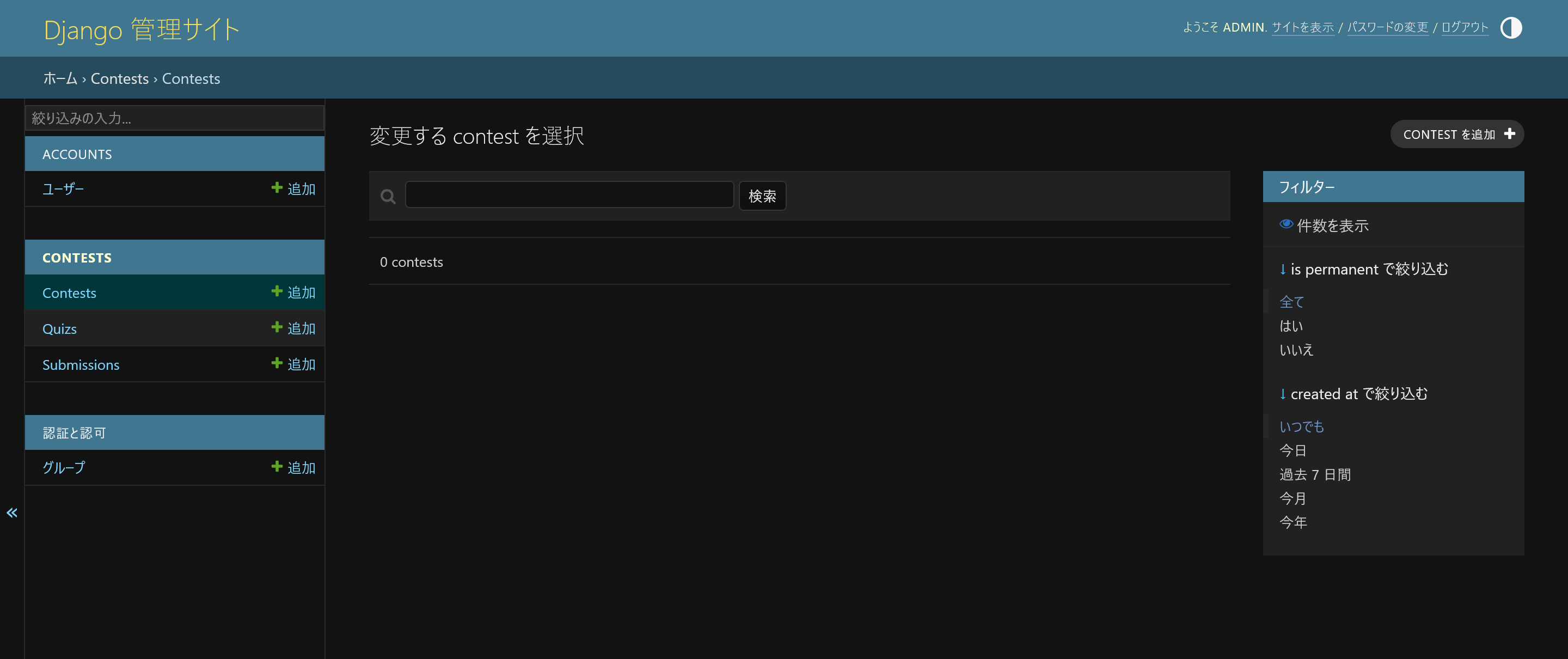
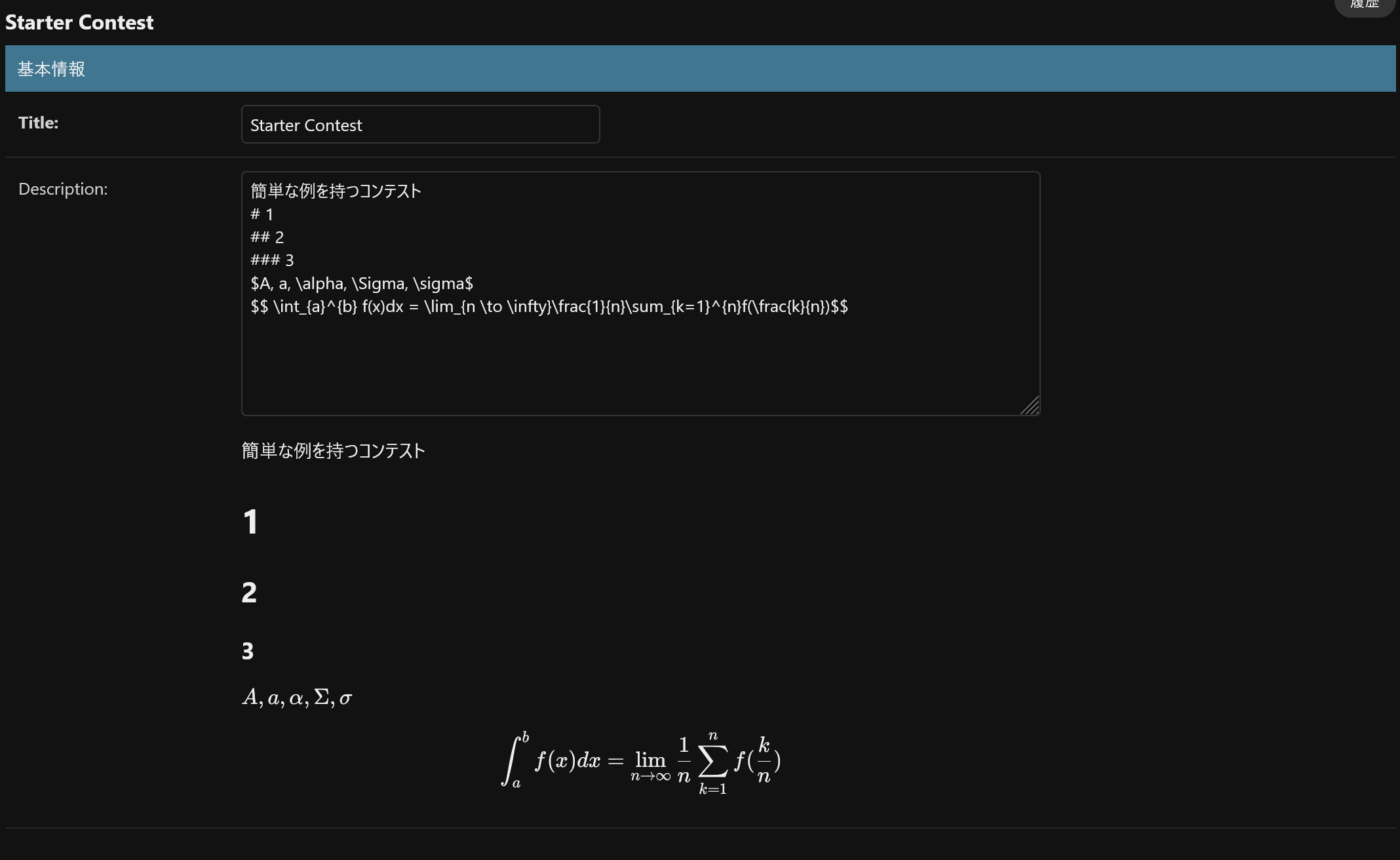
コンテストを作成。
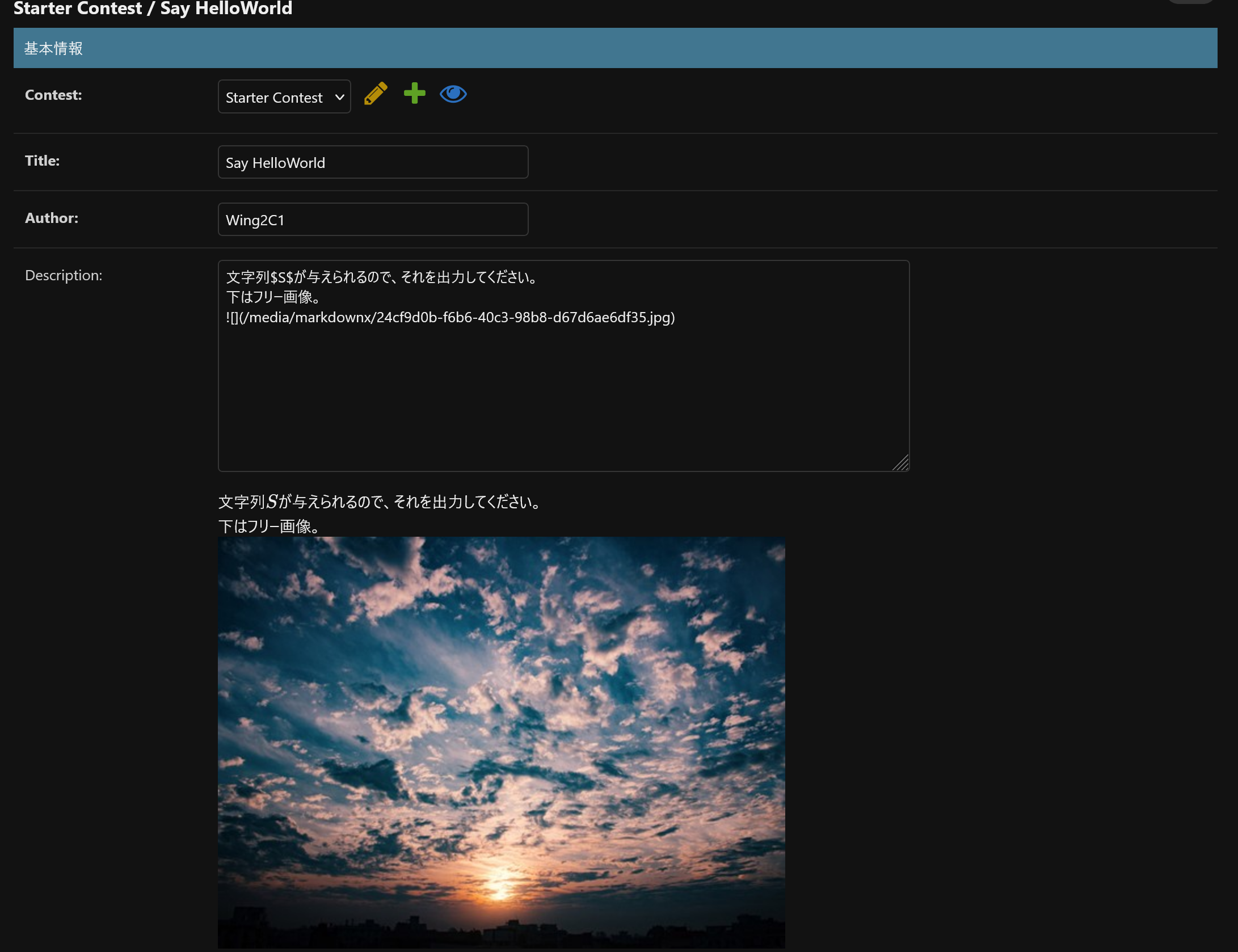
クイズを作成。なお、ドラッグしたり画像をコピペすればアップロード可能。
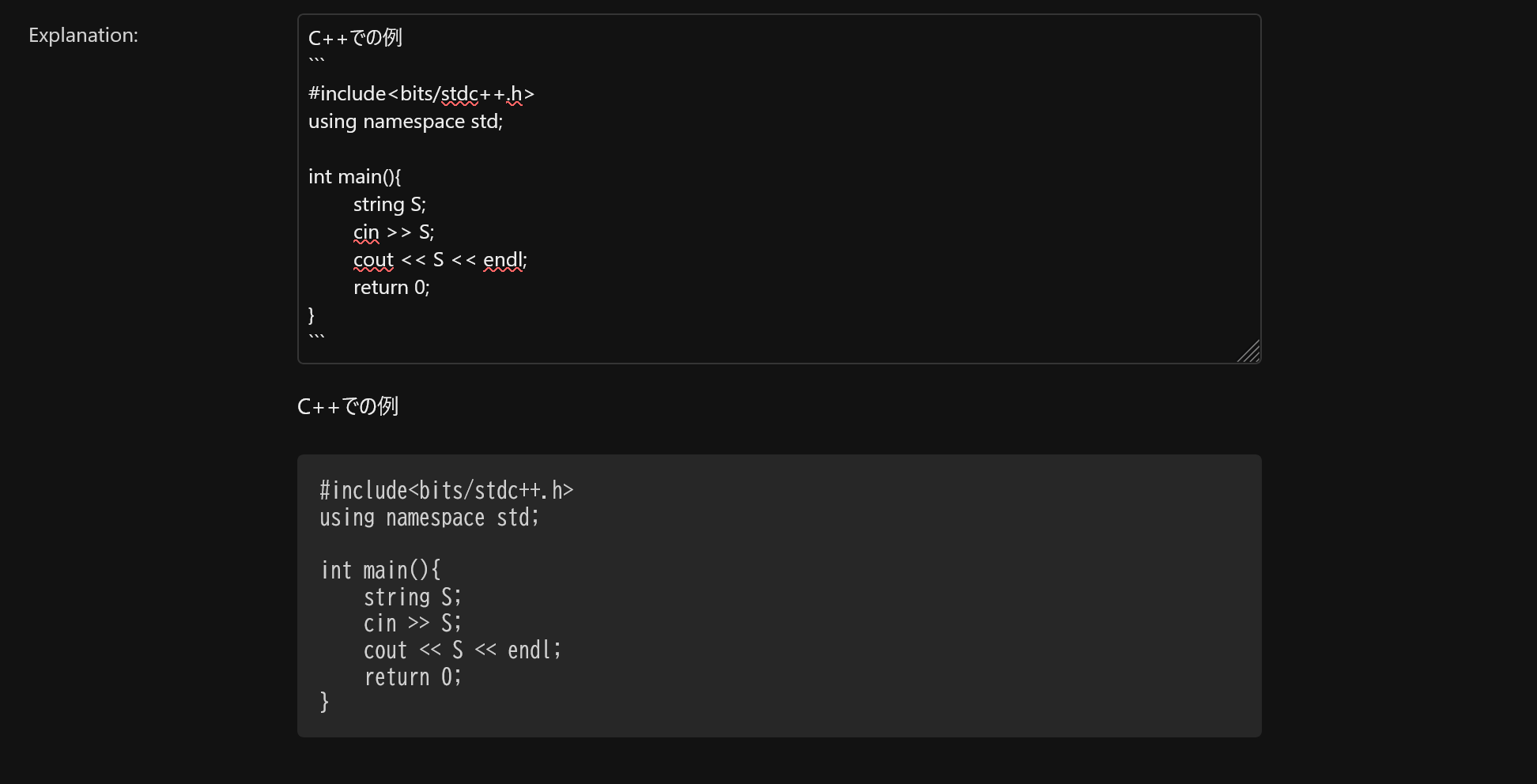
解説だって乗っけられる。(常設コンテストまたは、終了済みコンテストのみ表示)
サンプルケースがユーザーに見られるケースで、シークレットケースがユーザーから見られないケースだ。
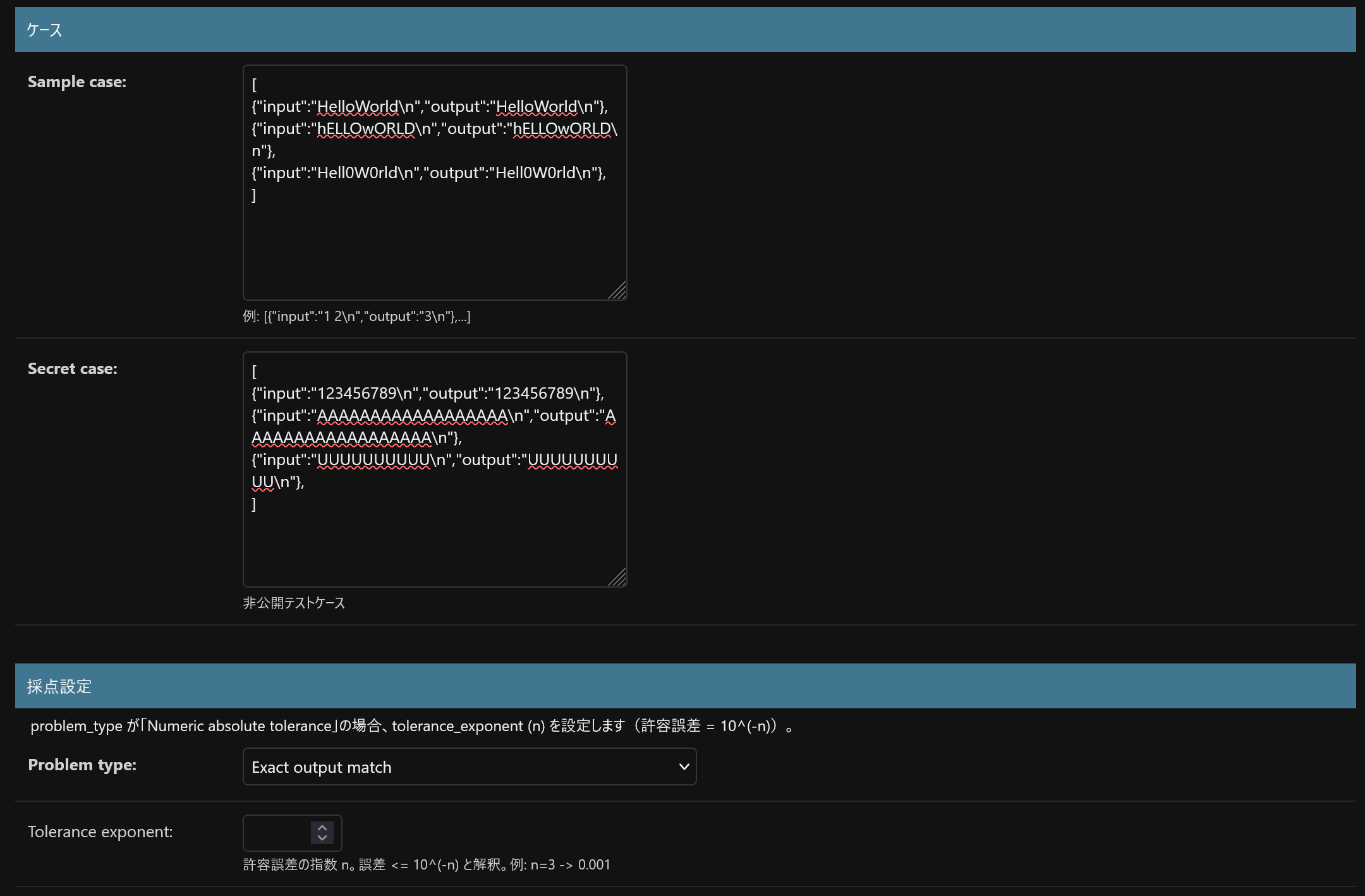
採点設定もできる。正確に等しければ正解にするタイプと、数値のみで、誤差$10^{-n}$以内であれば正解にするタイプの2つの種類がある。
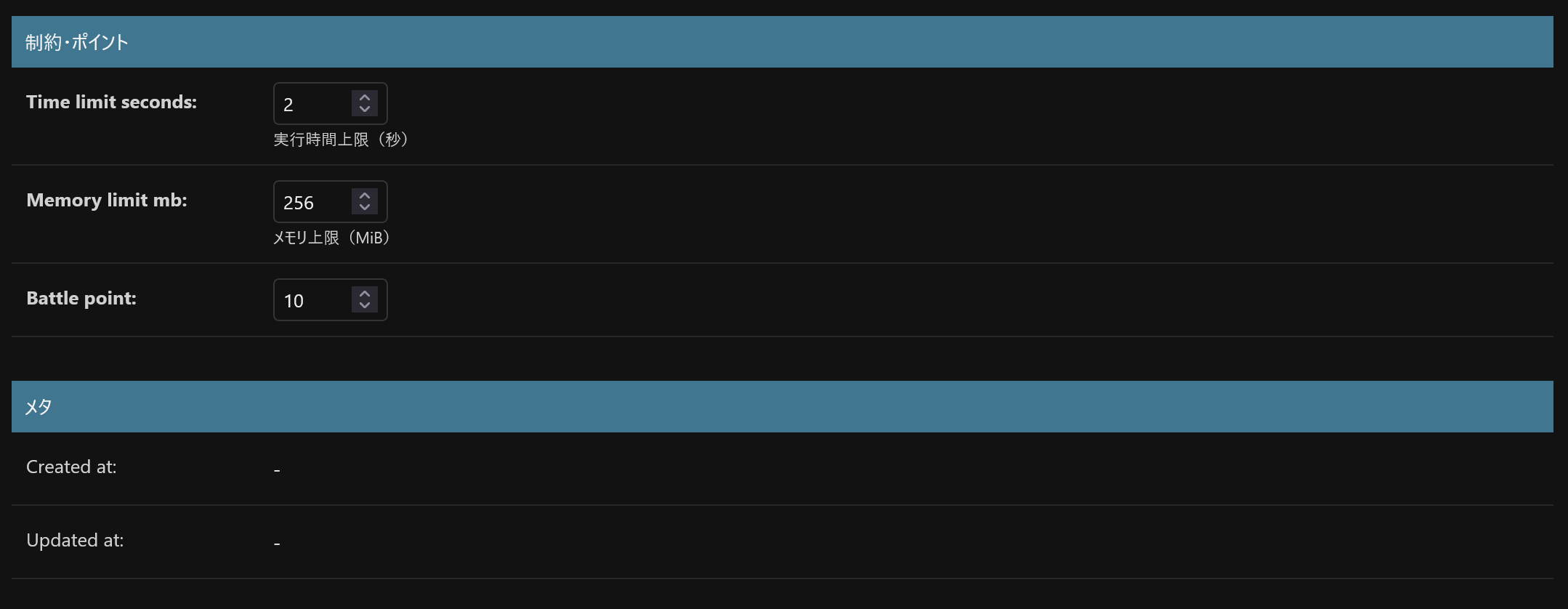
実行してから何秒以内に結果が出るか?実行してメモリをどれくらいまで許容するか?をここで設定出来る。battle pointをいくら付与するかも決められる。常設コンテストか開催中コンテストのみ付与される。
アカウントをこれにしてテストしてみよう。
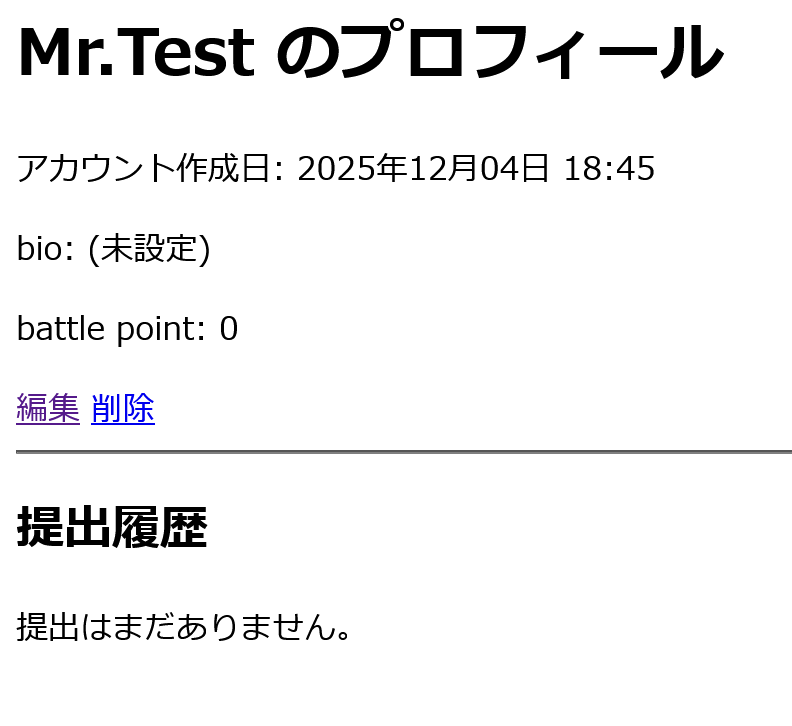
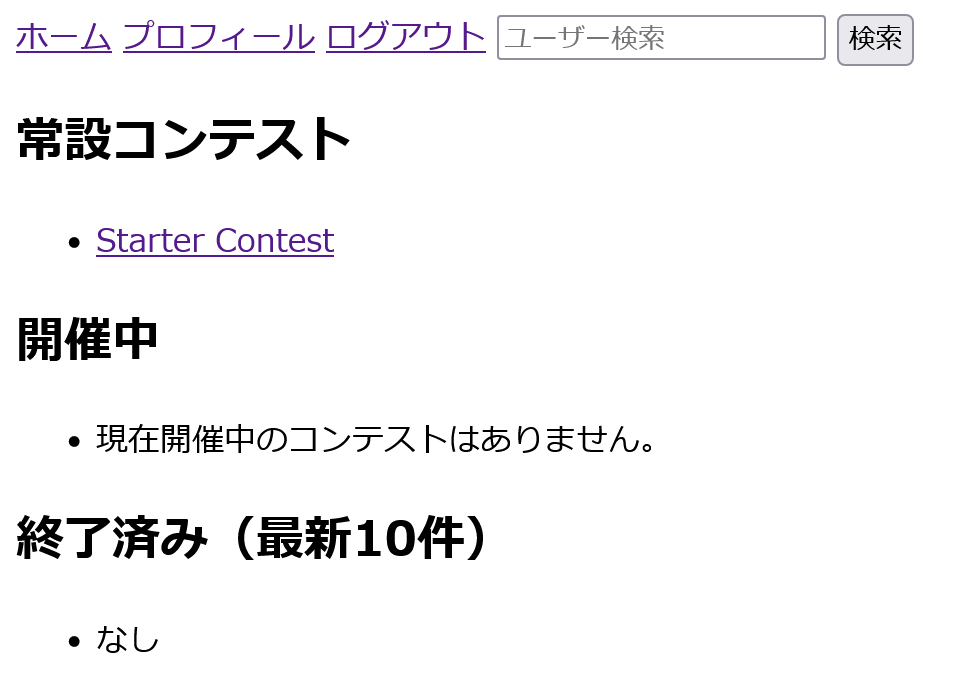
インデックスページ
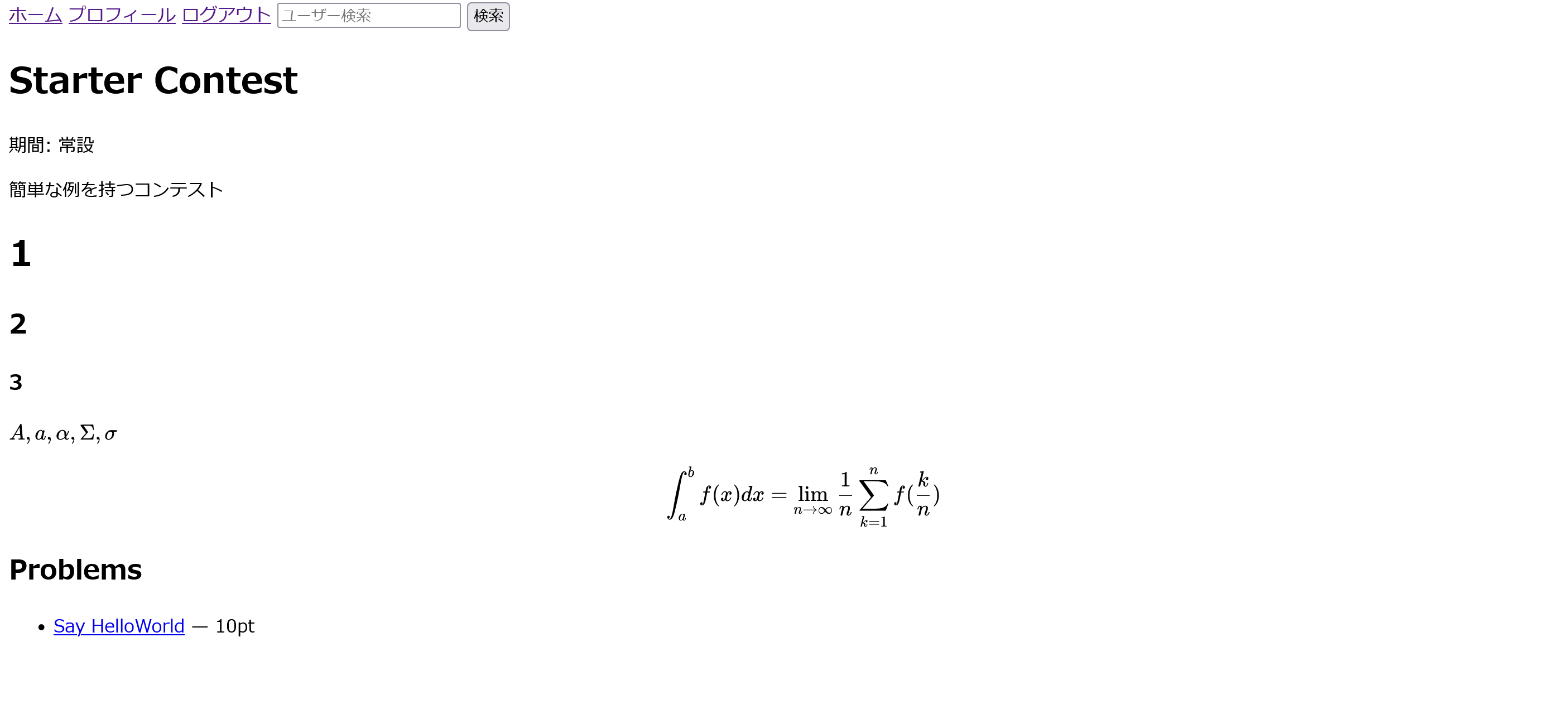
コンテストページ
問題ページ
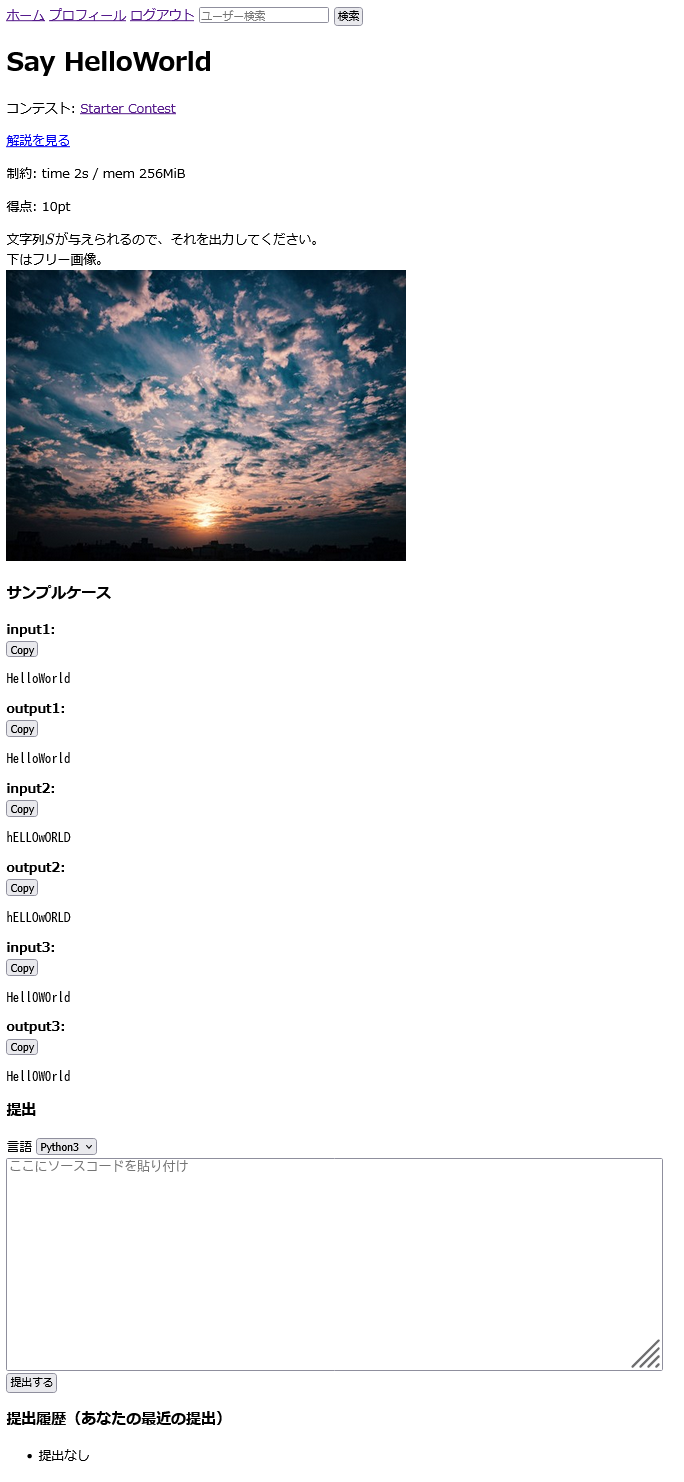
良さそうだね
明らかに間違っているものを投稿してみる。
#include<bits/stdc++.h>
using namespace std;

int main(){
    int A;
    cin >> A;
    cout << A << endl;
    return 0;
}
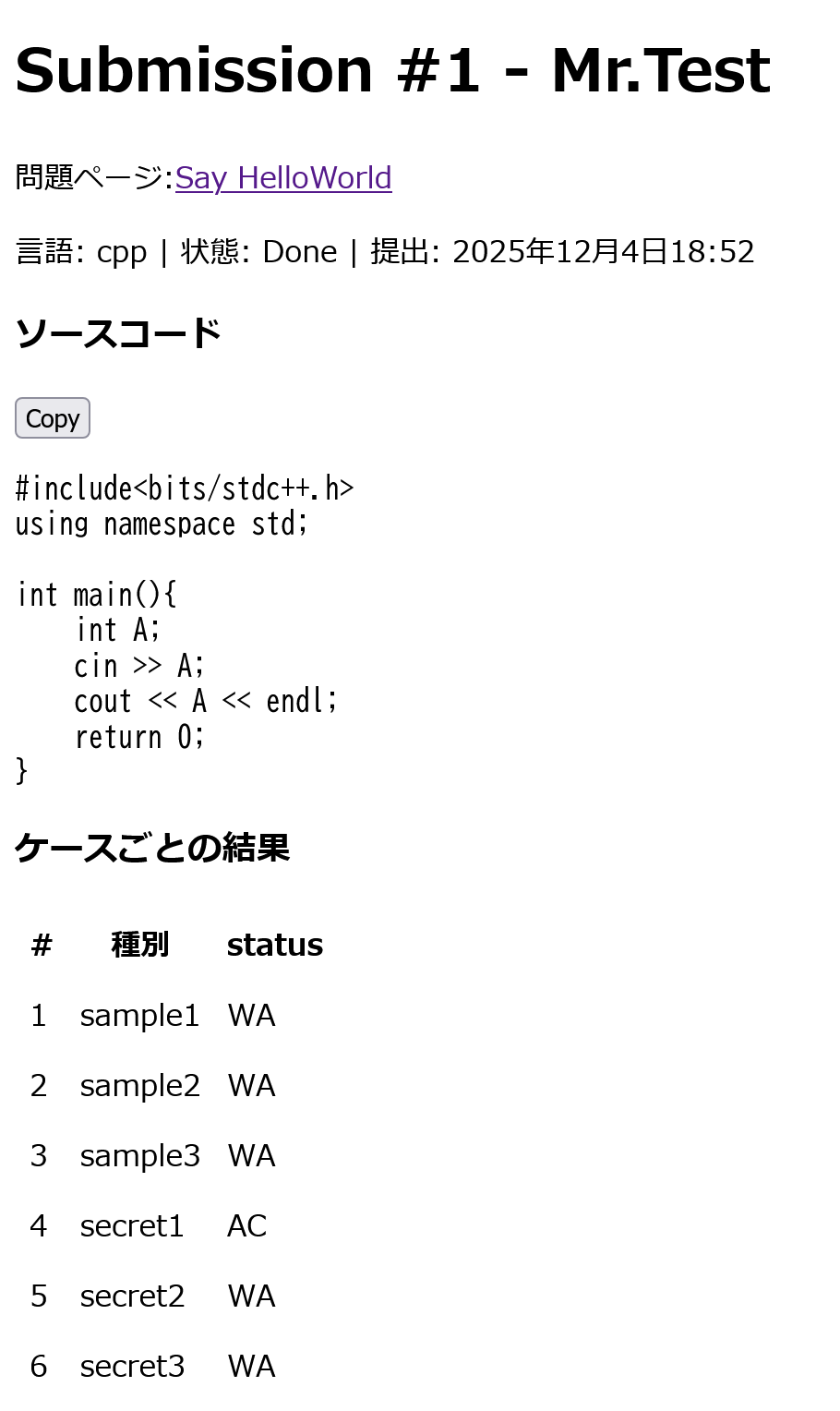
間違っているね。正しく動いている。
次は正解のコード
#include<bits/stdc++.h>
using namespace std;

int main(){
    string S;
    cin >> S;
    cout << S << endl;
    return 0;
}
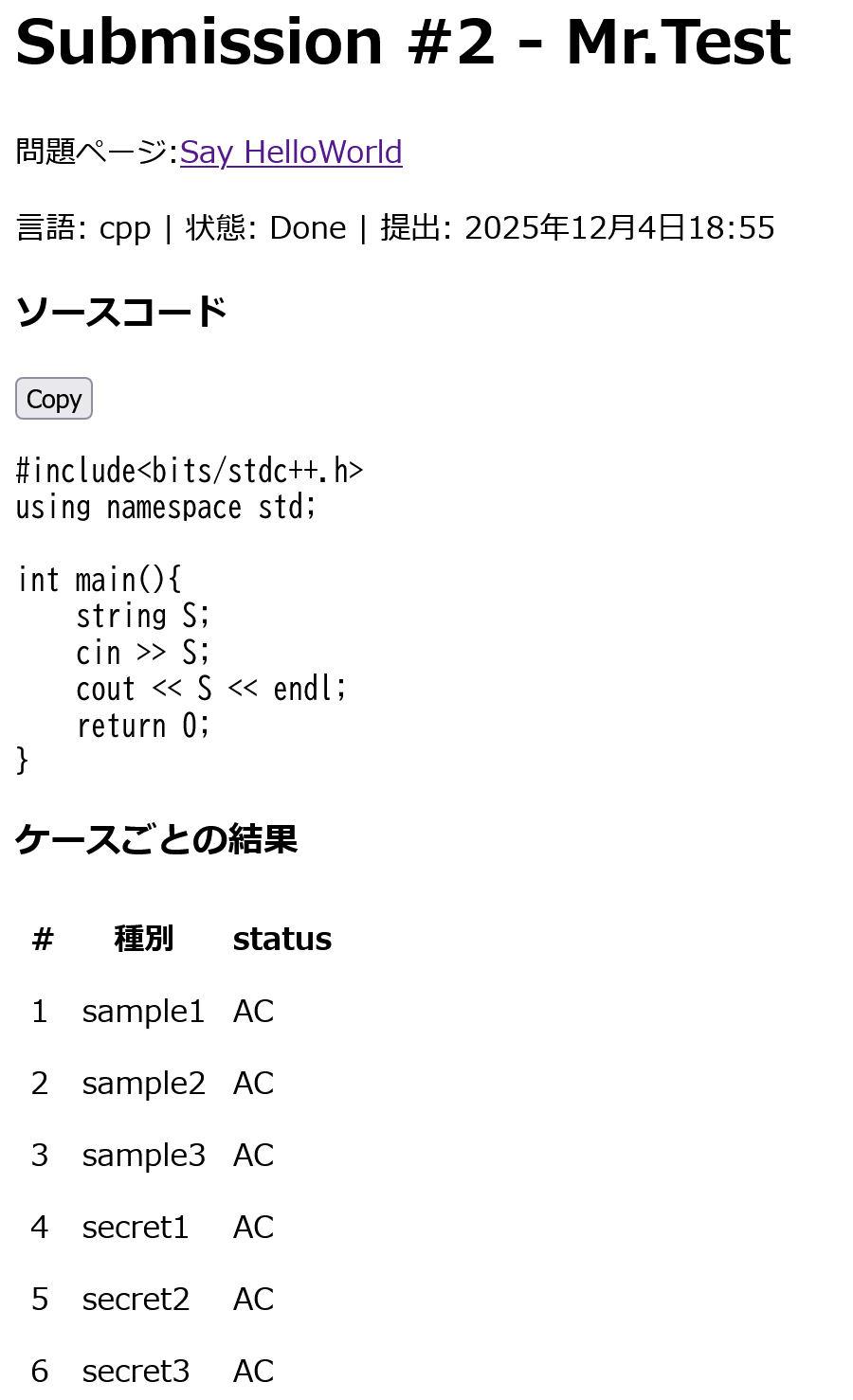
よかったー。では、すべてACであるためbattle pointが贈呈される。
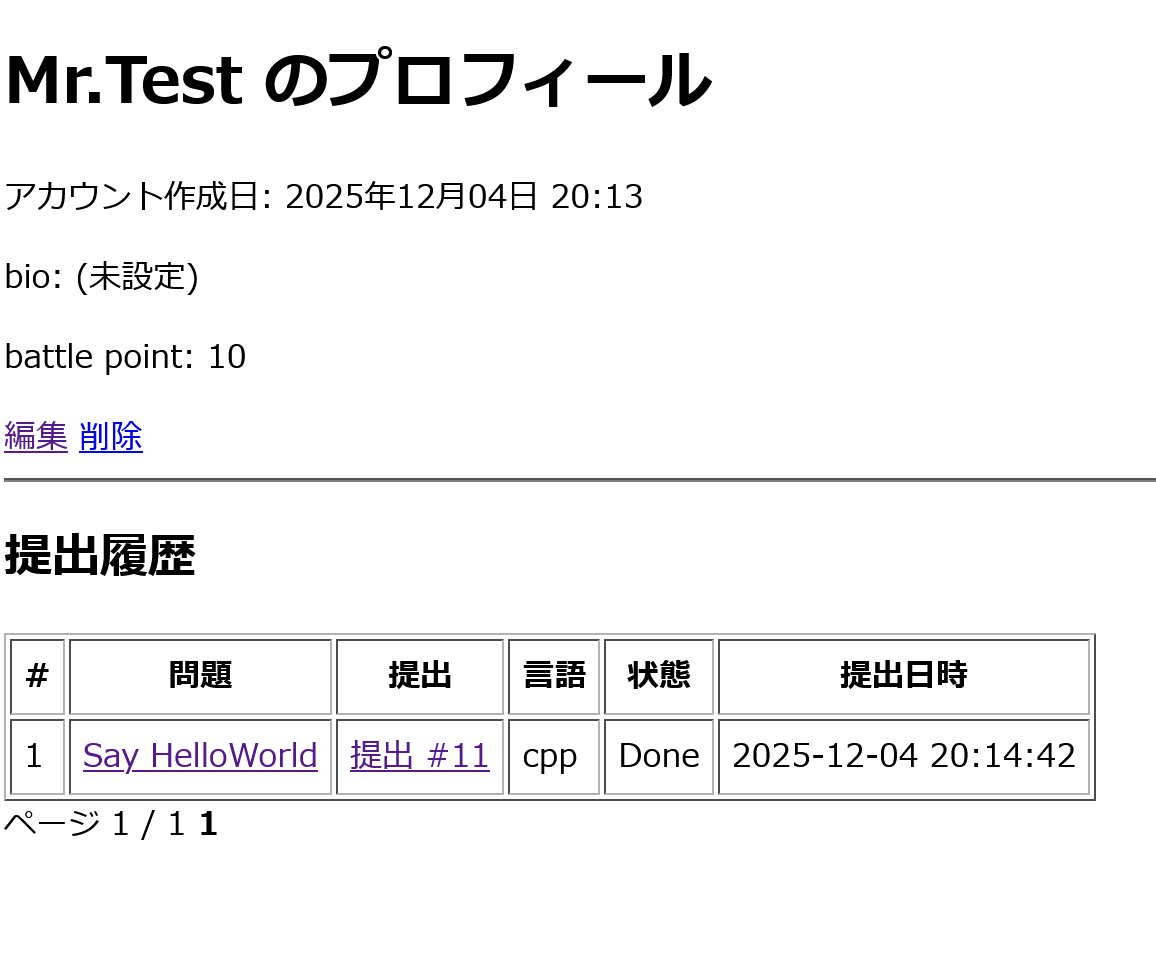
うん。贈呈されているね。
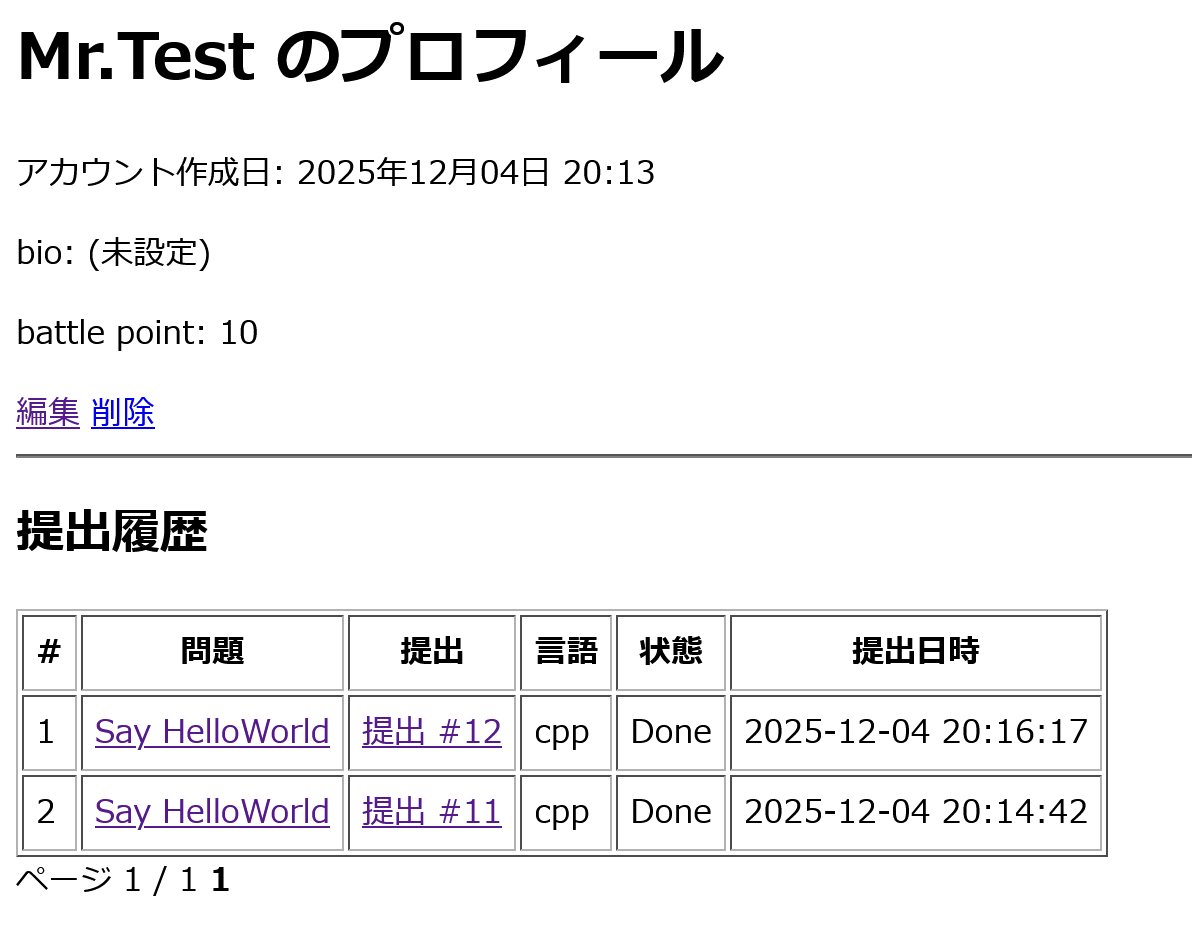
二度目の成功の提出には、ポイントを与えず。最高ですね。
これで、サーバー作成は終了。終わりです。
ぜひ、皆さんのお友達にも奨めて問題を出し合ってみませんか?
気が向いたらその5を書くかもしれない。