
はじめに
以前の記事で、AIを使って0円で家計簿Webアプリを作って公開しました。
【シンプル家計簿】https://kakeibo-khaki.vercel.app/
今回はユーザー視点で「これがないと不便だな」と感じた月別切り替え機能を追加したので、その実装記録をまとめます。
追加した機能
Before
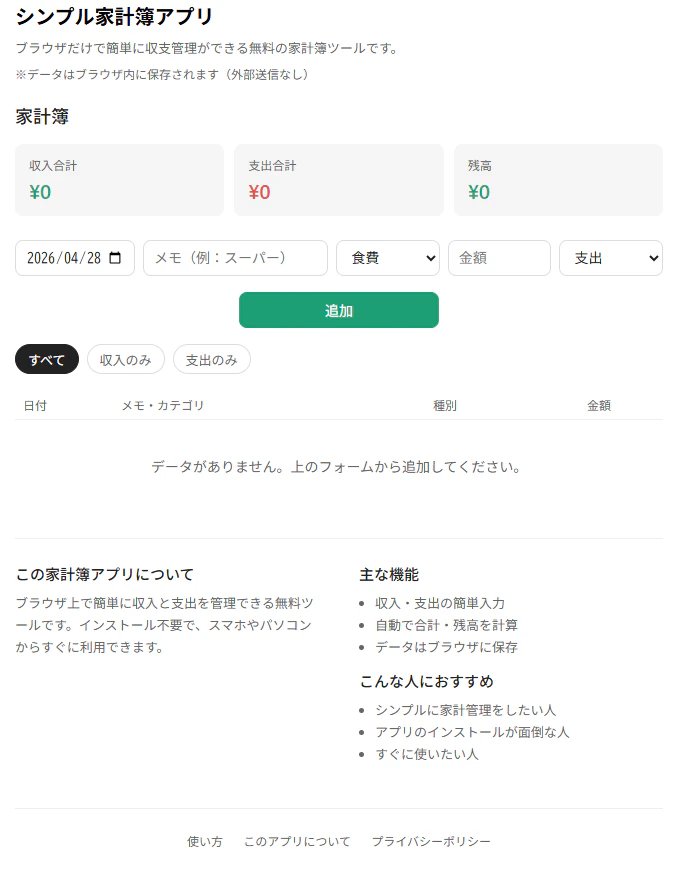
- 全データが一覧表示されるだけ
- 先月・先々月のデータが混ざって見づらい
- 今月の収支だけを確認する方法がない
After
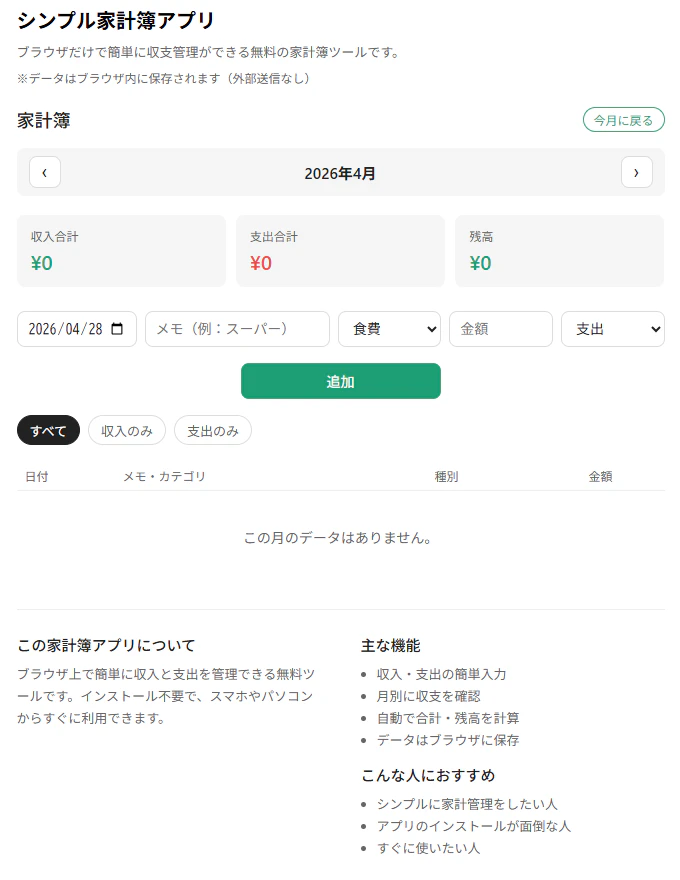
-
‹›ボタンで月を切り替えられる - 収入・支出・残高がその月だけで集計される
- 「今月に戻る」ボタンで今月に一発で戻れる
- データ入力時に入力した日付の月に自動ジャンプ
実装の概要
1. CSS追加(月ナビのスタイル)
.month-nav {
  display: flex;
  align-items: center;
  justify-content: space-between;
  margin-bottom: 1.2rem;
  background: var(--color-background-secondary);
  border-radius: var(--border-radius-md);
  padding: 8px 12px;
}
.month-nav-btn {
  width: 32px;
  height: 32px;
  border: 0.5px solid var(--color-border-secondary);
  border-radius: var(--border-radius-md);
  background: var(--color-background-primary);
  color: var(--color-text-primary);
  font-size: 18px;
  cursor: pointer;
  display: flex;
  align-items: center;
  justify-content: center;
}
.month-label {
  font-size: 15px;
  font-weight: 600;
  color: var(--color-text-primary);
}
.month-today-btn {
  font-size: 12px;
  color: #1D9E75;
  border: 0.5px solid #1D9E75;
  border-radius: 999px;
  padding: 3px 10px;
  background: transparent;
  cursor: pointer;
}
2. HTML追加(月ナビのUI)
「今月に戻る」ボタンをh2の横に配置し、月ナビをh2の下に追加しました。
<!-- h2の横に今月に戻るボタン -->
<div style="display:flex;align-items:center;justify-content:space-between;margin-bottom:1rem;">
  <h2 style="margin-bottom:0;">家計簿</h2>
  <button class="month-today-btn" onclick="goToToday()">今月に戻る</button>
</div>

<!-- 月ナビ -->
<div class="month-nav">
  <button class="month-nav-btn" onclick="changeMonth(-1)">‹</button>
  <span class="month-label" id="month-label"></span>
  <button class="month-nav-btn" onclick="changeMonth(1)">›</button>
</div>
3. JavaScript追加
// 現在表示中の年月を管理する変数
let currentYear = today.getFullYear();
let currentMonth = today.getMonth() + 1;

// 月ラベルを更新
function updateMonthLabel(){
  document.getElementById('month-label').textContent =
    `${currentYear}年${currentMonth}月`;
}

// ‹ › ボタンで月を移動
function changeMonth(diff){
  currentMonth += diff;
  if(currentMonth > 12){ currentMonth = 1; currentYear++; }
  if(currentMonth < 1){ currentMonth = 12; currentYear--; }
  updateMonthLabel();
  render();
}

// 今月に戻る
function goToToday(){
  const now = new Date();
  currentYear = now.getFullYear();
  currentMonth = now.getMonth() + 1;
  updateMonthLabel();
  render();
}

// 今月のデータだけ取り出す
function getMonthItems(){
  return items.filter(i=>{
    const d = new Date(i.date);
    return d.getFullYear()===currentYear && d.getMonth()+1===currentMonth;
  });
}
4. render()の修正
集計対象を全データ→今月データに変更しました。
// 変更前
const filtered = filter==='all' ? items : items.filter(...)

// 変更後
const monthItems = getMonthItems(); // 今月だけ取り出す
const filtered = filter==='all' ? monthItems : monthItems.filter(...)
工夫した点
「今月に戻る」ボタンの配置
最初は月ナビの中に「今月」ボタンを置いていましたが、クリックするまで何のボタンか分かりにくいという問題がありました。
「家計簿」という見出しの右横に「今月に戻る」と明記することで、一目でわかるUIに改善しました。
まとめ
| 変更箇所 | 内容 |
|---|---|
| CSS | 月ナビ用スタイルを追加 |
| HTML | 月ナビのUIを追加 |
| JS変数 |
currentYear currentMonthを追加 |
| JS関数 | 月管理用の関数を4つ追加 |
| render() | 集計対象を今月データに変更 |
既存のコードをほぼ変えずに機能追加できました。次回はカテゴリ別グラフの実装を予定しています。
★開発したアプリ
【シンプル家計簿】https://kakeibo-khaki.vercel.app/