
結論
エラーを修正できていません。
エラー内容
(1) 画面上からデータを登録。
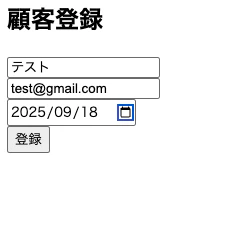
(2) 下記エラーとなる。
/Users/kerumatomomitsu/InsuranceProductManager/Controllers/LifeInsuranceMvcController.cs(41,43): warning CS8602: null 参照の可能性があるものの逆参照です。
info: Microsoft.Hosting.Lifetime[14]
      Now listening on: https://localhost:7252
info: Microsoft.Hosting.Lifetime[0]
      Application started. Press Ctrl+C to shut down.
info: Microsoft.Hosting.Lifetime[0]
      Hosting environment: Development
info: Microsoft.Hosting.Lifetime[0]
      Content root path: /Users/kerumatomomitsu/InsuranceProductManager
ModelState error: Name = 名前は必須です。
原因
フォームの input とモデルのバインドがうまくいっていない ことが原因。
AddCustomer.cshtmlからCustomer.csにデータが割り当てられる際に不備がある可能性。
コード
Models/Customer.cs
using System;
using System.ComponentModel.DataAnnotations;

namespace InsuranceProductManager.Models
{
    public class Customer
    {
        public int CustomerId { get; set; }

        [Required(ErrorMessage = "名前は必須です。")]
        public string Name { get; set; } = string.Empty;

        [EmailAddress(ErrorMessage = "有効なメールアドレスを入力してください。")]
        public string? Email { get; set; }

        [Required(ErrorMessage = "生年月日は必須です。")]
        [DataType(DataType.Date)]
        public DateTime BirthDate { get; set; }

        public int GetAge()
        {
            var today = DateTime.Today;
            int age = today.Year - BirthDate.Year;
            if (BirthDate.Date > today.AddYears(-age)) age--;
            return age;
        }
    }
}
Views/LifeInsuranceMvc/CustomerList.cshtml
@model IEnumerable<InsuranceProductManager.Models.Customer>

<h2>顧客一覧</h2>

@if (Model != null && Model.Any())
{
    <table border="1" cellpadding="5">
        <thead>
            <tr>
                <th>ID</th>
                <th>名前</th>
                <th>メール</th>
                <th>生年月日</th>
                <th>年齢</th>
            </tr>
        </thead>
        <tbody>
            @foreach (var customer in Model)
            {
                <tr>
                    <td>@customer.CustomerId</td>
                    <td>@customer.Name</td>
                    <td>@customer.Email</td>
                    <td>@customer.BirthDate.ToString("yyyy-MM-dd")</td>
                    <td>@customer.GetAge()</td>
                </tr>
            }
        </tbody>
    </table>
}
else
{
    <p>登録された顧客はまだいません。</p>
}

<p>
    <a asp-controller="Customer" asp-action="AddCustomer">新規登録へ戻る</a>
</p>
Views/LifeInsuranceMvc/AddCustomer.cshtml
@model InsuranceProductManager.Models.Customer

<h2>顧客登録</h2>

<form asp-controller="Customer" asp-action="AddCustomer" method="post">
    <div>
        <label asp-for="Name"></label>
        <input asp-for="Name" class="form-control" />
        <span asp-validation-for="Name" class="text-danger"></span>
    </div>

    <div>
        <label asp-for="Email"></label>
        <input asp-for="Email" class="form-control" />
        <span asp-validation-for="Email" class="text-danger"></span>
    </div>

    <div>
        <label asp-for="BirthDate"></label>
        <input asp-for="BirthDate" type="date" class="form-control" />
        <span asp-validation-for="BirthDate" class="text-danger"></span>
    </div>

    <button type="submit">登録</button>
</form>

@section Scripts {
    <partial name="_ValidationScriptsPartial" />
}
Controllers/LifeInsuranceMvcController.cs
using InsuranceProductManager.Data;
using InsuranceProductManager.Models;
using Microsoft.AspNetCore.Mvc;
using Microsoft.EntityFrameworkCore;
using System.Linq;
using System.Threading.Tasks;

namespace InsuranceApp.Controllers
{
    public class LifeInsuranceMvcController : Controller
    {
        private readonly AppDbContext _context;

        // コンストラクタは最初に記載
        public LifeInsuranceMvcController(AppDbContext context)
        {
            _context = context;
        }

        // --------------------
        // 顧客関連
        // --------------------

        // 顧客追加フォームを表示
        [HttpGet]
        public IActionResult AddCustomer()
        {
            return View();
        }

        // フォームから送信されたデータをDBに追加
        [HttpPost]
        public async Task<IActionResult> AddCustomer(Customer customer)
        {
            if (!ModelState.IsValid)
            {
                // デバッグ用
                foreach (var key in ModelState.Keys)
                {
                    var state = ModelState[key];
                    foreach (var error in state.Errors)
                    {
                        Console.WriteLine($"ModelState error: {key} = {error.ErrorMessage}");
                    }
                }
                return View(customer);
            }

            _context.Customers.Add(customer);
            await _context.SaveChangesAsync();

            // 登録後に一覧ページにリダイレクト
            return RedirectToAction(nameof(CustomerList));
        }

        // 顧客一覧を表示する画面
        public async Task<IActionResult> Customers()
        {
            var customers = await _context.Customers.ToListAsync();
            return View(customers);
        }

        // --------------------
        // 保険契約関連
        // --------------------

        [HttpGet]
        public IActionResult AddPolicy()
        {
            return View();
        }

        [HttpPost]
        public async Task<IActionResult> AddPolicy(InsurancePolicy policy)
        {
            if (!ModelState.IsValid)
            {
                return View(policy);
            }

            policy.IsActive = true;
            _context.InsurancePolicies.Add(policy);
            await _context.SaveChangesAsync();

            return RedirectToAction(nameof(ActivePolicies), new { customerId = policy.CustomerId });
        }

        // 特定顧客の契約一覧を表示する画面
        public async Task<IActionResult> ActivePolicies(int customerId)
        {
            var policies = await _context.InsurancePolicies
                .Where(p => p.CustomerId == customerId && p.IsActive)
                .ToListAsync();

            policies = policies.Where(p => !p.IsExpired()).ToList();

            ViewBag.CustomerId = customerId;
            return View(policies);
        }

        // 追加:顧客一覧表示
        [HttpGet]
        public async Task<IActionResult> CustomerList()
        {
            var customers = await _context.Customers.ToListAsync();
            return View(customers);
        }

        // --------------------
        // 保険料計算
        // --------------------

        // 保険料計算結果を画面で表示
        public async Task<IActionResult> CalculatePremium(int customerId, int policyId)
        {
            // 顧客取得
            var customer = await _context.Customers
                .FirstOrDefaultAsync(c => c.CustomerId == customerId);
            if (customer == null) return NotFound("顧客が見つかりません。");

            // 契約取得
            var policy = await _context.InsurancePolicies
                .FirstOrDefaultAsync(p => p.PolicyId == policyId && p.CustomerId == customerId);
            if (policy == null) return NotFound("契約が見つかりません。");

            // 保険料計算
            decimal premium = CalculateAnnualPremium(customer, policy);

            // Viewに渡す
            ViewBag.Customer = customer;
            ViewBag.Policy = policy;
            ViewBag.AnnualPremium = premium;

            return View();
        }

        /// <summary>
        /// 保険料計算ロジック
        /// </summary>
        private decimal CalculateAnnualPremium(Customer customer, InsurancePolicy policy)
        {
            decimal baseRate = 0.02m;

            // 年齢補正
            int age = customer.GetAge();
            decimal ageFactor = age <= 30 ? 1.0m : age <= 50 ? 1.5m : 2.0m;

            // 性別補正(Genderがあれば)
            decimal genderFactor = 1.0m;

            // 契約期間補正(10年ごとに5%)
            int termYears = (policy.EndDate.Year - policy.StartDate.Year);
            decimal termFactor = 1.0m + (termYears / 10) * 0.05m;

            decimal annualPremium = policy.CoverageAmount * baseRate * ageFactor * genderFactor * termFactor;
            return Math.Round(annualPremium, 0);
        }
    }
}