
どうも、三町哲平です!
GitHubを個人開発で使っているとbranch機能の有効性も多分フルには感じていないだろうし、チーム開発をした経験が無いことにもどかしさを最近感じております。
そんな、GitHubに関してまだまだ未熟な私が今まで使っていた。GitHubリポジトリに今まで使っていたローカルのディレクトリは、削除して別のディレクトリからpushしたい自体になったのでその時の対処法についてお伝えします。
まずは簡単に4stepで実装
1.ローカルのディレクトリを初期化する
$ git init
git initとは?
Gitのinitコマンドは、一言で言うと「リポジトリを新規に作成」するときに使用するコマンドです。
initコマンドを実行すると、現在のディレクトリまたは指定したディレクトリに「.git」というリポジトリを構成するディレクトリが作成されます。.gitにはGitで使用するファイルが新規に作成されます。
そのため、既に存在するリポジトリをサイド初期化を行いたい場合にもinitコマンドは使用されます。
引用記事:はじめてのGit!initコマンドでリポジトリを作成してみよう! | 侍エンジニア塾ブログ(Samurai Blog) - プログラミング入門者向けサイト
2. リモートの設定①
$ git remote add origin https://github.com/[ユーザ名]/[リポジトリ名].git
例↓:
$ git remote add origin https://github.com/gizaju10/illustrations.git
3. リモートの設定②
$ git remote set-url origin https://github.com/[ユーザ名]/[リポジトリ名].git
例↓:
$ git remote set-url origin https://github.com/gizaju10/illustrations.git
4. リモートのコミットIDを取得
$ git ls-remote origin
これにて完了!?
いつもの様にやってみる
ここまで終わったらあとは、いつも通り、__add→commit→push__で、はい終了!
$ git add .
$ git commit -m"DBのエラー対応により、ディレクトリ内を一新済"
$ git push origin master
↓
...とは行かないんですよね(汗)
下記↓の様なエラーが出ました。
To https://github.com/gizaju10/illustrations.git
 ! [rejected]        master -> master (fetch first)
error: failed to push some refs to 'https://github.com/gizaju10/illustrations.git'
hint: Updates were rejected because the remote contains work that you do
hint: not have locally. This is usually caused by another repository pushing
hint: to the same ref. You may want to first integrate the remote changes
hint: (e.g., 'git pull ...') before pushing again.
hint: See the 'Note about fast-forwards' in 'git push --help' for details.
To https://github.com/gizaju10/illustrations.git
 ! [rejected]        master -> master (fetch first)
エラー:一部の参照を「https://github.com/gizaju10/illustrations.git」にプッシュできませんでした
ヒント:リモートにあなたが行った作業が含まれているため、更新は拒否されました
ヒント:ローカルにはありません。これは通常、別のリポジトリがプッシュすることによって発生します
ヒント:同じ参照に。最初にリモートの変更を統合することをお勧めします
ヒント:(例: 'git pull ...')もう一度押す前に。
ヒント:詳細については、「gitpush--help」の「早送りに関する注意」を参照してください。
解決策は、何個かある様ですが、私の場合は、一番簡単な
$ git push origin master --force
↑上記を利用しました。
※ --forceによって、強制的に__$ git push origin master__を実行することができます。
あくまで、強制的にpushして現在のGitHubリポジトリを更新することになるので、チーム開発など複数人での開発では特に注意した上で使用して下さい。
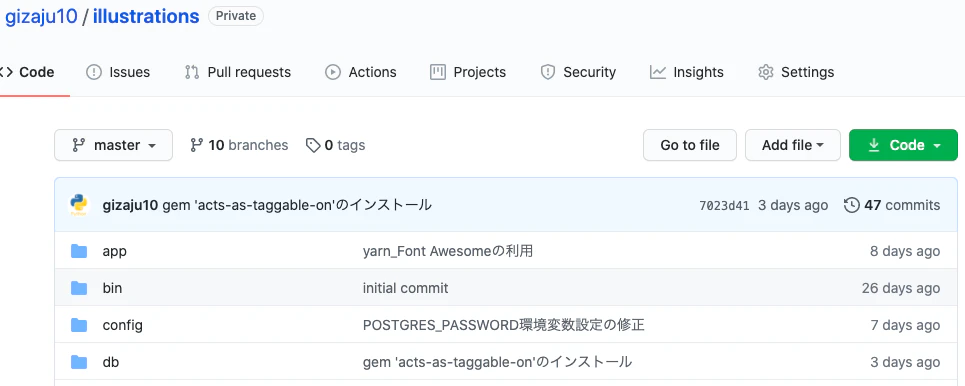
push前
push後
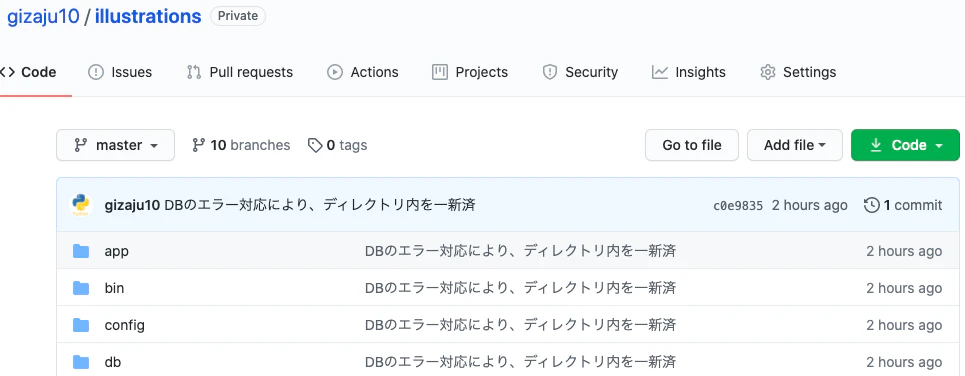
上手く出来ていますね!
参考及び引用記事
- はじめてのGit!initコマンドでリポジトリを作成してみよう! | 侍エンジニア塾ブログ(Samurai Blog) - プログラミング入門者向けサイト
- No such remote 'origin' - Qiita
- GitHub にリポジトリを追加する方法のパターン別まとめ | gotohayato.com
- 【git】error: failed to push some refs to "URL"のエラー対処法 - Qiita
- git ls-remote - Gitコマンド虎の巻
- git push を強制する -f (–force)と –force-with-lease | WWWクリエイターズ