
Reactって何?ってところから始めたので最初から
自己紹介
Goの本一冊一通りやってサーバーサイドかけるようになった。
サーバーと連携するWebフロントやってみたい。
htmlとcssは書いたことあるけど初心者。
jsは書けるけどWebで使ったことはほぼない。
環境
Mac
VSCode
Docker
やったこと
Webフロント技術選定
Reactチュートリアル
DockerでReact開発環境構築
React新規アプリを作成
Reactビルド
Goでサーバー立てて公開
Webフロント技術選定
やりたかったことは
「API叩いて、json返してそれをもとに画面を更新すること」
以下の3つから何をやるかを選択
- フレームワークなしjavascript
- Vue
- React
Rx使い慣れてるので暫定でReactに決めた。
このときのReactに対する理解
WebのUIつくるフレームワーク
複雑なUIも作れるらしい。
環境構築が必要
ビルド必要
Reactチュートリアル
Reactチュートリアル
事前知識なしでとりあえずやってみた。所要時間2時間くらい?
ブラウザで進められるので環境構築しなくてもよいというのがよかった。
エラー出た時に行数が表示されなくてきつい以外は良かった。
結局なにがバグってるのかわからなかったけど概念的には理解できたのでOK
Dockerで環境構築
いろいろインストールして汚したくないのでDocker環境構築は必ずやりたかった。
Reactの開発環境をDockerで構築してみた
このページを参考にして作った。
また、このページのリンクにあった以下の記事をみてReactに対するモチベーションがあがった。
社内ツールをReactで作り変えた話
最終的に以下のようにした

FROM node:8.16-alpine
version: '3'
services:
  node:
    build: docker/node
    volumes:
      - .:/usr/src/app
    tty: true
    working_dir: /usr/src/app/react-first
    ports:
      - "3000:3000"
      - "5000:5000"
volumesが/usr/src/appなのは参考元と同じにしただけ。
他の記事でもこうなっていたがなぜこのパスなのかはわからない。
portsはReactの開発で使うデフォルトのポート。
React新規アプリを作成
新規アプリというか新規プロジェクト
まずはコンテナ立ち上げる
docker-compose up -d
コンテナに入る
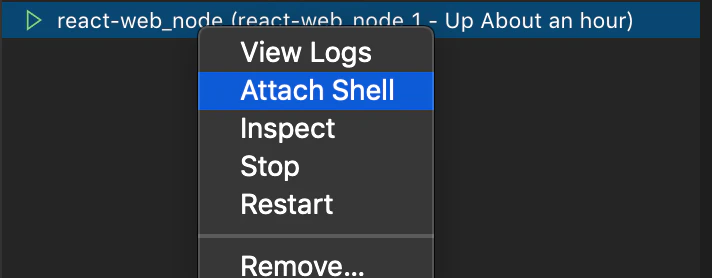
VSCodeのAttach Shell使うのが楽
プロジェクト作るところに移動
新規プロジェクト作成
npx create-react-app react-first
これでreact-firstというフォルダの中にいろいろファイルが生成される。
ReadMeを見ると使えるコマンドが書いてある。
特に使いそうなのは以下の2つ
### `yarn start`

Runs the app in the development mode.<br />
Open [http://localhost:3000](http://localhost:3000) to view it in the browser.

The page will reload if you make edits.<br />
You will also see any lint errors in the console.

...

### `yarn build`

Builds the app for production to the `build` folder.<br />
It correctly bundles React in production mode and optimizes the build for the best performance.

The build is minified and the filenames include the hashes.<br />
Your app is ready to be deployed!

See the section about [deployment](https://facebook.github.io/create-react-app/docs/deployment) for more information.
開発時はyarn startで確認
ビルドするときはyarn build
Reactビルド
前述したとおりyarn buildを使う
/usr/src/app/react-first # yarn build
yarn run v1.15.2
$ react-scripts build
Creating an optimized production build...
Compiled successfully.

File sizes after gzip:

  40.1 KB  build/static/js/2.0f91b0e9.chunk.js
  778 B    build/static/js/runtime-main.ec614299.js
  614 B    build/static/js/main.4cfd67be.chunk.js
  417 B    build/static/css/main.b100e6da.chunk.css

The project was built assuming it is hosted at the server root.
You can control this with the homepage field in your package.json.
For example, add this to build it for GitHub Pages:

  "homepage" : "http://myname.github.io/myapp",

The build folder is ready to be deployed.
You may serve it with a static server:

  yarn global add serve
  serve -s build

Find out more about deployment here:

  https://bit.ly/CRA-deploy

Done in 44.22s.

これでbuildフォルダができる。
しかし、Goで公開する上で問題があった。
これが本記事で書きたかったこと。
ポイントは上記結果の以下の部分
The project was built assuming it is hosted at the server root.
You can control this with the homepage field in your package.json.
For example, add this to build it for GitHub Pages:

  "homepage" : "http://myname.github.io/myapp",
serverルートで動くことを想定されてる。
変えるならpackage.json編集する
具体的には絶対パスで指定されてるのでルートじゃないとバグる。
罠でしかない。
解決方法は以下に書いてあった。
deployment
通常はrootに配置しないとバグるけど、
package.jsonに以下を加えれば相対パスにできるとのこと。
"homepage": ".",
なるほど。
  "private": true,
  "homepage": "./",
  "dependencies": {
    "react": "^16.10.2",
    "react-dom": "^16.10.2",
    "react-scripts": "3.2.0"
  },
/はいらないけど別ページについてたのでつけてた。
これで再ビルド
/usr/src/app/react-first # yarn build
yarn run v1.15.2
$ react-scripts build
Creating an optimized production build...
Compiled successfully.

File sizes after gzip:

  40.1 KB       build/static/js/2.0f91b0e9.chunk.js
  779 B (+1 B)  build/static/js/runtime-main.b1853f27.js
  614 B         build/static/js/main.66998ca0.chunk.js
  417 B         build/static/css/main.b100e6da.chunk.css

The project was built assuming it is hosted at ./.
You can control this with the homepage field in your package.json.

The build folder is ready to be deployed.

Find out more about deployment here:

  https://bit.ly/CRA-deploy

Done in 39.58s.
Goでサーバー立てて公開
buildフォルダを丸ごとGoのプロジェクトにコピー
Goのプロジェクトの詳細は省略

package main

import (
	"fmt"
	"net/http"
)

func main() {
	// buildフォルダを公開
	http.Handle("/admin/", http.StripPrefix("/admin/", http.FileServer(http.Dir("./build"))))

	// 前述のhomepageを記述してないと下の記述でしか動かない。他のパスだとバグる
	// http.Handle("/", http.FileServer(http.Dir("./build")))

	fmt.Println("Server Started Port 8080")
	http.ListenAndServe(":8080", nil)
}

これでReactが使える目処がたった。