
はじめに
これまで5年以上Rを書いてきましたが、ふと思い至ったので、検証がてらまとめてみます。
R はバージョン 4.5.3 を使いました。
> library(tidyverse)
── Attaching core tidyverse packages ─────────────────────────────────────── tidyverse 2.0.0 ──
✔ dplyr     1.2.1     ✔ readr     2.2.0
✔ forcats   1.0.1     ✔ stringr   1.6.0
✔ ggplot2   4.0.2     ✔ tibble    3.3.1
✔ lubridate 1.9.5     ✔ tidyr     1.3.2
✔ purrr     1.2.2
── Conflicts ───────────────────────────────────────────────────────── tidyverse_conflicts() ──
✖ dplyr::filter() masks stats::filter()
✖ dplyr::lag()    masks stats::lag()
ℹ Use the conflicted package to force all conflicts to become errors
概要
$はRの記法で、データフレームの特定の1列やリストの要素を取得するのに使います。dplyr::pull()はデータフレームの特定の1列を取得する関数です。データフレームに適用した場合、どちらも列の要素をベクトルで返します。
当然両者の結果は完全一致します。
> all(iris$Sepal.Length == iris |> pull(Sepal.Length))
[1] TRUE
なぜわざわざpull関数があるのか
ヘルプを見ると分かるのですが、以下のような機能があります。どれも $ ではカバーしきれません。
番号で列を指定できる
> colnames(iris)
[1] "Sepal.Length" "Sepal.Width"  "Petal.Length" "Petal.Width"  "Species"
>
> # Sepal.Lengthが選択されている
> iris |>
+   pull(1) |>
+   head()
[1] 5.1 4.9 4.7 4.6 5.0 5.4
>
> # Speciesが選択されている
> iris |>
+   pull(-1) |>
+   head()
[1] setosa setosa setosa setosa setosa setosa
Levels: setosa versicolor virginica
番号で指定ができるという点は、selectのセマンティクスを感じますね(dplyr::selectは列の位置を先頭からの順番として特定する)。
Tidy select が使えるのではと予想しました。ちょうどひとつの列が選ばれる条件でのみ、エラーにならず通るようです。
# 複数の列が選ばれるパターンではエラーになる
> iris |>
+   pull(starts_with("Sepal"))
Error in `pull()`:
! `!!enquo(var)` must select exactly one column.
Run `rlang::last_trace()` to see where the error occurred.
>
> # ひとつの列が選ばれるパターンでは通る
> iris |>
+   pull(matches("Sepal.Len")) |>
+   head()
[1] 5.1 4.9 4.7 4.6 5.0 5.4
>
> iris |>
+   pull(all_of("Sepal.Length")) |>
+   head()
[1] 5.1 4.9 4.7 4.6 5.0 5.4
列名を文字列で指定できる
文字列直打ちなら実は両方通ります(知らなかった…)。
> iris |>
+     pull("Sepal.Length") |>
+     head()
[1] 5.1 4.9 4.7 4.6 5.0 5.4
> iris$"Sepal.Length" |>
+   head()
[1] 5.1 4.9 4.7 4.6 5.0 5.4
ですが実際上はこのような書き方をすることはまず無く、もっぱら列名を動的に定義したかったり、引数で受け取ったりしたいでしょう。
> colname <- "Sepal.Length"
> # 問題なく通る
> iris |>
+   pull(colname) |>
+   head()
[1] 5.1 4.9 4.7 4.6 5.0 5.4
>
> # これは通らない
> iris$colname
NULL
Tidy evaluation をガチャガチャやって無理やり通そうとしてみましたが、できませんでした。大人しく [[ を使いましょう。
> iris[[colname]] |>
+   head()
[1] 5.1 4.9 4.7 4.6 5.0 5.4
存在しない列を指定した時にエラーになる
dplyr::pull() はエラーになってくれるので、デバッグしやすいです。 $ はエラーにならないので気づけない可能性があります。
# $はNULLを返すだけ
> iris$Takoyaki
NULL
>
# pullならエラーになる
> iris |>
  pull(Takoyaki)
Error in `pull()`:
Caused by error:
! オブジェクト 'Takoyaki' がありません
Run `rlang::last_trace()` to see where the error occurred.
Tidy Select のくだりの続きですが、dplyr::pull() の場合、列が存在しないパターンを投げた時の結果は、ちょうどひとつの列が選ばれていないということなので、エラーになります。
> iris |>
+   pull(matches("Ikayaki"))
Error in `pull()`:
! `!!enquo(var)` must select exactly one column.
Run `rlang::last_trace()` to see where the error occurred.
パイプで繋げやすい
これは自明ですね。ただ、$でも.を併用することでできます。が、ネイティブパイプ |> ではこれが塞がれており、magrittrのパイプ(%>% など)でないと通りません。magrittrが適当すぎた。
> # これは通る
> iris %>%
+   .$Sepal.Length %>%
+   head()
[1] 5.1 4.9 4.7 4.6 5.0 5.4
>
> # これは通らない
> iris |>
+   .$Sepal.Length |>
+   head()
.$Sepal.Length でエラー:
  function '$' not supported in RHS call of a pipe (<input>:2:3)
$ の役割
Geminiによると $ はネイティブ処理なのでオーバーヘッドが無く最速とのことでした。計測してみましょう。
> N <- 3
> loop <- 10000
>
> tbl.result <- tibble(
+   n = 1:N,
+   `$` = 1:N |>
+     map(~system.time({
+       for(i in 1:loop)
+           iris$Sepal.Length
+     })),
+   pull = 1:N |>
+     map(~system.time({
+       for(i in 1:loop)
+           iris |> pull(Sepal.Length)
+     })),
+   # ついでに [[ も計測
+   `[[` = 1:N |>
+     map(~system.time({
+       for(i in 1:loop)
+           iris[["Sepal.Length"]]
+     }))
+ )
>
> tbl.result
# A tibble: 3 × 4
      n `$`            pull           `[[`
  <int> <list>         <list>         <list>
1     1 <proc_tim [5]> <proc_tim [5]> <proc_tim [5]>
2     2 <proc_tim [5]> <proc_tim [5]> <proc_tim [5]>
3     3 <proc_tim [5]> <proc_tim [5]> <proc_tim [5]>
結果を集計します。
> tbl.result2 <- tbl.result |>
+     pivot_longer(-n, names_to = "func", values_to = "time") |>
+     mutate(time_erapsed = map_dbl(time, `[`, 3))
> tbl.result2
# A tibble: 9 × 4
      n func  time           time_erapsed
  <int> <chr> <list>                <dbl>
1     1 $     <proc_tim [5]>      0
2     1 pull  <proc_tim [5]>      0.650
3     1 [[    <proc_tim [5]>      0.0100
4     2 $     <proc_tim [5]>      0.01000
5     2 pull  <proc_tim [5]>      0.640
6     2 [[    <proc_tim [5]>      0.0300
7     3 $     <proc_tim [5]>      0.0400
8     3 pull  <proc_tim [5]>      0.640
9     3 [[    <proc_tim [5]>      0.01000
$ が圧倒的に早い結果となりました。 [[ は $ と同等のパフォーマンスを持っているようです。
> tbl.result2 |>
+     group_by(func) |>
+     summarise(
+         mean  = mean(time_erapsed),
+         stdev = var(time_erapsed)
+     ) |>
+     ggplot(aes(x = func, y = mean, fill = func)) +
+     geom_col() +
+     geom_errorbar(aes(ymax = mean + stdev, ymin = mean - stdev))
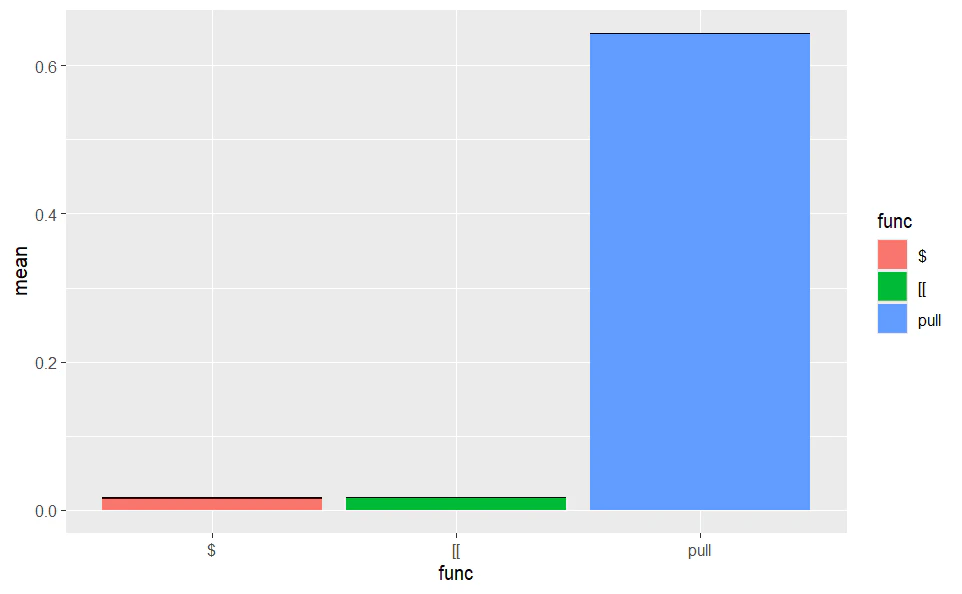
パフォーマンスが重視されるユースケースでは重要な違いになりそうですね。
まとめ
$ は高パフォーマンス高リスク、dplyr::pull() は色々面倒見てくれて安全だが遅い、ということで良いようです。