
前の記事
OCIのOracle LinuxでWebサーバ(nginx)を動かす(HTTPまで)
1.エラー表示の作成
1.1.デフォルトのエラー画面
デフォルト・・
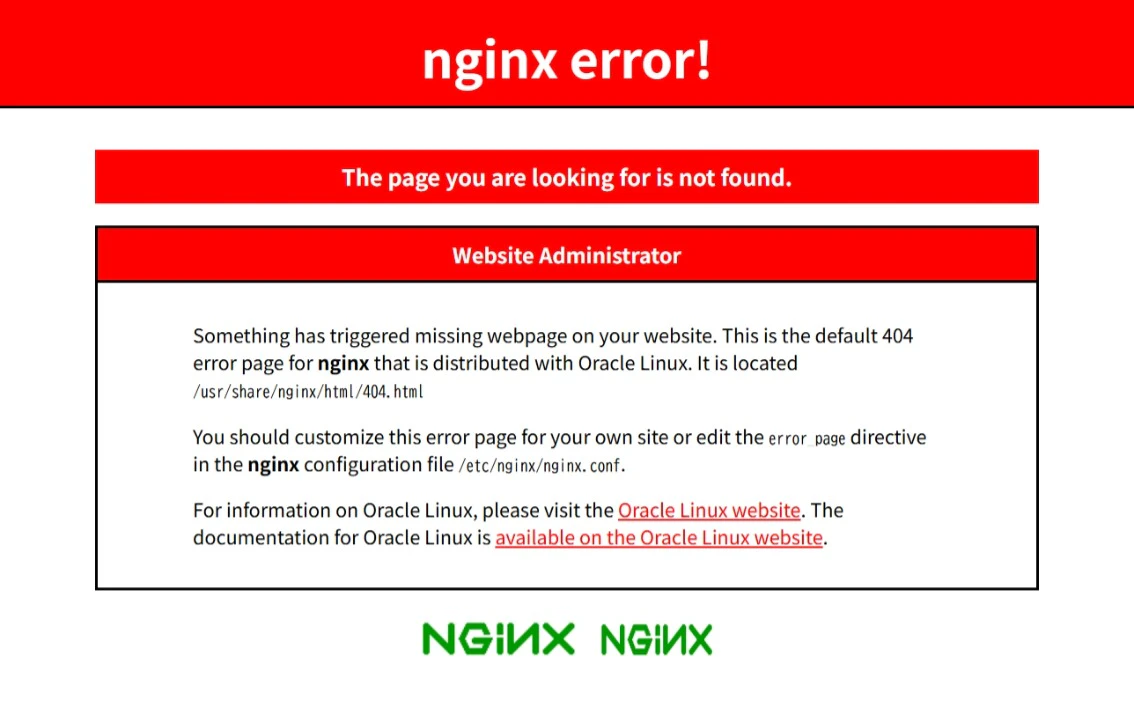
なんかいろんな情報が、ただ漏れ。
1.2.カスタムエラーページの作成
1.2.1.カスタムエラーページ作成準備
エラーページ作成準備
エラーページ用ディレクトリ作成
[opc@test-server ~]$ sudo mkdir /usr/share/nginx/htmlerror
[opc@test-server ~]$ sudo chown root:root /usr/share/nginx/htmlerror
[opc@test-server ~]$ sudo chmod 755 /usr/share/nginx/htmlerror
[opc@test-server ~]$ sudo vi /usr/share/nginx/htmlerror/404.html
特権設定しておきましょう。
・chownでユーザとグループを設定
・chmodで755(ユーザ:読み書き実行全部OK、グループ:読み実行のみ、その他:読み実行のみ)※ディレクトリにはアクセスできるようにして、書き込みや書き換えを制限。
1.2.2.カスタム404エラーページ作成準備
404エラーページ作成
404エラー:対象コンテンツが見つからないときのエラー
Apache風のエラーページ(HTML)
<!DOCTYPE HTML PUBLIC \"-//IETF//DTD HTML 2.0//EN\">
<html>
 <head>
  <title>404 Not Found</title>
 </head>
 <body>
  <h1>Not Found</h1>
  <p>The request was not found on this server.</p>
  <hr>
  </body>
</html>
1.2.2.カスタム50xエラーページ作成準備
50xエラーページ作成
50xエラー:サーバー起因のエラー
なんかのエラーページ(HTML)
<!DOCTYPE HTML PUBLIC \"-//IETF//DTD HTML 2.0//EN\">
<html>
 <head>
  <title>Internal Server Error</title>
 </head>
 <body>
  <h1>Internal Server error.</h1>
  <p>The request caused an error on this server.</p>
  <hr>
  </body>
</html>
2.nginx設定
2.1.エラー設定変更前の動作確認
nginxの設定ファイル確認
変更前
[opc@test-server ~]$ sudo nginx -t
nginx: the configuration file /etc/nginx/nginx.conf syntax is ok
nginx: configuration file /etc/nginx/nginx.conf test is successful
syntax is ok、test is successfulになって問題なし。
2.2.エラー動作のための設定
2.2.1.エラー動作のための設定変更
エラー表示設定追加
エラー表示設定追加変更前
[opc@test-server ~]$ cat /etc/nginx/nginx.conf
# For more information on configuration, see:
#   * Official English Documentation: http://nginx.org/en/docs/
#   * Official Russian Documentation: http://nginx.org/ru/docs/

user nginx;
worker_processes auto;
error_log /var/log/nginx/error.log;
pid /run/nginx.pid;

# Load dynamic modules. See /usr/share/doc/nginx/README.dynamic.
include /usr/share/nginx/modules/*.conf;

events {
    worker_connections 1024;
}

http {
    log_format  main  '$remote_addr - $remote_user [$time_local] "$request" '
                      '$status $body_bytes_sent "$http_referer" '
                      '"$http_user_agent" "$http_x_forwarded_for"';

    access_log  /var/log/nginx/access.log  main;

    sendfile            on;
    tcp_nopush          on;
    tcp_nodelay         on;
    keepalive_timeout   65;
    types_hash_max_size 4096;

    include             /etc/nginx/mime.types;
    default_type        application/octet-stream;

    # Load modular configuration files from the /etc/nginx/conf.d directory.
    # See http://nginx.org/en/docs/ngx_core_module.html#include
    # for more information.
    include /etc/nginx/conf.d/*.conf;

    server {
        listen       80;
        listen       [::]:80;
        server_name  _;
        root         /usr/share/nginx/html;
(省略)
             # Load configuration files for the default server block.
        include /etc/nginx/default.d/*.conf;

        error_page 404 /404.html;
        location = /404.html {
        }

        error_page 500 502 503 504 /50x.html;
        location = /50x.html {
        }
(省略)
error_page [エラーコード] /404.html;
locationで404.htmlのファイルがあるルートディレクトリを指定
internalでエラーファイルに対する直接外部アクセスを禁止
変更:error_pageのところを変更します。
        error_page 404 /404.html;
        location = /404.html {
            root /usr/share/nginx/htmlerror;
            internal;
        }

        error_page 500 502 503 504 /50x.html;
        location = /50x.html {
            root /usr/share/nginx/htmlerror;
            internal;
        }
error_page [エラーコード] /50x.html;
locationで50x.htmlのファイルがあるルートディレクトリを指定
internalでエラーファイルに対する直接外部アクセスを禁止
に変更する。
2.2.2.エラー動作設定変更の確認
文法確認コマンドで動作確認
変更後確認
[opc@test-server ~]$ sudo nginx -t
nginx: the configuration file /etc/nginx/nginx.conf syntax is ok
nginx: configuration file /etc/nginx/nginx.conf test is successful
2.2.3.エラー動作設定変更の反映(再起動)
nginx再起動
nginxの再起動
[opc@test-server www]$ sudo systemctl stop nginx
[opc@test-server www]$ sudo systemctl start nginx
2.3.curlコマンドで動作確認
curlコマンドで動作確認
[opc@test-server ~]$ curl http://localhost/nonexistpage
<!DOCTYPE HTML PUBLIC \"-//IETF//DTD HTML 2.0//EN\">
<html>
 <head>
  <title>404 Not Found</title>
 </head>
 <body>
  <h1>Not Found</h1>
  <p>The request was not found on this server.</p>
  <hr>
  </body>
</html>
最後に
記事の内容はCC BY-SA 4.0(著作者の情報とCCライセンス継承はお願いします。商用利用・改変・再配布は問題なし)です。