
対象環境:Windows 11 + PowerShell 5.1 (Windows PowerShell)
PowerShell 5.1で日本語を扱う際の文字化け対策をまとめた備忘録です。PowerShell 7とは動作が異なる部分があるので注意してください。
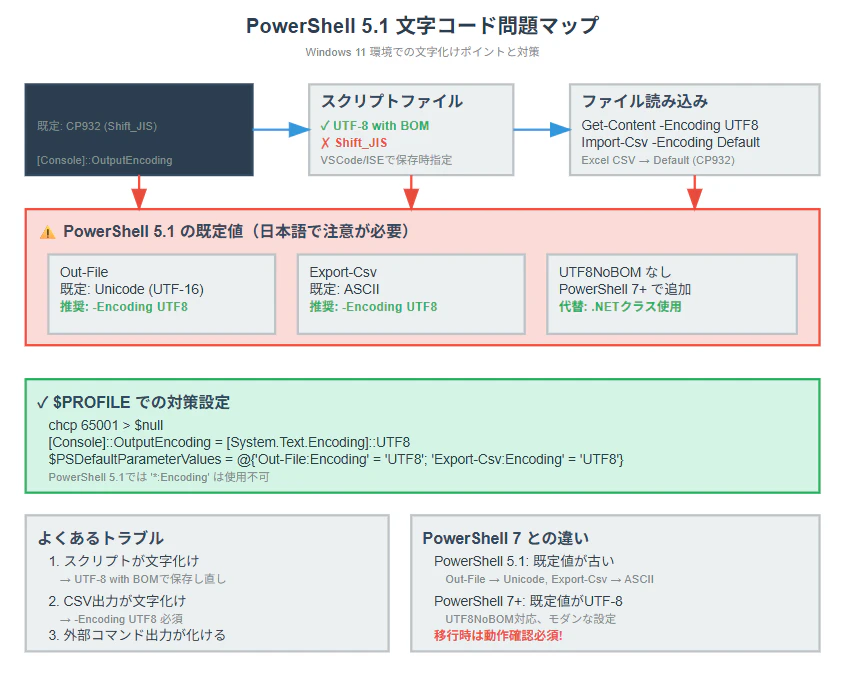
PowerShell 5.1の特徴
重要: PowerShell 5.1では既定の文字コードがUTF-8ではありません
- ファイル出力:既定でUTF-16 LE(Unicode)
- コンソール:システムのコードページ(日本語環境ではCP932/Shift_JIS)
- PowerShell 7では既定がUTF-8なので動作が異なります
忘れがちな基本設定
バージョン確認
# PowerShell 5.1かどうか確認
$PSVersionTable.PSVersion
# Major 5, Minor 1 であることを確認
コンソール文字コード確認・変更
# 現在の設定確認
chcp                          # システムコードページ(通常932)
[Console]::OutputEncoding     # 出力エンコーディング
[Console]::InputEncoding      # 入力エンコーディング


# UTF-8に変更
chcp 65001
[Console]::OutputEncoding = [System.Text.Encoding]::UTF8
[Console]::InputEncoding = [System.Text.Encoding]::UTF8

$PROFILEで自動設定(PowerShell 5.1用)
# プロファイル編集
notepad $PROFILE

# 追加内容(PowerShell 5.1専用設定)
chcp 65001 > $null
[Console]::OutputEncoding = [System.Text.Encoding]::UTF8
[Console]::InputEncoding = [System.Text.Encoding]::UTF8

# PowerShell 5.1では *:Encoding は使えないので個別指定
$PSDefaultParameterValues = @{
    'Out-File:Encoding' = 'UTF8'
    'Export-Csv:Encoding' = 'UTF8'
    'Set-Content:Encoding' = 'UTF8'
    'Add-Content:Encoding' = 'UTF8'
    'Import-Csv:Encoding' = 'UTF8'
}
ファイル操作時の文字コード指定(PowerShell 5.1)
読み込み
# PowerShell 5.1では明示的指定が必須
Get-Content "file.txt" -Encoding UTF8
Get-Content "shift_jis.txt" -Encoding Default  # CP932/Shift_JIS

# CSV(Excel出力は大抵Shift_JIS)
Import-Csv "data.csv" -Encoding UTF8
Import-Csv "excel.csv" -Encoding Default
書き込み(PowerShell 5.1の注意点)
# PowerShell 5.1では既定がUnicode(UTF-16 LE)なので注意!
"テスト" | Out-File "output.txt"  # ← これだとUTF-16になる

# 正しい書き方(UTF-8指定)
"テスト" | Out-File "output.txt" -Encoding UTF8
"追記" | Out-File "output.txt" -Encoding UTF8 -Append

# CSV出力(PowerShell 5.1では既定がASCII!)
Get-Process | Export-Csv "process.csv" -Encoding UTF8 -NoTypeInformation

# PowerShell 5.1にはUTF8NoBOMがない
# BOMなしUTF-8が必要な場合は以下
[System.IO.File]::WriteAllText("output.txt", "テスト", [System.Text.UTF8Encoding]($false))
よくハマるパターンと対処法
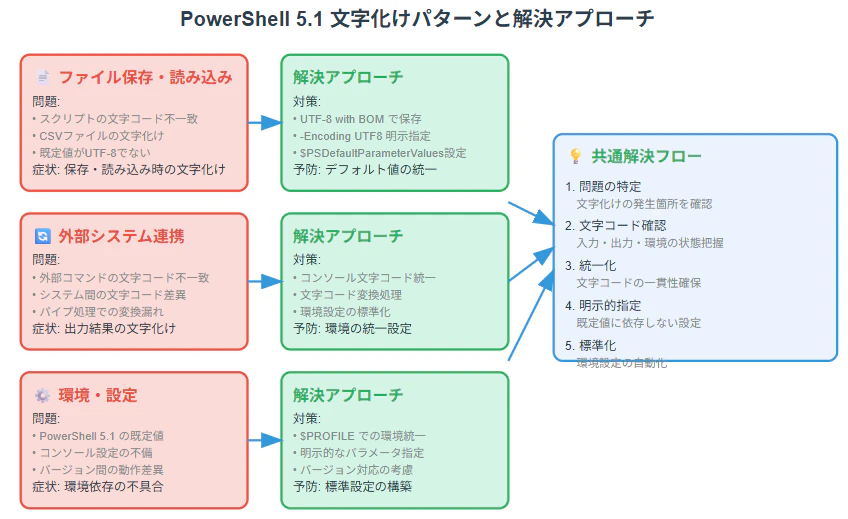
パターン1: スクリプトファイルが文字化け
# 原因:スクリプトがShift_JISで保存されている
# 対処:VSCodeなどでUTF-8(BOMつき)で保存し直す
# または実行時に指定
PowerShell -File "script.ps1" -InputFormat Text
例えば、次のような日本語が含まれるスクリプト(文字コード:UTF-8)をターミナルで実行すると、終端が見つからないというエラーが発生することがあります。


パターン2: 外部コマンドの出力が化ける
# 原因:外部コマンドが期待しない文字コードで出力
# 対処:パイプ経由で変換
cmd /c "xxx" | ForEach-Object { [System.Text.Encoding]::UTF8.GetString([System.Text.Encoding]::Default.GetBytes($_)) }

# またはコンソール設定変更
chcp 65001
パターン3: CSVが文字化け
# Excel出力のCSVを読む場合
Import-Csv "excel_output.csv" -Encoding Default

# 自分で出力する場合は扱いたい文字コードを指定する
Get-Process | Export-Csv "output.csv" -Encoding UTF8 -NoTypeInformation
注意事項:
Windows版の日本語環境におけるExcelは、CSVファイルを**Shift_JIS(CP932)**という文字コードで読み書きするのがデフォルトです。この文字コードは日本語の旧来の標準であり、UTF-8などの他の文字コードで保存されたCSVは、文字化けすることがあります。
そのため、互換性を重視する場合は、Excel用にShift_JISで保存するか、UTF-8(BOM付き)を使うのが一般的です。
PowerShell 5.1 エンコーディング一覧
| 指定値 | 説明 | PowerShell 5.1での既定 |
|---|---|---|
| UTF8 | UTF-8 (BOM付き) | 明示的指定推奨 |
| Default | システム既定(CP932/Shift_JIS) | 古いファイル・Excel CSV |
| Unicode | UTF-16 LE (BOM付き) | Out-Fileの既定値 |
| ASCII | 7bit ASCII | Export-Csvの既定値 |
注意: PowerShell 5.1にはUTF8NoBOMがありません
BOMなしUTF-8が必要な場合は.NETクラスを直接使用
参考情報