
はじめに
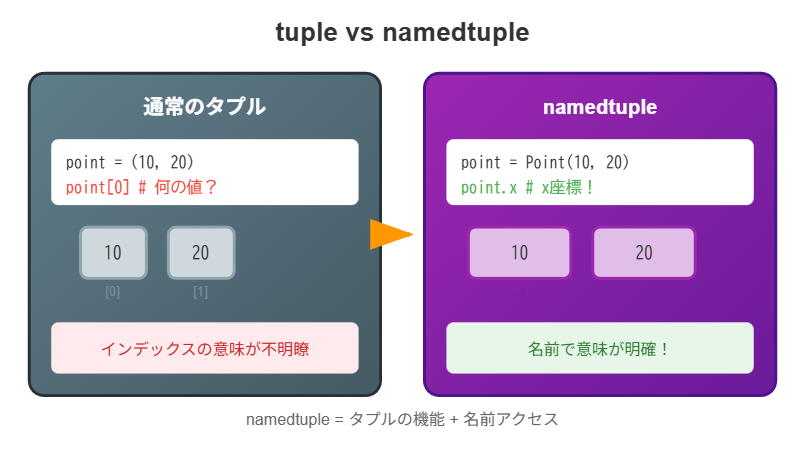
namedtupleは、タプルの要素に名前でアクセスできるようにした特殊なタプルです。辞書よりメモリ効率が良く、クラスより簡潔に書けます。
namedtupleとは
from collections import namedtuple

# 通常のタプル
point = (10, 20)
print(point[0])  # 10 - 何を表すか分かりにくい

# namedtuple
Point = namedtuple('Point', ['x', 'y'])
point = Point(10, 20)
print(point.x)   # 10 - 明確!
print(point.y)   # 20
定義方法
リストで定義
from collections import namedtuple

Point = namedtuple('Point', ['x', 'y'])
p = Point(10, 20)
スペース区切りの文字列で定義
Point = namedtuple('Point', 'x y')
p = Point(10, 20)
カンマ区切りの文字列で定義
Point = namedtuple('Point', 'x, y')
p = Point(10, 20)
インスタンスの作成
位置引数
Point = namedtuple('Point', ['x', 'y'])
p = Point(10, 20)
キーワード引数
p = Point(x=10, y=20)
p = Point(y=20, x=10)  # 順序は自由
辞書から作成
data = {'x': 10, 'y': 20}
p = Point(**data)
print(p)  # Point(x=10, y=20)
リスト/タプルから作成
coords = [10, 20]
p = Point._make(coords)
print(p)  # Point(x=10, y=20)
値へのアクセス
名前でアクセス
p = Point(10, 20)
print(p.x)  # 10
print(p.y)  # 20
インデックスでアクセス
print(p[0])  # 10
print(p[1])  # 20
アンパック
x, y = p
print(x, y)  # 10 20
タプルとしての特性
イミュータブル(変更不可)
p = Point(10, 20)
# p.x = 30  # AttributeError: can't set attribute
イテラブル
p = Point(10, 20)
print(list(p))  # [10, 20]

for value in p:
    print(value)  # 10, 20
比較可能
p1 = Point(10, 20)
p2 = Point(10, 20)
p3 = Point(30, 40)

print(p1 == p2)  # True
print(p1 == p3)  # False
ハッシュ可能(辞書のキーにできる)
p = Point(10, 20)
distances = {p: 22.36}
print(distances[Point(10, 20)])  # 22.36
便利なメソッドと属性
_fields - フィールド名の取得
Point = namedtuple('Point', ['x', 'y'])
print(Point._fields)  # ('x', 'y')
_asdict() - 辞書に変換
p = Point(10, 20)
d = p._asdict()
print(d)  # {'x': 10, 'y': 20}

# 注: Python 3.8+では dict、3.7以前では OrderedDict を返す
print(type(d))  # <class 'dict'>
_replace() - 一部を変更した新しいインスタンス
p = Point(10, 20)
p2 = p._replace(x=30)
print(p2)  # Point(x=30, y=20)
print(p)   # Point(x=10, y=20) - 元は変更されない
_make() - イテラブルから作成
data = [10, 20]
p = Point._make(data)
print(p)  # Point(x=10, y=20)
デフォルト値の設定
defaults パラメータ(Python 3.7+)
from collections import namedtuple

# 右側のフィールドからデフォルト値が適用される
Point = namedtuple('Point', ['x', 'y', 'z'], defaults=[0])

p1 = Point(10, 20)      # z=0
p2 = Point(10, 20, 30)  # z=30
print(p1)  # Point(x=10, y=20, z=0)
print(p2)  # Point(x=10, y=20, z=30)
複数のデフォルト値
Config = namedtuple('Config', ['host', 'port', 'debug'],
                    defaults=['localhost', 8080, False])

c1 = Config()                    # 全てデフォルト
c2 = Config('example.com')       # portとdebugはデフォルト
c3 = Config('example.com', 80)   # debugだけデフォルト
namedtuple vs 辞書 vs クラス
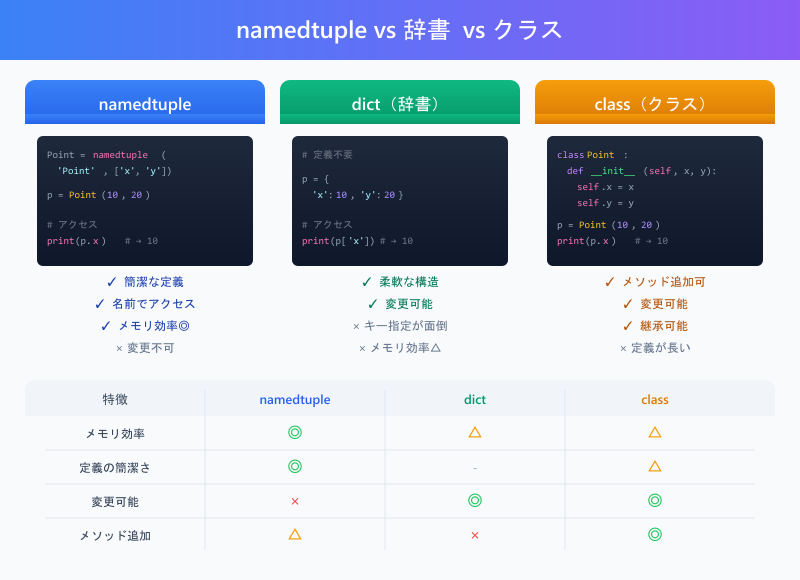
# 辞書
point_dict = {'x': 10, 'y': 20}
print(point_dict['x'])  # キー指定が面倒

# クラス
class PointClass:
    def __init__(self, x, y):
        self.x = x
        self.y = y

point_class = PointClass(10, 20)
print(point_class.x)  # 定義が長い

# namedtuple
Point = namedtuple('Point', ['x', 'y'])
point_nt = Point(10, 20)
print(point_nt.x)  # 簡潔で明確
比較表
| 特徴 | namedtuple | dict | class |
|---|---|---|---|
| メモリ効率 | ◎ | △ | △ |
| 定義の簡潔さ | ◎ | - | △ |
| 変更可能 | × | ◎ | ◎ |
| 名前アクセス | ◎ | ◎ | ◎ |
| メソッド追加 | △ | × | ◎ |
実践例
ユーザー情報の管理
from collections import namedtuple

User = namedtuple('User', ['id', 'name', 'email', 'age'])

users = [
    User(1, '田中', 'tanaka@example.com', 25),
    User(2, '山田', 'yamada@example.com', 30),
    User(3, '佐藤', 'sato@example.com', 28),
]

# 年齢でフィルタリング
adults = [u for u in users if u.age >= 28]
for user in adults:
    print(f"{user.name}: {user.email}")
座標計算
from collections import namedtuple
import math

Point = namedtuple('Point', ['x', 'y'])

def distance(p1, p2):
    """2点間の距離を計算"""
    return math.sqrt((p2.x - p1.x)**2 + (p2.y - p1.y)**2)

p1 = Point(0, 0)
p2 = Point(3, 4)
print(f"距離: {distance(p1, p2)}")  # 距離: 5.0
よくある間違い
1. 変更しようとする
p = Point(10, 20)
# p.x = 30  # エラー!

# 正解: _replace を使う
p = p._replace(x=30)
2. 予約語をフィールド名に使う
# NG: classは予約語
# Bad = namedtuple('Bad', ['class', 'def'])

# OK: rename=True で自動リネーム
Fixed = namedtuple('Fixed', ['class', 'def'], rename=True)
print(Fixed._fields)  # ('_0', '_1')

# 有効なフィールド名は保持され、無効なものだけ位置番号に置換される
Partial = namedtuple('Partial', ['name', 'class', 'age'], rename=True)
print(Partial._fields)  # ('name', '_1', 'age')
まとめ

| 操作 | 方法 |
|---|---|
| 定義 | namedtuple('Name', ['field1', 'field2']) |
| 作成 |
Point(10, 20) または Point(x=10, y=20)
|
| アクセス |
p.x または p[0]
|
| 辞書変換 | p._asdict() |
| 値の変更 | p._replace(x=30) |
| リストから作成 | Point._make([10, 20]) |