
はじめに
Pythonのcollectionsモジュールは、リストや辞書を拡張した特殊なコンテナ型を提供します。適切に使い分けることで、コードの可読性とパフォーマンスを向上できます。

collectionsモジュールとは
from collections import (
    namedtuple,    # 名前付きタプル
    deque,         # 両端キュー
    Counter,       # カウンター
    OrderedDict,   # 順序付き辞書
    defaultdict,   # デフォルト値付き辞書
    ChainMap,      # 辞書のチェーン
    UserDict,      # 辞書のカスタマイズ用
    UserList,      # リストのカスタマイズ用
    UserString,    # 文字列のカスタマイズ用
)
各コンテナの特徴と用途
namedtuple - 名前でアクセスできるタプル
from collections import namedtuple

# 定義
Point = namedtuple('Point', ['x', 'y'])
p = Point(10, 20)

# 名前でアクセス
print(p.x, p.y)  # 10 20

# インデックスでもOK
print(p[0], p[1])  # 10 20
用途: 構造化データ、CSVの行、座標、設定値
deque - 高速な両端操作
from collections import deque

d = deque([1, 2, 3])

# 両端に追加(O(1))
d.appendleft(0)  # [0, 1, 2, 3]
d.append(4)      # [0, 1, 2, 3, 4]

# 両端から削除(O(1))
d.popleft()  # 0
d.pop()      # 4
用途: キュー、スタック、履歴管理、スライディングウィンドウ
Counter - 要素のカウント
from collections import Counter

# カウント
c = Counter(['a', 'b', 'a', 'c', 'a'])
print(c)  # Counter({'a': 3, 'b': 1, 'c': 1})

# 上位N件
print(c.most_common(2))  # [('a', 3), ('b', 1)]
用途: 頻度集計、ヒストグラム、単語カウント
OrderedDict - 順序を保持する辞書
from collections import OrderedDict

od = OrderedDict()
od['a'] = 1
od['b'] = 2
od['c'] = 3

# 順序が保証される
print(list(od.keys()))  # ['a', 'b', 'c']

# 末尾に移動
od.move_to_end('a')
print(list(od.keys()))  # ['b', 'c', 'a']
用途: LRUキャッシュ、順序が重要な設定、JSON出力の順序制御
defaultdict - 自動初期化される辞書
from collections import defaultdict

# リストとして初期化
d = defaultdict(list)
d['fruits'].append('apple')
d['fruits'].append('banana')
print(d)  # {'fruits': ['apple', 'banana']}

# 整数として初期化(カウント用)
d = defaultdict(int)
d['a'] += 1
d['b'] += 1
print(d)  # {'a': 1, 'b': 1}
用途: グルーピング、集計、ネスト辞書の構築
ChainMap - 複数辞書の仮想的な結合
from collections import ChainMap

defaults = {'color': 'red', 'size': 'medium'}
user_settings = {'color': 'blue'}

# 結合(user_settingsが優先)
config = ChainMap(user_settings, defaults)
print(config['color'])  # blue
print(config['size'])   # medium
用途: 設定の階層化、スコープ管理、環境変数のフォールバック
使い分けチャート
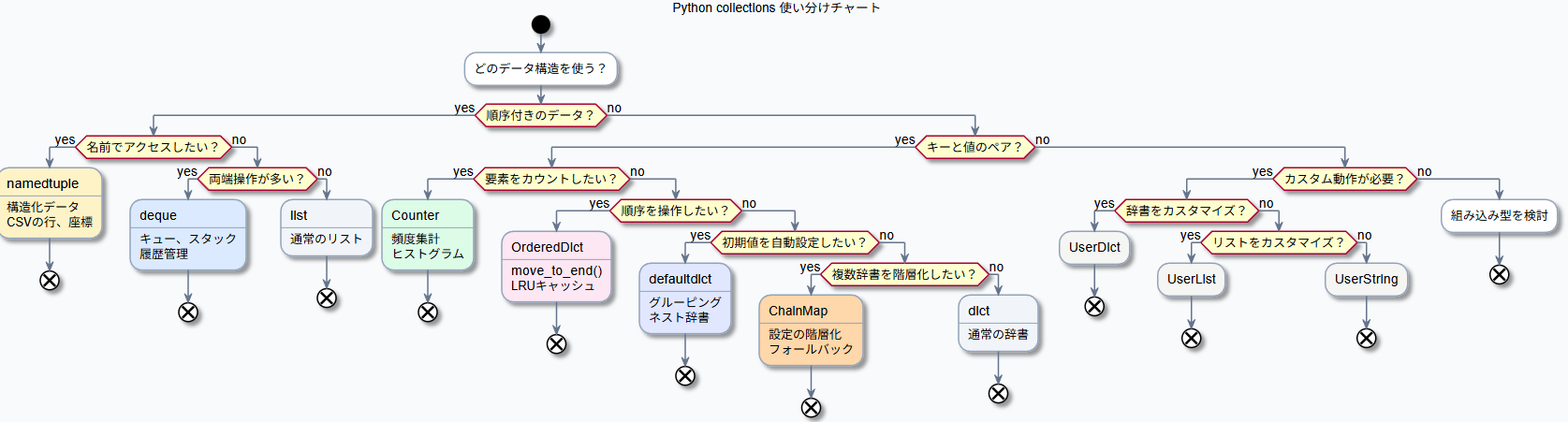
どのデータ構造を使う?
│
├─ 順序付きのデータ?
│   ├─ 名前でアクセスしたい → namedtuple
│   ├─ 両端操作が多い → deque
│   └─ 単純なリスト → list
│
├─ キーと値のペア?
│   ├─ 要素をカウントしたい → Counter
│   ├─ 順序を操作したい → OrderedDict
│   ├─ 初期値を自動設定したい → defaultdict
│   ├─ 複数辞書を階層化したい → ChainMap
│   └─ 単純な辞書 → dict
│
└─ カスタム動作が必要?
    ├─ 辞書をカスタマイズ → UserDict
    ├─ リストをカスタマイズ → UserList
    └─ 文字列をカスタマイズ → UserString
パフォーマンス比較
| 操作 | list | deque |
|---|---|---|
末尾追加 append
|
O(1) | O(1) |
先頭追加 insert(0, x)
|
O(n) | O(1) |
末尾削除 pop()
|
O(1) | O(1) |
先頭削除 pop(0)
|
O(n) | O(1) |
| インデックスアクセス | O(1) | O(n) |
# リストの先頭追加は遅い
lst = list(range(100000))
lst.insert(0, -1)  # 全要素をシフト

# dequeの先頭追加は速い
from collections import deque
dq = deque(range(100000))
dq.appendleft(-1)  # O(1)
Python 3.7以降の変化
dict が順序を保持するように
Python 3.7以降、通常のdictも挿入順序を保持します。
# Python 3.7+
d = {}
d['a'] = 1
d['b'] = 2
d['c'] = 3
print(list(d.keys()))  # ['a', 'b', 'c'] - 順序保持
OrderedDictを使う場面:
-
move_to_end()が必要 - 順序を考慮した
==比較が必要 - Python 3.6以前との互換性
実践例:設定管理
from collections import ChainMap, namedtuple

# デフォルト設定
defaults = {
    'host': 'localhost',
    'port': 8080,
    'debug': False
}

# 環境別設定
production = {'debug': False, 'port': 80}
development = {'debug': True}

# 現在の環境設定を取得
def get_config(env='development'):
    envs = {
        'production': production,
        'development': development
    }
    return ChainMap(envs.get(env, {}), defaults)

config = get_config('development')
print(f"Host: {config['host']}")   # localhost
print(f"Port: {config['port']}")   # 8080
print(f"Debug: {config['debug']}") # True
まとめ

| コンテナ | 主な用途 |
|---|---|
| namedtuple | 構造化データ、イミュータブルなレコード |
| deque | 両端操作、キュー、履歴 |
| Counter | カウント、頻度分析 |
| OrderedDict | 順序操作、LRUキャッシュ |
| defaultdict | グルーピング、自動初期化 |
| ChainMap | 設定の階層化 |
次回移行に機会があれば、それぞれ深掘りする予定。