
0. はじめに
CARLA Leaderboard 2.0を用いてマルチカメラデータセットを作成します。背景として、Hidden Biases of End-to-End Driving Datasetsのリポジトリで生成したデータセットを用いてE2Eの自動運転モデルを学習しようと計画したのですが、このリポジトリで収集できるのはシングルカメラのみでした。一方で、トライしようとしていたものはカメラのみで推論するモデルが多く、今後はカメラのモデルが主流になってくる可能性があるため、マルチカメラに拡張する必要がありました。本記事では、行った実装について概要を説明します。
1. 概要
- Hidden Biases of End-to-End Driving Datasetsで提案されたデータセットをマルチカメラに拡張する。
- 公開されているコードはシングルカメラなので、容易にカメラを追加できるように変更を加える。
- 位置/角度等のパラメータはnuScenesの設定値を参照した(もちろん、用途に応じて変更は可能)。
リンク
本記事の実装結果:https://github.com/Sugar-98/Carla_ML_Platform
論文:https://arxiv.org/abs/2412.09602
ベースのリポジトリ:https://github.com/autonomousvision/carla_garage
2. 手法
2.1. ベースプロジェクトの構成と変更箇所
ベースプロジェクトは下記を使用します。PDM-Liteというプランナを使用して、CARLA Leaderboard 2.0を用いたデータ収集と、Transfuser++、TCP、PlanTなどを学習、Leaderboard 2.0でベンチマークする機能が実装されています。
https://github.com/autonomousvision/carla_garage
このリポジトリで扱っているモデルについては、下記記事で解説しています。
データ収集を行うAgentのクラス構成は下記のようになっています。
[AutoPilot]
制御指令値を決めるためのプランナ、車速サーボ、操舵制御器等が実装されています。使用するセンサ はHDMAP、IMU、車速センサのみで、認識系は使用していません。代わりにCARLA serverに直接接続して、通常のLeaderboardでは取得できない周辺車両や信号の真値を取得し、より精度の高いプランニングを行っています。
[DataAgent]
データセットに使用する情報の取得を行います。rgb,semantics,depth,lidarが取り付けられている他、CARLA serverから取得した周辺車両情報を用いて、BEV、Bounding Boxの生成も行っています。
[AutonomousAgent]
Leaderboardが提供している抽象クラス。これを継承してエントリポイントを書いておくと、Leaderboard側がsetup()やrun_step()等のAPIを呼んで制御を実行してくれます。データ収集におけるエントリポイントはDataAgentになります。AutonomousAgentの詳細は下記を参照。
https://leaderboard.carla.org/get_started_v2_0/

今回やりたい事はAgentにマルチカメラを取り付けてデータ収集する事なので、DataAgentを改造してカメラの取り付けやデータの保存を追加します。センサの取り付けは下記のようなイメージで、パラメータを書いた辞書をリストに格納して返します。
result.append({
          'type': 'sensor.camera.rgb',
          'x': tmp_trans[0],
          'y': tmp_trans[1],
          'z': tmp_trans[2],
          'roll': np.degrees(tmp_rot[0]),
          'pitch': np.degrees(tmp_rot[1]),
          'yaw': np.degrees(tmp_rot[2]),
          'width': camera.W,
          'height': camera.H,
          'fov': np.degrees(camera.fov),
          'id': camera.name
})
2.2. 座標変換と内部パラメータの設定
CARLAはUnreal Engineの座標系を採用しているため、左手系であり、原点も車両の重心に取っている場合が多いです(原点はアセット毎に決まるので、ものによる)。一方で、自動運転の研究で広く使われるnuScenesは右手系であり、車両後軸の中心を基準点としています。従って、CARLAの座標系に合わせてデータ取得をしてしまうと、後ほどモデルにIntrinsic/Extrinsicを取り込もうとした際に不都合が生じる可能性があります。また、CARLAで設定するのはIntrinsicではなく"height"、"height"、"fov"のため、ここもIntrinsicで設定しておいた方が汎用的だと考えられます。
[上:CARLA 座標系、下:nuScenes座標系]
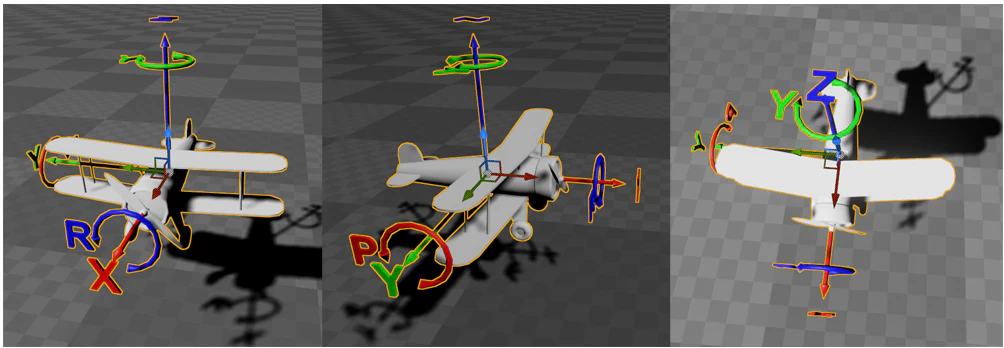
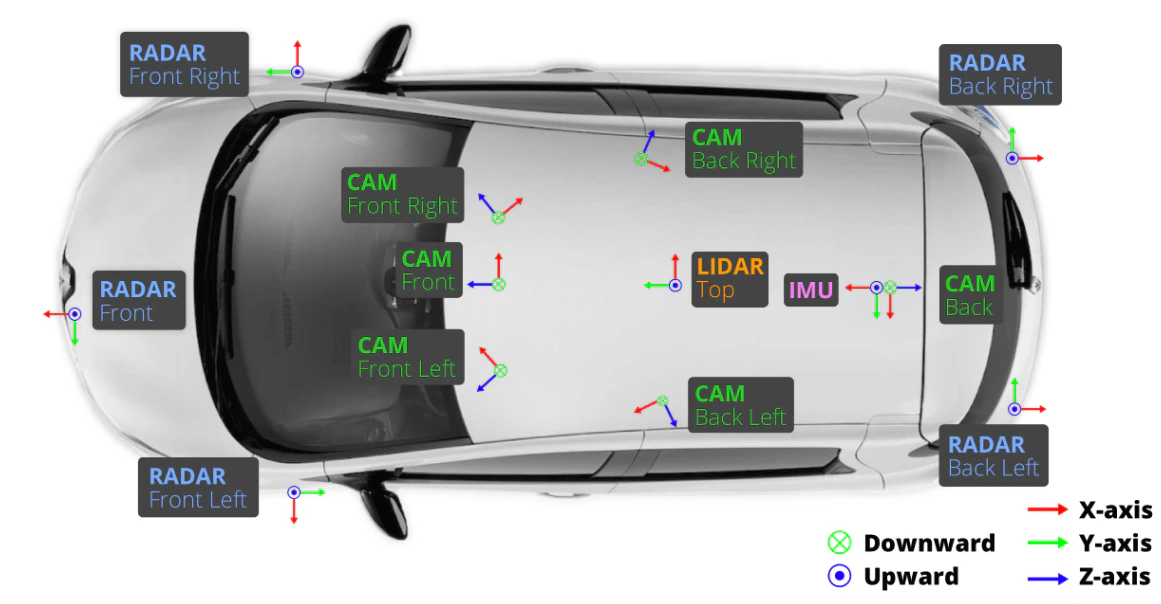
そこで、下記クラスと関数を作成(細かい実装はcommon_library/common/utils.pyを参照)、nuScenes/CARLAのパラメータを相互変換できるようにし、実際の設定値もnuSceanesのパラメータを使用する事にしました。ただし、原点だけはプランニングの事を考えるとBounding Boxの中心にしておくと都合が良さそうだったので、そのように設定しています。
[実装内容]
・コンストラクタで設置位置、取得する画像の高さ/幅を設定
・クオータニオン/オイラーの相互変換
・Intrinsic/Fovの相互変換
・設置位置のオフセット
・回転行列の取得

右手系 → 左手系の座標変換
def conv_NuScenes2Carla(trans_nu, rot_mat_nu):
  trans_carla = trans_nu
  trans_carla[1] = -trans_nu[1]

  rot_mat_nu = np.asarray(rot_mat_nu)
  R_veh2img = np.array([[0, 0, 1],
                        [-1, 0, 0],
                        [0, -1, 0]], dtype=float)

  rev_y_axis = np.diag([1.0, -1.0, 1.0])
  R_tmp = rot_mat_nu @ R_veh2img.T
  R_carla = rev_y_axis @ R_tmp @ rev_y_axis

  sy = -R_carla[2,0]
  pitch = np.arcsin(np.clip(sy, -1.0, 1.0))
  cp = np.cos(pitch)

  if cp > 1e-8:
    roll  = np.arctan2(R_carla[2,1], R_carla[2,2])
    yaw   = np.arctan2(R_carla[1,0], R_carla[0,0])
  else:
    roll  = 0.0
    yaw   = np.arctan2(-R_carla[0,1], R_carla[1,1])

  rot_carla = [roll, pitch, yaw]
  return trans_carla, rot_carla
2.3 センサーの取り付け
GlobalConfigに設置するカメラを定義し、DataAgentのsetup()内で取り付けを行います。nuScenesのパラメータを使用してカメラ定義 → 座標系を後軸中心からアセット原点にオフセットという流れです。アセットとして使用する"lincoln.mkz_2017"の後軸中心位置は[-1.4, 0, 0.25]だったので、その分オフセットします。
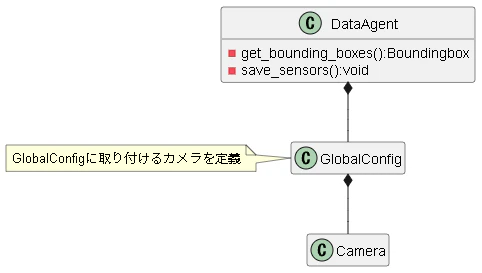
カメラの定義
    self.camera_width = 1600  # Camera width in pixel during data collection and eval (affects sensor agent)
    self.camera_height = 900  # Camera height in pixel during data collection and eval (affects sensor agent)
    origin2rear = [-1.4, 0, 0.25] #vehicle.lincoln.mkz_2017

    tmp_trans = [1.70079118954, 0.0159456324149, 1.51095763913]
    tmp_rot = [0.4998015430569128, -0.5030316162024876, 0.4997798114386805, -0.49737083824542755]
    tmp_intrinsic = [
      [1266.417203046554, 0.0, 816.2670197447984],
      [0.0, 1266.417203046554, 491.50706579294757],
      [0.0, 0.0, 1.0]
    ]
    self.CAM_FRONT = Camera(tmp_trans, self.camera_width, self.camera_height, name="CAM_FRONT",\
                            rot_quaternion = tmp_rot, intrins = tmp_intrinsic)

    tmp_trans = [0.0283260309358, 0.00345136761476, 1.57910346144]
    tmp_rot = [0.5037872666382278, -0.49740249788611096, -0.4941850223835201, 0.5045496097725578]
    tmp_intrinsic = [
      [809.2209905677063,0.0,829.2196003259838],
      [0.0,809.2209905677063,481.77842384512485],
      [0.0,0.0,1.0]
    ]
    self.CAM_BACK = Camera(tmp_trans, self.camera_width, self.camera_height, name="CAM_BACK",\
                            rot_quaternion = tmp_rot, intrins = tmp_intrinsic)

    tmp_trans = [1.03569100218,0.484795032713,1.59097014818]
    tmp_rot = [0.6924185592174665,-0.7031619420114925,-0.11648342771943819,0.11203317912370753]
    tmp_intrinsic = [
      [1256.7414812095406,0.0,792.1125740759628],
      [0.0,1256.7414812095406,492.7757465151356],
      [0.0,0.0,1.0]
    ]
    self.CAM_BACK_LEFT = Camera(tmp_trans, self.camera_width, self.camera_height, name="CAM_BACK_LEFT",\
                            rot_quaternion = tmp_rot, intrins = tmp_intrinsic)

    tmp_trans = [1.52387798135,0.494631336551,1.50932822144]
    tmp_rot = [0.6757265034669446,-0.6736266522251881,0.21214015046209478,-0.21122827103904068]
    tmp_intrinsic = [
      [1272.5979470598488,0.0,826.6154927353808],
      [0.0,1272.5979470598488,479.75165386361925],
      [0.0,0.0,1.0]
    ]
    self.CAM_FRONT_LEFT = Camera(tmp_trans, self.camera_width, self.camera_height, name="CAM_FRONT_LEFT",\
                            rot_quaternion = tmp_rot, intrins = tmp_intrinsic)

    tmp_trans = [1.5508477543,-0.493404796419,1.49574800619]
    tmp_rot = [0.2060347966337182,-0.2026940577919598,0.6824507824531167,-0.6713610884174485]
    tmp_intrinsic = [
      [1260.8474446004698,0.0,807.968244525554],
      [0.0,1260.8474446004698,495.3344268742088],
      [0.0,0.0,1.0]
    ]
    self.CAM_FRONT_RIGHT = Camera(tmp_trans, self.camera_width, self.camera_height, name="CAM_FRONT_RIGHT",\
                            rot_quaternion = tmp_rot, intrins = tmp_intrinsic)

    tmp_trans = [1.0148780988,-0.480568219723,1.56239545128]
    tmp_rot = [0.12280980120078765,-0.132400842670559,-0.7004305821388234,0.690496031265798]
    tmp_intrinsic = [
      [1259.5137405846733,0.0,807.2529053838625],
      [0.0,1259.5137405846733,501.19579884916527],
      [0.0,0.0,1.0]
    ]
    self.CAM_BACK_RIGHT = Camera(tmp_trans, self.camera_width, self.camera_height, name="CAM_BACK_RIGHT",\
                            rot_quaternion = tmp_rot, intrins = tmp_intrinsic)

    self.cameras = [
      self.CAM_FRONT,
      self.CAM_BACK,
      self.CAM_BACK_LEFT,
      self.CAM_FRONT_LEFT,
      self.CAM_FRONT_RIGHT,
      self.CAM_BACK_RIGHT
    ]
    self.num_cameras = 0
    for idx, camera in enumerate(self.cameras):
      camera.offset_position(origin2rear)
      self.num_cameras += 1
[使用するアセット]

config.py内で取り付けるカメラをリストに格納しておき、DataAgentのsetup()で順番にAgentに取り付けをしていくのみ。
      if self.config.gen_rgb:
        for idx, camera in enumerate(self.config.cameras):
          tmp_trans, tmp_rot = conv_NuScenes2Carla(camera.trans, camera.get_rot_mat())
          result.append({
          'type': 'sensor.camera.rgb',
          'x': tmp_trans[0],
          'y': tmp_trans[1],
          'z': tmp_trans[2],
          'roll': np.degrees(tmp_rot[0]),
          'pitch': np.degrees(tmp_rot[1]),
          'yaw': np.degrees(tmp_rot[2]),
          'width': camera.W,
          'height': camera.H,
          'fov': np.degrees(camera.fov),
          'id': camera.name
          })
2.4 データ書き込み部分の実装変更
データ書き込みはDataAgent.runstep()内で、指定した周期(config.data_save_freq)毎に呼ばれるsave_sensors()で実施されているようなので、下記の通り書き込み処理を追記しました。
  def save_sensors(self, tick_data):
    frame = self.step // self.config.data_save_freq

    # CARLA images are already in opencv's BGR format.
    if self.config.gen_rgb:
      rgb = tick_data['rgb']
      for idx, camera in enumerate(self.config.cameras):
        cv2.imwrite(str(self.save_path / 'rgb' / camera.name /(f'{frame:04}.jpg')), rgb[camera.name])
      cv2.imwrite(str(self.save_path / 'rgb_augmented' / (f'{frame:04}.jpg')), tick_data['rgb_augmented'])
3. 取得結果
データの取得結果は下記の通りになりました。nuScenesとかなり近い画角でデータ取得できている事が確認できます。
[nuScenes]

[CARLA]

4. おわりに
今回は、CARLA Leaderboard 2.0を用いてマルチカメラのデータセットの作成を行いました。このデータセットを用いて、Lift Splat Shootなど、E2E自動運転モデルのbackboneに使用できるBEVモデルの学習を進めていきたいと思います。
Appendix
環境構築について
CARLA Leaderboardは基本的にLinux上で動かす事を想定しているため、Windowsを用いる場合はWSLか仮想マシンを使用することになると思います。しかし、私のWSL環境ではCARLAの画面描画が上手く立ち上がらずエラーになってしまったため(CARLA以外でGUI表示できることは確認済み)、諦めてWindows側でCARLA serverを立ち上げ、WSLからそこに接続する構成としました。近い報告はいくつか上がっているものの解決に至っている情報を見つけることができなかったため、同じエラーが起きた場合はこちらの方法をおすすめします。