
ゴール
- Lambda + API Gatewayをコンソールで構築
- LambdaをPythonで実装
- API GatewayでGET/POSTを作る
- LambdaからDynamoDBを操作
- AWS SAMで同じ構成をコード化
- LambdaをDockerコンテナイメージでデプロイ
- CI/CD(GitHub Actionsなど)を構築
Lambda + API Gatewayをコンソールで構築
Lambda構築
- 関数名:hello-api
- ランタイム:Python 3.13 など
- アーキテクチャ:arm64 でも x86_64 でもOK
- 実行ロール:新しいロールを作成
Lambdaのコードを以下にします。
import json

def lambda_handler(event, context):

    return {

        "statusCode": 200,

        "headers": {

            "Content-Type": "application/json"

        },

        "body": json.dumps({

            "message": "Hello World"

        })

    }
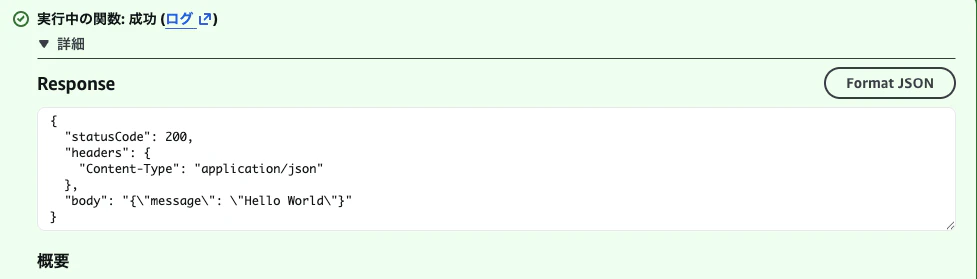
テスト実行
テストタブから実行します。
とりあえず、以下で実行。
{}
実行結果
API Gateway構築
今回は HTTP API を使うのがおすすめです。
API Gatewayには大きく、
- HTTP API
- REST API
があります。
単純なLambda APIなら、まずは HTTP API で十分です。
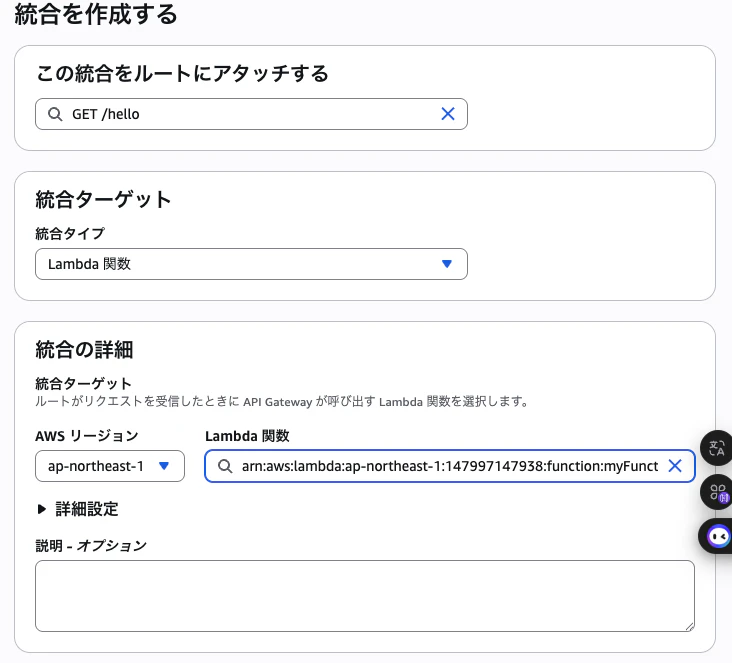
Routeを設定する
GET /hello
というAPIにします。
つまり、
GET https://xxxxx.execute-api.ap-northeast-1.amazonaws.com/hello
/helloを前に作成したLambdaへ統合します。
curlで実行
 curl https://xxxxxxxxx.ap-northeast-1.amazonaws.com/hello
{"message": "Hello World"}%
成功!!
次回、 LambdaをPythonで実装
処理を持たせたLambdaで色々実行