
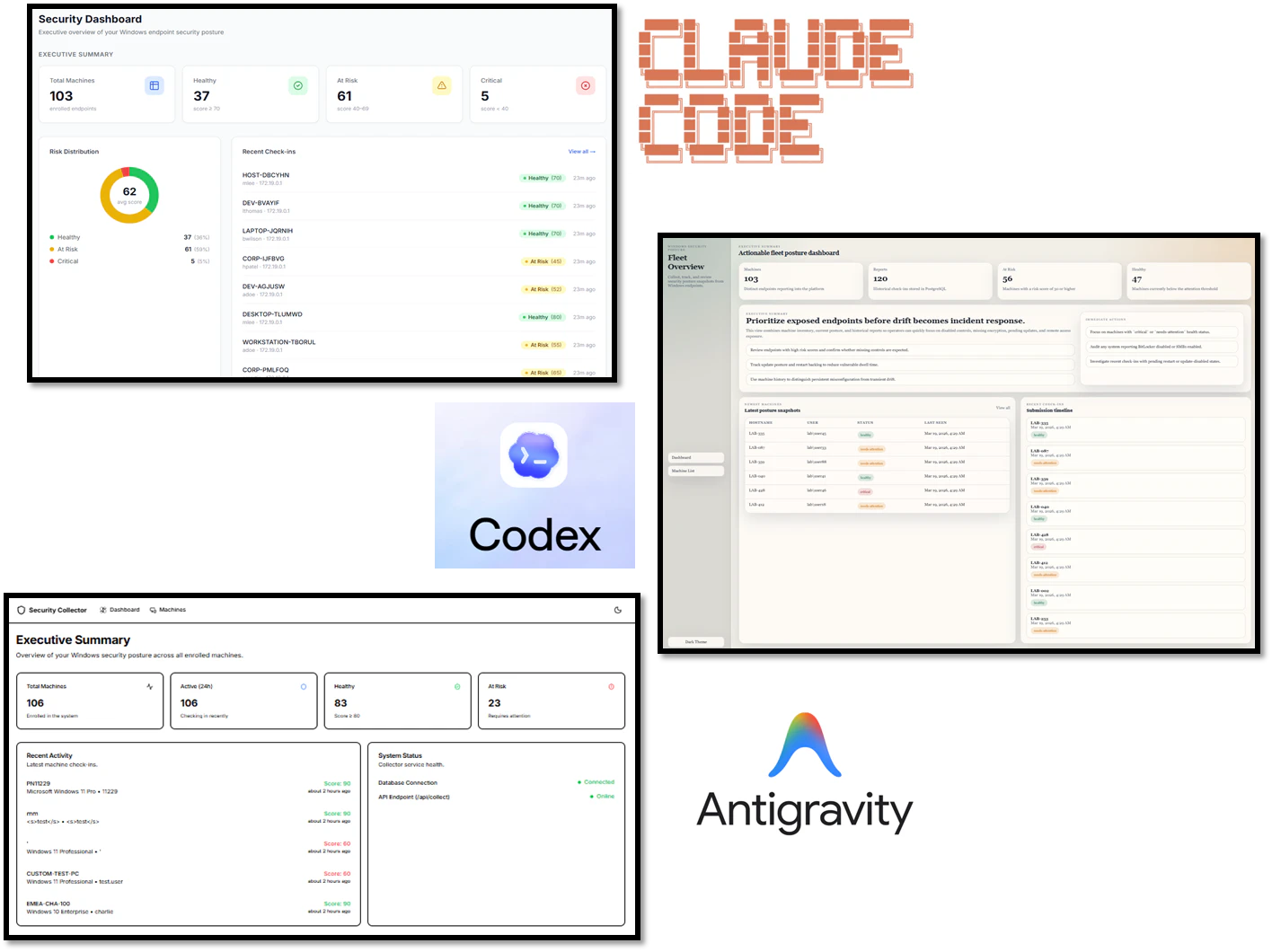
目次
テスト対象
- 月額3000円~4000円のプランを利用した
- いずれもシングルエージェントとして利用
| Coding Agent | プラン | モデル | 費用(月額、USD) |
|---|---|---|---|
| Anthropic Claude Code | Team Standard | Sonnet 4.6 | 25 |
| OpenAI Codex | Plus | GPT-5.4 | 20 |
| Google Antigravity | Google AI Pro | Gemini 3.1 Pro (High) | 19.99 |
結論
- 総合ではClaude Codeが最も安定していた
- クライアント実装ではCodexが最も充実していた
- Antigravityは粗さはあるが、DB設計には光る点があった
| Coding Agent | クライアント | サーバ | 総合 |
|---|---|---|---|
| Anthropic Claude Code | 8 | 10 | 18 |
| OpenAI Codex | 10 | 6 | 16 |
| Google Antigravity | 3 | 7 | 10 |
おことわり
- UIの評価にはかなり主観が入っています
- 本来は人間が追加指示を出して改善を重ねるものですが、今回は正常動作するまで修正させ、その後は追加改善なしで評価しました。いわば v1.0.0 時点の比較です
- 時間の都合上、以下は評価対象外です。あとで記事を足すかもしれません。
- 例外処理の充実度
- セキュリティ
- 軽くXSSやSQLiは確認したが、どれも最低限の対策は入っているように見えた
- 大量クライアントをさばく性能
作らせたアプリ「Windowsセキュリティチェッカー」
-
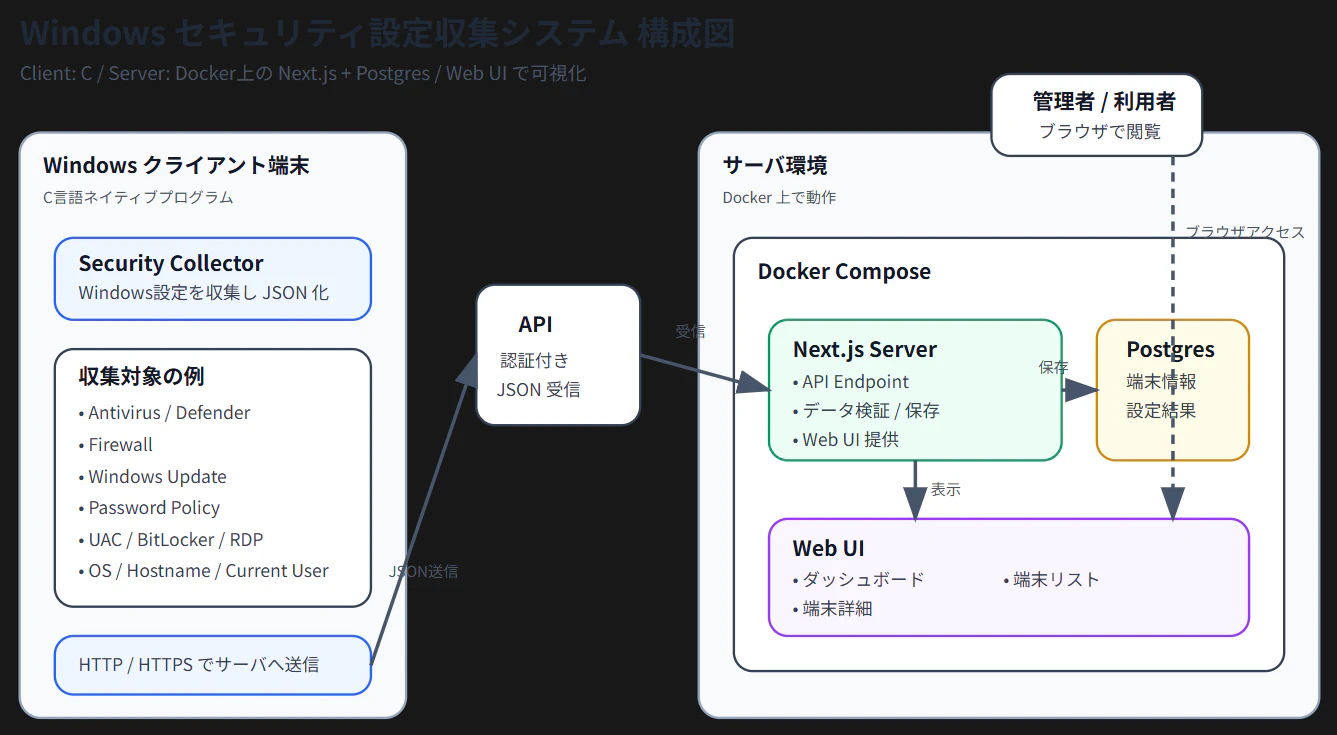
Windows上の各種セキュリティ設定をチェックして、サーバに通知するクライアント・サーバのプログラム
-
クライアント:C言語
-
サーバ:Docker上で動作するNext.js + PostgreSQL
-
サーバ側はWebUIがあり、ダッシュボードや端末リスト、詳細が確認できる
-
自由度を残すため、以下の指示をした
- サーバのダッシュボードはエグゼクティブサマリを含める旨を入れたのみで、細かい構成については言及せず
- クライアント側で取得するデータに「その他のセキュリティ設定も取って」と命令した
-
細かい命令が見たい方は下方にあるプロンプト参照
VibeCodingから動かすまで
- 初回のコード生成は15分から30分程度かかった
- どのCoding Agentも一発で動作するものは作れず、クライアント・サーバいずれも動かして(コンパイルして)、エラーを貼り付けて、修正させる作業を3~10回ほど繰り返した
- 特にAntigravityのサーバ側はかなりてこずっていた
- クライアントのコンパイルやサーバの起動はCoding Agentに託し、自動デバッグもできるが、まだコマンド実行権限を与えるほどやつらを信用していない自分がいる
- エラーが解消して動作するようになった時点で、追加改善は行わせず、その状態をひとまず v1.0.0 として評価した
Antigravityでのトラブル
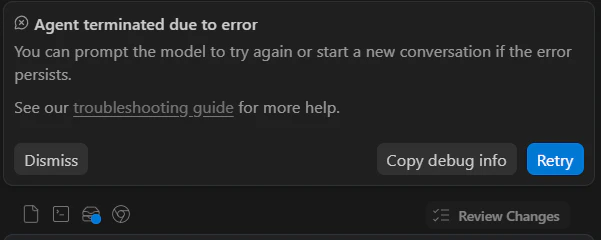
Antigravityではサーバの起動(docker compose build)でエラーが多発し、AI Agentがずっと直そうとしたものの、以下のエラーが出て、新しい会話を始める必要があった。
結果・比較
クライアント
| Coding Agent | スコア | 評価コメント |
|---|---|---|
| Claude Code | 8 | 指示した内容のことはきっちりできている |
| Codex | 10 | 指示した内容に加えて+αがある |
| Antigravity | 3 | PoC色が強く、修正なしでそのまま運用に乗せるのは厳しい |
取得している情報
- Codexは+αでAdminitratorやGuestログインの可否もチェックしている
- Codexは取得に失敗した際のエラーを送信している
-
どのCoding Agentも日本語名のコンピュータ名では文字化けを引き起こす
- Windowsプログラミング初学者が陥りがちな罠
| 取得情報 | Claude Code | Codex | Antigravity |
|---|---|---|---|
| OS情報 | ○ | ○ | ○ |
| Hostname | ○ | ○ | ○ |
| Current User | ○ | ○ | ○ |
| Last Boot Time | ○ | ○ | ○ |
| Domain / Workgroup | ○ | ○ | ○ |
| Antivirus | ○ | ○ | △(AntiVirusProduct の実取得・解析はしておらず、JSON では antivirusEnabled:true 固定) |
| Defender | ○ | ○ | ○ |
| Firewall | ○ | ○ | △(実測ロジックがなく、JSON では firewallEnabled:true 固定) |
| Windows Update | ○ | ○ | △(更新設定や状態を実取得しておらず、JSON では windowsUpdateStatus:"Checked" 固定) |
| UAC | ○ | ○ | × |
| Password Policy | ○ | ○ | × |
| BitLocker | ○ | ○ | △(実測しておらず、JSON では bitlockerEnabled:false 固定) |
| RDP | ○ | ○ | △(実測しておらず、JSON では rdpEnabled:false 固定) |
| SMB / SMBv1 | ○ | ○ | × |
| Built-in Administrator / Guest 状態 | × | ○ | × |
| Collection Errors | × | ○ | × |
| 送信時刻 / Collected At | × | ○ | × |
パラメータの持たせ方
| パラメータ | Claude Code | Codex | Antigravity |
|---|---|---|---|
| サーバのURL | コマンドライン引数 | コマンドライン引数 | ハードコーディング |
| Preshared Key *1 | コマンドライン引数 | コマンドライン引数 | ハードコーディング |
*1 サーバにデータを送信する際のトークンのようなもの
サーバ
| Coding Agent | スコア | 評価コメント |
|---|---|---|
| Claude Code | 10 | 万人受けする今どきのUIである |
| Codex | 6 | UIはフォント含めて、いまいち |
| Antigravity | 7 | UIはシンプルでよいが指示した機能が実装されていなかった。DB構成で加点。 |
- サーバスコアは、機能・UI・DB設計を総合して評価した
- Antigravityは、未実装機能で減点した一方、DB設計を加味して最終的に7点とした
機能面
- いずれも想定通りの動作となっており、以下の一点を除きほぼ差がなかった
- Antigravityのマシン一覧の画面にはソート機能が付与されていなかった
UI
- 実際のUIについてはスクリーンショット 参照
DB
- DBはPostgreSQL + Prismaで構築させている
| Coding Agent | スコア | 評価コメント |
|---|---|---|
| Claude Code | 8 | 普通 |
| Codex | 7 | MachineとReportテーブルに重複するデータが多く一覧を出す前提の設計 |
| Antigravity | 9 | シンプルなDB設計で冗長データがない |
-
個人的にはデータがしっかり正規化されて、冗長なデータがないAntigravityがきれいと感じた
- 一方でダッシュボードやマシン一覧の画面でDBに負荷がかかる可能性が高い
-
以下が詳細比較である
| 観点 | Claude Code | Codex | Antigravity |
|---|---|---|---|
| 正規化の度合い | 中 | 低め | 高い |
| 冗長データ | 中程度 | 多い | 少ない |
| 更新時の整合性管理 | やや必要 | 最も必要 | 楽 |
| 一覧画面の作りやすさ | 高い | 非常に高い | やや低い |
| 最新状態での検索・ソート | 有利 | 最も有利 | やや不利 |
| スキーマの単純さ | 中 | 低め | 高い |
| 監査・履歴保持 | あり | あり | あり |
| 運用ダッシュボード向き | 高い | 非常に高い | 低〜中 |
スクリーンショット
Claude Code
ダッシュボード

- カラフルで映えている
- 比率を表す円グラフは加点
- Security Coverageもわかりやすくてよき
端末一覧
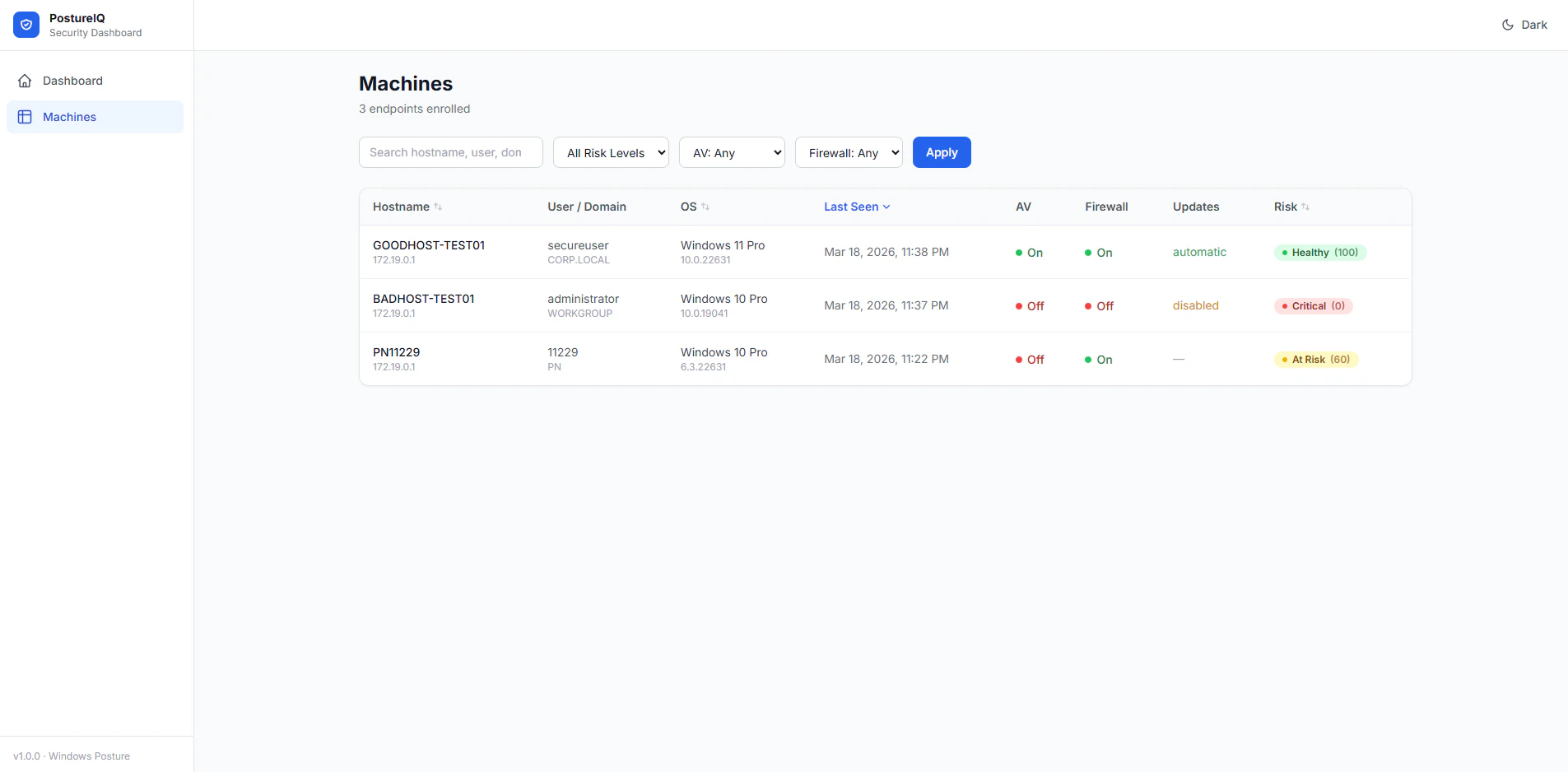
- わかりやすくてよき
端末詳細
良好な端末
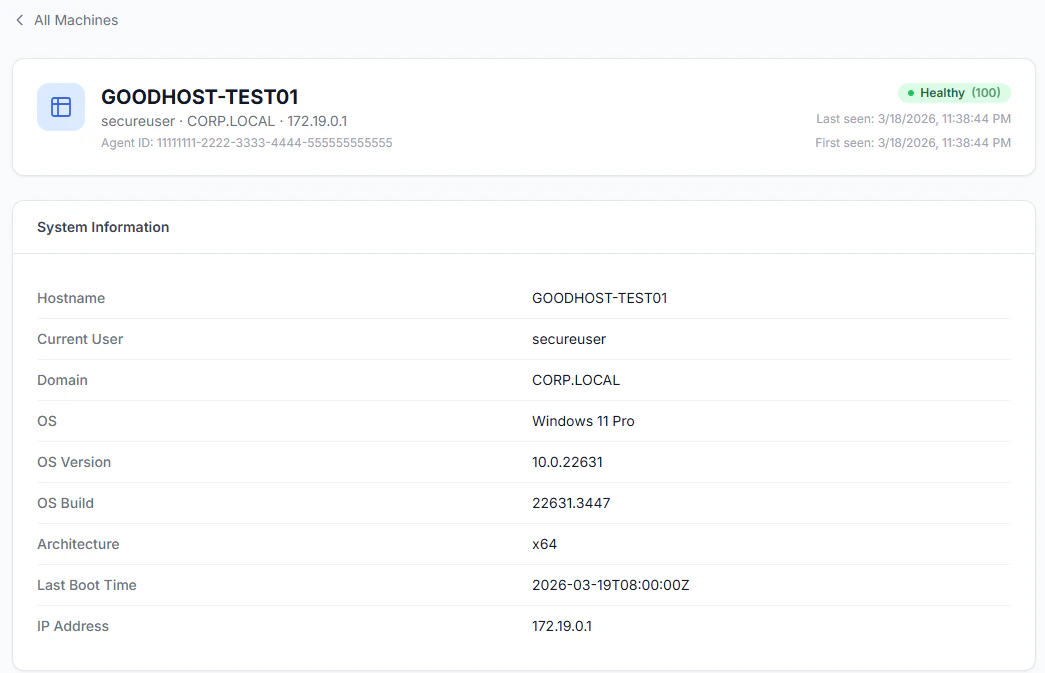
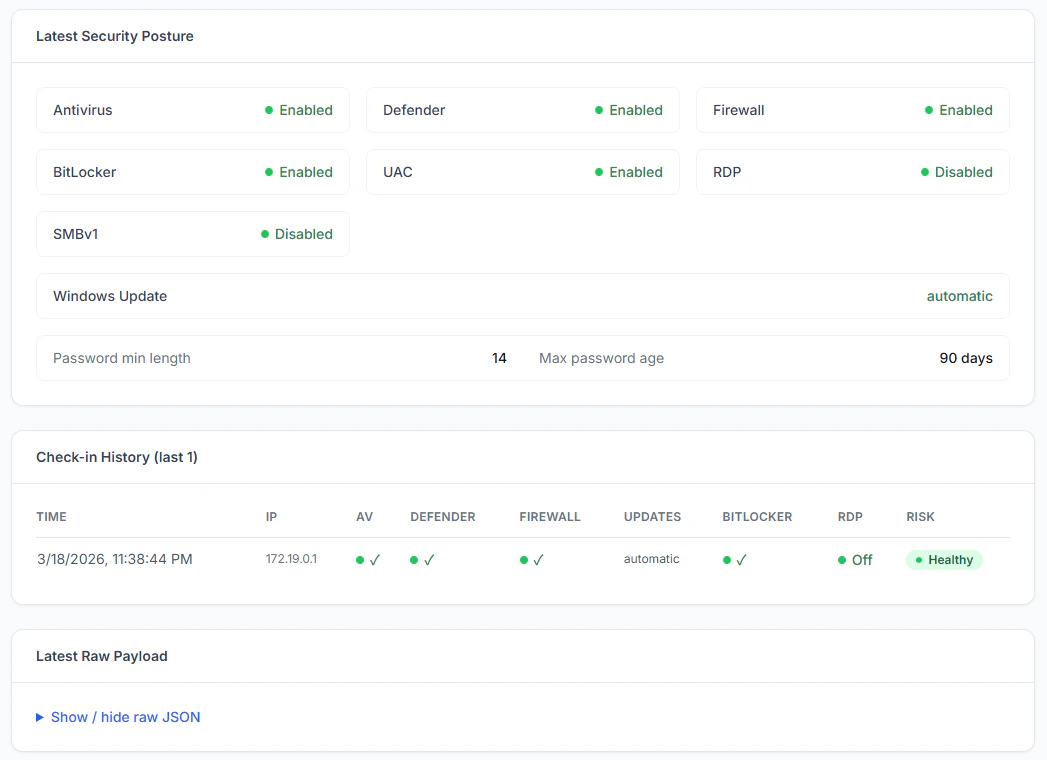

- Raw JSONが折りたたまれており、デフォルトでは見えないのがよい
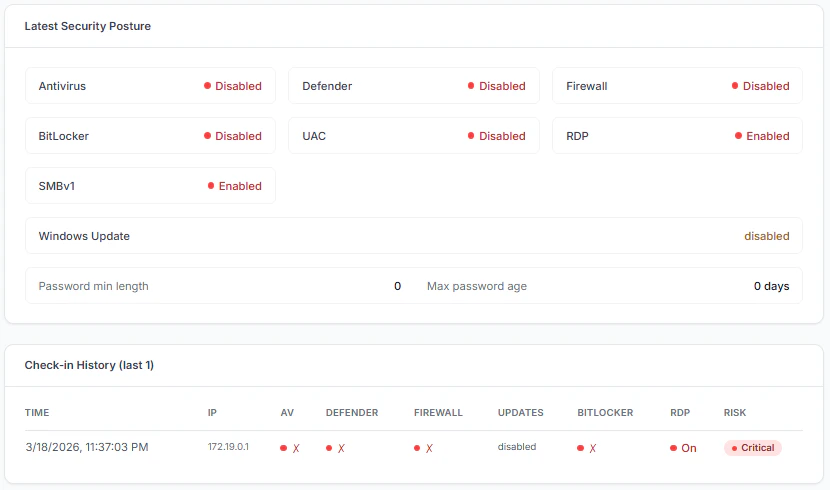
危険な端末

ダークモード

- 文句なし
Codex
ダッシュボード
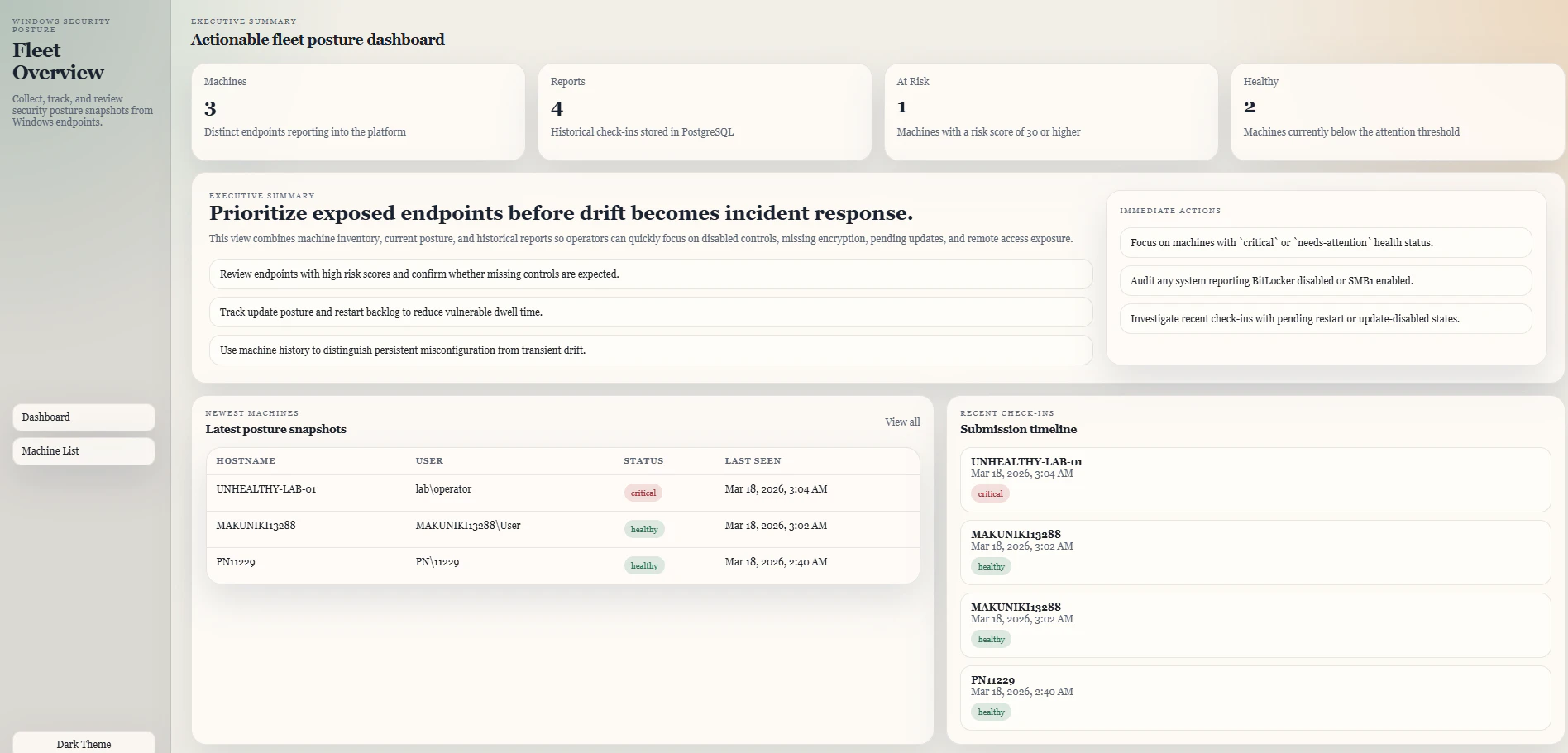
- フォ、フォントがあまり好きくない。。。
- エグゼクティブサマリが静的で結果によらず表示される
- チャートが一個もない
- 色もほとんどない
端末一覧

- 合格
端末詳細
良好な端末
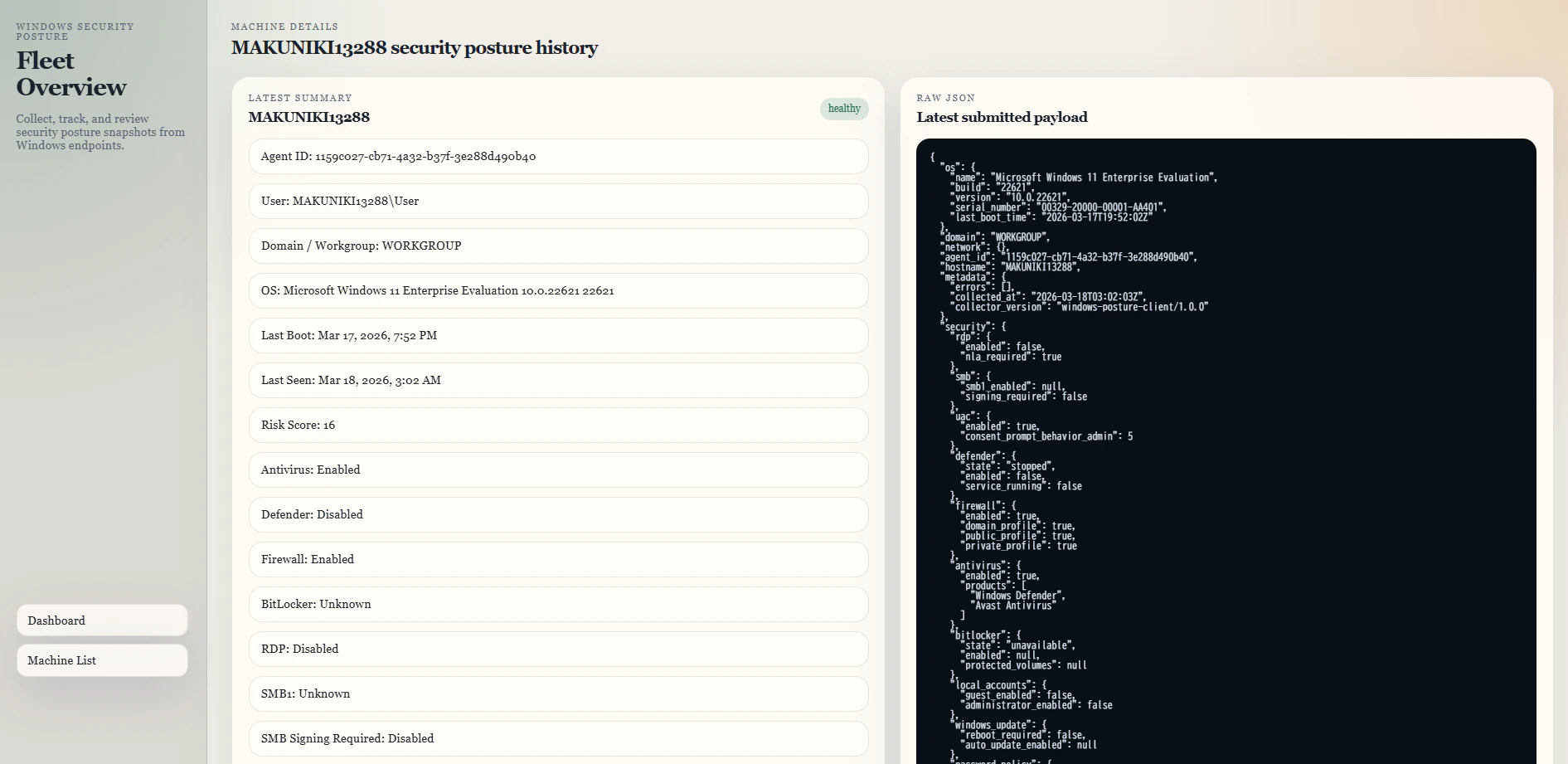
- RAW JSONがずっと出ているのはちょっと。。
危険な端末
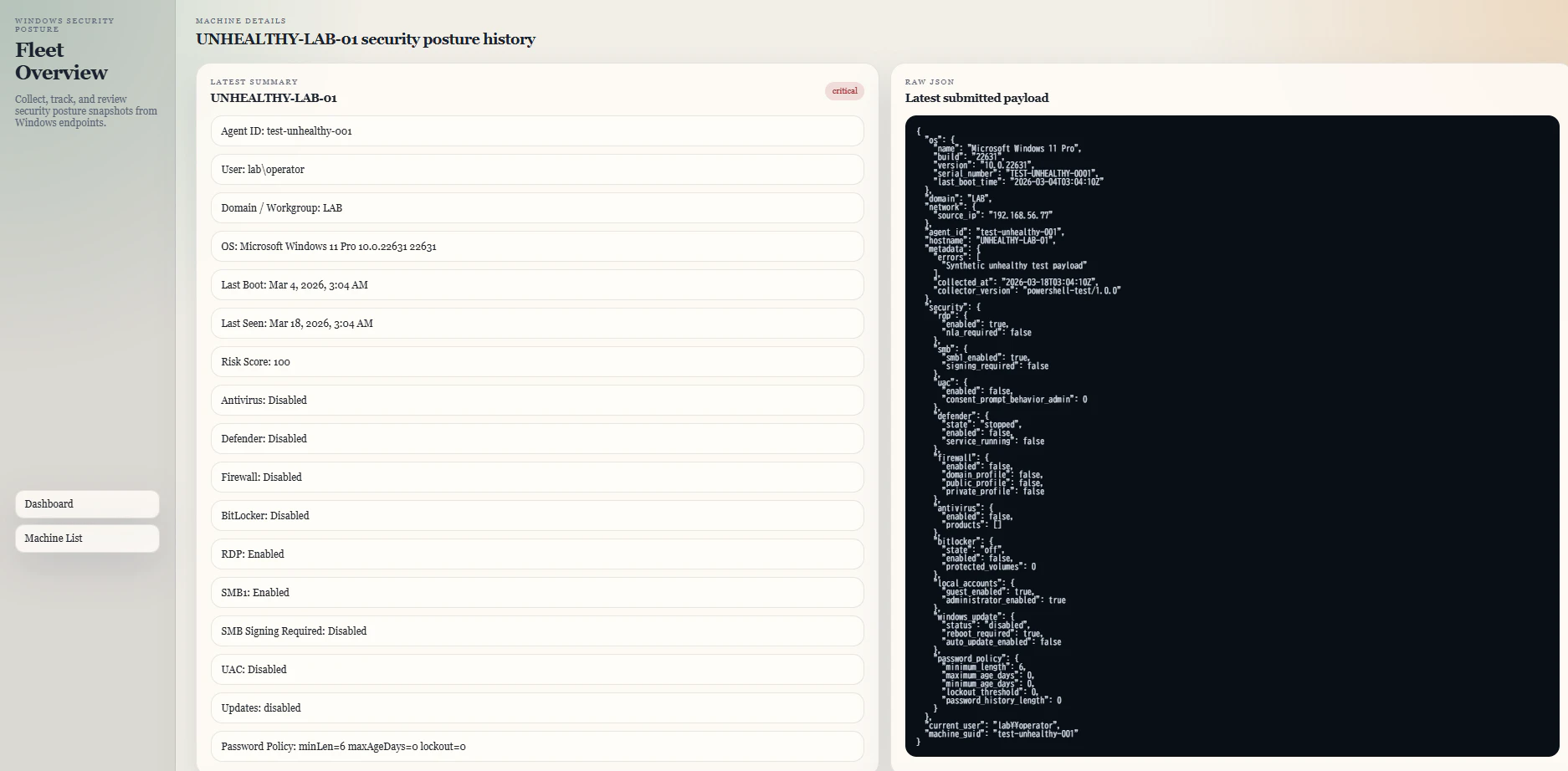
- 何がだめなのかハイライトしてほしい
ダークモード

- 合格
Antigravity
ダッシュボード
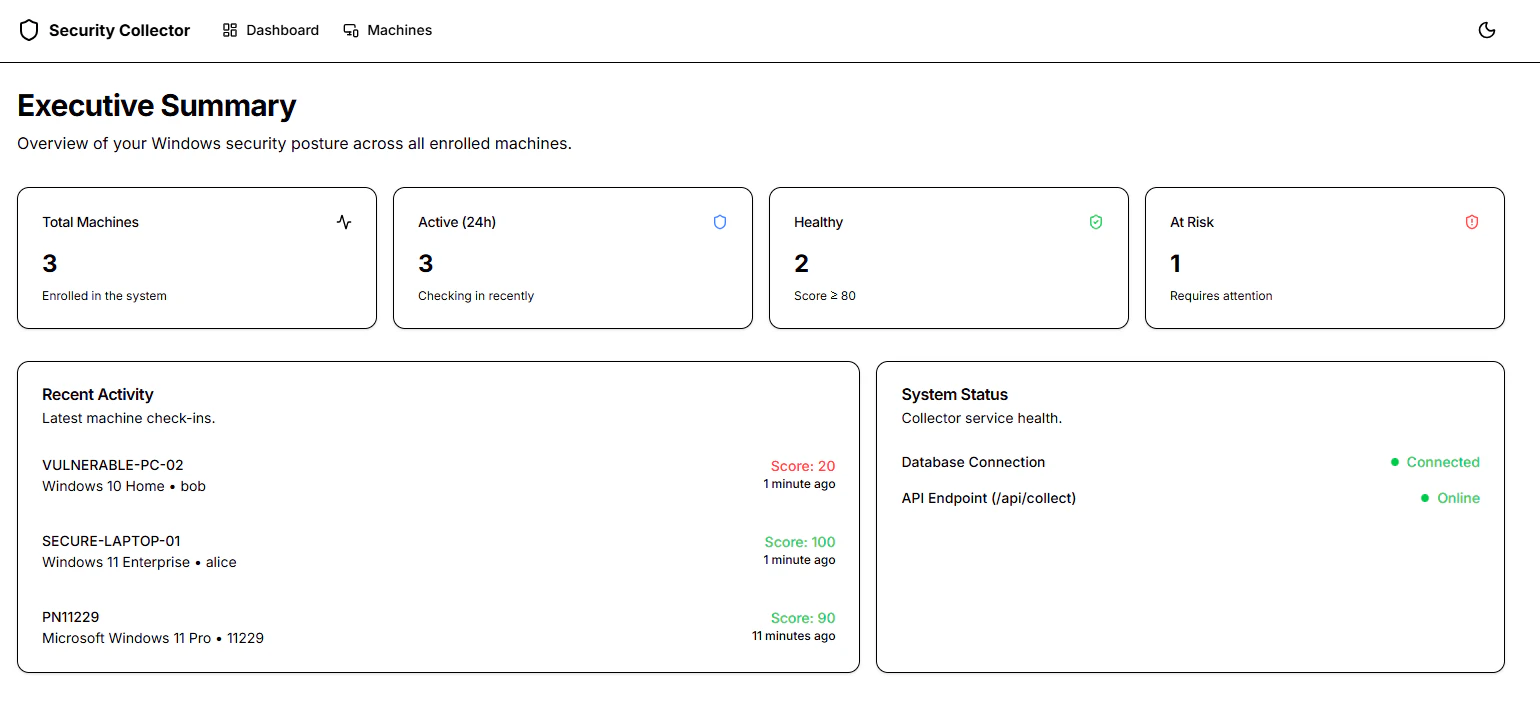
- ミニマリストで個人的にはめっちゃ刺さるデザイン
端末一覧
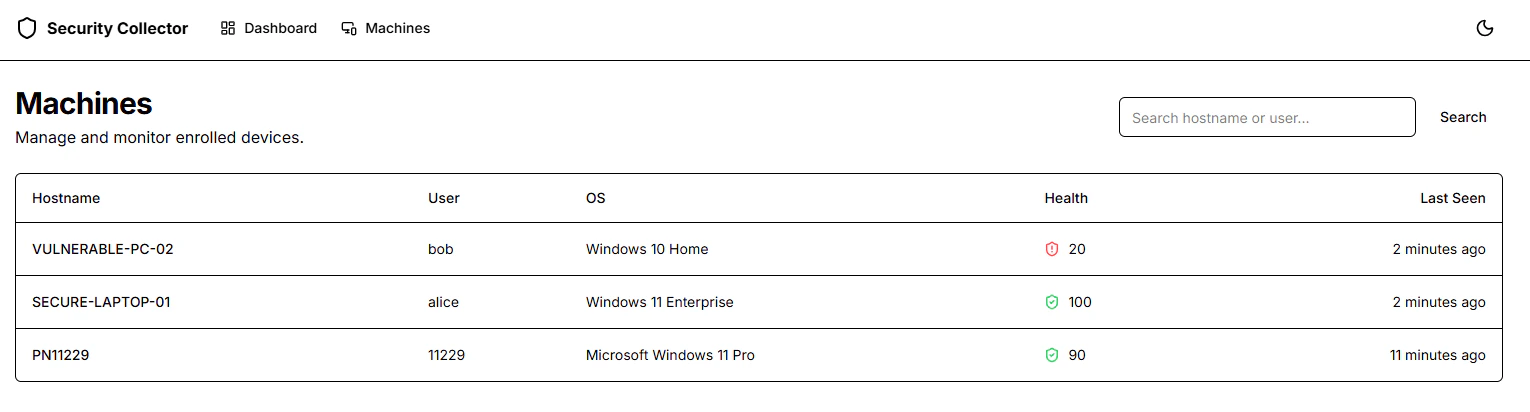
- 指示していたソート機能がないのが残念
端末詳細
良好な端末
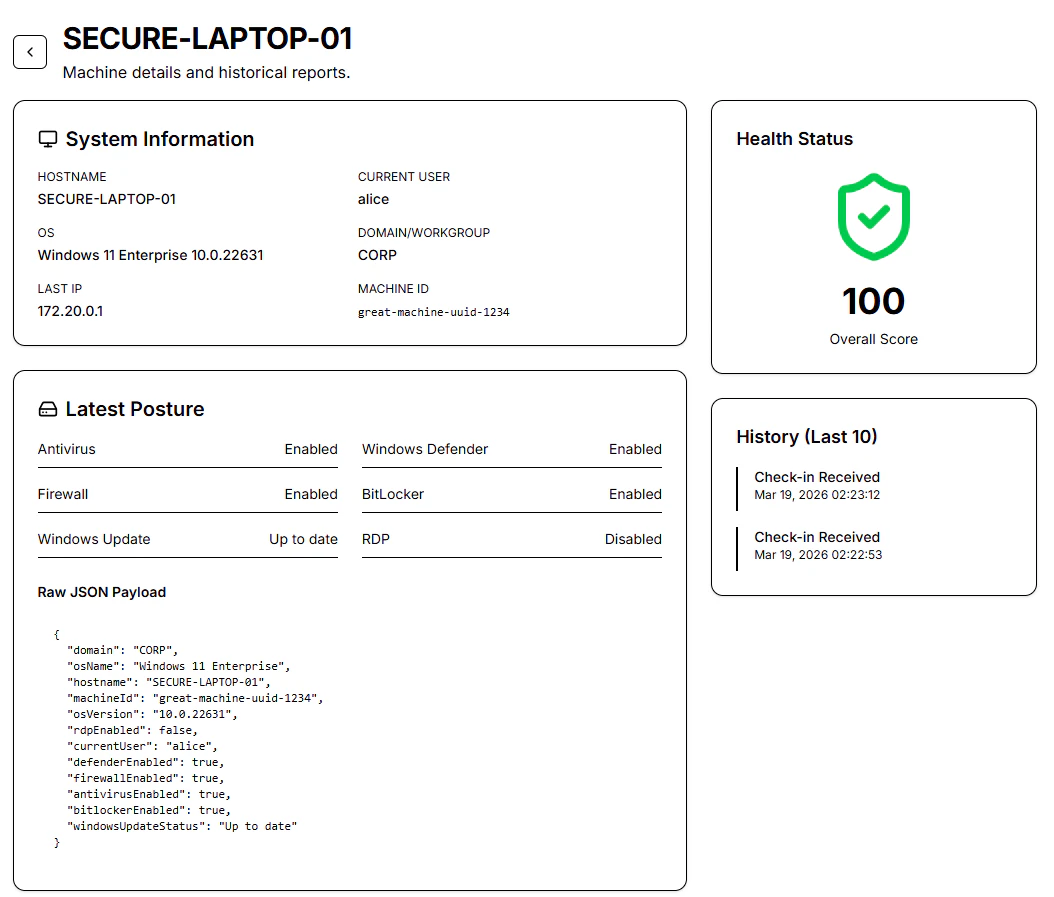
- Raw JSONはデフォルトでやっぱり表示しちゃうのね
危険な端末
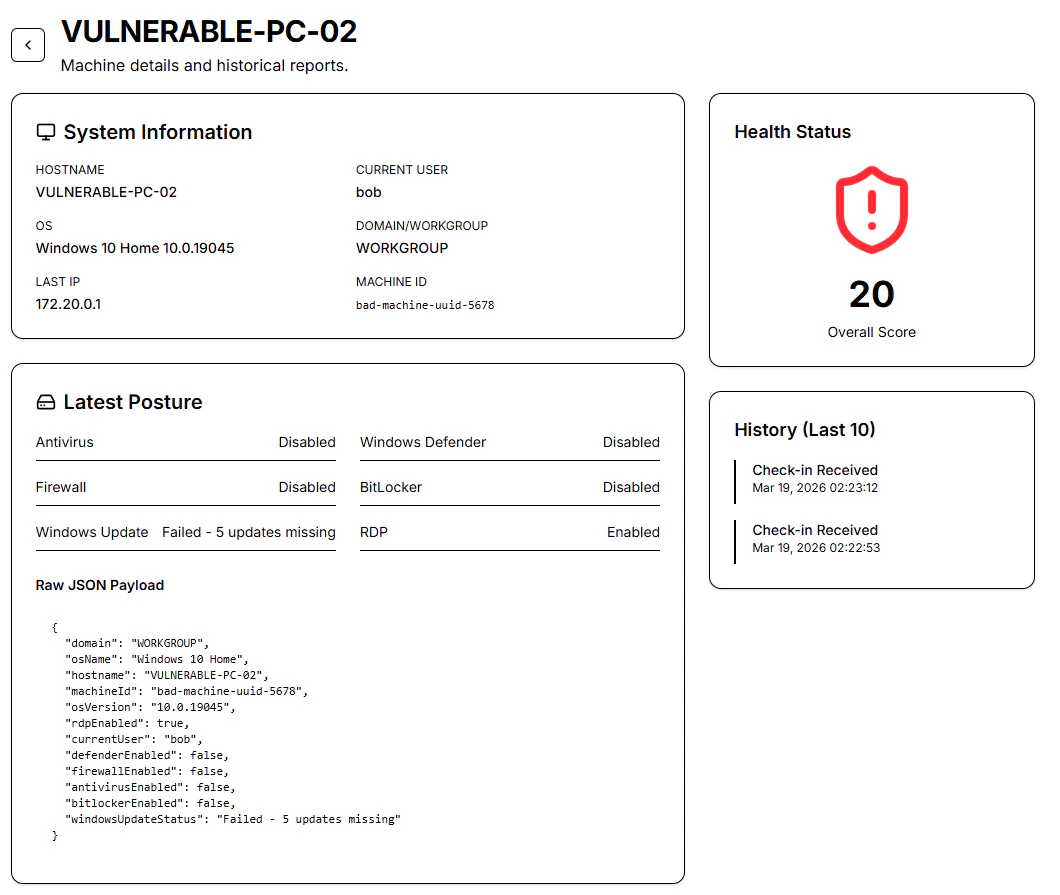
- 問題点がハイライトされていないのが残念
ダークモード
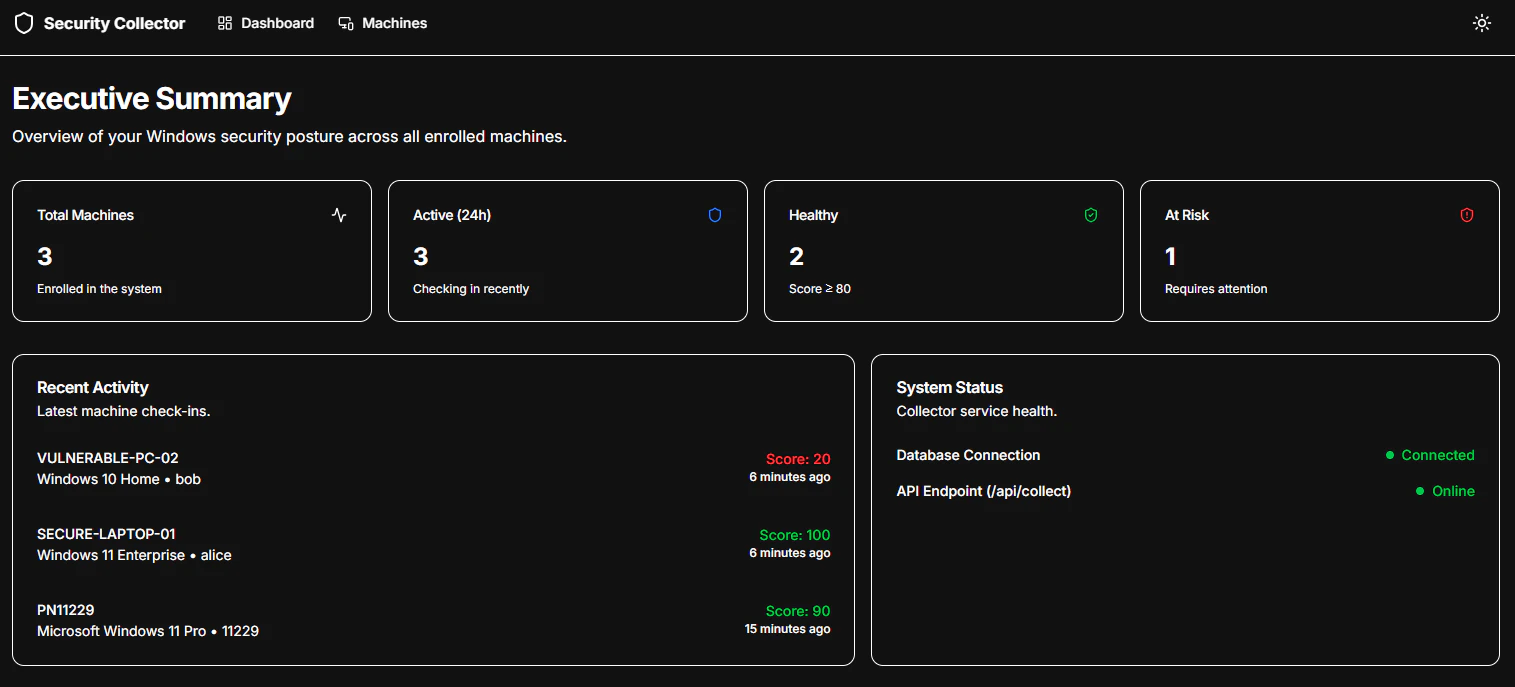
- ギーク感がたまらない
利用したプロンプト
Build a complete Windows security posture collection system with the following requirements.

Goal:
Create a production-style client/server system where a Windows client written in C collects local security posture information and sends it to a Next.js server. The server must authenticate the client using a pre-shared secret, store the data in a database, and provide a web UI for viewing and managing machine security posture information.

1. Client
- Language: C
- Must compile with Microsoft Visual Studio cl.exe
- Must be a Windows-native program
- Prefer Windows APIs, WMI, registry access, and other native methods over unnecessary external dependencies
- Collect security-related information from Windows, including at minimum:
  - Hostname
  - Current user
  - Domain or workgroup
  - OS version and build
  - Last boot time
  - Antivirus status
  - Windows Defender status if available
  - Firewall status
  - Windows Update status
  - Password policy
  - Local account or security policy information if practical
  - UAC settings
  - BitLocker status if available
  - RDP status if available
  - SMB-related settings if available
  - Any other useful Windows security posture information
- Serialize collected data as structured JSON
- Send the JSON to the server over HTTP or HTTPS
- Include a pre-shared secret in the request for authentication
- Handle network failures and collection failures gracefully
- Print useful logs or status output
- Keep the code modular and readable
- Provide clear build instructions for cl.exe
- Prefer working code over pseudo-code

2. Server
- Framework: Next.js
- Must run inside Docker
- Must provide API endpoints for client submission
- Must validate the pre-shared secret before accepting any data
- Must store machine data persistently in a database
- Must provide the following pages:
  - Dashboard
  - Machine List
  - Machine Details
- UI: Switchable between Dark Theme and Light Theme

3. Database
- Add a real database-backed design for the server
- Use PostgreSQL as the default database
- Use Prisma ORM for schema management and database access
- The database must be included in docker-compose.yml so the full system can run locally with one command
- The schema should be designed for practical machine inventory and security posture tracking
- At minimum include tables or models for:
  - machines
  - checkins or reports
  - optional latest_status summary if useful
- The design should support:
  - multiple machines reporting to one server
  - repeated check-ins from the same machine over time
  - storing both normalized summary fields and raw JSON payloads
  - tracking created_at and updated_at timestamps
  - linking machine records to many submitted reports
- Suggested machine-level fields:
  - id
  - machine_id or agent_id
  - hostname
  - current_user
  - domain
  - os_name
  - os_version
  - last_seen_at
  - first_seen_at
  - latest_ip if available
  - latest_health_score or risk_score if implemented
  - and any other parameter if needed
- Suggested report-level fields:
  - id
  - machine_id foreign key
  - submitted_at
  - antivirus_enabled
  - firewall_enabled
  - windows_update_status
  - bitlocker_enabled
  - rdp_enabled
  - defender_enabled
  - and any other parameter if needed
  - raw_payload as JSON
- The API should update the machine’s latest summary fields while also inserting a historical report record
- Include Prisma schema, migration/setup steps, and example queries where relevant

4. Dashboard Pages
- The dashboard should be crystal clear and beautiful.
- Implement a dashboard including Exective Summary
- And an actionable dashboard.


5. Machine List Page
- Display machines in a table
- Include pagination
- Include sorting
- Include search and filtering if practical
- Include useful columns such as:
  - Hostname
  - Current user
  - OS version
  - Last seen
  - Antivirus status
  - Firewall status
  - Update status
  - Risk score or health status
- Data must come from the database, not in-memory storage

6. Machine Details Page
- Show full details for a single machine
- Show latest known posture summary
- Show historical reports/check-ins for that machine
- Show the raw collected JSON in a readable format if useful
- Use the database to load both summary and report history

7. API Requirements
- Provide an endpoint for client submission
- Require the pre-shared secret in a header or another clearly documented field
- Reject unauthorized requests
- Validate and sanitize incoming payloads
- Parse the incoming JSON and map it into database records
- Upsert or create the machine record based on a stable machine identifier
- Insert a new historical report/check-in record for every submission
- Return practical JSON responses

8. Deliverables
Provide the following:
- Full project structure with separate client and server directories
- All code files
- Next.js server code
- Prisma schema
- Database access layer
- API route implementations
- Dashboard, Machine List, and Machine Details pages
- Dockerfile
- docker-compose.yml including both app and PostgreSQL services
- .env.example
- README.md
- .gitignore
- Setup and run instructions
- Build instructions for the client using cl.exe
- Example API request and response payloads

9. Constraints
- Prefer practical, working code over pseudo-code
- Keep the code modular, maintainable, and readable
- Use secure defaults
- Do not ask unnecessary clarification questions
- Make reasonable design choices when needed and explain them briefly
- Avoid toy examples; build something realistic enough to extend
- Do not rely on in-memory storage for core data
- Use PostgreSQL and Prisma unless there is a very strong reason not to

10. Output Format
- Start with a short architecture overview
- Then provide the full directory structure
- Then provide the server code
- Then provide the database schema and database-related files
- Then provide the client code
- Then provide Docker-related files
- Then provide README.md
- Then provide .env.example and .gitignore
- Then provide setup/build/run instructions
- Then provide example API payloads
- Then provide a short list of future improvements
クライアントのリスク判定基準
Claude Code
- 100点からスタートする減点方式(低い=リスクがある)
- AntivirusとDefenderが独立して評価されてしまう(必ず減点が生じる)
| Condition | Deduction |
|---|---|
| Antivirus disabled | −20 |
| Defender disabled | −15 |
| All firewall profiles off | −20 |
| Any firewall profile off | −10 |
| Updates disabled | −15 |
| Updates notify-only | −8 |
| BitLocker disabled | −10 |
| RDP enabled | −10 |
| UAC disabled | −10 |
| SMBv1 enabled | −5 |
| Password min length < 8 | −5 |
| Risk Score Range | Health Status |
|---|---|
70–100 |
healthy |
40–69 |
warning |
0–39 |
critical |
Codex
- 0点からスタートする加点方式(高い=リスクがある)
| Condition | Points Added |
|---|---|
| Antivirus disabled | +30 |
| Firewall disabled | +25 |
| Pending restart for updates | +10 |
Windows Update status contains disabled
|
+20 |
| BitLocker disabled | +15 |
| RDP enabled | +8 |
| SMB1 enabled | +15 |
| SMB signing not required | +8 |
| UAC disabled | +12 |
Password minimum length below 10
|
+8 |
Lockout threshold above 10
|
+5 |
| Risk Score Range | Health Status |
|---|---|
0-29 |
healthy |
30-59 |
needs-attention |
60-100 |
critical |
Antigravity
- 100点からスタートする減点方式(低い=リスクがある)
- AntivirusとDefenderが同時に評価されるのはよき
- 他の評価観点はクライアント側がそもそも正しい値を送らないため、最初から除外しているもよう
| Condition | Deduction |
|---|---|
| Both Antivirus and Defender disabled | -30 |
| Firewall disabled | -20 |
| Windows Update failed | -20 |
| BitLocker disabled | -10 |
| Risk Score Range | Health Status |
|---|---|
80-100 |
Healthy |
0-79 |
At Risk |