
概要
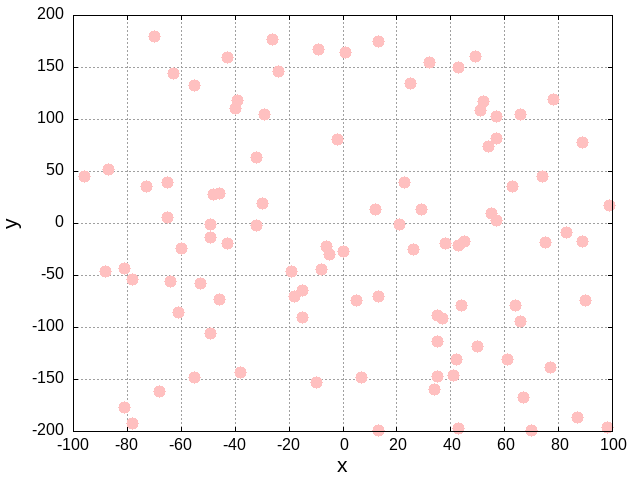
- 2次元データ(x, y)をクラスタリングした
- クラスタ数は4つ
- (x, y)データは-100<=x<=100, -200<=y<=200の範囲でランダムな点を100個作成した
2D_data.csv
 -49.00,   -1.00
 -53.00,  -58.00
  41.00, -146.00
  99.00,   17.00
 -32.00,   -2.00
...
   5.00,  -74.00
  90.00,  -74.00
 -73.00,   36.00
 -24.00,  146.00
 -70.00,  180.00
実装
main()
- フローチャート

- ソースコード
# main関数
def main():

    # パラメータ初期設定
    def initializeParameters():
        # クラスタ数
        clusterNum = 4
        # データの変数の数
        variablesNum = 2

        return clusterNum, variablesNum
    # パラメータ初期設定の関数ここまで

    clusterNum, variablesNum = initializeParameters()

    # 読み込むファイル名
    filename = "00_2D_data.csv"
    # データの読み込み
    data = read_data(filename)

    # クラスタリング実施
    data, centroid = performClustering(data, clusterNum, variablesNum)

    # クラスタリング後のデータの書き込み
    filename2 = "02_afterClustering.csv"
    write_data(data, filename2)

    # 最終的に求まった重心を表示
    print("-- finally calculated centroid --")
    printCentroid(centroid, variablesNum)

if __name__ == '__main__':
    main()
- 変数の説明
- data...読み取った100個の(x, y)データを格納
- clusterNum...クラスタの個数
- variablesNum...データの次元. 今回は(x, y)なので2となる
- centroid...各クラスタの重心
performClustering(data, clusterNum, variablesNum)
- クラスタリングをする関数
- クラスタリング終了の条件
- それぞれのクラスタの重心の移動が小さくなる
- 一定回数クラスタの割り振りを繰り返す(重心の移動があっても強制終了する)
- クラスタリング終了の条件
- フローチャート
(分かりづらい...)

- ソースコード
performClustering(data, clusterNum, variablesNum)
# クラスタリングを実行する関数 the function performing clustering
def performClustering(data, clusterNum, variablesNum):

    # 最初はランダムにクラスタリング->クラスタ番号を割り振る
    data, centroid = firstRandomClustering(data, clusterNum, variablesNum)

    # 各データの重心からの距離を格納する変数
    deltaCentroid = 0.0
    # クラスタリング開始 start clustering
    # 重心の変化がほぼ0になるor各クラスタへの割り当てをrepeat回実施したら終了する
    repeat = 20
    print("== start clustering ==")
    for cnt in range(repeat):

        # 更新前の重心をコピーする
        previousCentroid = copy.deepcopy(centroid)

        # i番目のデータをいずれかのクラスタに分類
        # classify data[i] into one of the clusters
        for i in range(len(data)):

            distance_min = 99999
            provisionalClusterNumber = 99999

            for j in range(0, clusterNum):

                # 重心とデータの位置座標の距離を計算する
                # calculate the distance between the centroid and the data coordinate
                distance = calcDistance(data[i], centroid[j], variablesNum)

                # データがどのクラスタの重心に一番近いかを判定する
                # Determine which the cluster centroid the data is closest to
                if distance < distance_min:
                    distance_min = distance
                    provisionalClusterNumber = j

            # データと最も重心が近いクラスタの番号を代入する
            # Input the cluster number whose centroid is closest to the data
            data[i][variablesNum] = provisionalClusterNumber

        # 各クラスタの(暫定的な)重心計算
        # calculate the centroid of each cluster
        centroid = calcCentroid(data, clusterNum, variablesNum, centroid)

        # 重心がどれだけ変化したかを計算する
        deltaCentroid = 0.0
        for i in range(clusterNum):
            deltaCentroid = deltaCentroid + calcDistance(previousCentroid[i], centroid[i], variablesNum)
        print(f"{cnt+1:7d}th : change in centroid = {deltaCentroid:.8f}")

        # 重心の移動の変化が小さければクラスタリングは終了とする
        if deltaCentroid <= 1.0e-5:
            print(f"{cnt+1:7d}th : finish calculating")
            break

    print("== finish clustering ==")

    data.sort(key=lambda x: x[(variablesNum+1)-1])

    return data, centroid
performClustering関数内で登場する関数一覧
firstRandomClustering(data, clusterNum, variablesNum)
- 内容
- ランダムにクラスタを割り振る
- その時点での重心を求める
- ソースコード
# 最初はランダムにクラスタリング->クラスタ番号を割り振る
def firstRandomClustering(data, clusterNum, variablesNum):

    # i番目のデータのクラスタ番号をランダムに決定する
    initialClusterNo = []
    for i in range(len(data)):
        initialClusterNo.append(random.randrange(0, clusterNum))

    # dataに3列目に新たにクラスタ番号が追加される
    # -> data[i] = [x, y, (クラスタ番号)]
    for row, c in zip(data, initialClusterNo):
        row.append(c)

    # 各クラスタの重心の初期化
    centroid = []
    for i in range(clusterNum):
        centroidEachCluster = [0.0 for _ in range(variablesNum)]
        centroidEachCluster = centroidEachCluster + [i]
        centroid.append(centroidEachCluster)
    # 初期設定時点での各クラスタの重心を計算する
    centroid = calcCentroid(data, clusterNum, variablesNum, centroid)

    # ランダムにクラスタ番号を割り当てた初期のデータをファイルに書き込む
    # write the initial data with randomly assigned to cluster numbers to a file
    write_data(data, "01_beforeClustering.csv")

    return data, centroid
calcCentroid(data, clusterNum, variablesNum, centroid)
# 各クラスタの重心を計算
def calcCentroid(data, clusterNum, variablesNum, centroid):

    for i in range(clusterNum):

        # 同じクラスタに属するサンプル数をカウントする変数
        n = 0

        # 同じクラスタに属するデータの各パラメータの平均値
        Xmeans = [0.0] * variablesNum
        # 同じクラスタに属するデータの各パラメータの合計
        Xtotal = [0.0] * variablesNum

        # 同じクラスタの所属するデータの各パラメータにおける平均を計算する
        for j in range(len(data)):
            if data[j][variablesNum] == i:
                for k in range(variablesNum):
                    Xtotal[k] = Xtotal[k] + data[j][k]
                n = n + 1
        if n != 0:
            for k in range(variablesNum):
                Xmeans[k] = Xtotal[k]/n

        # 算出した重心をそれ専用の配列に格納する
        for j, row in enumerate(Xmeans):
            if j == variablesNum:
                centroid[i][j] = i
            else:
                centroid[i][j] = Xmeans[j]

    return centroid
calcDistance(p1, p2, variablesNum)
# 2点間の距離を計算する
def calcDistance(p1, p2, variablesNum):

    distance = 0.0
    for i in range(variablesNum):
        distance = distance + (p1[i] - p2[i])**2
    distance = distance**0.5

    return distance
結果
-
分類前のデータ
- 初期にランダムで割り振ったときのデータ。クラスタごとに色付けしている

- 初期にランダムで割り振ったときのデータ。クラスタごとに色付けしている
-
分類後のデータ
