
本日は
Julia アドベントカレンダー $N = 23$ の記事です.
以前は Distributed.jl, DistributedArrays.jl を使ってラズパイを使って分散計算をさせました.
今回は Claude Code で使用したコードを MPI.jl に書き換えてもらい動かした記録です.モデルは Opus 4.5 を使っています.
準備するもの(ハードウェア)
- 計算用のラズパイ
- 前回同様にラズパイ5を8台使います(
rpi5-1, ..., rpi5-8)
- 前回同様にラズパイ5を8台使います(
-
mpiexecjlコマンドを実行するためのラズパイ (rpi4-1)- Distributed.jl を使う場合は Mac を使っていましたが,
mpiexecjlを使ってラズパイに命令することができませんでした - 計算用のOSと同じにする必要があるのだと思います.そこで手元にあったラズパイ4を用意しました
- Distributed.jl を使う場合は Mac を使っていましたが,
概念的には下記のようなイメージです.
    ssh         mpiexecjl
mac ---> rpi4-1 ---------> rpi5-1, ..., rpi5-8
準備するもの(ソフトウェア)
rpi4-1 から rpi5-*(=計算用のラズパイ)に対して SSH 接続ができていることを確認します.また計算ノード rpi5-* にある /etc/hosts へ下記を挿入します:
192.168.xxx.yyy rpi4-1
ここで 192.168.xxx.yyy は rpi4-1 の IP アドレスです.適宜置き換えください.ip -br a で確認することができます.これをしないと unable to get host address for rpi4-1 というエラーが起きます.
ログインノード rpi4-1 において, using MPI; MPI.MPI.install_mpiexecjl() を実行します.これにより mpiexecjl コマンドが使用できます.~/.julia/bin 直下にインストールされるので必要に応じて PATH 環境変数に追加してください.
計算ノード rpi5-* に計算を実行するスクリプトを配置します.作業ディレクトリとして ~/work/mpi をおきました.
# 計算用ラズパイで作業をする
$ cd ~/work/mpi
$ ls # 下記のようなファイルが揃っていることを確認する
gcd_pi_mpi.jl mandelbrot_mpi.jl Manifest.toml Project.toml
$ cat Project.toml # 依存パッケージを格納
[deps]
ImageCore = "a09fc81d-aa75-5fe9-8630-4744c3626534"
MPI = "da04e1cc-30fd-572f-bb4f-1f8673147195"
Sixel = "45858cf5-a6b0-47a3-bbea-62219f50df47"
その一で作成した MPI 版
最大公約数を使った円周率計算は一発で動きました.割り当てるパラメータを調節する(Round-robin work distributionにする)などの指示も出して3回ぐらいのプロンプト入力で実現できました.Opus4.5 すごいなぁ.
using MPI

function calcπ_mpi(N, comm)
    rank = MPI.Comm_rank(comm)
    size = MPI.Comm_size(comm)

    # Round-robin work distribution for better load balancing
    # Each rank processes: rank+1, rank+1+size, rank+1+2*size, ...
    local_cnt = 0
    for a = (rank+1):size:N
        for b = 1:N
            local_cnt += ifelse(gcd(a, b) == 1, 1, 0)
        end
    end

    # Reduce to rank 0
    total_cnt = MPI.Reduce(Int64(local_cnt), +, 0, comm)

    # Only rank 0 computes result
    if rank == 0
        prob = total_cnt / N / N
        return √(6 / prob)
    else
        return 0.0
    end
end

function main()
    MPI.Init()
    comm = MPI.COMM_WORLD
    rank = MPI.Comm_rank(comm)
    size = MPI.Comm_size(comm)

    if rank == 0
        @info "Start processing..."
        @info "MPI size: $size"
    end

    # Warm up
    N = 100
    if rank == 0
        @info "Warm up"
        @info N
        output = @time calcπ_mpi(N, comm)
    else
        calcπ_mpi(N, comm)
    end

    # Benchmarks
    for N in [100, 1000, 10_000, 5 * 10_000, 100_000]
        if rank == 0
            @info N
            output = @time calcπ_mpi(N, comm)
            @show output
        else
            calcπ_mpi(N, comm)
        end
    end

    MPI.Finalize()
end

if abspath(PROGRAM_FILE) == @__FILE__
    main()
end
rpi4-1 で mpiexecjl を実行します.4 core x 8 node ということで 32 プロセス動きます.
terasaki@rpi4-1:~/work/mpi $ cat machines_gcd
rpi5-1.local:4
rpi5-2.local:4
rpi5-3.local:4
rpi5-4.local:4
rpi5-5.local:4
rpi5-6.local:4
rpi5-7.local:4
rpi5-8.local:4
terasaki@rpi4-1:~/work/mpi $ cat gcd_mpi.sh
mpiexecjl -n 32 -f machines_gcd julia ~/work/mpi/gcd_pi_mpi.jl
terasaki@rpi4-1:~/work/mpi $ bash gcd_mpi.sh
[ Info: Start processing...
[ Info: MPI size: 32
[ Info: Warm up
[ Info: 100
  0.205445 seconds (171 allocations: 7.812 KiB, 6.43% compilation time)
[ Info: 100
  0.000039 seconds (3 allocations: 80 bytes)
output = 3.139597498005517
[ Info: 1000
  0.000784 seconds (3 allocations: 80 bytes)
output = 3.140415340380906
[ Info: 10000
  0.262110 seconds (3 allocations: 80 bytes)
output = 3.141534239016629
[ Info: 50000
  5.732534 seconds (3 allocations: 80 bytes)
output = 3.141560849524047
[ Info: 100000
 25.758576 seconds (3 allocations: 80 bytes)
output = 3.141584775839274
Distributed.jl 使うより二倍遅くなりましたね・・・.なぜでしょうね・・・.
その二で使った例
マンデルブロー集合の描画の例です.Opus 4.5 がほぼ一発で作ってくれました.
描画結果が転置してたのでそれを直してというプロンプトで修正を依頼しました.
using MPI
using ImageCore, Sixel

Base.@kwdef struct Param{I,F}
    xmin::F = -1.75
    xmax::F = 0.75
    width::I = 4096
    ymin::F = -1.25
    ymax::F = 1.25
    height::I = 4096
    max_iter::I = 500
end

function mandelbrot_kernel(param::Param, c)
    (; max_iter) = param
    z = c
    for i = 0:max_iter-1
        z = z * z + c
        abs(z) > 2 && return i
    end
    max_iter
end

function makeaxes(param::Param)
    (; xmin, xmax, width, ymin, ymax, height) = param
    x = range(xmin, xmax, width + 1)[begin:end-1]
    y = range(ymin, ymax, height + 1)[begin:end-1]
    x, y
end

function compute_mandelbrot_mpi(param::Param, comm)
    rank = MPI.Comm_rank(comm)
    size = MPI.Comm_size(comm)

    (; width, height) = param
    x, y = makeaxes(param)

    # Each rank computes its assigned columns using round-robin distribution
    # rank i processes columns: i, i+size, i+2*size, ...
    # This matches the original mandelbrot.jl data layout: (width, height)
    local_results = Vector{Vector{Int}}()
    local_col_indices = Int[]

    compute_start = MPI.Wtime()
    for col_idx = (rank+1):size:width
        col_data = zeros(Int, height)
        Base.Threads.@threads for row_idx = 1:height
            c = complex(x[col_idx], y[row_idx])
            col_data[row_idx] = mandelbrot_kernel(param, c)
        end
        push!(local_results, col_data)
        push!(local_col_indices, col_idx)
    end
    compute_end = MPI.Wtime()
    compute_time = compute_end - compute_start

    # Gather all results to rank 0
    transfer_start = MPI.Wtime()
    if rank == 0
        # Initialize full result matrix (width, height) to match original
        full_result = zeros(Int, width, height)

        # Place rank 0's own results
        for (i, col_idx) in enumerate(local_col_indices)
            full_result[col_idx, :] = local_results[i]
        end

        # Receive results from other ranks
        for src_rank = 1:size-1
            # Receive number of columns from this rank
            num_cols_ref = Ref{Int}(0)
            MPI.Recv!(num_cols_ref, src_rank, 0, comm)
            num_cols = num_cols_ref[]

            # Receive column indices
            col_indices = zeros(Int, num_cols)
            MPI.Recv!(col_indices, src_rank, 1, comm)

            # Receive column data
            for (i, col_idx) in enumerate(col_indices)
                col_data = zeros(Int, height)
                MPI.Recv!(col_data, src_rank, 2, comm)
                full_result[col_idx, :] = col_data
            end
        end

        transfer_end = MPI.Wtime()
        transfer_time = transfer_end - transfer_start
        return full_result, compute_time, transfer_time
    else
        # Send results to rank 0
        num_cols = length(local_col_indices)
        MPI.Send(Ref(num_cols), 0, 0, comm)
        MPI.Send(local_col_indices, 0, 1, comm)

        for col_data in local_results
            MPI.Send(col_data, 0, 2, comm)
        end

        transfer_end = MPI.Wtime()
        transfer_time = transfer_end - transfer_start
        return nothing, compute_time, transfer_time
    end
end

function main()
    MPI.Init()
    comm = MPI.COMM_WORLD
    rank = MPI.Comm_rank(comm)
    size = MPI.Comm_size(comm)

    if rank == 0
        @info "Start processing Mandelbrot set..."
        @info "MPI size: $size"
        @info "Using $(Base.Threads.nthreads()) threads per rank"
    end

    param = Param()

    if rank == 0
        @info "Parameters:" param
        @info "Computing..."
    end

    start_time = MPI.Wtime()
    result, compute_time, transfer_time = compute_mandelbrot_mpi(param, comm)
    end_time = MPI.Wtime()

    if rank == 0
        total_time = end_time - start_time
        @info "Performance metrics:"
        @info "  Total time: $(total_time) seconds"
        @info "  Computation time: $(compute_time) seconds"
        @info "  Data transfer time: $(transfer_time) seconds"
        @info "  Transfer ratio: $(round(transfer_time/total_time*100, digits=2))%"

        # Visualize result
        @info "Creating visualization..."

        @assert maximum(result) > 0
        normalized = result / maximum(result)
        gray = colorview(Gray, normalized')
        sixel_encode(gray)

        @info "Done!"
    else
        @info "Rank $rank - Computation time: $(compute_time) seconds, Transfer time: $(transfer_time) seconds"
    end

    MPI.Finalize()
end

if abspath(PROGRAM_FILE) == @__FILE__
    main()
end
rpi5-1.local
rpi5-2.local
rpi5-3.local
rpi5-4.local
rpi5-5.local
rpi5-6.local
rpi5-7.local
rpi5-8.local
terasaki@rpi4-1:~/work/mpi $ cat mandelbrot_mpi.sh
mpiexecjl -n 8 -f machines_mandelbrot julia -t 4 ~/work/mpi/mandelbrot_mpi.jl
terasaki@rpi4-1:~/work/mpi $ bash mandelbrot_mpi.sh
[ Info: Start processing Mandelbrot set...
[ Info: MPI size: 8
[ Info: Using 4 threads per rank
┌ Info: Parameters:
└   param = Param{Int64, Float64}(-1.75, 0.75, 4096, -1.25, 1.25, 4096, 500)
[ Info: Computing...
[ Info: Rank 3 - Computation time: 2.301492703999884 seconds, Transfer time: 7.7861111980000715 seconds
[ Info: Rank 2 - Computation time: 3.828034366000338 seconds, Transfer time: 6.153103343000112 seconds
[ Info: Rank 6 - Computation time: 2.2956830540001647 seconds, Transfer time: 8.20621367700005 seconds
[ Info: Rank 7 - Computation time: 2.315352926000287 seconds, Transfer time: 8.291760336000152 seconds
[ Info: Rank 5 - Computation time: 2.599571841999932 seconds, Transfer time: 8.062263087999781 seconds
[ Info: Rank 4 - Computation time: 2.3638820909995957 seconds, Transfer time: 8.296246726999925 seconds
[ Info: Rank 1 - Computation time: 2.3180627110000387 seconds, Transfer time: 8.431903622999926 seconds
[ Info: Performance metrics:
[ Info:   Total time: 11.298005592999743 seconds
[ Info:   Computation time: 9.543225861000337 seconds
[ Info:   Data transfer time: 1.7547748619999766 seconds
[ Info:   Transfer ratio: 15.53%
[ Info: Creating visualization...
iTerm2 で実行すると下記のように画像が出力されます.
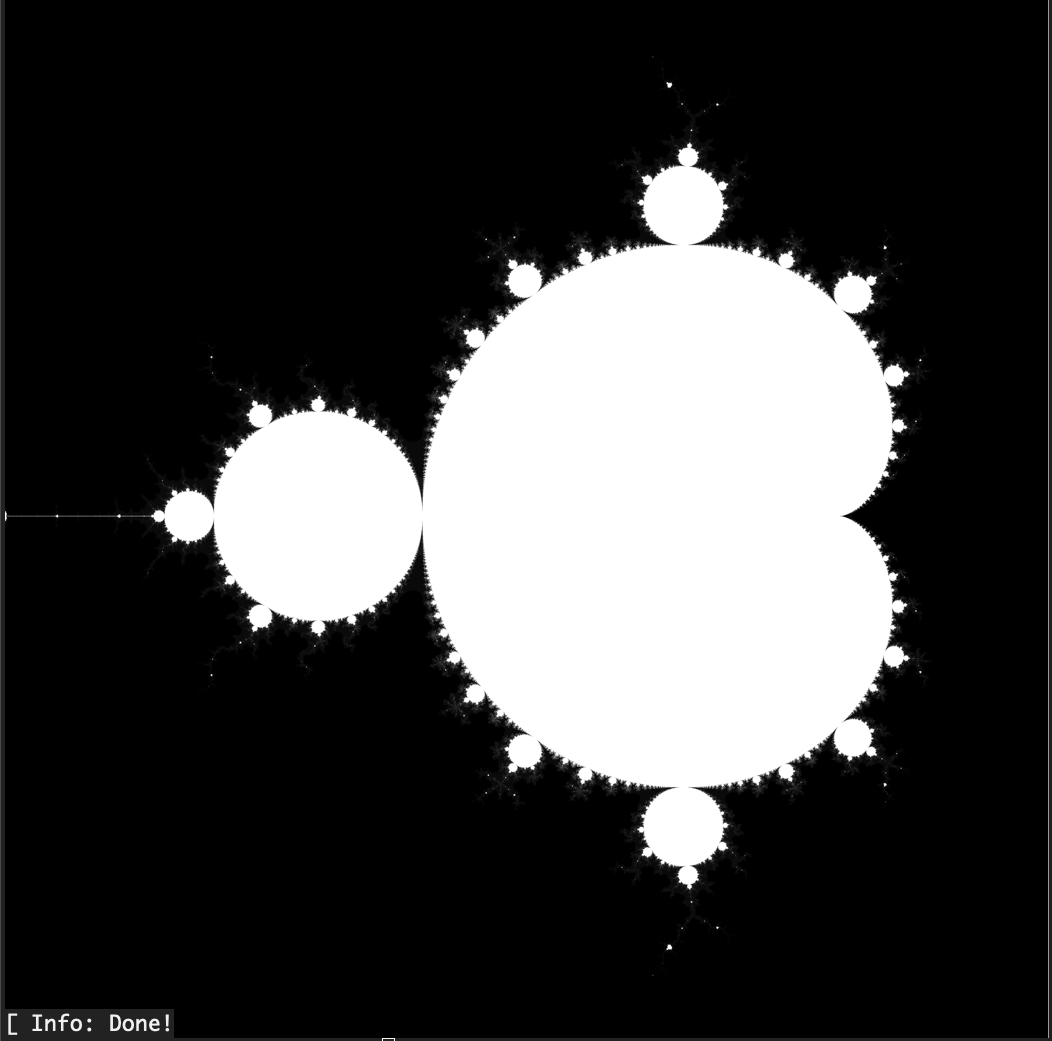
起動も含めて 13 秒程度で終わっています.体感 Distributed.jl + DistributedArrays.jl を使った時に比べると転送コストは削減されてるように見えました.
まとめ
MPI.jl に書き直したものを公開しました.Julia による Distributed.jl は計算ノードのOSが異なっていても動くメリットがあります.MPI.jl を使うときは OS のバージョンも揃えて色々ノードの設定 /etc/hosts の設定が必要でした(ちょっと面倒).一方で,マンデルブロー集合のように領域を分割するようなケースでは通信でボトルネックになってた箇所が MPI 実装に置き換えることで速度が改善されました.DistributedArrays.jl 頑張って欲しいところです.円周率を計算する系だと Julia の方が高速でしたね.何故でしょう・・・.お時間がある方は是非トライしてみてください.