
やりたいことがとっちらかった内容だけれど作業の備忘録として。
新しいUbuntu環境の作成
Ubuntu Imageのダウンロード
https://cloud-images.ubuntu.com/focal/current/
からWSL/AMD64用のイメージをダウンロードしておく。(amdとarmがよく似てるので混乱した)
https://cloud-images.ubuntu.com/focal/current/focal-server-cloudimg-amd64-wsl.rootfs.tar.gz
WSL2へのImport
> wsl --import Ubuntu20.04-Django $env:USERPROFILE\AppData\Local\Packages\Ubuntu20.04-django\ $env:USERPROFILE\Downloads\focal-server-cloudimg-amd64-wsl.rootfs.tar.gz --version 2
(ダウンロード先を変更しているときは.tar.gzの場所指定は適宜変更)
確認
> wsl -l -v
  NAME                  STATE           VERSION
* Ubuntu-18.04          Stopped         2
  Ubuntu20.04-Django    Stopped         2
PowerShellから起動してみる
> wsl -d Ubuntu20.04-Django
Welcome to Ubuntu 20.04 LTS (GNU/Linux 4.19.104-microsoft-standard x86_64)

 * Documentation:  https://help.ubuntu.com
 * Management:     https://landscape.canonical.com
 * Support:        https://ubuntu.com/advantage

  System information as of Sun Jun 21 10:24:53 JST 2020

  System load:  0.0                Processes:             8
  Usage of /:   0.4% of 250.98GB   Users logged in:       0
  Memory usage: 0%                 IPv4 address for eth0: 172.18.223.85
  Swap usage:   0%

0 updates can be installed immediately.
0 of these updates are security updates.


This message is shown once once a day. To disable it please create the
/root/.hushlogin file.
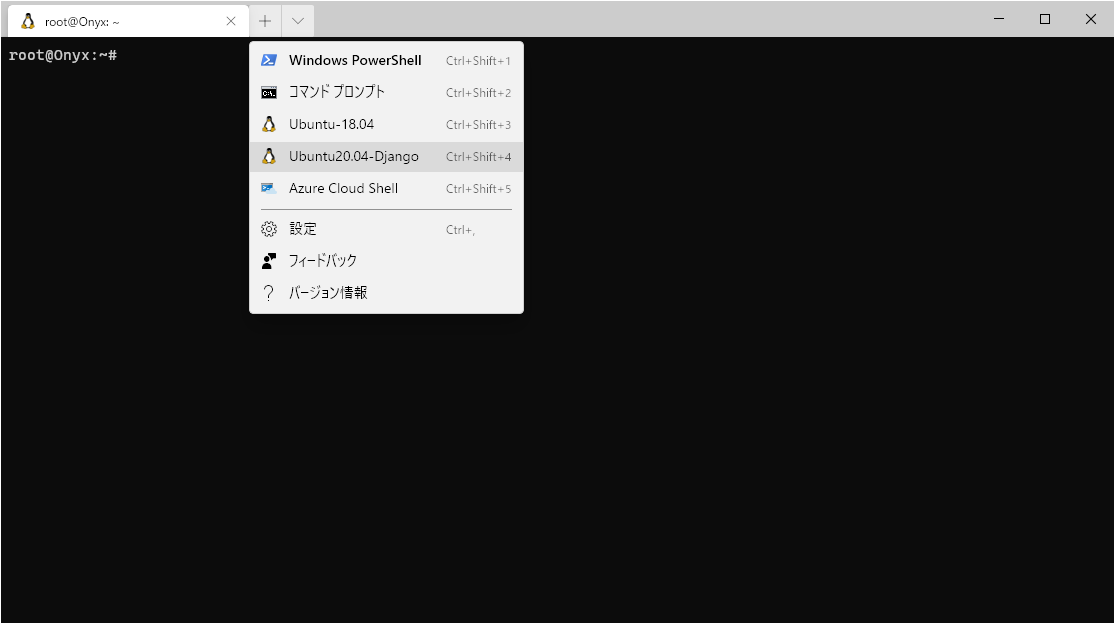
Windows Terminalにも自動で追加された。
ユーザの追加
この方法だとrootログインしてしまい、初期設定で何らかのユーザの作成も為されなかったので手動で作成。
# sudo adduser ubuntu
Adding user `ubuntu' ...
Adding new group `ubuntu' (1000) ...
Adding new user `ubuntu' (1000) with group `ubuntu' ...
Creating home directory `/home/ubuntu' ...
Copying files from `/etc/skel' ...
New password:
Retype new password:
passwd: password updated successfully
Changing the user information for ubuntu
Enter the new value, or press ENTER for the default
        Full Name []:
        Room Number []:
        Work Phone []:
        Home Phone []:
        Other []:
Is the information correct? [Y/n] y
あと、こちらを常用するのでsudoできる権限も足しておく。
# sudo usermod -G sudo ubuntu
sudoするときのパスワードを不要にしとく(任意)。visudoして以下を追記。
ubuntu ALL=NOPASSWD: ALL
Defaultのユーザとして設定
Ubuntuに/etc/wsl.confを作成して以下の記述を追加。
[user]
default = ubuntu
Djangoの導入
以下は上記で導入したUbuntu20.04上で。
apt insatll
何はなくともapt update
$ sudo apt update
今回はお手軽にSQLite3をDBに使うので入れとく
$ sudo apt install sqlite3
pip
$ sudo apt install python3-pip
python3→pythonのシンボリックリンクを追加(任意)
$ sudo ln -s /usr/bin/python3.8 /usr/bin/python
virtualenvの導入
$ sudo pip3 install virtualenv
Collecting virtualenv
  Downloading virtualenv-20.0.23-py2.py3-none-any.whl (4.7 MB)
     |████████████████████████████████| 4.7 MB 1.1 MB/s
Collecting distlib<1,>=0.3.0
  Downloading distlib-0.3.0.zip (571 kB)
     |████████████████████████████████| 571 kB 1.6 MB/s
Collecting filelock<4,>=3.0.0
  Downloading filelock-3.0.12-py3-none-any.whl (7.6 kB)
Collecting appdirs<2,>=1.4.3
  Downloading appdirs-1.4.4-py2.py3-none-any.whl (9.6 kB)
Requirement already satisfied: six<2,>=1.9.0 in /usr/lib/python3/dist-packages (from virtualenv) (1.14.0)
Building wheels for collected packages: distlib
  Building wheel for distlib (setup.py) ... done
  Created wheel for distlib: filename=distlib-0.3.0-py3-none-any.whl size=340427 sha256=498340d7c638b6c3c3a356d283e294edd3283ded680117667dcc4e90cb4cdcd3
  Stored in directory: /root/.cache/pip/wheels/eb/4e/d2/a903d4184fb49e4ac06474d65715b129aee13d69f7d227e78e
Successfully built distlib
Installing collected packages: distlib, filelock, appdirs, virtualenv
Successfully installed appdirs-1.4.4 distlib-0.3.0 filelock-3.0.12 virtualenv-20.0.23
Django3用の仮想環境の作成
$ cd ~/www/
$ mkdir django3
$ cd django3/
$ virtualenv django3-env
created virtual environment CPython3.8.2.final.0-64 in 465ms
  creator CPython3Posix(dest=/home/atziluth/www/django3/django3-env, clear=False, global=False)
  seeder FromAppData(download=False, pip=latest, setuptools=latest, wheel=latest, via=copy, app_data_dir=/home/atziluth/.local/share/virtualenv/seed-app-data/v1.0.1)
  activators BashActivator,CShellActivator,FishActivator,PowerShellActivator,PythonActivator,XonshActivator
$ . django3-env/bin/activate
(django3-env) $
(環境名)がプロンプトに表示されていることを確認してから、djangoをpipから導入する。
(django3-env) $ pip3 install django
Collecting django
  Downloading Django-3.0.7-py3-none-any.whl (7.5 MB)
     |████████████████████████████████| 7.5 MB 4.0 MB/s
Collecting pytz
  Downloading pytz-2020.1-py2.py3-none-any.whl (510 kB)
     |████████████████████████████████| 510 kB 4.4 MB/s
Collecting asgiref~=3.2
  Downloading asgiref-3.2.10-py3-none-any.whl (19 kB)
Collecting sqlparse>=0.2.2
  Downloading sqlparse-0.3.1-py2.py3-none-any.whl (40 kB)
     |████████████████████████████████| 40 kB 2.8 MB/s
Installing collected packages: pytz, asgiref, sqlparse, django
Successfully installed asgiref-3.2.10 django-3.0.7 pytz-2020.1 sqlparse-0.3.1
(django3-env) $ django-admin --version
3.0.7
バージョン指定なしだと3.0.7が導入された。指定がある場合は $ pip3 install django==2.2 のように。
ちなみにpipではなくaptからpython3-djangoを導入した場合は2020/06/21時点で2.2.12がインストールされた。