
今回は、JAX-RS方式でJakartaEEアプリでのページ遷移を実装してみます。
遷移ページはlogin.htmlです。
ディレクトリ構成
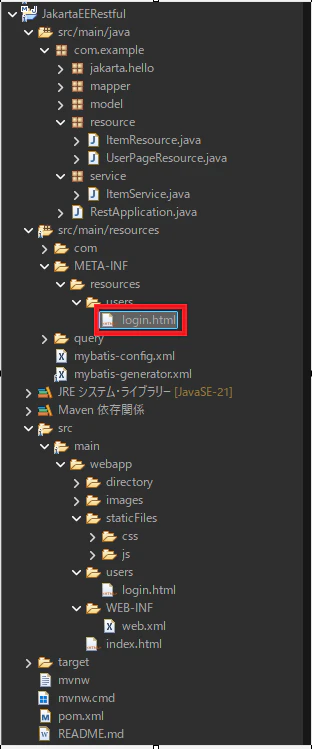
login.htmlは下記に配置します。
JakartaEERestful
├─ src
│  ├─ main
│  │  ├─ java
│  │  │  └─ com.example.resource
│  │  │     └─ UserPageResource.java
│  │  ├─ resources
│  │  │  └─ META-INF
│  │  │     └─ resources
│  │  │        └─ users
│  │  │           └─ login.html
│  │  └─ webapp
│  │     └─ index.html
なぜMETA-INF/resourcesを作るのか
JAX-RS(Jakarta RESTful Web Services)は、
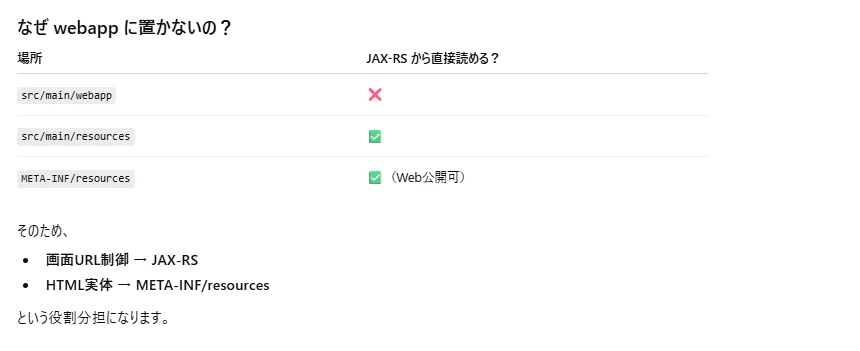
■src/main/webapp は直接読めない
■クラスパス上のリソースは安全に読める
という仕様上の前提があります。
そこでJakarta EEでは、
src/main/resources/META-INF/resources
を 「Webリソースとして公開される特別な場所」 として定義しています。
ポイント
■META-INF → 新規作成
■resources → 新規作成
■Maven が自動で クラスパスに含める
■WARに含まれると 静的Webリソースとして扱われる
実装
/JakartaEERestful/src/main/webapp/index.html
<!DOCTYPE html>
<html lang="ja">
<head>
    <meta charset="UTF-8">
    <title>RESTfulなアイテム CRUDサンプル</title>
	<!--共通フレームワーク-->
	<link rel="stylesheet" href="./staticFiles/css/bootstrap/css/bootstrap.min.css" type="text/css"/>
	<!--個別CSSファイル-->
	<link rel="stylesheet" href="./staticFiles/css/style.css" type="text/css">
</head>
<body>
<header>
	<div class="inner wrapper">
		<nav>
			<ul>
				<li><a href="./api/users/login">ログイン</a></li>
				<li><a href="#">登録</a></li>
			</ul>
		</nav>
	</div>
</header>
<!--タイトル-->
<h3 class="title">RESTfulなアイテム CRUDサンプル 【インメモリ使用】</h3>
<!--サブタイトル-->
<h4 class="subtitle">新規作成 / 更新</h4>

<div class="mb-3">
	<label for="itemId" class="form-label">ID:</label>
	<input type="text" class="form-control" id="itemId" placeholder="1111"/>
</div>
<div class="mb-3">
	<label for="itemName" class="form-label">名前:</label>
	<input type="text" class="form-control" id="itemName" placeholder="田中たろう">
</div>
<div class="mb-3">
	<button class="btn btn-primary" onclick="createItem()">作成 (POST)</button>
	<button class="btn btn-success" onclick="updateItem()">更新 (PUT)</button>
</div>

<div class="mb-3 outer_sampletable">
	<div class="inner_sampletable">
		<h4>一覧</h4>
		<button class="btn btn-secondary" onclick="loadItems()">一覧の再読み込み (GET)</button>
		<table>
		    <thead>
		        <tr>
		            <th>ID</th>
		            <th>名前</th>
		            <th>操作</th>
		        </tr>
		    </thead>
		    <tbody id="itemTableBody"></tbody>
		</table>
	</div>
</div>

<script>
const API_BASE = "/JakartaEERestful/api/items";

// GET
async function loadItems() {
    const response = await fetch(API_BASE);
    const items = await response.json();

    const tbody = document.getElementById("itemTableBody");
    tbody.innerHTML = "";

    items.forEach(item => {
        const tr = document.createElement("tr");

        tr.innerHTML = `
            <td>${item.id}</td>
            <td>${item.name}</td>
            <td>
                <button class="btn btn-info" onclick="editItem(${item.id}, '${item.name}')">編集</button>
                <button class="btn btn-danger" onclick="deleteItem(${item.id})">削除</button>
            </td>
        `;
        tbody.appendChild(tr);
    });
}

// POST
async function createItem() {
	const id = document.getElementById("itemId").value;
    const name = document.getElementById("itemName").value;

    await fetch(API_BASE, {
        method: "POST",
        headers: { "Content-Type": "application/json" },
        body: JSON.stringify({ id,name })
    });

    clearForm();
    loadItems();
}

// PUT
async function updateItem() {
    const id = document.getElementById("itemId").value;
    const name = document.getElementById("itemName").value;

    if (!id) {
        alert("IDを入力してください");
        return;
    }

    await fetch(`${API_BASE}/${id}`, {
        method: "PUT",
        headers: { "Content-Type": "application/json" },
        body: JSON.stringify({ name })
    });

    clearForm();
    loadItems();
}

// DELETE
async function deleteItem(id) {
    await fetch(`${API_BASE}/${id}`, {
        method: "DELETE"
    });

    loadItems();
}

// フォームに反映
function editItem(id, name) {
    document.getElementById("itemId").value = id;
    document.getElementById("itemName").value = name;
}

// フォームクリア
function clearForm() {
    document.getElementById("itemId").value = "";
    document.getElementById("itemName").value = "";
}

// 初期表示
loadItems();
</script>

</body>
</html>
遷移先
/JakartaEERestful/src/main/resources/META-INF/resources/users/login.html
<!DOCTYPE html>
<html>
<head>
<meta charset="UTF-8">
<title>管理者ログイン</title>
<!--個別ファイル-->
<link rel="stylesheet" href="" type="text/css"/>
<script type="text/javascript" src="../staticFiles/js/users/login.js"></script>
</head>
<body>
	<div class="login">
		<h1 class="login__title">管理者ログイン</h1>
		<form class="login__form" method="post">
			<!-- メールアドレス -->
			<div class="login__group">
				<label class="login__label" for="email">メールアドレス</label>
				<input
					class="login__input"
					type="email"
					id="email"
					name="email"
					required
				/>
			</div>
			<!-- パスワード -->
			<div class="login__group">
				<label class="login__label" for="password">パスワード</label>
				<input
					class="login__input"
					type="password"
					id="password"
					name="password"
					required
				/>
			</div>
			<!-- 性別 -->
			<div class="login__group">
				<span class="login__label">性別</span>
				<div class="login__radio">
					<label>
						<input type="radio" name="gender" value="M" required/>男性
					</label>
					<label>
						<input type="radio" name="gender" value="F" required/>女
					</label>
					<label>
						<input type="radio" name="gender" value="O" required/>その他
					</label>
				</div>
			</div>
			<!-- オフィス -->
			<div class="login__group">
				<label class="login__label">オフィス</label>
				<select
					class="login__select"
					id="office"
					name="office"
					required
				>
					<option value="">選択してください</option>
					<option value="東京都">東京都</option>
					<option value="神奈川県">神奈川県</option>
					<option value="埼玉県">埼玉県</option>
					<option value="千葉県">千葉県</option>
				</select>
			</div>
			<!-- ボタン -->
			<div class="login__actions">
				<button
					class="login__button login__button--primary"
					type="button"
				>
					ログイン
				</button>
				<button
					class="login__button login__button--secondary"
					type="button"
					onclick="clickBackToTopPage()"
				>
					戻る
				</button>
			</div>
		</form>
	</div>
</body>
</html>
/JakartaEERestful/src/main/java/com/example/resource/UserPageResource.java
package com.example.resource;

import java.io.InputStream;
import java.nio.charset.StandardCharsets;

import jakarta.ws.rs.GET;
import jakarta.ws.rs.Path;
import jakarta.ws.rs.Produces;
import jakarta.ws.rs.core.MediaType;
import jakarta.ws.rs.core.Response;

@Path("/users")
public class UserPageResource {
    @GET
    @Path("/login")
    @Produces(MediaType.TEXT_HTML)
    public Response loginPage() {

        InputStream is = getClass()
                .getClassLoader()
                .getResourceAsStream("META-INF/resources/users/login.html");

        if (is == null) {
            return Response.status(Response.Status.NOT_FOUND).build();
        }

        String html;
        try {
            html = new String(is.readAllBytes(), StandardCharsets.UTF_8);
        } catch (Exception e) {
            return Response.serverError().build();
        }

        return Response.ok(html).build();
    }
}