
今回は、SpotBugsを使ったバグパターンの検出の設定とレポート出力までしてみたいと思います。
ビルドツールはMavenを使います。
SpotBugs公式サイトよりプラグインをpom.xmlに入れる
下記の公式サイトに記載のある通り、プラグインをpom.xmlに追加します。
修正後のpom.xmlのキャプチャ👇

修正後のpom.xmlのキャプチャ👇
pom.xml
<?xml version="1.0" encoding="UTF-8"?>
<project xmlns="http://maven.apache.org/POM/4.0.0" xmlns:xsi="http://www.w3.org/2001/XMLSchema-instance"
	xsi:schemaLocation="http://maven.apache.org/POM/4.0.0 https://maven.apache.org/xsd/maven-4.0.0.xsd">
	<modelVersion>4.0.0</modelVersion>
	<parent>
		<groupId>org.springframework.boot</groupId>
		<artifactId>spring-boot-starter-parent</artifactId>
		<version>4.0.1</version>
		<relativePath/> <!-- lookup parent from repository -->
	</parent>
	<groupId>com.example</groupId>
	<artifactId>Sample</artifactId>
	<version>0.0.1-SNAPSHOT</version>
	<name>Sample</name>
	<description>Demo project for Spring Boot</description>
	<url/>
	<licenses>
		<license/>
	</licenses>
	<developers>
		<developer/>
	</developers>
	<scm>
		<connection/>
		<developerConnection/>
		<tag/>
		<url/>
	</scm>
	<properties>
		<java.version>21</java.version>
	</properties>
	<dependencies>
		<dependency>
			<groupId>org.springframework.boot</groupId>
			<artifactId>spring-boot-starter-webmvc</artifactId>
		</dependency>

		<dependency>
			<groupId>org.springframework.boot</groupId>
			<artifactId>spring-boot-devtools</artifactId>
			<scope>runtime</scope>
			<optional>true</optional>
		</dependency>
		<dependency>
			<groupId>org.projectlombok</groupId>
			<artifactId>lombok</artifactId>
			<optional>true</optional>
		</dependency>
		<dependency>
			<groupId>org.springframework.boot</groupId>
			<artifactId>spring-boot-starter-webmvc-test</artifactId>
			<scope>test</scope>
		</dependency>
	</dependencies>

	<build>
		<plugins>
			<plugin>
				<groupId>org.apache.maven.plugins</groupId>
				<artifactId>maven-compiler-plugin</artifactId>
				<configuration>
					<annotationProcessorPaths>
						<path>
							<groupId>org.projectlombok</groupId>
							<artifactId>lombok</artifactId>
						</path>
					</annotationProcessorPaths>
				</configuration>
			</plugin>
			<plugin>
				<groupId>org.springframework.boot</groupId>
				<artifactId>spring-boot-maven-plugin</artifactId>
				<configuration>
					<excludes>
						<exclude>
							<groupId>org.projectlombok</groupId>
							<artifactId>lombok</artifactId>
						</exclude>
					</excludes>
				</configuration>
			</plugin>
			<plugin>
	            <groupId>com.github.spotbugs</groupId>
	            <artifactId>spotbugs-maven-plugin</artifactId>
	            <version>4.8.3.0</version>
	            <configuration>
	                <effort>Max</effort>
	                <threshold>Low</threshold>
	                <xmlOutput>true</xmlOutput>
	                <!--HTML出力-->
                	<htmlOutput>true</htmlOutput>
	            </configuration>
        	</plugin>
		</plugins>
	</build>

</project>
今回は、HTMLレポートも出力したいので下記のようにしました。
pom.xml
<plugin>
    <groupId>com.github.spotbugs</groupId>
    <artifactId>spotbugs-maven-plugin</artifactId>
    <version>4.8.3.0</version>
    <configuration>
        <effort>Max</effort>
        <threshold>Low</threshold>
        <xmlOutput>true</xmlOutput>
        <!--HTML出力-->
        <htmlOutput>true</htmlOutput>
    </configuration>
</plugin>
バグパターンのコードを書いてみる
つづいて、バグが混在しているコードを作ってみます。
👉 このコードにより、SpotBugsは
「nullチェックなしで参照している」という警告を出します。
SampleApplication.java
package com.example.demo;

import org.springframework.boot.SpringApplication;
import org.springframework.boot.autoconfigure.SpringBootApplication;

@SpringBootApplication
public class SampleApplication {

	public static void main(String[] args) {
		SpringApplication.run(SampleApplication.class, args);
		SampleApplication app = new SampleApplication();
		app.printLength(null);
	}
	// SpotBugsが検出しやすいバグ
    public void printLength(String text) {
        System.out.println(text.length()); // ← NullPointerExceptionの可能性
    }
}
SpotBugsを実行する
プロジェクトの上で右クリックして[コマンドプロンプト]を選択します。
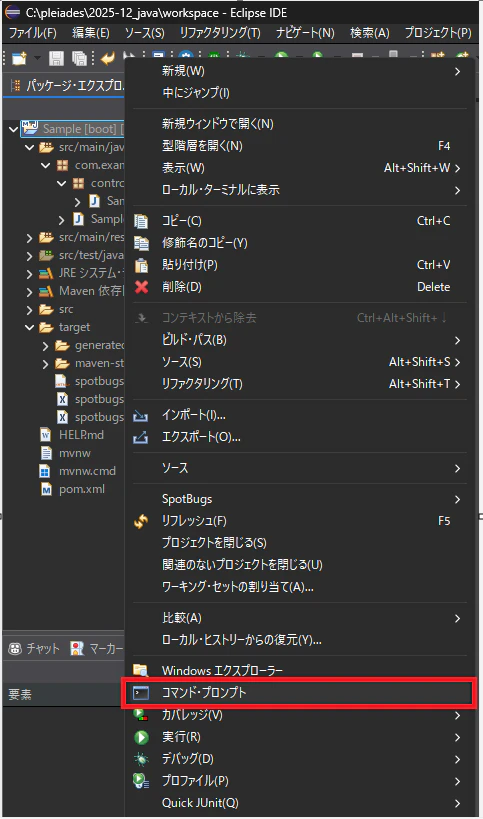
コマンドプロンプトが起動したら、下記のコマンドを実行します。
mvn spotbugs:spotbugs
正常に完了するとコマンドプロンプトに下記が表示されます。
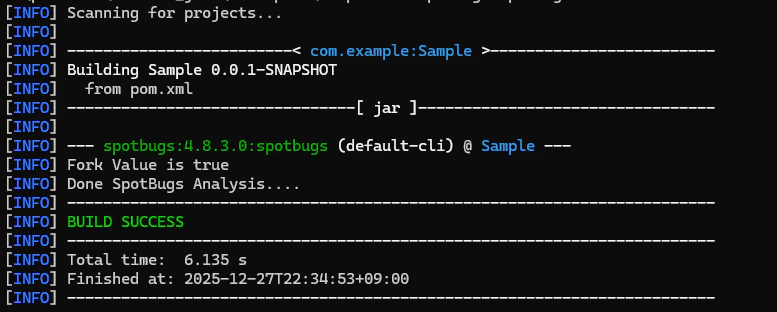
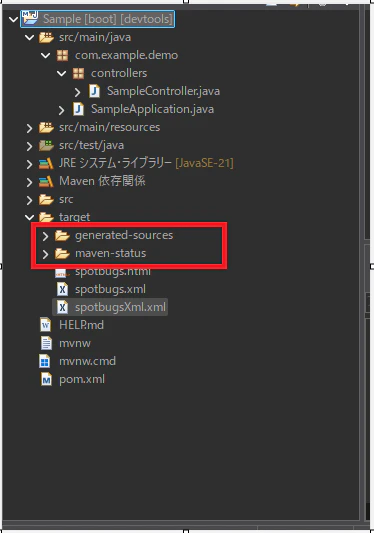
Eclipseのディレクトリを見てみましょう。
下記のフォルダが追加されているかと思います。
下記のようにレポートが出力出来たら完了です。
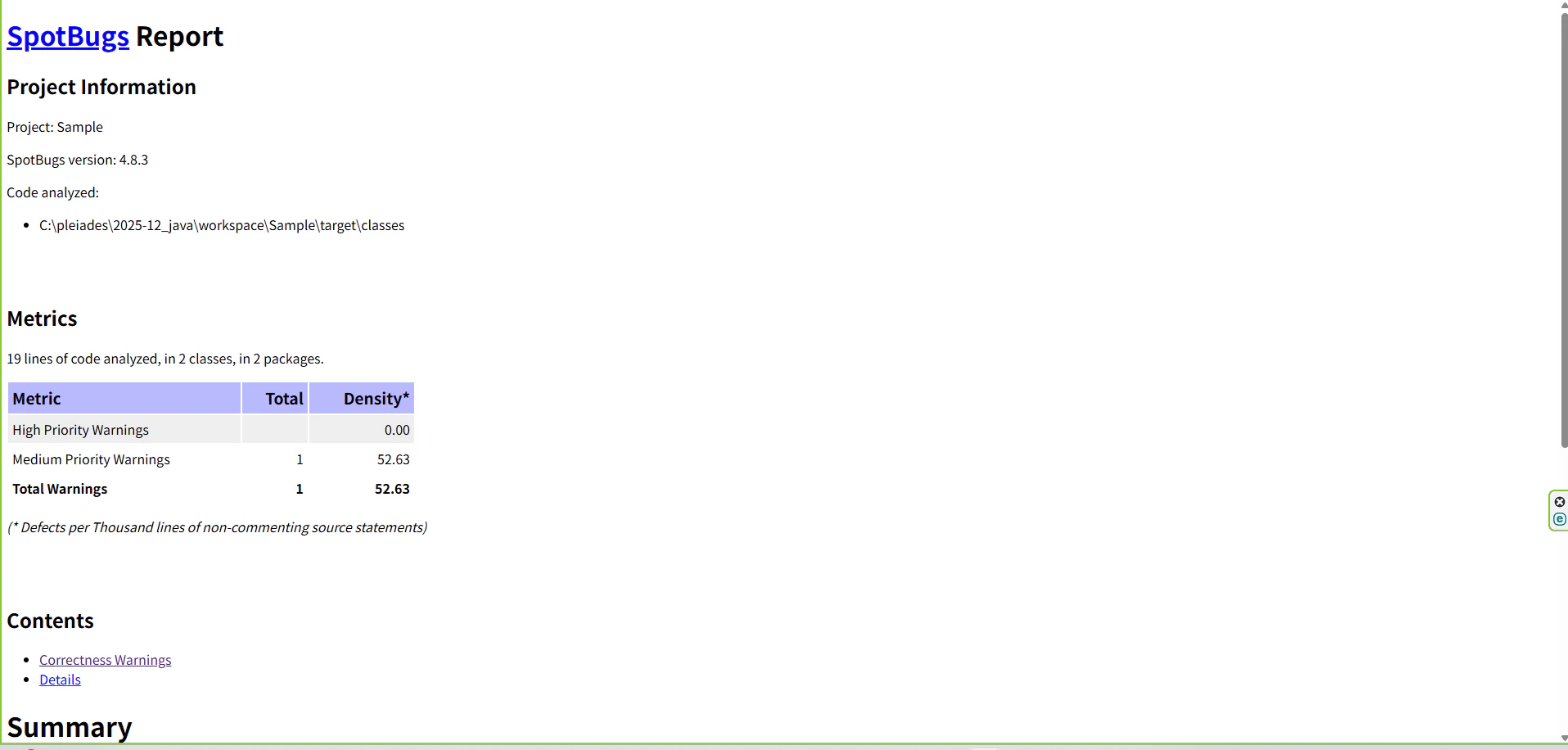
サイト
SpotBugs公式サイト
CheckStyle公式サイト
Checkstyle 使い方メモ